It is currently Fri Aug 07, 2026 10:30 am


All times are UTC - 5 hours [ DST ]


Post new topic Reply to topic  [ 21 posts ]  Go to page 1, 2  Next
Author Message
 Post subject: Potrace for Gimp3 Win10
PostPosted: Mon Apr 21, 2025 11:33 am  (#1) 
Offline
GimpChat Member
User avatar

Joined: Jan 13, 2011
Posts: 2648
Location: Poland
Potrace(TM) is a tool for tracing a bitmap, which means, transforming a bitmap into a smooth, scalable image.

Potrace-1.16:
https://potrace.sourceforge.net/#description
https://potrace.sourceforge.net/#downloading

Unzip the attachment and place it in your (home) plug-ins directory.
It also contains the necessary exe and dll libraries.

Very important:
The plugin path cannot contain directories with spaces and special (accented) characters.
The default installation and portable version of Samj meet these conditions.

This plug-ins:
1.Saves active layer as File-name.png in dir Potrace_for_Gimp3.
2. Launches potrace.exe (console) - create 'File-name'.svg.
3. Wait for the console to close.
4. Opened 'File-name'.svg as layer and/or path.
IF YOU DO NOT RENAME THE FILE, THEY WILL BE OVERWRITTEN.

In menu: In menu: Filters ➤ Edge-Detect ➤ Potrace

Image

Image

Stroke path manualy:
Image


Attachments:
Potrace_for_Gimp3.zip [152.63 KiB]
Downloaded 9156 times

_________________
Image
Share on Facebook Share on Twitter Share on Orkut Share on Digg Share on MySpace Share on Delicious Share on Technorati
Top
 Post subject: Re: Potrace for Gimp3 Win10
PostPosted: Thu Apr 24, 2025 2:54 am  (#2) 
Offline
GimpChat Member

Joined: Jan 07, 2025
Posts: 11
I just deleted 2 lines in the plugin and Potrace now visible in gimp 3 and working (see image for deleted lines). I don't know if the plugin need this two lines. I get no error.
Attachment:
potrace cor.jpg
potrace cor.jpg [ 75.65 KiB | Viewed 6618 times ]


Top
 Post subject: Re: Potrace for Gimp3 Win10
PostPosted: Thu Apr 24, 2025 3:15 am  (#3) 
Offline
GimpChat Member
User avatar

Joined: Jan 13, 2011
Posts: 2648
Location: Poland
Hi Denzjos.

This is a very interesting solution to the problem.
You are right that these two lines are not needed for the plugin to work (but they are useful when writing because they allow you to analyze possible problems).
It is just a mystery to me why the plugin registers correctly in my Gimp without removing these two lines.

_________________
Image


Top
 Post subject: Re: Potrace for Gimp3 Win10
PostPosted: Thu Apr 24, 2025 11:04 pm  (#4) 
Offline
GimpChat Member
User avatar

Joined: Jan 13, 2011
Posts: 2648
Location: Poland
If any of the users had a situation (problem and solution) identical to Denzjos, please let me know.
Attached is a file without 2 lines (diagnostic).


Attachments:
Potrace_for_Gimp3.zip [152.6 KiB]
Downloaded 121 times

_________________
Image
Top
 Post subject: Re: Potrace for Gimp3 Win10
PostPosted: Mon Apr 28, 2025 3:30 am  (#5) 
Offline
GimpChat Member
User avatar

Joined: Jul 06, 2013
Posts: 2662
Location: California
Potrace.exe, Autotrace.exe, and voronoi.exe don't show up in the navigation menu under edge detect in GIMP 3.0, for me. I'm also having trouble with FilterForge. I can't get the .py file to show up in GIMP 3.0. If anyone can help me figure out how to get these plugins to work and show up in GIMP, I'd appreciate it.


Top
 Post subject: Re: Potrace for Gimp3 Win10
PostPosted: Mon Apr 28, 2025 3:50 am  (#6) 
Offline
Global Moderator
User avatar

Joined: May 16, 2010
Posts: 16152
Potrace and Autotrace are working fine for me.

_________________
Image


Top
 Post subject: Re: Potrace for Gimp3 Win10
PostPosted: Mon Apr 28, 2025 4:04 am  (#7) 
Offline
Global Moderator
User avatar

Joined: May 16, 2010
Posts: 16152
mackenzieh wrote:
Potrace.exe, Autotrace.exe, and voronoi.exe don't show up in the navigation menu under edge detect in GIMP 3.0, for me. I'm also having trouble with FilterForge. I can't get the .py file to show up in GIMP 3.0. If anyone can help me figure out how to get these plugins to work and show up in GIMP, I'd appreciate it.


1 You have to have Filter Forge installed.
2 You have to give permissions (full) for the tga lifesaver file in Program Files/Filter Forge (your version #)/Previews/StandardImageOpaque1Lifesaver.tga

Right click the tga file and select properties/security and give full perms to the user listing.

Image

_________________
Image


Top
 Post subject: Re: Potrace for Gimp3 Win10
PostPosted: Mon Apr 28, 2025 5:38 am  (#8) 
Offline
GimpChat Member
User avatar

Joined: Jan 13, 2011
Posts: 2648
Location: Poland
Hi mackenzieh.

Make sure you have the latest version.

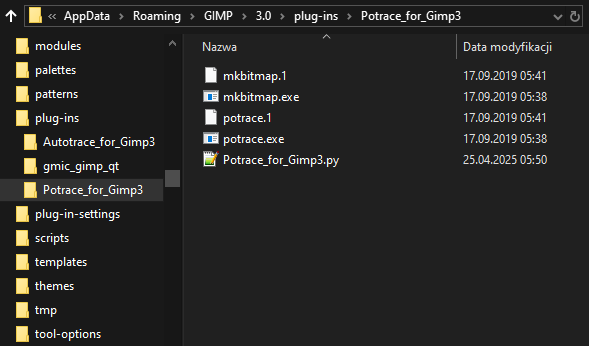
In this case it's not the exe files that register in the menu but the py files.
In Gimp 2.10 the exe and dll files went to the bin directory in Gimp but I found a way to change that (now they are all in one subdirectory - which is important when changing the Gimp version or uninstalling it).

Did you keep the file hierarchy?
Gimp 3.0 plugins are now required to be in a separate subdirectory.

Image

_________________
Image


Top
 Post subject: Re: Potrace for Gimp3 Win10
PostPosted: Mon Apr 28, 2025 2:30 pm  (#9) 
Offline
GimpChat Member
User avatar

Joined: Jul 06, 2013
Posts: 2662
Location: California
Rod wrote:
mackenzieh wrote:
Potrace.exe, Autotrace.exe, and voronoi.exe don't show up in the navigation menu under edge detect in GIMP 3.0, for me. I'm also having trouble with FilterForge. I can't get the .py file to show up in GIMP 3.0. If anyone can help me figure out how to get these plugins to work and show up in GIMP, I'd appreciate it.


1 You have to have Filter Forge installed.
2 You have to give permissions (full) for the tga lifesaver file in Program Files/Filter Forge (your version #)/Previews/StandardImageOpaque1Lifesaver.tga

Right click the tga file and select properties/security and give full perms to the user listing.

[ Image ]


Thanks Rod. I've decided not to install filterforge.


Top
 Post subject: Re: Potrace for Gimp3 Win10
PostPosted: Mon Apr 28, 2025 2:38 pm  (#10) 
Offline
GimpChat Member
User avatar

Joined: Jul 06, 2013
Posts: 2662
Location: California
MareroQ wrote:
Hi mackenzieh.

Make sure you have the latest version.

In this case it's not the exe files that register in the menu but the py files.
In Gimp 2.10 the exe and dll files went to the bin directory in Gimp but I found a way to change that (now they are all in one subdirectory - which is important when changing the Gimp version or uninstalling it).

Did you keep the file hierarchy?
Gimp 3.0 plugins are now required to be in a separate subdirectory.

[ Image ]


Hi MareroQ,

I have the latest version of GIMP 3.0 and the plugins.

Here's where I placed the plugins:
Image

When gimp 3.0 loads, I don't see the plugins in their designated categories.


Top
 Post subject: Re: Potrace for Gimp3 Win10
PostPosted: Mon Apr 28, 2025 3:30 pm  (#11) 
Offline
GimpChat Member
User avatar

Joined: Jan 13, 2011
Posts: 2648
Location: Poland
For diagnosis I need screenshots with paths to files (not directories):
Autotrace_for_Gimp3.py
Potrace_for_Gimp3.py
Voronoi_Stippler_for_Gimp3.py

On the sidelines: there is one error with resynthesizer.exe - it is not in a subdirectory resynthesizer.

_________________
Image


Top
 Post subject: Re: Potrace for Gimp3 Win10
PostPosted: Tue Apr 29, 2025 12:36 am  (#12) 
Offline
Global Moderator
User avatar

Joined: May 16, 2010
Posts: 16152
Could this possibly be the problem?

viewtopic.php?f=9&t=21641&sid=be77511ce7d0236eb4d923e3d022c6b3#p296022

_________________
Image


Top
 Post subject: Re: Potrace for Gimp3 Win10
PostPosted: Tue Apr 29, 2025 6:45 pm  (#13) 
Offline
GimpChat Member
User avatar

Joined: Jul 06, 2013
Posts: 2662
Location: California
MareroQ wrote:
For diagnosis I need screenshots with paths to files (not directories):
Autotrace_for_Gimp3.py
Potrace_for_Gimp3.py
Voronoi_Stippler_for_Gimp3.py

On the sidelines: there is one error with resynthesizer.exe - it is not in a subdirectory resynthesizer.


MareroQ,

This is what I see where I put the files:
Image

Image

Image

As for Resynthesizer.exe, the subdirectory didn't catch on, so I just put the file there instead and when GIMP 3.0 loaded, so did the plugin.

EDIT: Two plugins show up in GIMP 3.0: Potrace & Autotrace. Voronoi Stippler does not show up in GIMP 3.0 under edge detect.


Top
 Post subject: Re: Potrace for Gimp3 Win10
PostPosted: Tue Apr 29, 2025 11:15 pm  (#14) 
Offline
GimpChat Member
User avatar

Joined: Jan 13, 2011
Posts: 2648
Location: Poland
edit due to additional information in the post #13

Everything looks fine (except for the older version of Voronoi)
viewtopic.php?f=9&t=21640
and I don't know why these plugins don't register in the Gimp menu.

If nikplugin registers in the menu (let me know if it does), then that also rules out a general Python problem (and Python Console registers in Filters/Development/Python-Fu) and I don't know how to fix it.

Can You check if starting Gimp by directly clicking gimp.exe (in ?: Program Files/Gimp 3/bin) makes any difference?

That's all I can do to solve this problem at the moment. :oops:


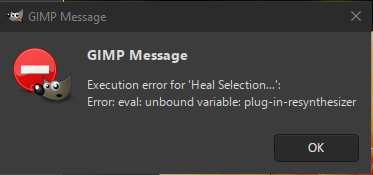
Back to the resynthesizer:

I placed it like you did, without a subdirectory, Gimp loaded without any error messages, but try running Heal Selection for example and you'll get an error:

Image

_________________
Image


Top
 Post subject: Re: Potrace for Gimp3 Win10
PostPosted: Wed Apr 30, 2025 7:38 pm  (#15) 
Offline
GimpChat Member
User avatar

Joined: Jul 06, 2013
Posts: 2662
Location: California
MareroQ wrote:
edit due to additional information in the post #13

Everything looks fine (except for the older version of Voronoi)
viewtopic.php?f=9&t=21640
and I don't know why these plugins don't register in the Gimp menu.

If nikplugin registers in the menu (let me know if it does), then that also rules out a general Python problem (and Python Console registers in Filters/Development/Python-Fu) and I don't know how to fix it.

Can You check if starting Gimp by directly clicking gimp.exe (in ?: Program Files/Gimp 3/bin) makes any difference?

That's all I can do to solve this problem at the moment. :oops:


Back to the resynthesizer:

I placed it like you did, without a subdirectory, Gimp loaded without any error messages, but try running Heal Selection for example and you'll get an error:

[ Image ]


I doubt that Voronoi is an older version because I downloaded the zip file Voronoi_Stippler_for_Gimp3.zip which you provided. I think the only file needed for Voronoi_Stippler_for_Gimp3 is the .py file. I haven't tried the resynthesizer yet, but I will. Voronoi Stippler still doesn't load in GIMP 3.0 under edge-detect.


Top
 Post subject: Re: Potrace for Gimp3 Win10
PostPosted: Wed Apr 30, 2025 9:28 pm  (#16) 
Offline
GimpChat Member
User avatar

Joined: Jan 13, 2011
Posts: 2648
Location: Poland
Sometimes I guess intuitively, but not this time.

Image

You have the version from 21.04.2025 - you need the one from 25.04.2025

_________________
Image


Top
 Post subject: Re: Potrace for Gimp3 Win10
PostPosted: Thu May 01, 2025 7:54 pm  (#17) 
Offline
GimpChat Member
User avatar

Joined: Jul 06, 2013
Posts: 2662
Location: California
MareroQ wrote:
Sometimes I guess intuitively, but not this time.

[ Image ]

You have the version from 21.04.2025 - you need the one from 25.04.2025


Where can I download the current version?


Top
 Post subject: Re: Potrace for Gimp3 Win10
PostPosted: Thu May 01, 2025 9:19 pm  (#18) 
Offline
GimpChat Member
User avatar

Joined: Jan 13, 2011
Posts: 2648
Location: Poland
I provided the link in post no. #14 (and when you read it, it says when and why the attachment was changed).

_________________
Image


Top
 Post subject: Re: Potrace for Gimp3 Win10
PostPosted: Thu May 01, 2025 10:35 pm  (#19) 
Offline
GimpChat Member
User avatar

Joined: Jul 06, 2013
Posts: 2662
Location: California
MareroQ wrote:
I provided the link in post no. #14 (and when you read it, it says when and why the attachment was changed).


I downloaded it again. I'm starting GIMP 3.0 up now. Voronoi Stippler is there under edge detect. :)


Top
 Post subject: Re: Potrace for Gimp3 Win10
PostPosted: Thu May 01, 2025 10:53 pm  (#20) 
Offline
GimpChat Member
User avatar

Joined: Jan 13, 2011
Posts: 2648
Location: Poland
:bigthup

... and just a suggestion:
the right question in the right thread :roll: :)

_________________
Image


Top
Post new topic Reply to topic  [ 21 posts ]  Go to page 1, 2  Next

All times are UTC - 5 hours [ DST ]


* Login  


Powered by phpBB3 © phpBB Group