It is currently Wed Sep 02, 2026 3:00 pm


All times are UTC - 5 hours [ DST ]


Post new topic Reply to topic  [ 6 posts ] 
Author Message
 Post subject: Re: Paths to flame (new P.S. plugin)
PostPosted: Sun Jun 14, 2015 5:40 am  (#1) 
Offline
GimpChat Member

Joined: Sep 09, 2012
Posts: 143
Greetings earthling. :)

When i looked at the coding at LayerFX.py i almost swallowed a piece of chocolate.. ohh maaan the work. :)
So what i'm saying is that i think you have a lovely sense of optimism today and i hope your wish comes true!
Many things Have been done though in the past by coders on fire, so why not, dosn't hurt to ask right? :)
Gimp can set stuff on fire though, just not That fancy way, yet. ;)

*Bump!* :)


Share on Facebook Share on Twitter Share on Orkut Share on Digg Share on MySpace Share on Delicious Share on Technorati
Top
 Post subject: Re: Paths to flame (new P.S. plugin)
PostPosted: Sun Jun 14, 2015 8:19 am  (#2) 
Offline
Retired Staff
User avatar

Joined: May 22, 2008
Posts: 6946
Location: Somewhere in GIMP
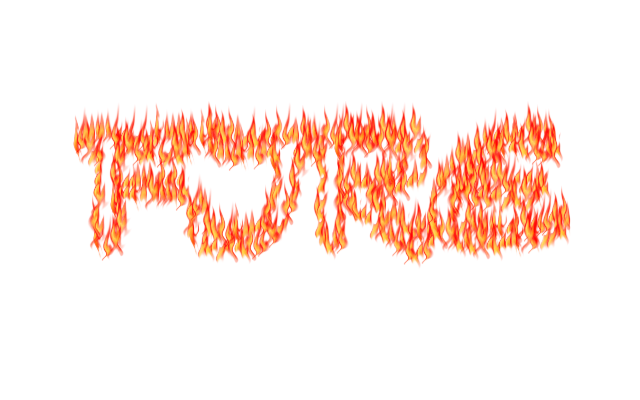
That's really nice, Conbagui. I am attaching an animated flames brush (9 different flames in it). I tried using a very thin font, selecting it and shrank it so it looked about like a one-line path. Did Selection to Path, unselected it, then stroked the path.

Sizing and spacing the flames takes a bit of doing.

Perhaps someone could come up with an easier and better way to do all of the steps. Making the letter paths a different way would be good.

Image


Attachments:
flames.gih [1.66 MiB]
Downloaded 267 times

_________________
Image
World War IV will be fought with sticks and stones. - Albert Einstein
Top
 Post subject: Re: Paths to flame (new P.S. plugin)
PostPosted: Sun Jun 14, 2015 11:58 am  (#3) 
Offline
Global Moderator
User avatar

Joined: May 16, 2010
Posts: 16169
Oregonian wrote:
That's really nice, Conbagui. I am attaching an animated flames brush (9 different flames in it). I tried using a very thin font, selecting it and shrank it so it looked about like a one-line path. Did Selection to Path, unselected it, then stroked the path.

Sizing and spacing the flames takes a bit of doing.

Perhaps someone could come up with an easier and better way to do all of the steps. Making the letter paths a different way would be good.

[ Image ]

Excellent results O! :)
Thanks for the animated brush.
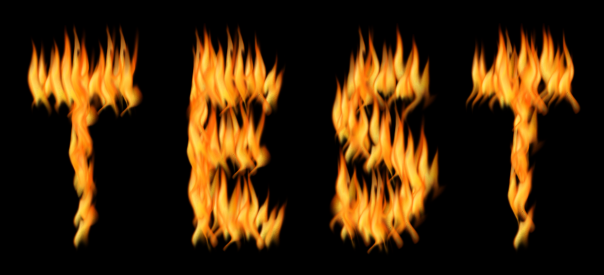
Text selection to path - selected brush and then path layer
Right click path layer select stroke path
Stroke with brush and use dynamics.
Messed with spacing and size a bit and got great results.
Duplicated results and set the top layer to burn mode.
Image

_________________
Image


Top
 Post subject: Re: Paths to flame (new P.S. plugin)
PostPosted: Sun Jun 14, 2015 12:07 pm  (#4) 
Offline
Script Coder
User avatar

Joined: Dec 27, 2014
Posts: 508
Rod wrote:
Duplicated results and set the top layer to burn mode.

LOL


Top
 Post subject: Re: Paths to flame plugin (Can someone? Please)
PostPosted: Tue Jun 16, 2015 2:57 am  (#5) 
Offline
Script Coder
User avatar

Joined: Dec 27, 2014
Posts: 508
@Conbagui
This is not going to be very easy.
The basic technique is fairly straightforward, as previous posters have shown, and O's animated brush is certainly a good start.
But the problem is that to get a good result requires a lot of "tweaking", particularly with the brush size and spacing.
So, if the technique is implemented as an ordinary Script-Fu or Python-Fu script, you will find that you have to keep running the script, adjusting the values until you get a satisfactory result. And that doesn't really save any effort compared with doing it manually.

This sort of workflow only makes sense with a preview, allowing the user to tweak to their hearts content. And, as you know, the -Fu libraries do not currently support previews.
So, to implement anything like the PhotoShop plugin (with a preview), it would have to be implemented in C or non-Fu Python, and that is a lot of work (because the coder has to do all the dialog set-up and execution, as well as implementing the workflow).
It could be done, but don't hold your breath.

From the screenshot you posted above, it looks like the PhotoShop plugin also has various modes ("Flame Type", "Flame Style", Flame Shape") and some extra tweaks (eg. "Flame lines complexity", "Turbulent", "Jag", "Flame Bottom Alignment"), so it might be helpful if you could find out more about those.

BTW. to do text, it may be helpful to start with a single-line engraving font, rather than a standard solid or outline font.


Top
 Post subject: Re: Paths to flame plugin (Can someone? Please)
PostPosted: Tue Jun 16, 2015 3:41 pm  (#6) 
Offline
Script Coder
User avatar

Joined: Dec 27, 2014
Posts: 508
Some more thoughts:
Using paths may not be the best way of doing this - Oregonian got a decent result by starting with a skinny font and shrinking until it was effectively a single-line text and Rod got a decent result using an outline, but both of these methods leave just the flames to depict the text.
In the more general case, you may want text or other object(s) with body/substance, and using paths will only produce flames around the edges of the text/object(s), not from the body.
So, if anybody does want to do a plugin/script for this, I think it would be better for the flames to emanate from random points in a selection like this:

Image

The selection might be user-defined or automatic alpha-to-selection. This would allow the flexibility to do either whole or partial text/object(s). And the primary variables would then be flame size (ie. brush size) and flame density (rather than brush spacing).


Top
Post new topic Reply to topic  [ 6 posts ] 

All times are UTC - 5 hours [ DST ]


* Login  


Powered by phpBB3 © phpBB Group