It is currently Sun Sep 06, 2026 7:39 am


All times are UTC - 5 hours [ DST ]


Post new topic Reply to topic  [ 11 posts ] 
Author Message
 Post subject: how do i get a wavy chrome effect ?
PostPosted: Sun Aug 26, 2012 1:10 am  (#1) 
Offline
GimpChat Member
User avatar

Joined: Jul 17, 2012
Posts: 2769
i downloaded this script tonight:
http://gimpscripts.com/2012/01/3d-metal-text/

which gives you this effect

Attachment:
Chromed.png
Chromed.png [ 77.74 KiB | Viewed 5674 times ]


anybody knows how to do this effect manually ?

i Google-searched for 'Chrome + Text + Effect', but couldnt find something that looks the same

is the waves effect perhaps done in similar way like in this video by GimpTricks ?

www.youtube.com Video from : www.youtube.com


EDIT:
just realized, its a script by Graechan and based on a tutorial by Draconian
does that mean there is a tutorial somewhere ?


Share on Facebook Share on Twitter Share on Orkut Share on Digg Share on MySpace Share on Delicious Share on Technorati
Top
 Post subject: .
PostPosted: Sun Aug 26, 2012 2:19 am  (#2) 
Offline
GimpChat Member

Joined: Apr 19, 2012
Posts: 80
Location: Australia
.


Last edited by b10h4z4rd on Thu Sep 06, 2012 5:14 pm, edited 1 time in total.

Top
 Post subject: Re: how do i get a wavy chrome effect ?
PostPosted: Sun Aug 26, 2012 6:20 am  (#3) 
Offline
GimpChat Member
User avatar

Joined: Aug 24, 2011
Posts: 1785
Location: Dallas, TX
If you are wanting the sinus effect like ripples or folds in fabric, I use Filters>Render>Clouds and set one of the values higher than the other. An example would be X=1 and Y=6. Follow that with Colors>Curves and use my "Max Chrome" preset available here:

viewtopic.php?f=23&t=4150

Gaussian Blur at 25 to smooth out the distortion lines then add a layer for texture or color using Overlay or Grain Merge. You can also use Map to Gradient and use one of the Metallic Gradients from that tutorial.

viewtopic.php?f=23&t=4097&p=50500#p50500

Once you have made your pattern, you can then use it as an environment map as explained in the Chrome Techniques tutorial Odin mentioned or just use it as a layer for your text depending on the results you are after. Any questions just PM me or post here and I'll be glad to help.

_________________
Image


Top
 Post subject: Re: how do i get a wavy chrome effect ?
PostPosted: Sun Aug 26, 2012 12:05 pm  (#4) 
Offline
GimpChat Member
User avatar

Joined: Jul 17, 2012
Posts: 2769
thanks everybody for the help so far

Draconian, i studied all your tutorials earlier but the effect im looking for seems to be something different

GimpTricks/Jolie gets her ripples from Render -> Pattern -> Sinus, but it seems thats not quite what i need either...

i had a look at Graechan´s script in the Editor program
from what i understand, it seems the script runs Solid Noise and a BumMap to create the effect
i tried that, but still not getting quite the same effect

;;;;;;;;;;;;Main body of Script;;;;;;;;;;   
   (gimp-selection-load img-channel)
   (gimp-edit-clear text-layer)
   (plug-in-solid-noise RUN-NONINTERACTIVE image text-layer 0 0 0 1 5 5)
   (plug-in-bump-map RUN-NONINTERACTIVE image text-layer img-channel 360 45 38 0 0 0 0 TRUE FALSE 0)
   (if (= polish 0) (gimp-curves-spline text-layer 0 18 #(0 255 30 0 65 255 95 0 125 255 160 0 190 255 222 0 255 255)));max
   (if (= polish 1) (gimp-curves-spline text-layer 0 14 #(0 0 31 193 79 30 127 255 191 94 222 255 255 185)));med
   (if (= polish 2) (gimp-curves-spline text-layer 0 14 #(0 0 32 160 94 63 127 223 190 161 222 255 255 255)));soft
   (gimp-brightness-contrast text-layer bright bright)
   (gimp-selection-invert image)
    (gimp-edit-clear text-layer)
   (gimp-selection-invert image)


Attachment:
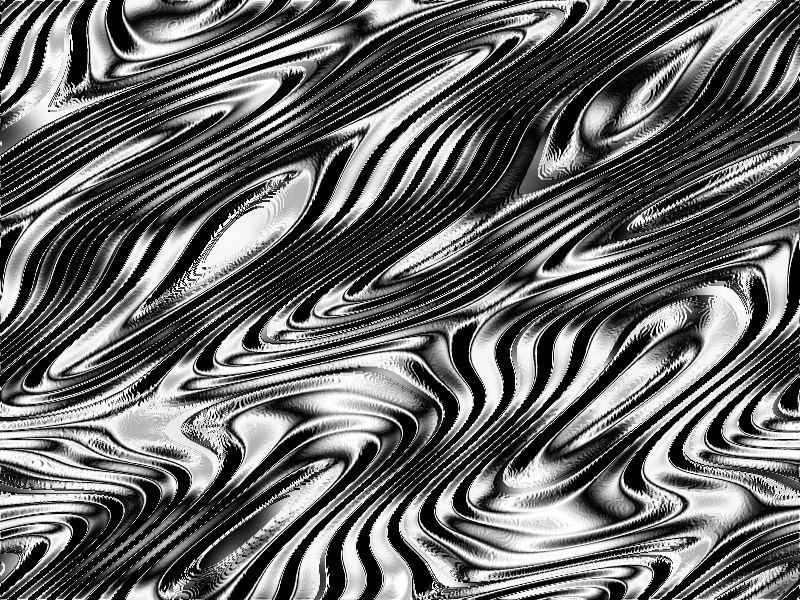
erm.png
erm.png [ 743.2 KiB | Viewed 5595 times ]


Top
 Post subject: Re: how do i get a wavy chrome effect ?
PostPosted: Sun Aug 26, 2012 12:10 pm  (#5) 
Offline
GimpChat Member
User avatar

Joined: Aug 24, 2011
Posts: 1785
Location: Dallas, TX
If you are trying to duplicate the exact effect in your first post, you can use teh sinus approach or use the clouds approach tehn use threshold to get the extreme black and white effect on the pattern. Not sure exactly what you are after here.

_________________
Image


Top
 Post subject: Re: how do i get a wavy chrome effect ?
PostPosted: Sun Aug 26, 2012 12:19 pm  (#6) 
Offline
GimpChat Member
User avatar

Joined: Jul 17, 2012
Posts: 2769
Draconian wrote:
Not sure exactly what you are after here.
i want to duplicate exactly what the script does, because im a curious fellow, thats all :geek

it seems that all i tried and all of your suggestions lack something, because what i get, doesnt look the same

i will try a bit more later

thanks again for the help


Top
 Post subject: Re: how do i get a wavy chrome effect ?
PostPosted: Sun Aug 26, 2012 8:56 pm  (#7) 
Offline
GimpChat Member
User avatar

Joined: Jul 17, 2012
Posts: 2769
i think i finally got it - it was all about the curve settings

Attachment:
Tandem.png
Tandem.png [ 84.92 KiB | Viewed 5558 times ]


Top
 Post subject: Re: how do i get a wavy chrome effect ?
PostPosted: Sun Aug 26, 2012 8:59 pm  (#8) 
Offline
GimpChat Member
User avatar

Joined: Apr 08, 2010
Posts: 5420
Location: Northwest Ohio
the chrome tutorial I use, uses curves on the top layer....and the curves graph has lots of waves in it.


Top
 Post subject: Re: how do i get a wavy chrome effect ?
PostPosted: Sun Aug 26, 2012 9:34 pm  (#9) 
Offline
GimpChat Member
User avatar

Joined: Jul 17, 2012
Posts: 2769
2-ton wrote:
the chrome tutorial I use, uses curves on the top layer....and the curves graph has lots of waves in it.
do you have a link to that tutorial, 2-ton, that would be great ?!

i used these numbers from the script code

(gimp-curves-spline text-layer 0 14 #(0 0 32 160 94 63 127 223 190 161 222 255 255 255)

i assume every pair of numbers is a coordinate on the curve display


Top
 Post subject: Re: how do i get a wavy chrome effect ?
PostPosted: Sun Aug 26, 2012 10:03 pm  (#10) 
Offline
GimpChat Member
User avatar

Joined: Apr 08, 2010
Posts: 5420
Location: Northwest Ohio
I do not know where it is right off-hand. I will have to hunt it up, I will try to get to it tomorrow. This is the resulting text I made quite a while ago...obviously I used the bevel/emboss script fu for the shapes but I used curves for the chrome look. I think you start with a med. grey color for the chrome. I am sure someone else will know the full method, assuming that this is the type of chrome you are looking for.

Image


Top
 Post subject: Re: how do i get a wavy chrome effect ?
PostPosted: Sun Aug 26, 2012 10:11 pm  (#11) 
Offline
GimpChat Member
User avatar

Joined: Jul 17, 2012
Posts: 2769
2-ton wrote:
I think you start with a med. grey color for the chrome. I am sure someone else will know the full method, assuming that this is the type of chrome you are looking for.

nice text you made !

i think thats the usual chrome effect that you will find most of the time
but that was not the thing i was looking for

anyway, doesnt matter
thanks for the help, much appreciated


Top
Post new topic Reply to topic  [ 11 posts ] 

All times are UTC - 5 hours [ DST ]


* Login  


Powered by phpBB3 © phpBB Group



