It is currently Wed Sep 02, 2026 7:20 am


All times are UTC - 5 hours [ DST ]


Post new topic Reply to topic  [ 4 posts ] 
Author Message
 Post subject: I just noticed this
PostPosted: Tue Aug 05, 2014 8:50 pm  (#1) 
Offline
Retired Staff
User avatar

Joined: May 22, 2008
Posts: 6946
Location: Somewhere in GIMP
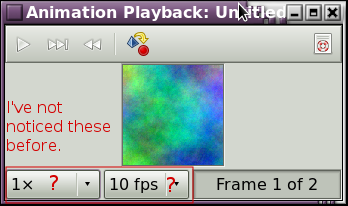
The animation playback dialog has two more buttons on it than it used to have. I'm not really sure what they are for.
Image


The manual does not show those two button selections nor explain them. I tried using them but could not tell much difference.
http://docs.gimp.org/2.8/en/plug-in-animationplay.html

_________________
Image
World War IV will be fought with sticks and stones. - Albert Einstein


Share on Facebook Share on Twitter Share on Orkut Share on Digg Share on MySpace Share on Delicious Share on Technorati
Top
 Post subject: Re: I just noticed this
PostPosted: Tue Aug 05, 2014 10:40 pm  (#2) 
Offline
Script Coder
User avatar

Joined: May 07, 2014
Posts: 4528
Location: Canada
when i used those buttons during playback, they just speed up slow down the animation.

_________________
TinT


Top
 Post subject: Re: I just noticed this
PostPosted: Tue Aug 05, 2014 11:03 pm  (#3) 
Offline
GimpChat Member
User avatar

Joined: Dec 08, 2013
Posts: 1088
1x varies the playback speed of animation. eg: 1.5 if faster than o.5.
10 fpx is the number of frames to play per second. requires at least the number of frames in the animation as that number shown.
has little effect on your anim (playback preview) as you still need to convert it into time. It does not alter anim.

_________________
Image


Top
 Post subject: Re: I just noticed this
PostPosted: Wed Aug 06, 2014 10:14 am  (#4) 
Offline
Retired Staff
User avatar

Joined: May 22, 2008
Posts: 6946
Location: Somewhere in GIMP
Thanks guys. I'll need a busier animation to try them out. :bigthup

_________________
Image
World War IV will be fought with sticks and stones. - Albert Einstein


Top
Post new topic Reply to topic  [ 4 posts ] 

All times are UTC - 5 hours [ DST ]


* Login  


Powered by phpBB3 © phpBB Group