It is currently Thu Jun 11, 2026 2:57 pm


All times are UTC - 5 hours [ DST ]


Post new topic Reply to topic  [ 5 posts ] 
Author Message
 Post subject: Off centered lettering
PostPosted: Fri Dec 12, 2025 11:32 pm  (#1) 
Offline
New Member

Joined: Oct 25, 2025
Posts: 1
I’m using GIMP 3.0.2 and I have the words ‘Praise Wave Productions’ going vertically down both sides of a centered photo. The problem is that the vertical text on both sides does not line up exactly the way it should. I need somebody to help me fix this, so all three words line up perfectly in straight vertical columns on each side of the photo.


Attachments:
File comment: This is my company photo
Company Name.jpg
Company Name.jpg [ 308.98 KiB | Viewed 6129 times ]
File comment: This is my company photo
Company Name.jpg
Company Name.jpg [ 308.98 KiB | Viewed 6129 times ]
File comment: This is my company photo
Company Name.jpg
Company Name.jpg [ 308.98 KiB | Viewed 6129 times ]
Share on Facebook Share on Twitter Share on Orkut Share on Digg Share on MySpace Share on Delicious Share on Technorati
Top
 Post subject: Re: Off centered lettering
PostPosted: Sat Dec 13, 2025 5:19 am  (#2) 
Offline
GimpChat Member

Joined: Mar 04, 2011
Posts: 2603
Regardless of content.

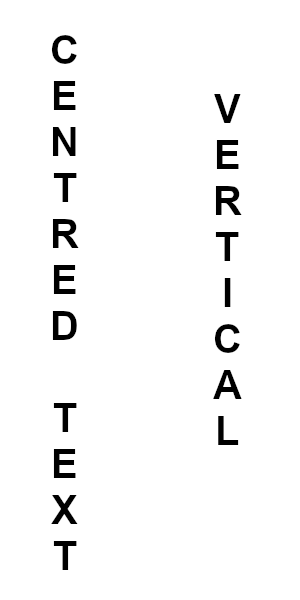
Just a guess but it looks like you formatted some of the text using the on-canvas editor. Use the Text tool tool options to set size, spacing etc. Then use the right-click Vertical left-to-right (upright orientation) option

Attachment:
vertical.jpg
vertical.jpg [ 29.13 KiB | Viewed 6103 times ]


Edit: Of course it might be the font, Which one is it ? Try a different font.


Top
 Post subject: Re: Off centered lettering
PostPosted: Sun Dec 14, 2025 5:09 am  (#3) 
Offline
Global Moderator
User avatar

Joined: Apr 01, 2012
Posts: 8364
Location: On the other side of your screen
Long as you keep your text centred each letter should be in line with the one before. what I did was put a text box down one side then made sure tool options for text was on centred, after each capital letter press enter then the next letter and enter until the first word was finished. Did a double enter between words the the next word as the first. Do a text box down the other side and make sure your tool options are the same, and complete the word as before. As rich showed, you should be able to run a line straight down the centre of them then
Image

_________________
Image
Free Fun Photo Editing & resources
Poems from the Lord
Gimp Newby
Gimp version 3.2.0 and GMIC-Qt 3.7.5 OS :- Windows 10 Home 64


Top
 Post subject: Re: Off centered lettering
PostPosted: Sun Dec 14, 2025 5:38 am  (#4) 
Offline
GimpChat Member

Joined: Mar 04, 2011
Posts: 2603
OK, another closer look and I now think this:

The black text is from the screenshots.
It looks like a sans-serif font which is proportional - I's and L's and 1's are narrower and take up less space than other characters.
If you try and make vertical text by putting each character on a new line, setting right-to-left justification and tweaking line spacing, you get the blue text with characters "nudged" over to the right.

Attachment:
01-text.jpg
01-text.jpg [ 75.93 KiB | Viewed 6061 times ]


What you need to do is:
Make the text as normal, horizontal - left-to-right - dynamic text box
Right click in the on screen text and choose Vertical right to left (upright orientation)
Then in the text tool options tweak the character spacing to make the letters closer together.

Attachment:
02-text.jpg
02-text.jpg [ 90.6 KiB | Viewed 6061 times ]


Top
 Post subject: Re: Off centered lettering
PostPosted: Tue Dec 16, 2025 8:02 am  (#5) 
Offline
Administrator
User avatar

Joined: Aug 10, 2012
Posts: 14017
Location: Native to NYC living in Arizona, Gimp 2.8 - 3.0, Win 11 PC.
Hello musicman67 and welcome to Gimp Chat.
:jumpclap :clap :jumpclap

The text tool can be a bit wonky sometimes and things don't always line up the way we think they should.
Given that there seems to only be a few letter that were noticeably not in line.
I repositioned those individual letters manually by cutting and pasting them,
which took a very short time to do.
Here is my result.
A png image with transparency to demonstrate this quick manual edit that could be done.
Without having to redo the entire text.


Attachment:
File comment: Quick Cut and Paste Text Realignment
Company Name_edit_wallace_00.png
Company Name_edit_wallace_00.png [ 45.34 KiB | Viewed 6014 times ]

_________________
Image
"A wise man learns more from a foolish question than a fool can learn from a wise answer"
Image


Top
Post new topic Reply to topic  [ 5 posts ] 

All times are UTC - 5 hours [ DST ]


* Login  


Powered by phpBB3 © phpBB Group