It is currently Thu Sep 03, 2026 4:05 pm


All times are UTC - 5 hours [ DST ]


Post new topic Reply to topic  [ 9 posts ] 
Author Message
 Post subject: Color Differences When Saving PNGs in GIMP 2.6 vs 2.8
PostPosted: Wed Aug 29, 2012 10:13 pm  (#1) 
Offline
GimpChat Founder
User avatar

Joined: May 22, 2008
Posts: 5241
Location: Gimpville
I noticed a strange problem while working with the banners submitted in the banner challenge.

Some of the banners submitted didn't flow seamlessly into the background. There was a noticeable difference in color between the banners submitted, even though everyone was working from the same background image gradient.

I tested the same banner (xcf) in both GIMP 2.6 and GIMP 2.8 and sure enough, the exported PNG in 2.8 wasn't exactly the same color as the exported PNG in 2.6. The banners on here can be transparent and the BG gradient will simply show through so this is not really an issue, in this case, but it seems it could potentially be a problem.

Here is what I'm seeing..
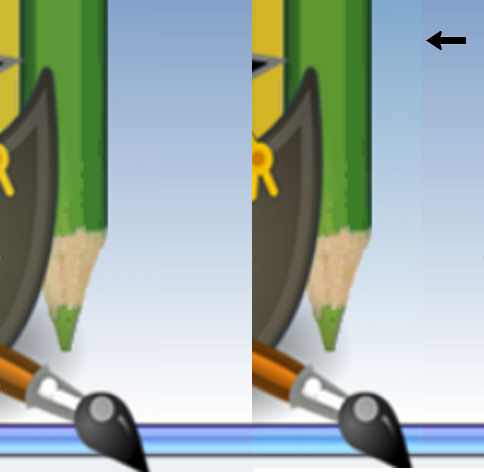
Image

As you can see, the PNG on the left, which was exported with GIMP 2.6, flowed perfectly into the original background gradient, yet the PNG on the right, exported with GIMP 2.8 does not. It's a slightly different color.

Why would this be the case? Anyone know what's going on here?

_________________
“If you reach for the stars, you just might land on a decently sized hill.” - Stuart Hill


Share on Facebook Share on Twitter Share on Orkut Share on Digg Share on MySpace Share on Delicious Share on Technorati
Top
 Post subject: Re: Color Differences When Saving PNGs in GIMP 2.6 vs 2.8
PostPosted: Thu Aug 30, 2012 2:35 am  (#2) 
Offline
Script Coder
User avatar

Joined: Oct 25, 2010
Posts: 4812
Look like you have exported the PNG with an imbedded color profile.

_________________
Image


Top
 Post subject: Re: Color Differences When Saving PNGs in GIMP 2.6 vs 2.8
PostPosted: Thu Aug 30, 2012 2:38 am  (#3) 
Offline
GimpChat Founder
User avatar

Joined: May 22, 2008
Posts: 5241
Location: Gimpville
I used the same xcf in both 2.6 and 2.8, both being default installs. Could there a difference between the default installs on each?

_________________
“If you reach for the stars, you just might land on a decently sized hill.” - Stuart Hill


Top
 Post subject: Re: Color Differences When Saving PNGs in GIMP 2.6 vs 2.8
PostPosted: Thu Aug 30, 2012 3:38 am  (#4) 
Offline
Script Coder
User avatar

Joined: Jun 22, 2010
Posts: 1171
Location: Here and there
As Saulgoode says, it does look like there are different colour profiles embedded as the right hand one looks more saturated in the yellows.

That said I've just tried the experiment of exporting your vertical bars template from 2.6 and 2.8 and I don't see a colour shift between them and GIMP claims they are both using sRGB built-in as a colour profile. However I do get different sized files and I've been careful to set the PNG options the same, so something has definitely changed.

Do you have colour management switched on in 2.6 and not in 2.8 (or vice-versa?)

Can you attach the two PNG exports here so we can look at them in something that isn't GIMP.

Kevin


Top
 Post subject: Re: Color Differences When Saving PNGs in GIMP 2.6 vs 2.8
PostPosted: Thu Aug 30, 2012 4:39 am  (#5) 
Offline
GimpChat Member
User avatar

Joined: May 26, 2012
Posts: 342
Location: France
Embedded color profiles.. Such a mess :D
Also mentioning that firefox itself make use of color profiles supplied by your graphic editor (which does it silently, sometimes).

PNGs became a bit annoying lately because of that, that's why I'm using GIFs instead (when possible) because there's no color profile to interpret in this format. Additionally, there's anoter tool I use, it's tweakpng, I'm using it to kill some datas in PNGs (like color profiles and less important things), it's fast and handy.

Good luck with this ! I've been there, bad memories ;)

edit: some infos regarding firefox color management: https://developer.mozilla.org/en-US/doc ... in_Firefox


Last edited by anarkhya on Thu Aug 30, 2012 4:54 am, edited 1 time in total.

Top
 Post subject: Re: Color Differences When Saving PNGs in GIMP 2.6 vs 2.8
PostPosted: Thu Aug 30, 2012 4:50 am  (#6) 
Offline
GimpChat Member

Joined: Mar 14, 2011
Posts: 998
Perhaps your libpng has changed since 2.6? Have you looked at the changelog to see if there is anything there? I must confess, I have not looked myself.


Top
 Post subject: Re: Color Differences When Saving PNGs in GIMP 2.6 vs 2.8
PostPosted: Thu Aug 30, 2012 5:12 am  (#7) 
Offline
Script Coder
User avatar

Joined: Jun 22, 2010
Posts: 1171
Location: Here and there
I can now account for my file size difference - 2.6 was flattening and saving without an Alpha channel, and 2.8 was flattening and saving with an alpha channel.

Kevin


Top
 Post subject: Re: Color Differences When Saving PNGs in GIMP 2.6 vs 2.8
PostPosted: Thu Aug 30, 2012 6:06 am  (#8) 
Offline
GimpChat Member
User avatar

Joined: Oct 29, 2010
Posts: 711
Location: Netherlands
@ GnuTux,
Which gimp-2.8 are you using?
If it is 2.8.1 or higher and you have lcms 2 installed that might explain the differences.
Open the pdf file in gimp and you'll know if gimp uses V4 and V2 profile.
http://www.color.org/version4ready.xalter
Gerard.

_________________
Gentoo Linux always up-to-date.
Kernel-3.17.4 Python-2.7.8/3.3.5
Gimp-2.8.14

I use Linux only.
And Virtualbox with Win 7


Top
 Post subject: Re: Color Differences When Saving PNGs in GIMP 2.6 vs 2.8
PostPosted: Thu Aug 30, 2012 9:24 am  (#9) 
Offline
GimpChat Founder
User avatar

Joined: May 22, 2008
Posts: 5241
Location: Gimpville
Ok, I verified that the color management settings are the same in both versions. They are the default values and were never changed.

The funny thing is, I can't seem to duplicate the problem now. I have no idea why. :puzzled

Considering that it occurred several times, I'm sure it will rear its ugly head again at some point, and maybe I'll figure out what is going on or what I did that caused it. :crash

Thanks for all the great suggestions, anyway.

_________________
“If you reach for the stars, you just might land on a decently sized hill.” - Stuart Hill


Top
Post new topic Reply to topic  [ 9 posts ] 

All times are UTC - 5 hours [ DST ]


* Login  


Powered by phpBB3 © phpBB Group

