It is currently Tue Jul 21, 2026 2:53 am


All times are UTC - 5 hours [ DST ]


Post new topic Reply to topic  [ 12 posts ] 
Author Message
 Post subject: Dragan effect
PostPosted: Fri Jun 29, 2012 2:06 pm  (#1) 
Offline
New Member

Joined: Dec 29, 2011
Posts: 4
Hi,
I'm searching a tutorial in order to realize a Dragan Effect, I didn't find anything here, could you help me?
Thanks in advance for your help.
Kekko

_________________
Kekko 400D
My Album Flickr


Share on Facebook Share on Twitter Share on Orkut Share on Digg Share on MySpace Share on Delicious Share on Technorati
Top
 Post subject: Re: Dragan effect
PostPosted: Fri Jun 29, 2012 2:14 pm  (#2) 
Offline
GimpChat Member
User avatar

Joined: Nov 16, 2011
Posts: 5127
Location: Metro Vancouver, BC
Try here, "Create Dragan" effect
http://www.gimpusers.com/tutorials/drag ... simulation

_________________
Image
Gimp 2.8.18, Linux, median user
Gimp Chat Tutorials Index
Spirit Bear (Kermode)


Top
 Post subject: Re: Dragan effect
PostPosted: Fri Jun 29, 2012 2:18 pm  (#3) 
Offline
New Member

Joined: Dec 29, 2011
Posts: 4
Thanks Odinbc,
I knew it but I meant something more "hard".
I tried sometime to apply the general rules of a Dragan Effect changing some parameters, here an example: Image but I would like to study the effect deeply.
Ciao
Kekko

_________________
Kekko 400D
My Album Flickr


Top
 Post subject: Re: Dragan effect
PostPosted: Fri Jun 29, 2012 2:55 pm  (#4) 
Offline
GimpChat Member

Joined: Mar 04, 2011
Posts: 2610
This is the tut I have bookmarked.
http://www.gimpforphotos.com/tutorial-i ... ffect.html

not a bad little site

http://www.gimpforphotos.com/gimp-tutorials.html


Top
 Post subject: Re: Dragan effect
PostPosted: Fri Jun 29, 2012 3:06 pm  (#5) 
Offline
New Member

Joined: Dec 29, 2011
Posts: 4
Oh thanks, I know it too, it's a my friend website, another Italian boy.
Thanks for your interest.
Ciao
Kekko

_________________
Kekko 400D
My Album Flickr


Top
 Post subject: Re: Dragan effect
PostPosted: Fri Jun 29, 2012 8:26 pm  (#6) 
Offline
Global Moderator
User avatar

Joined: May 16, 2010
Posts: 16124
This looks a lot like the National Geographic Effect.
http://registry.gimp.org/node/9592

Image

_________________
Image


Top
 Post subject: Re: Dragan effect
PostPosted: Sun Dec 30, 2012 8:17 am  (#7) 
Offline
GimpChat Member
User avatar

Joined: Dec 02, 2012
Posts: 203
Location: Cantabria, Spain
I think there isn't a general rule to achieve this effect. Before the act of taking the picture there is a thorough preparation thereof: lighting, decoration, model, etc...

I always thought that this effect is only in the mind of Dragan.

My failed attempts:

Image


Image

_________________
Image


My Gimp rides on Antergos (Arch), Linux Mint, Debian and Fedora


Top
 Post subject: Re: Dragan effect
PostPosted: Sun Dec 30, 2012 10:20 am  (#8) 
Offline
Script Coder
User avatar

Joined: Jun 22, 2010
Posts: 1171
Location: Here and there
When I first heard of it, I created a script to do it based on this Photoshop tutorial:

http://www.ascenicworld.com/2007/11/28/ ... mystified/

Kevin


Top
 Post subject: Re: Dragan effect
PostPosted: Sun Dec 30, 2012 2:59 pm  (#9) 
Offline
GimpChat Member
User avatar

Joined: Jul 17, 2012
Posts: 2769
http://www.gimpusers.com/tutorials/drag ... simulation


Top
 Post subject: Re: Dragan effect
PostPosted: Sun Dec 30, 2012 4:12 pm  (#10) 
Offline
GimpChat Member
User avatar

Joined: Dec 02, 2012
Posts: 203
Location: Cantabria, Spain
#Esper:

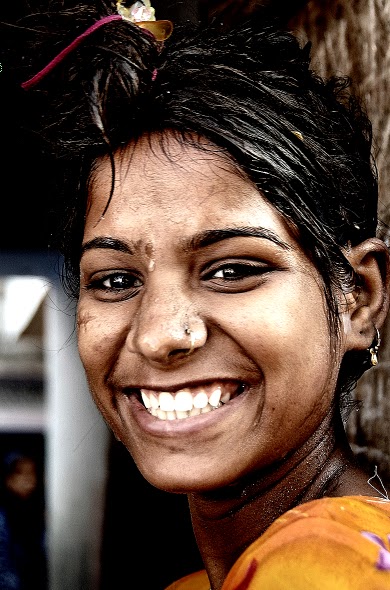
This one is a Dragan picture and I'm not sure to get that result with the Gimp tutorial users.


Attachments:
Selección_773.jpg
Selección_773.jpg [ 39.1 KiB | Viewed 4248 times ]

_________________
Image


My Gimp rides on Antergos (Arch), Linux Mint, Debian and Fedora
Top
 Post subject: Re: Dragan effect
PostPosted: Sun Dec 30, 2012 5:10 pm  (#11) 
Offline
GimpChat Member
User avatar

Joined: Jul 17, 2012
Posts: 2769
it says Dragan effect in the headline, right


Top
 Post subject: Re: Dragan effect
PostPosted: Sun Dec 30, 2012 7:52 pm  (#12) 
Offline
GimpChat Member

Joined: Apr 12, 2010
Posts: 5870
jamac4k wrote:
#Esper:

This one is a Dragan picture and I'm not sure to get that result with the Gimp tutorial users.


i believe you will not but is better because in case that nice model will beat you hard or at least will remain very upset. :hehe

The dragan effect will work at best on expressive old faces (and even bodies) enhancing and revealing dramatically all the wrinkles ,

Not that could not applied to a young model with pesky skin but would be almost a challenge
(leaving out the risk of unpleasant model reaction ,because similar effect may even reveal skin defect carefully masked by hours of accurate make up... :bawl )

Instead a old woman or man , or yes even child but if you want make look a normal child as a living in hut in a favela , or anyway in some dramatic situation.

Or yes even for a girl or woman but that want play as mercenary, junkie,ninja, or just raped, or anyway something dramatic

So i believe the problem here is not the technique , national geographic , and the other script quoted (and playing with the setting also my Graphic Novel and Graphic Boost filter for gmic ) would allow a similar effect..on the right model

@Kekko 400D

you got much closer with the model a a unshaved man is more adapt
But not the lighting on his face:
that photo has that type of diffuse light good to make skin peasky ,hiding all skin defect and details .

So maybe there there be no much to reveal or enhance because most blown out
(of course diffuse vs relief lights have similar effects on objects but on faces and skin difference may look stronger )

_________________
My 3D Gallery on Deviantart http://photocomix2.deviantart.com/
Main gallery http://www.flickriver.com/photos/photocomix-mandala/
Mandala and simmetry http://www.flickriver.com/photos/photocomix_mandala/

Image

Mrs Wilbress


Top
Post new topic Reply to topic  [ 12 posts ] 

All times are UTC - 5 hours [ DST ]


* Login  


Powered by phpBB3 © phpBB Group