It is currently Wed Jul 29, 2026 10:29 pm


All times are UTC - 5 hours [ DST ]


Post new topic Reply to topic  [ 4 posts ] 
Author Message
 Post subject: Undoing 256 color dithering
PostPosted: Thu Nov 19, 2015 12:37 am  (#1) 
Offline
New Member

Joined: Nov 18, 2015
Posts: 2
Hello everyone,

I have very old (circa 1995) computer art that is 256 colors. It is all cartoons.

The original high resolution art is not available. So I want to take the 256 color computer screen art and change it to millions of colors (24 bit) art.

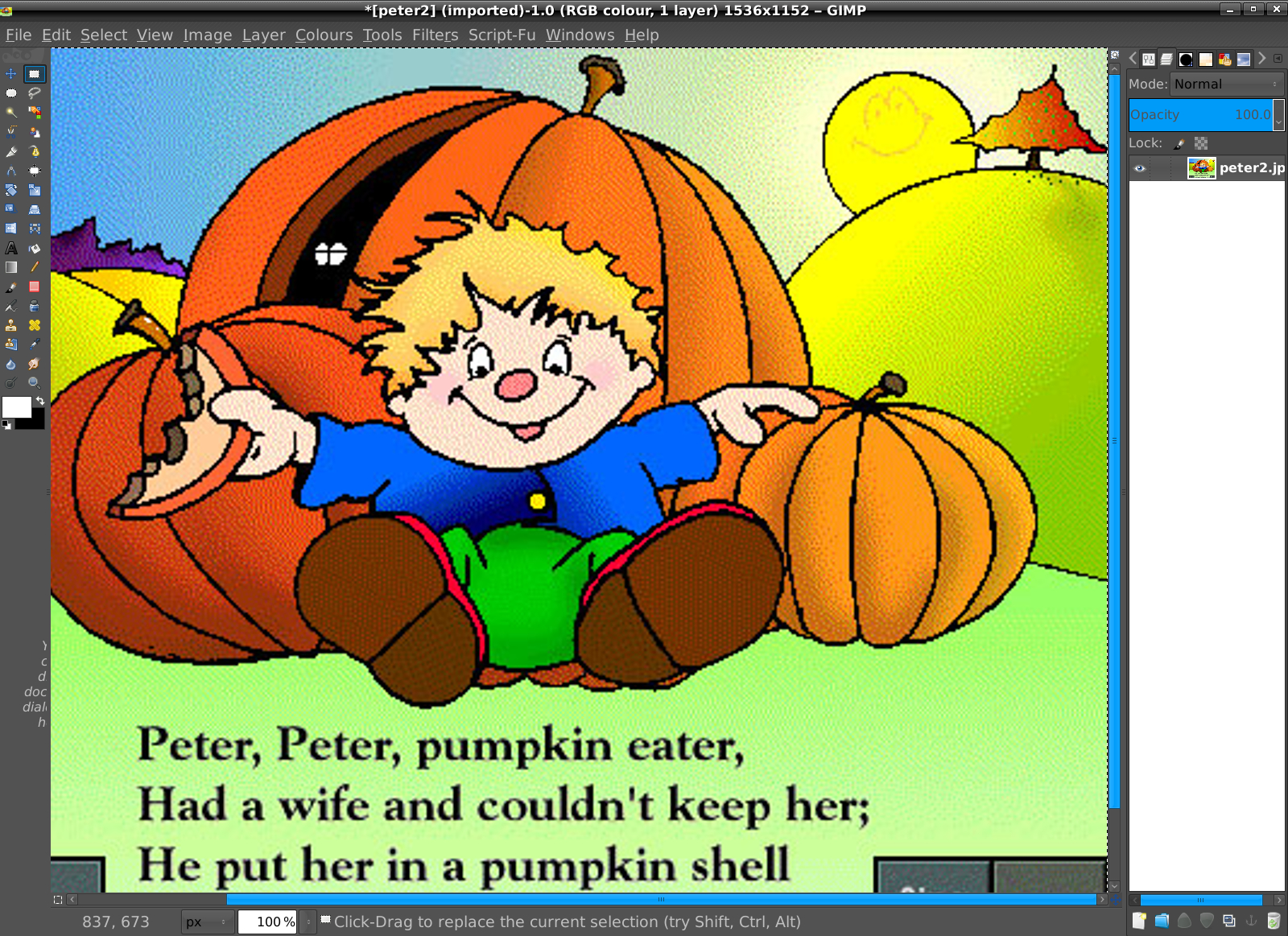
But the original reduction to 256 colors resulted in dithering. In the sample image below, you can see the alternating pixel colors used to fake the appearance of colors not in the 256 palette.
Attachment:
peter2.jpg
peter2.jpg [ 154.95 KiB | Viewed 5352 times ]

What's the best way to take that 256 art and make the areas look smooth and not dithered? I'm a part-time software developer, not an artist, so I'm hoping for an easy solution in GIMP.

I couldn't find a good way using GIMP on Mac OS X. The Despeckle filter on a very old version of Photoshop worked okay, but that computer is no longer available. Also, somebody recently demonstrated to me what Photoshop's Smart Blur can do (they created the image below; the threshold was set to 60).

Attachment:
peter3.jpg
peter3.jpg [ 186.02 KiB | Viewed 5352 times ]

If GIMP or G'MIC cannot do that, I could rent some version of Photoshop monthly from Adobe. Not sure about whether I need the CC or CS version, if Photoshop is my best solution.

Thanks very much for sharing your knowledge.


Share on Facebook Share on Twitter Share on Orkut Share on Digg Share on MySpace Share on Delicious Share on Technorati
Top
 Post subject: Re: Undoing 256 color dithering
PostPosted: Thu Nov 19, 2015 1:51 am  (#2) 
Offline
GimpChat Member
User avatar

Joined: Sep 24, 2010
Posts: 12819
Ran G'MIC Wavelet denoise followed by G'MIC Bilateral denoise and re-introduced the smiley face. If you don't have the G'MIC filter, I suggest you get it; it's extremely powerful and should be a part of your toolkit. :)


Attachments:
peter2.jpg
peter2.jpg [ 163.87 KiB | Viewed 5307 times ]

_________________
Lyle

Psalm 109:8

Image
Top
 Post subject: Re: Undoing 256 color dithering
PostPosted: Thu Nov 19, 2015 8:37 am  (#3) 
Offline
GimpChat Member
User avatar

Joined: Jan 31, 2015
Posts: 146
The current stable Gimp (2.8) doesn't support any bit depth beyond 8 bit, though I don't believe you need a higher bit depth to smooth out the colours of a dithered cartoon image. The problem with your second image where the photoshop deblur filter was used, is that the suns face is blurred out. I got the same result with G'mics filters, but there an easy way around this.

Make sure you have the latest stable Gimp 2.8 and the latest G'mic installed.

Open your image. Upscale your image by 300%. Make a selection around the suns face and go to "selection--->invert". This will ensure that the suns face area is not affected by the filtering process. Here's a before image with the undesired dithering:

Image

Open G'mic, open category "Repair" and choose "Smooth [bilateral] and apply it with the default settings. In the same category, choose smooth [thin brush] and also apply it with the default parameters. These filters are smart and do their best to avoid detail areas and only affect colour areas. Finally, go to colours----curves and apply the below shown setting to get the variation between the tones back:

Image

This should be your result:

Image

Now scale it back down with the cubic re-sampler to it original size (512 x 384 px):

Image


Top
 Post subject: Re: Undoing 256 color dithering
PostPosted: Thu Nov 19, 2015 1:18 pm  (#4) 
Offline
GimpChat Member
User avatar

Joined: Oct 10, 2014
Posts: 60
Hi AppReject, I don't know much about dithering but I looked it up on internet. I got as far as dedithering pixel shaders. I don't know if any dedithering filters are available? Goodluck


Top
Post new topic Reply to topic  [ 4 posts ] 

All times are UTC - 5 hours [ DST ]


cron

* Login  


Powered by phpBB3 © phpBB Group