It is currently Wed Sep 02, 2026 8:45 am


All times are UTC - 5 hours [ DST ]


Post new topic Reply to topic  [ 9 posts ] 
Author Message
 Post subject: Trying to get this effect in Gimp
PostPosted: Wed Jul 10, 2013 1:53 pm  (#1) 
Offline
Global Moderator
User avatar

Joined: May 16, 2010
Posts: 16169
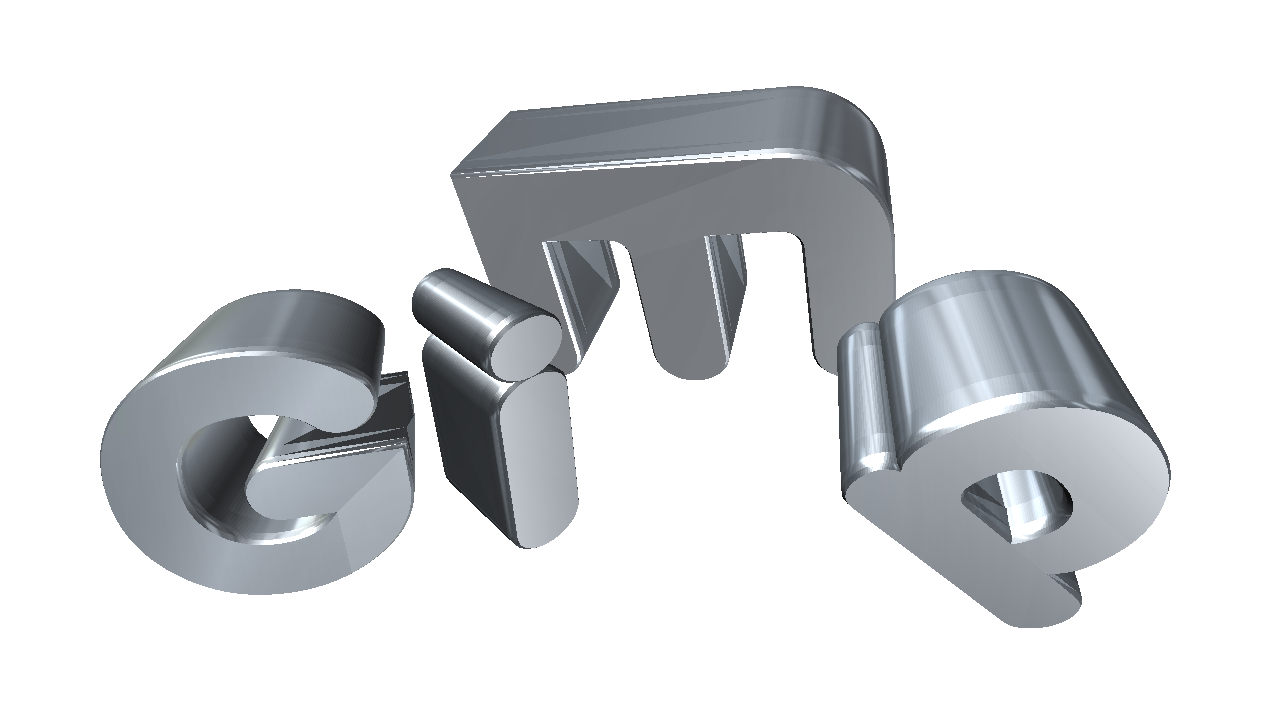
Anyone have any ideas on how to mimic this effect in Gimp.
Image

I rendered this one in Aurora 3D but i would like to do this with our Gimp software. :)

_________________
Image


Share on Facebook Share on Twitter Share on Orkut Share on Digg Share on MySpace Share on Delicious Share on Technorati
Top
 Post subject: Re: Trying to get this effect in Gimp
PostPosted: Wed Jul 10, 2013 2:22 pm  (#2) 
Offline
GimpChat Member
User avatar

Joined: Jan 20, 2012
Posts: 583
Looks like you will need to create a 3d map of each letter. Than run a map image to get the metal effect, and bevel the edges.
How is the way...how indeed

_________________


"In the face of adversity, there's three things: fly, freeze or fight; We're choosing to fight..."- Guy Boucher, Tampa Bay Lighting Head Coach


Top
 Post subject: Re: Trying to get this effect in Gimp
PostPosted: Wed Jul 10, 2013 3:01 pm  (#3) 
Offline
Global Moderator
User avatar

Joined: May 16, 2010
Posts: 16169
ZWard117 wrote:
Looks like you will need to create a 3d map of each letter. Than run a map image to get the metal effect, and bevel the edges.
How is the way...how indeed


The 3D effect will be pretty easy with the correct type and Saulgoodes 3Dify script. :bigthup
I am wondering how to get that glossy reflective metallic look. A blur and Color>Curves maybe?

Remember i want to do this entirely in GIMP itself. No outside programs. :)

_________________
Image


Top
 Post subject: Re: Trying to get this effect in Gimp
PostPosted: Thu Jul 25, 2013 2:06 pm  (#4) 
Offline
GimpChat Member

Joined: Jun 04, 2013
Posts: 38
Location: South TX
Did you ever figure this out? Those are some very cool letters. I've heard you mention Saulgoode's 3Dify script many times. I've searched and can't find any such script at the registry and other places. Do you have a link, or could you attach it? I have the make 3D text script; is it the same thing?


Top
 Post subject: Re: Trying to get this effect in Gimp
PostPosted: Thu Jul 25, 2013 2:46 pm  (#5) 
Offline
Global Moderator
User avatar

Joined: May 16, 2010
Posts: 16169
sb158 wrote:
Did you ever figure this out? Those are some very cool letters. I've heard you mention Saulgoode's 3Dify script many times. I've searched and can't find any such script at the registry and other places. Do you have a link, or could you attach it? I have the make 3D text script; is it the same thing?


No the make 3D only works on text layers.
The 3dify script is attached. It works on alpha or text or objects. I wish it had a setting to fill the layers with a user chosen pattern or gradient before merging though. :)

Anyways i have not been able to render this effect in GIMP ...yet. :)

Image

Image


Attachments:
File comment: after install this is located at Filters>Misc>3Dify
sg-3d-ify.scm [2.57 KiB]
Downloaded 124 times

_________________
Image
Top
 Post subject: Re: Trying to get this effect in Gimp
PostPosted: Thu Jul 25, 2013 3:56 pm  (#6) 
Offline
GimpChat Member

Joined: Jun 04, 2013
Posts: 38
Location: South TX
Thanks for the script. I have no doubt that you will eventually figure out how to get both the text styles and the reflective metal effect in Gimp. You seem to be very good at doing that. Good luck!


Top
 Post subject: Re: Trying to get this effect in Gimp
PostPosted: Thu Jul 25, 2013 4:13 pm  (#7) 
Offline
GimpChat Member
User avatar

Joined: Jul 17, 2012
Posts: 2769
all individual letters are rotated
what you could try is decide on a vanishing point for each letter and then extrude with the motionblur-technique

then you duplicate the motionblur with Clone Layer and vary the colour so that you get shading and a gradient, like in this tut
http://gimpchat.com/viewtopic.php?f=23&t=6660
then apply chrome curves on the gradient to metalize


Top
 Post subject: Re: Trying to get this effect in Gimp
PostPosted: Thu Jul 25, 2013 4:44 pm  (#8) 
Offline
Administrator
User avatar

Joined: Aug 10, 2012
Posts: 14190
Location: Native to NYC living in Arizona, Gimp 2.8 - 3.0, Win 11 PC.
Rod wrote:
sb158 wrote:
Did you ever figure this out? Those are some very cool letters. I've heard you mention Saulgoode's 3Dify script many times. I've searched and can't find any such script at the registry and other places. Do you have a link, or could you attach it? I have the make 3D text script; is it the same thing?


No the make 3D only works on text layers.
The 3dify script is attached. It works on alpha or text or objects. I wish it had a setting to fill the layers with a user chosen pattern or gradient before merging though. :)

Anyways i have not been able to render this effect in GIMP ...yet. :)

[ Image ]

[ Image ]

Is this script good in 2.6?

_________________
Image
"A wise man learns more from a foolish question than a fool can learn from a wise answer"
Image


Top
 Post subject: Re: Trying to get this effect in Gimp
PostPosted: Fri Jul 26, 2013 1:39 am  (#9) 
Offline
Global Moderator
User avatar

Joined: May 16, 2010
Posts: 16169
conbagui wrote:
G'MIC 3D Extrusion
[ Image ]


Quote:
all individual letters are rotated
what you could try is decide on a vanishing point for each letter and then extrude with the motionblur-technique

then you duplicate the motionblur with Clone Layer and vary the colour so that you get shading and a gradient, like in this tut
http://gimpchat.com/viewtopic.php?f=23&t=6660
then apply chrome curves on the gradient to metalize


Fantastic ideas folks. :)

_________________
Image


Top
Post new topic Reply to topic  [ 9 posts ] 

All times are UTC - 5 hours [ DST ]


* Login  


Powered by phpBB3 © phpBB Group