It is currently Wed Aug 19, 2026 4:55 am


All times are UTC - 5 hours [ DST ]


Post new topic Reply to topic  [ 11 posts ] 
Author Message
 Post subject: new with question on folder dialog box
PostPosted: Sun Jan 19, 2014 9:41 am  (#1) 
Offline
New Member

Joined: Jan 19, 2014
Posts: 2
Wow, it took me a long while just to figure out how to make a post.
So I'm new to Gimp and my first question is in the folder dialog box, how to I view it as a group of large icons rather than a list in text view?


Share on Facebook Share on Twitter Share on Orkut Share on Digg Share on MySpace Share on Delicious Share on Technorati
Top
 Post subject: Re: new with question on folder dialog box
PostPosted: Sun Jan 19, 2014 9:58 am  (#2) 
Offline
Global Moderator
User avatar

Joined: May 16, 2010
Posts: 16161
Hi and welcome to Gimp Chat. :)
I am not too entirely sure of what you are talking about.
Is it the Edit>Preferences folder list, the Windows Explorer folder list, or the save or export folder lists?

_________________
Image


Top
 Post subject: Re: new with question on folder dialog box
PostPosted: Sun Jan 19, 2014 5:26 pm  (#3) 
Offline
New Member

Joined: Jan 19, 2014
Posts: 2
It's when you have a blank screen open, when you're ready to open up a picture to work on There's a ruler up at the top and a ruler at the left side. Also up at the top it says File, Edit, Select, View, Image, Layer, Colors, Tools, Dialogs, Filters.

When I click on FILE, I get a box with menu choices of New, Open, Open as Layers, Open Location, Open recent, Acquire, Save, Save As, Save a Copy, etc. I click on OPEN, and this opens a box with folder and picture choices, and they are all in text, and I see no way to change them to large icons.

I don't want to have to go thru hundreds of photos, clicking on them one at a time to see them in the Preview pane to the right of the text folders.... I would like to see a bunch of them as thumbnails, the little pictures, so I can see what to choose from.....

Thanks


Top
 Post subject: Re: new with question on folder dialog box
PostPosted: Sun Jan 19, 2014 5:31 pm  (#4) 
Offline
GimpChat Member
User avatar

Joined: Apr 08, 2010
Posts: 5420
Location: Northwest Ohio
on my computer, when I click on the name of the pic in the written list, I can see a tiny thumbnail of it. Unfortunately it's so small I can't always see what it is, so I open it it in my quick look to check it out. Sometimes, I also just go find the photo I want in my files system, then take note of the name and path so I can easily find it when in gimp.


Top
 Post subject: Re: new with question on folder dialog box
PostPosted: Mon Jan 20, 2014 3:19 am  (#5) 
Offline
GimpChat Member
User avatar

Joined: Aug 16, 2012
Posts: 4271
Location: Göteborg, Sweden
Shiloh459: i don't know if there's any way to change that, at least i don't know of one. i manage with the preview to the right of the list and i try to name and place the files so i can find them. that's of course easier said than done, and i've often wish i could have large preview icons in gimp, so if anyone comes up with a solution for this, i'd be as happy as you.

_________________


Top
 Post subject: Re: new with question on folder dialog box
PostPosted: Mon Jan 20, 2014 3:54 am  (#6) 
Offline
GimpChat Member
User avatar

Joined: Mar 23, 2012
Posts: 7388
Location: Göteborg at last!
I usually don't use file-open. Drag and drop your files from Windows explorer or whichever browser you are using directly onto your open Gimp. There is a popular open source program that can even see xcfs but I can't remember what it is called and I'll kick myself when I find out.

WELCOME TO GIMP CHAT


Top
 Post subject: Re: new with question on folder dialog box
PostPosted: Mon Jan 20, 2014 6:25 am  (#7) 
Offline
GimpChat Member
User avatar

Joined: Apr 07, 2010
Posts: 14182
Welcome to Gimp Chat Shiloh459.
This is what I do,
Go to Files > Open > Documents > Flowers > Photo.jpg. This opens the picture I want to use and as you can see in the dialogue, the name I hi-lite shows what it is on the right.
Image

_________________
Image


Top
 Post subject: Re: new with question on folder dialog box
PostPosted: Mon Jan 20, 2014 6:49 am  (#8) 
Offline
Global Moderator
User avatar

Joined: May 16, 2010
Posts: 16161
That is the Gimp-Open dialog window.. You need to click any (text line) in the list. Then on the right side a thumbnail image of your selection should show.
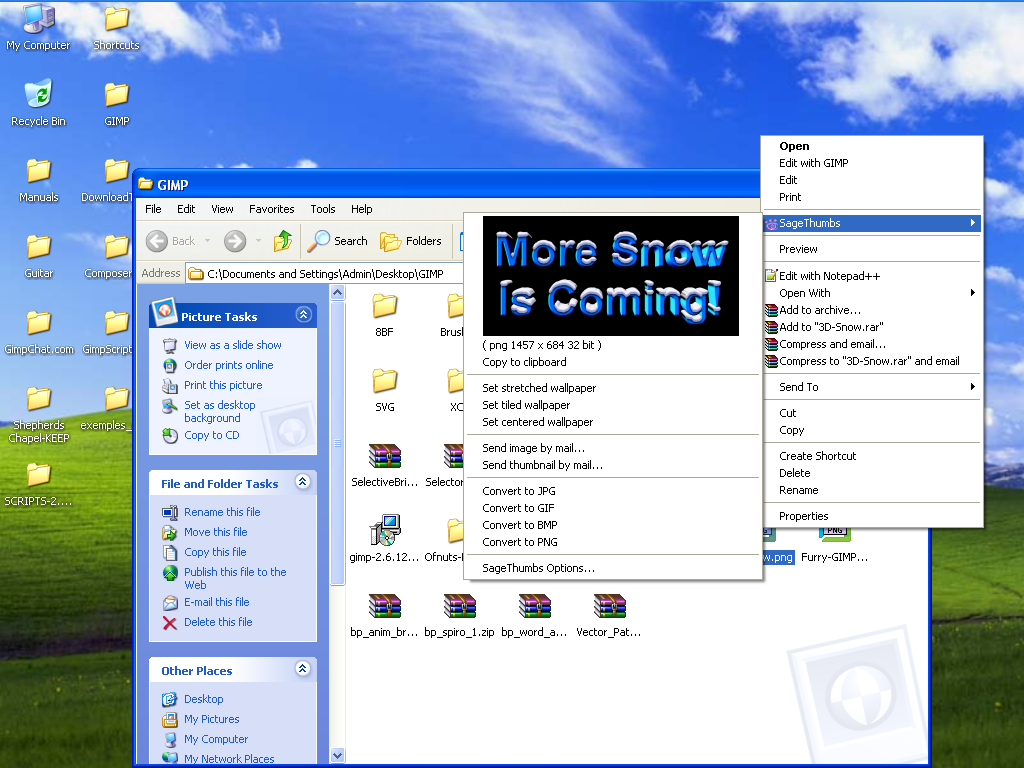
I also have a (Windows) program installed named "SageThumbs" I can right click any image on my computer and select sagethumbs and see that image as a thumbnail. :)

Image

I use that little program to see the image and then i just drag and drop the correct one onto GIMP's toolbox. The neat thing about this thumbnail viewer is not only is it free but it see's XCF GIMP format images also. :bigthup

Image

_________________
Image


Top
 Post subject: Re: new with question on folder dialog box
PostPosted: Mon Jan 20, 2014 7:26 am  (#9) 
Offline
GimpChat Member
User avatar

Joined: Apr 07, 2010
Posts: 14182
I thought that is what I just said Rod, I guess I worded it wrong.

_________________
Image


Top
 Post subject: Re: new with question on folder dialog box
PostPosted: Mon Jan 20, 2014 7:32 am  (#10) 
Offline
GimpChat Member
User avatar

Joined: Jan 20, 2013
Posts: 590
I always use windows explorer to select the picture and then I ask to open with GIMP. Even when I want to "open as layer" first I try with explorer, and once opened, I transfer the layer to another image. This allows me to better visualize what I want to open.
Rod, thanks for the "sagethumbs". I didn't know it yet.

_________________
Image


Top
 Post subject: Re: new with question on folder dialog box
PostPosted: Tue Jan 21, 2014 7:15 am  (#11) 
Offline
Global Moderator
User avatar

Joined: May 16, 2010
Posts: 16161
molly wrote:
I thought that is what I just said Rod, I guess I worded it wrong.


My apologies Molly. :)

_________________
Image


Top
Post new topic Reply to topic  [ 11 posts ] 

All times are UTC - 5 hours [ DST ]


* Login  


Powered by phpBB3 © phpBB Group