It is currently Tue Oct 13, 2026 4:36 pm


All times are UTC - 5 hours [ DST ]


Post new topic Reply to topic  [ 82 posts ]  Go to page Previous  1, 2, 3, 4, 5  Next
Author Message
 Post subject: Re: Introducing Gimp 2.7.3
PostPosted: Mon May 02, 2011 8:35 am  (#41) 
Offline
GimpChat Member
User avatar

Joined: Jan 13, 2011
Posts: 2648
Location: Poland
For Gimp 2.7.3 (Windows XP) all work well:

mm color gray decompose.py
mm extern dynamic range compression.py
mm extern eaw.py
mm extern EAWTool.py
mm extern LabCurves.py
mm extern sigmoidal.py
mm extern webresize.py

only mm Export to Photivo.py - after addition to missing libraries tcl in c: \ Program Files \ Gimp-2.7.3 \ python \tcl

_________________
Image


Top
 Post subject: Re: Introducing Gimp 2.7.3
PostPosted: Mon May 02, 2011 9:07 am  (#42) 
Offline
GimpChat Member
User avatar

Joined: Sep 24, 2010
Posts: 12851
Darn; missed that post Rod. lol

:)

_________________
Lyle

Psalm 109:8

Image


Top
 Post subject: Re: Introducing Gimp 2.7.3
PostPosted: Mon May 02, 2011 5:35 pm  (#43) 
Offline
GimpChat Member

Joined: Mar 14, 2011
Posts: 998
lylejk wrote:
Darn; missed that post Rod. lol

:)

Yep, missed it too!! Well, maybe that was somebody's idea of a bare bone install? :)


Top
 Post subject: Re: Introducing Gimp 2.7.3
PostPosted: Mon May 02, 2011 5:40 pm  (#44) 
Offline
GimpChat Member

Joined: Mar 14, 2011
Posts: 998
PhotoComix wrote:
...

the huge plugin windows were not in that list, just because i can't imagine any advantage to revert to the original.
But sure in case someone may prefer the old microscopic preview a patch would be useful, just i will like to know if somebody had problems with the huge preview

In this case, still talking about the huge-preview hack, i still hope someone may feel pushed to provide a better solution:
as copy from some other plugin the snippet of code relate to a good, preview that may be panned,zoomed ,disabled or enabled and enlarged by enlarging the filter gui
...and merge down the code.

I hope will be done , in the while i think the changes derived by my trivial hack still much better then actual behaviour

Anyway i believe changes of default or hardcoded values are seldom considereted be relevant change in the code

Hey PC,

Thanks, got your PM. A lot to digest. Will get back to you soon. :)

As for the above, maybe I miscommunicated. I am saying that if I use the large previews, I don't get an install due to windows resource files. :)

Hence I was asking for a patch that I can incorporate when I rebuild Gimp.

Thanks,
Partha


Top
 Post subject: Re: Introducing Gimp 2.7.3
PostPosted: Wed May 04, 2011 9:23 am  (#45) 
Offline
GimpChat Member
User avatar

Joined: Sep 24, 2010
Posts: 12851
Hey Partha. Just saw this one that David posted at G'MIC's Flickr. Have no idea what it means, but maybe you do and can use the info to compile G'MIC for 64-bit Windows. :)

http://www.flickr.com/groups/gmic/discu ... 638369642/

_________________
Lyle

Psalm 109:8

Image


Top
 Post subject: Re: Introducing Gimp 2.7.3
PostPosted: Wed May 04, 2011 10:52 am  (#46) 
Offline
GimpChat Member

Joined: Apr 12, 2010
Posts: 5870
well says that he can't do because has not a wn 64 co0mputer but that if the enviroment is ready to compile gimp or gimp plugin the make file should be sufficent, and in case of problems to let him know

gmic run well with gimp 2.7 in linux ( i tried with a older build timr ago) so i suppose should be the same for
windows

_________________
My 3D Gallery on Deviantart http://photocomix2.deviantart.com/
Main gallery http://www.flickriver.com/photos/photocomix-mandala/
Mandala and simmetry http://www.flickriver.com/photos/photocomix_mandala/

Image

Mrs Wilbress


Top
 Post subject: Re: Introducing Gimp 2.7.3
PostPosted: Wed May 04, 2011 8:06 pm  (#47) 
Offline
GimpChat Member

Joined: Mar 14, 2011
Posts: 998
lylejk wrote:
Hey Partha. Just saw this one that David posted at G'MIC's Flickr. Have no idea what it means, but maybe you do and can use the info to compile G'MIC for 64-bit Windows. :)

http://www.flickr.com/groups/gmic/discu ... 638369642/

Thanks I will look into it.

Partha


Top
 Post subject: Re: Introducing Gimp 2.7.3
PostPosted: Wed May 04, 2011 8:09 pm  (#48) 
Offline
GimpChat Member

Joined: Mar 14, 2011
Posts: 998
PhotoComix wrote:
well says that he can't do because has not a wn 64 co0mputer but that if the enviroment is ready to compile gimp or gimp plugin the make file should be sufficent, and in case of problems to let him know

gmic run well with gimp 2.7 in linux ( i tried with a older build timr ago) so i suppose should be the same for
windows

PC,

gmic works well on gimp 2.7 at least on Windows in the sense that gimp 2.7 has a hybrid 32/64 bit environment. Notice that the python provided with 2.7.1 on Windows is 32 bit. Similarly gmic is also 32 bit. No 64bit for Windows. When I tried compiling gmic for 64 bit, I got weird requirements such as Xwindows that should not be necessary.

Thanks,
Partha


Top
 Post subject: Re: Introducing Gimp 2.7.3
PostPosted: Thu May 05, 2011 9:52 pm  (#49) 
Offline
GimpChat Member
User avatar

Joined: Apr 30, 2010
Posts: 1937
Location: Missouri
I installed it on a USB dive, worked perfectly, i installed it on my laptop, worked perfectly, but when i tried on my desktop, it asked me where to install it (it didn't do that in either of the previous cases) and I keep getting this error 10 to 15 times, and it won't open a PNG because something is missing. I used the same install that I used for my laptop, I checked and zlib1.dll seems to be where it should be, at least it's in the same place it's in relative to my 2.6.11 install. I haven't been having any problems with my 2.6.11 install so I'm not at all sure what's happening here.

_________________
Image
The last time I kept an open mind,
my brain fell out and the dog grabbed it.
Now it's full of dirt, toothmarks, and dog slobber.
No more open minds or dogs for me.


Top
 Post subject: Re: Introducing Gimp 2.7.3
PostPosted: Fri May 06, 2011 9:10 am  (#50) 
Offline
GimpChat Member

Joined: Mar 14, 2011
Posts: 998
Gms9810 wrote:
I installed it on a USB dive, worked perfectly, i installed it on my laptop, worked perfectly, but when i tried on my desktop, it asked me where to install it (it didn't do that in either of the previous cases) and I keep getting this error 10 to 15 times, and it won't open a PNG because something is missing. I used the same install that I used for my laptop, I checked and zlib1.dll seems to be where it should be, at least it's in the same place it's in relative to my 2.6.11 install. I haven't been having any problems with my 2.6.11 install so I'm not at all sure what's happening here.

Hi,
I'm not at my computer so can't give you a detailed answer. Two things come to mind. Sorry, maybe you didn't, install properly? The hard drive version does ask where to install and you can select the default and you will be fine. The other thing I can think of is that you have another version of zlib1.DLL in your path.

Thanks,
Partha


Top
 Post subject: Re: Introducing Gimp 2.7.3
PostPosted: Fri May 06, 2011 9:42 am  (#51) 
Offline
GimpChat Member
User avatar

Joined: Apr 30, 2010
Posts: 1937
Location: Missouri
partha wrote:
Gms9810 wrote:
I installed it on a USB dive, worked perfectly, i installed it on my laptop, worked perfectly, but when i tried on my desktop, it asked me where to install it (it didn't do that in either of the previous cases) and I keep getting this error 10 to 15 times, and it won't open a PNG because something is missing. I used the same install that I used for my laptop, I checked and zlib1.dll seems to be where it should be, at least it's in the same place it's in relative to my 2.6.11 install. I haven't been having any problems with my 2.6.11 install so I'm not at all sure what's happening here.

Hi,
I'm not at my computer so can't give you a detailed answer. Two things come to mind. Sorry, maybe you didn't, install properly? The hard drive version does ask where to install and you can select the default and you will be fine. The other thing I can think of is that you have another version of zlib1.DLL in your path.

Thanks,
Partha

I'm pretty sure I installed it right but it's possible that I didn't do something properly. The zlib1.dll is the one that installed with 2.7.3, it was in the 2.7.3 folder when i installed it and i didn't put it there. I used the same installer for my other 3 computers so i know it isn't corrupt. I'll remove the whole installation and do it again.

_________________
Image
The last time I kept an open mind,
my brain fell out and the dog grabbed it.
Now it's full of dirt, toothmarks, and dog slobber.
No more open minds or dogs for me.


Top
 Post subject: Re: Introducing Gimp 2.7.3
PostPosted: Tue Jul 19, 2011 7:47 am  (#52) 
Offline
Global Moderator
User avatar

Joined: May 16, 2010
Posts: 16200
Has anyone been able to get MathMap to run in Gimp-2.7.3 yet? :)
I have it installed in there but i keep getting a data execution prevention error.
Memory access violation error...
I tried removing from the list but Windows keeps putting it back in even after i restart. :lol


Top
 Post subject: Re: Introducing Gimp 2.7.3
PostPosted: Tue Jul 19, 2011 8:03 am  (#53) 
Offline
GimpChat Member
User avatar

Joined: Apr 07, 2010
Posts: 14182
Rod, I just installed Mathmap in 2.7.3 and it appears to be okay.
Here are the steps I used:

you can install the mathmap 1.3.5 version that you would have gotten here:

http://www.complang.tuwien.ac.at/schani ... -setup.exe

Once you download that file (or you may still have it on your computer), double-click on it to install it.

Once that is installed, go and grab the zip file MathMap_custom_script_2_1_by_photocomix_resources.zip from PhotoComix at:

http://photocomix-resources.deviantart. ... 1-83507321 (or you may still have it on your computer)

Then unzip MathMap_custom_script_2_1_by_photocomix_resources.zip somewhere on your desktop.

Then place the unzipped folder which will be named mathmap-extra-2-Ecquirectangular into the mathmap expressions folder at:

C:\Documents and Settings\Owner\.gimp-2.7\mathmap\expressions

Finally restart Gimp.

_________________
Image


Last edited by molly on Wed Jul 20, 2011 4:42 am, edited 1 time in total.

Top
 Post subject: Re: Introducing Gimp 2.7.3
PostPosted: Tue Jul 19, 2011 10:15 pm  (#54) 
Offline
Global Moderator
User avatar

Joined: May 16, 2010
Posts: 16200
Ok i got it
I had to take 3 DLL files from Gimp-2.6/bin and place them into Gimp-2.7.3/plugins folder for the interface to work.

Image
Now i am trying to get the expressions to show in the menu as i can only get the mathmap link.I can load different files so no big deal really.
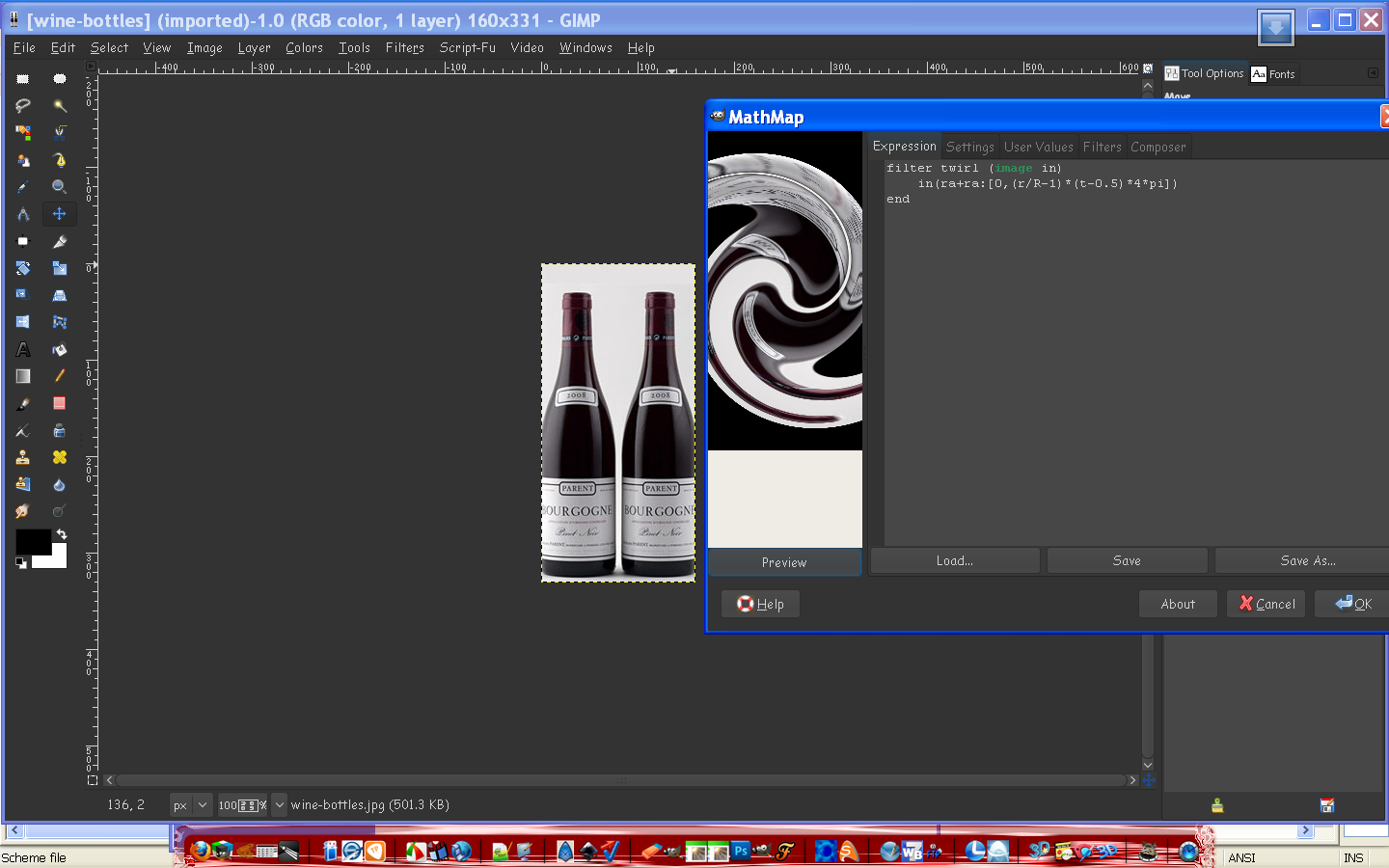
Image

See i uninstalled Gimp-2.6.11 a while back and have been using only Gimp-2.7.3
I did however have Gimp-2.6.11 portable handy so i copied the DLL files from there.

Molly have you tried your mathmap.exe yet?
Could be you do not have the new Data Prevention Software i had to have installed for Windows new xp update (curse Microsoft)... and the program keeps shutting down mathmap... :lol

Looks like i found a way around it though. :)

I have to thank you for the idea though Molly cause see when i downloaded the new mathmap exe, it wanted to install in the gimp-2.6 directory.I had uninstalled all my gimp-2.6 stuff so it had none to install to.
That gave me the idea it needed certain DLL files from Gimp-2.6 to run possibly.
So i just placed the exe file in the gimp-2.7.3 plugins folder and ran the startup, got those three DLL errors and added them in the plugins foolder from the gimp-2.6 portable bin folder.

Success!

Big Hugs Molly!
PC will be happy to hear this also as they have not figured out a way to get it to run in Gimp-2.7.3 and no-one seems to be able to compile it yet. :)

Amazes me that it ran for you Molly.You may want to make sure.If it will not run add those three DLL files to the Gimp-2.7.3 /Plugins folder and you should be good to go.You will have to load all the filters as you go though.
Trying to figure that out right now and i will keep you informed of my progress.

Thanks again Molly! :bigthup :yes


Top
 Post subject: Re: Introducing Gimp 2.7.3
PostPosted: Wed Jul 20, 2011 4:51 am  (#55) 
Offline
GimpChat Member
User avatar

Joined: Apr 07, 2010
Posts: 14182
Sorry Rod, in my last post I said to place mathmap-extra-2-Ecquirectangular in expressions folder in 2.6, should have been 2.7. I changed it. These are old instrucs I had from when I installed it to 2.6....

Rod or anyone.
I was supposed to put mathmap-extra-2-Ecquiretangular in Mathmap expressions folder in 2.7.3. I couldn't find that folder but saw one called gimpressionist. I stuck it in there but it isn't the correct one.. That is why that particular part of mathmap isn't working for me. I do have that folder in 2.6 with it in.
Question: Would I be able to just make a folder and call it expressions and stick the files in there?

_________________
Image


Top
 Post subject: Re: Introducing Gimp 2.7.3
PostPosted: Wed Jul 20, 2011 6:24 am  (#56) 
Offline
Global Moderator
User avatar

Joined: May 16, 2010
Posts: 16200
You should be able to do that yes.
What i did was let it install into a default directory.So it created the .gimp-2.6/plugins and mathmap folders and sub folders.Then i just moved them where they needed to be, and deleted the gimp-2.6 folder.After that i added the DLL files to Gimp-2.7.3's plugin folder and Mathmap executed but without a list of expressions in the menu like Gimp-2.6.11 had.
But you can still open the Mathmap interface and select Load and browse to the expressions folder and choose one. :)

Remember too that i have Gimp-2.7.3 installed.I do not run the portable version.So i have all those needed user doc folders.You should be able to put the Mathmap folder anywhere and just browse to it with the Mathmap interface dialog.

This seems to work rather nicely.it would be nice if i could figure out how to get them to list in the Gimp menu though. :)


Top
 Post subject: Re: Introducing Gimp 2.7.3
PostPosted: Wed Jul 20, 2011 6:35 am  (#57) 
Offline
GimpChat Member
User avatar

Joined: Apr 07, 2010
Posts: 14182
Thanks Rod. I am really messed up now. I had Mathmap under Generic and everything except Ecquiretangular worked. Now, today Mathmap completely disappeared from gimp2.7. I found those 3 dll fies you had listed in 2.6 and copied them to plug-ins 2.7. that might be what messed it up. I might have to just take it all out and start over. I have it all on my USB....

_________________
Image


Top
 Post subject: Re: Introducing Gimp 2.7.3
PostPosted: Wed Jul 20, 2011 6:50 am  (#58) 
Offline
Global Moderator
User avatar

Joined: May 16, 2010
Posts: 16200
Molly try just taking out those DLL files first and see if it comes back. :)


Top
 Post subject: Re: Introducing Gimp 2.7.3
PostPosted: Wed Jul 20, 2011 7:12 am  (#59) 
Offline
GimpChat Member
User avatar

Joined: Apr 07, 2010
Posts: 14182
ok Rod. I will try that.

I am thinking seriously of taking out gimp 2.6.11 and then putting 2.7 onto the hard drive instead of the USB. There is no use switching back and forth all the time when I am very happy with 2.76. I love, love the single window....hate the Text but that will come in time.

Edit: I took out the 3 dll's. still no sign of Mathmap.

_________________
Image


Top
 Post subject: Re: Introducing Gimp 2.7.3
PostPosted: Wed Jul 20, 2011 7:25 am  (#60) 
Offline
GimpChat Member
User avatar

Joined: Jan 13, 2011
Posts: 2648
Location: Poland
As for me - mathmat works well, but need a lot of libraries (XP 32bit).
Files *. mm in the directory: c:\Documents and Settings\User\.gimp-2.7\mathmap\expressions\


Attachments:
Dll for Mathmat.png
Dll for Mathmat.png [ 13.3 KiB | Viewed 2158 times ]
Mathmap.png
Mathmap.png [ 238.91 KiB | Viewed 2158 times ]

_________________
Image
Top
Post new topic Reply to topic  [ 82 posts ]  Go to page Previous  1, 2, 3, 4, 5  Next

All times are UTC - 5 hours [ DST ]


* Login  


Powered by phpBB3 © phpBB Group







