It is currently Fri Jun 12, 2026 5:59 am


All times are UTC - 5 hours [ DST ]


Post new topic Reply to topic  [ 7 posts ] 
Author Message
 Post subject: Creating new templates
PostPosted: Mon Mar 11, 2013 12:21 pm  (#1) 
Offline
New Member

Joined: Mar 11, 2013
Posts: 3
GIMP Version: 2.6.11
Operating System: Windows
OS Version: XP - SP3
GIMP Experience: Intermediate Level


Hi. I do a lot of work with gimp to create headers, Facebook covers etc. I was wondering if there is a way to save a layered file as a template and have it show up in the Create>New dropdown list? I know I can save it as an xcf file on my computer and open it up each time but it would be easier if I could just grab it from the Create> New window.

Specifically I am wanting to make a template that will have the Facebook cover dimensions...851x315 with a placeholder layer of 170x170 at the appropriate coordinates in the cover...210px from the top and 23px from the left. I tried creating a new template and it saves the full cover dimensions but not the layered image so I have to add that and place it each time manually.

Any insight would be greatly appreciated!

Thanks,
Dave


Share on Facebook Share on Twitter Share on Orkut Share on Digg Share on MySpace Share on Delicious Share on Technorati
Top
 Post subject: Re: Creating new templates
PostPosted: Mon Mar 11, 2013 12:26 pm  (#2) 
Offline
GimpChat Member

Joined: Sep 24, 2012
Posts: 275
Location: Scotland
I think it's done through the template dialog:
Menu > Windows > Dockable Dialogs > Templates
Then one of the buttons at the bottom.

*edit* sorry that's probably not much help if you've tried that :oops:
No idea if yu can do layered ones :? need help from an expert!


Top
 Post subject: Re: Creating new templates
PostPosted: Mon Mar 11, 2013 12:41 pm  (#3) 
Offline
New Member

Joined: Mar 11, 2013
Posts: 3
Thanks. I did try that but couldn't see where I could save a layered file as a template. It may not be possible as I have tried googling it and couldn't find what I wanted so thought I would check here with people who know Gimp.


Top
 Post subject: Re: Creating new templates
PostPosted: Mon Mar 11, 2013 12:45 pm  (#4) 
Offline
GimpChat Member

Joined: Sep 24, 2012
Posts: 275
Location: Scotland
I'm sure a real expert will be along soon with an answer, I think I read your question with blinkers on :sglasses


Top
 Post subject: Re: Creating new templates
PostPosted: Mon Mar 11, 2013 1:25 pm  (#5) 
Offline
GimpChat Member
User avatar

Joined: Sep 22, 2012
Posts: 2089
Location: US
Not an expert but GIMP can't save templates as images or multilayer files yet. GIMP also doesn't have autosave and restore last session features that are quite useful.
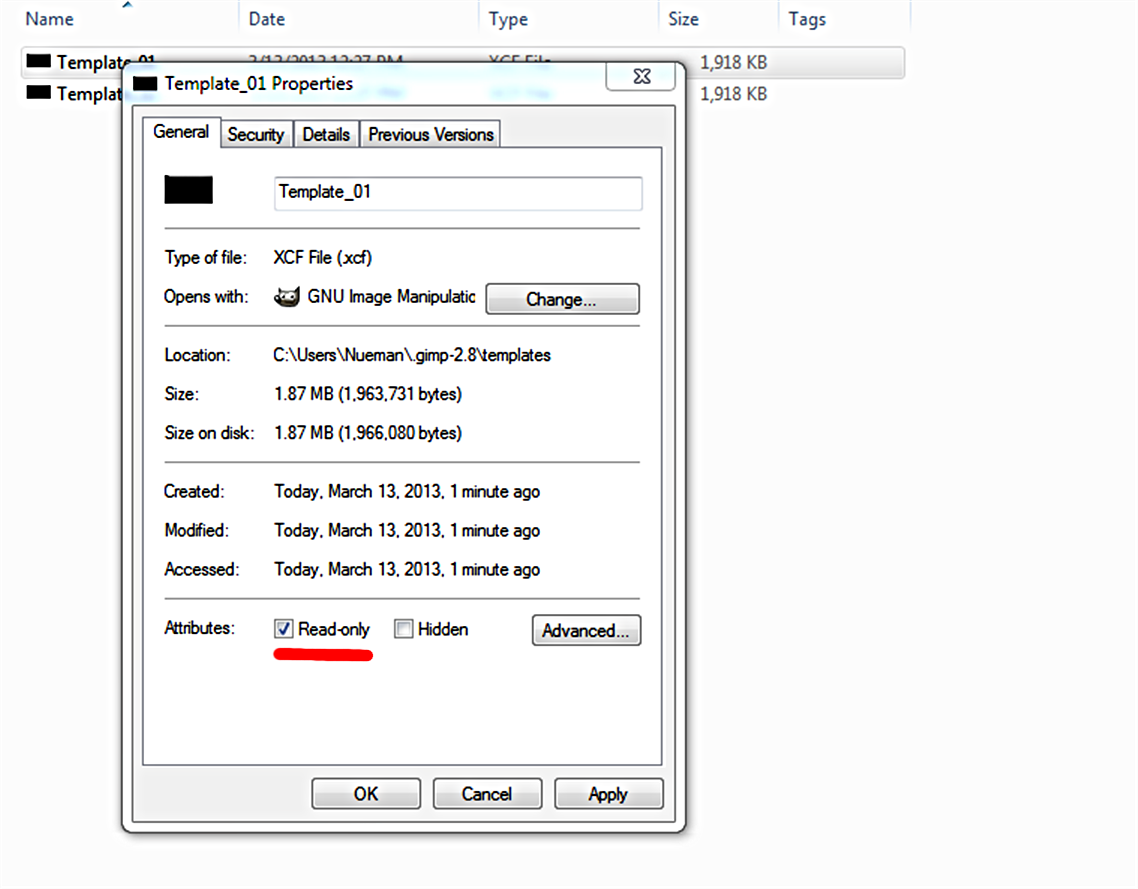
The only way is to have your template xcf files in 'templates' user folder (.gimp-2.8), add this destination to Favorites (there is a + button in Open Image browser window), change these files properties to 'Read only' from the file context menu, thus GIMP will force you to Save_as a new document if any changes were made.


Top
 Post subject: Re: Creating new templates
PostPosted: Wed Mar 13, 2013 12:05 am  (#6) 
Offline
New Member

Joined: Mar 11, 2013
Posts: 3
Thanks for that tip. Took me a little bit to get what you were saying but once I did it worked great! :tyspin

Dave


Top
 Post subject: Re: Creating new templates
PostPosted: Wed Mar 13, 2013 11:52 am  (#7) 
Offline
GimpChat Member
User avatar

Joined: Sep 22, 2012
Posts: 2089
Location: US
daveall wrote:
Thanks for that tip. Took me a little bit to get what you were saying but once I did it worked great! :tyspin

Dave


You're welcome.
Sorry, that is my usual style - very compressed information feed, glad you had that figured out.
Although I didn't think of a much wider audience who may not be very familiar with all that stuff.

1. Create your template and save as template.xcf in ~path~/user/.gimp.2.8/templates folder
2. In GIMP go to File>Open and browse your file system to 'templates' folder
3. Click on the + button to add 'templates' to Favorits

Image

4. Go to 'templates' folder and right-click on template.xcf file to bring up File Context Menu.
5. Click on Properties and in General check 'Read Only' box there.

Image


Top
Post new topic Reply to topic  [ 7 posts ] 

All times are UTC - 5 hours [ DST ]


* Login  


Powered by phpBB3 © phpBB Group