It is currently Mon Sep 28, 2026 6:37 am


All times are UTC - 5 hours [ DST ]


Post new topic Reply to topic  [ 8 posts ] 
Author Message
 Post subject: Drop Down Size Box
PostPosted: Mon Sep 02, 2013 7:23 pm  (#1) 
Offline
GimpChat Member
User avatar

Joined: Jun 02, 2013
Posts: 2090
GIMP Version: 2.6.11
Operating System: Windows
GIMP Experience: Intermediate Level


Not sure why, but I'm getting this box show up next to the % sign. Anyone know why?

Image

EDIT: Also, I'm trying to uninstall the program, to do a reinstall, and it won't let me. Here's the message I get:

Image

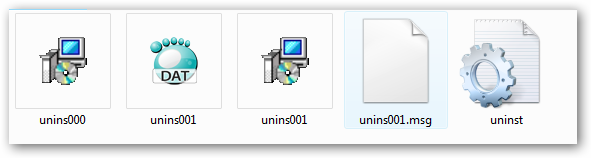
When I look in the program files, it shows that it's there:

Image

_________________
Image


Share on Facebook Share on Twitter Share on Orkut Share on Digg Share on MySpace Share on Delicious Share on Technorati
Top
 Post subject: Re: Drop Down Size Box
PostPosted: Mon Sep 02, 2013 7:39 pm  (#2) 
Offline
GimpChat Member
User avatar

Joined: Jun 02, 2013
Posts: 2090
Never mind, I fixed it. Thanks.

_________________
Image


Top
 Post subject: Re: Drop Down Size Box
PostPosted: Tue Sep 03, 2013 1:31 am  (#3) 
Offline
Script Coder
User avatar

Joined: Oct 25, 2010
Posts: 4812
'2009' is the Unicode encoding for a "thin space". Looks like you have a font problem.

_________________
Image


Top
 Post subject: Re: Drop Down Size Box
PostPosted: Tue Sep 03, 2013 2:19 am  (#4) 
Offline
Global Moderator
User avatar

Joined: May 16, 2010
Posts: 16175
Did you rename "unins001" to "unins000" :)


Top
 Post subject: Re: Drop Down Size Box
PostPosted: Wed Sep 04, 2013 12:36 am  (#5) 
Offline
GimpChat Member
User avatar

Joined: Jun 02, 2013
Posts: 2090
Rod wrote:
Did you rename "unins001" to "unins000" :)

Haha, never even noticed it. Nah, instead of trying to uninstall, I just installed it again. Worked fine.

_________________
Image


Top
 Post subject: Re: Drop Down Size Box
PostPosted: Wed Sep 04, 2013 2:21 am  (#6) 
Offline
Global Moderator
User avatar

Joined: May 16, 2010
Posts: 16175
Glad to hear you fixed it. By the way i have the same little box next to mine in Gimp-2.8.6 also. :)
Not too sure if it is because of the custom font i use in my theme or what.
Image


Top
 Post subject: Re: Drop Down Size Box
PostPosted: Wed Sep 04, 2013 5:38 pm  (#7) 
Offline
GimpChat Member
User avatar

Joined: Jun 02, 2013
Posts: 2090
Strange.

_________________
Image


Top
 Post subject: Re: Drop Down Size Box
PostPosted: Wed Sep 04, 2013 5:50 pm  (#8) 
Offline
GimpChat Member
User avatar

Joined: Sep 22, 2012
Posts: 2089
Location: US
This usually happens when you delete some of the Windows system fonts. :mrgreen:


Top
Post new topic Reply to topic  [ 8 posts ] 

All times are UTC - 5 hours [ DST ]


* Login  


Powered by phpBB3 © phpBB Group