It is currently Sun Sep 27, 2026 1:51 am


All times are UTC - 5 hours [ DST ]


Post new topic Reply to topic  [ 12 posts ] 
Author Message
 Post subject: Create a Frozen layer?
PostPosted: Thu Mar 27, 2014 5:51 am  (#1) 
Offline
GimpChat Member

Joined: Mar 27, 2014
Posts: 11
GIMP Version: 2.8.10
Operating System: Windows
GIMP Experience: Beginner Level


Hi there,

I am trying to create a frozen layer that has an alpha to put on top of a model which has its own paint and logos to make it like it would be out of a freezer kind of.
I tried to create it with clouds (with an alpha layer) and got some result but not realistic enought :oops:
Is it possible to create something like that in Gimp? : pls see attached pics:
I mean only for the frozen layer on top..

Thanks for your help :tyspin

Guy


Attachments:
File comment: this one may be too complexe, but just to get the idea..
frozen2.jpg
frozen2.jpg [ 152.17 KiB | Viewed 4643 times ]
File comment: this one I think could be possible to do but we can see that the ice layers has slightly variations and a nice randomnes in size which I find difficult to reproduce with brush for ex.
frozen.jpg
frozen.jpg [ 16.83 KiB | Viewed 4643 times ]
Share on Facebook Share on Twitter Share on Orkut Share on Digg Share on MySpace Share on Delicious Share on Technorati
Top
 Post subject: Re: Create a Frozen layer?
PostPosted: Thu Mar 27, 2014 8:33 am  (#2) 
Offline
GimpChat Member
User avatar

Joined: Mar 01, 2014
Posts: 14198
Location: Spain, Aragón
I see the picture very good with such a frozen look. It's very real. Good job GuyBrush! Could you explain how to do that? The third one perhaps the best one. :clap

_________________
Image

Gimp 2.10.36 (samj) portable _ OS Windows 10 Home_ 64bits
Don’t be afraid to start over. It’s a new chance to rebuild what you want.


Top
 Post subject: Re: Create a Frozen layer?
PostPosted: Thu Mar 27, 2014 8:43 am  (#3) 
Offline
GimpChat Member

Joined: Mar 27, 2014
Posts: 11
Hi Issabella,
I didnt do it ;) I would like to but,
maybe someone on the chat will be able to help :paint


Top
 Post subject: Re: Create a Frozen layer?
PostPosted: Thu Mar 27, 2014 9:37 am  (#4) 
Offline
Global Moderator
User avatar

Joined: Apr 01, 2012
Posts: 8471
Location: On the other side of your screen
Looks good. Only thing I have done that is anything like it is this
Image
I was able to do it with the aid of a script but I can't think of where it is now or even what it is called.
It is called frost crystals in Script-fu > Alpha to logo > Frost Crystals (alpha)
Thread about Script

_________________
Image
Free Fun Photo Editing & resources
Poems from the Lord
Gimp Newby
Gimp version 3.2.4 and GMIC-Qt 4.0.2 OS :- Windows 10 Home 64


Top
 Post subject: Re: Create a Frozen layer?
PostPosted: Thu Mar 27, 2014 1:06 pm  (#5) 
Offline
GimpChat Member

Joined: Mar 27, 2014
Posts: 11
I googled Frost instead of Frozen and found more results..
Thanks for your input Sallyanne :bigthup it opened new doors:
see the tests I did on the red color down..:

I used the brushes from:

"Obsidian Dawn Frost Brushes" which gave good effects, specially the nrs :
SS Frost025 + SS Frost022 or SS Frost007->009

Other brushes worked also nice like:
texture01
texture hose1
bristles
acrylic04

I found also a tute, it is for photoshop but I think it can be used also in Gimp, didn't manage it though:

can't put the link here but u can google: tutorialwiz frost snow
there is a picture of a bush in there:

To convert it to Gimp:

The channel mixer in Gimp, I found in: color/components/channel mixer
and used "Lighten only"

It works like that I think: everything that is white becomes very white and produce snow effect

If somebody manage it, I would be curious to have some feedback how ;-)

I post some of the results with these Frost brushes:


Attachments:
TextureHose01,Bristles,Acrylic04.jpg
TextureHose01,Bristles,Acrylic04.jpg [ 59.7 KiB | Viewed 4558 times ]
SS Frost_Mix.jpg
SS Frost_Mix.jpg [ 54.9 KiB | Viewed 4558 times ]
Top
 Post subject: Re: Create a Frozen layer?
PostPosted: Thu Mar 27, 2014 1:36 pm  (#6) 
Offline
GimpChat Member
User avatar

Joined: Aug 16, 2012
Posts: 4271
Location: Göteborg, Sweden
guy brush: thanks for the tip on the obsidian dawn frost brushes, i am always out looking for wintry things :)! i might take a look at that ps tut as well.


_________________


Top
 Post subject: Re: Create a Frozen layer?
PostPosted: Thu Mar 27, 2014 5:17 pm  (#7) 
Offline
GimpChat Member

Joined: Mar 27, 2014
Posts: 11
;) you're welcome, quite effective these frost brushs and this other technique of channel mix


Top
 Post subject: Re: Create a Frozen layer?
PostPosted: Fri Mar 28, 2014 9:53 am  (#8) 
Offline
GimpChat Member
User avatar

Joined: Aug 30, 2012
Posts: 2174
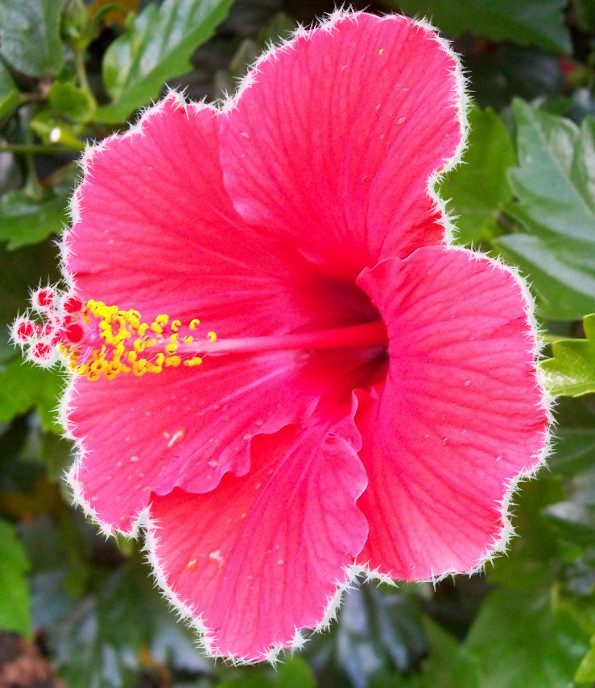
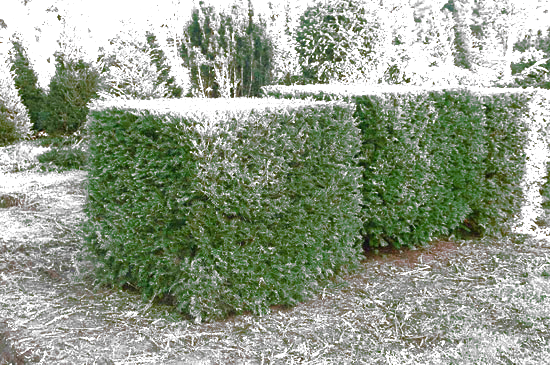
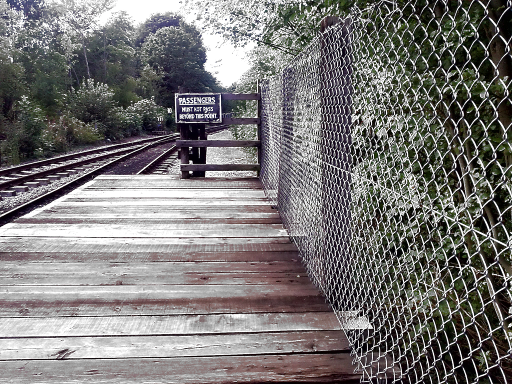
Had a quick look at the tutorial you posted and have managed to achieve this,

Image

It seem to be very image dependant, as I have tried my method on several other images of different colours and texture but never with the same results,

Original Image
Image

Frosted Image
Image

I think the new layer created would be more effective if some sort of crystal structure could be merged into it, I'm working on that at the moment but this is all I have time for.

MY STEPS SO FAR.

1. Open image in Gimp
2. Duplicate image and select this new layer,
3. Change layer mode to Lighten
4. Go>Colours>Desaturate and select Luminosity and click OK.
5. Go>Colours>Brightness-Contrast and increase contrast until desired effect is achieved, I found a setting of between 60 to 70 seemed to work OK.

Hopefully these few steps might inspire someone to push this idea further.

_________________
Image


Top
 Post subject: Re: Create a Frozen layer?
PostPosted: Fri Mar 28, 2014 5:13 pm  (#9) 
Offline
GimpChat Member
User avatar

Joined: May 27, 2011
Posts: 707
He4rty

Thank You for the idea:)
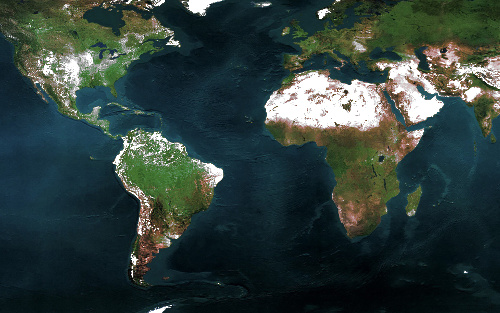
From this :
Image

to :

Image


Top
 Post subject: Re: Create a Frozen layer?
PostPosted: Fri Mar 28, 2014 8:20 pm  (#10) 
Offline
GimpChat Member
User avatar

Joined: Nov 16, 2011
Posts: 5127
Location: Metro Vancouver, BC
I noticed the penguins are having a good time in the Sahara. :pengy

_________________
Image
Gimp 2.8.18, Linux, median user
Gimp Chat Tutorials Index
Spirit Bear (Kermode)


Top
 Post subject: Re: Create a Frozen layer?
PostPosted: Fri Mar 28, 2014 8:33 pm  (#11) 
Offline
GimpChat Member
User avatar

Joined: May 27, 2011
Posts: 707
Global warming :hoh


Top
 Post subject: Re: Create a Frozen layer?
PostPosted: Sat Mar 29, 2014 12:14 am  (#12) 
Offline
GimpChat Member
User avatar

Joined: Aug 30, 2012
Posts: 2174
pirate541 - Nice work.

Odinbc - That's the only issue with this method, it only creates a frosting on the lighter colours.

_________________
Image


Top
Post new topic Reply to topic  [ 12 posts ] 

All times are UTC - 5 hours [ DST ]


* Login  


Powered by phpBB3 © phpBB Group