It is currently Sat Sep 26, 2026 4:21 pm


All times are UTC - 5 hours [ DST ]


Post new topic Reply to topic  [ 13 posts ] 
Author Message
 Post subject: themes folder
PostPosted: Sat Jun 28, 2014 8:11 am  (#1) 
Offline
GimpChat Member
User avatar

Joined: May 17, 2014
Posts: 1571
GIMP Version: 2.8.10
Operating System: Windows
GIMP Experience: Beginner Level


It’s very odd, when I open Gimp, in every folder I see two lines of text.

C:\users\usersname\.gimp-2.8\plug-ins
C:\Program Files\GIMP 2\lib\gimp\2.0\plug-ins

and so on

Only in the Themes folder I get this
just one text line

Image

and when I open it

Image

However when I look on my computer I see the themes I downloaded.
But they are no longer available.


Image

_________________
Ella's gallery - YouTube


Share on Facebook Share on Twitter Share on Orkut Share on Digg Share on MySpace Share on Delicious Share on Technorati
Top
 Post subject: Re: themes folder
PostPosted: Sat Jun 28, 2014 8:43 am  (#2) 
Offline
GimpChat Member
User avatar

Joined: Apr 07, 2010
Posts: 14182
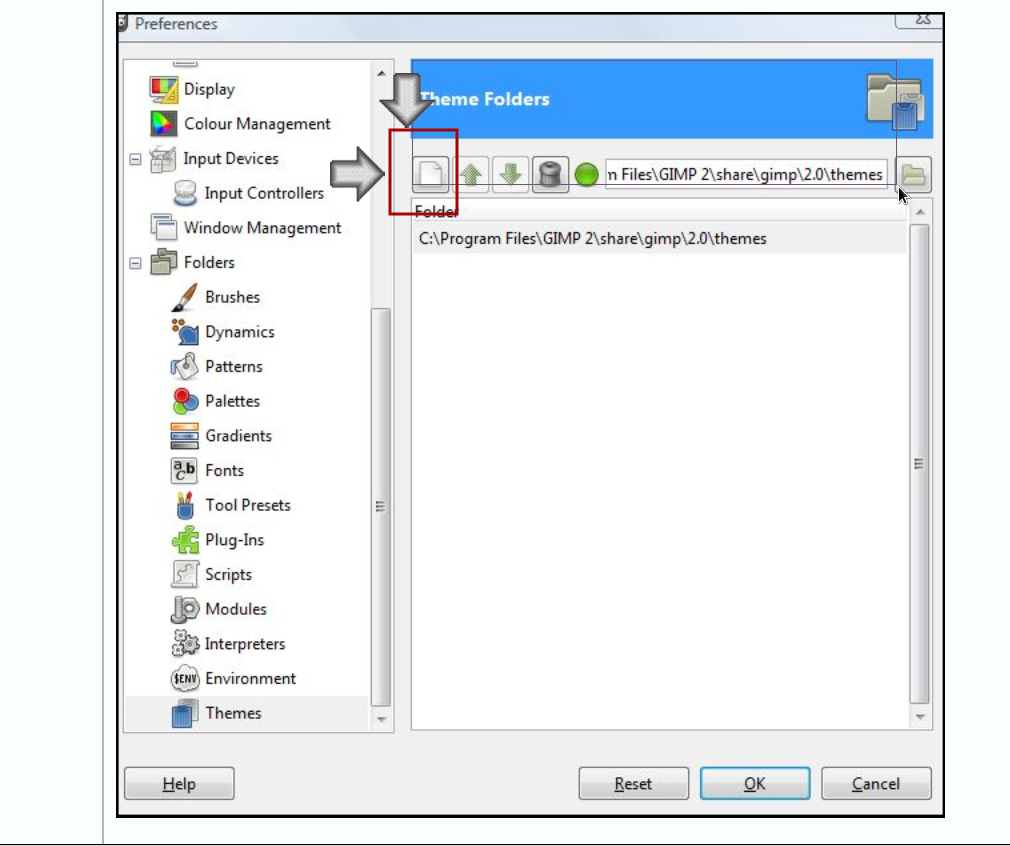
Click the white icon on the top left to add, then copy or type in your user folder, then restart Gimp. You need that one selected in order to use your Teal Appear Paterned etc.
Image

_________________
Image


Top
 Post subject: Re: themes folder
PostPosted: Sat Jun 28, 2014 9:24 am  (#3) 
Offline
GimpChat Member
User avatar

Joined: May 17, 2014
Posts: 1571
:tyspin for the advice molly, the Teal Appeal is back :bigthup

I have another question. Under filters there is no G'mic. Where can I find it?

_________________
Ella's gallery - YouTube


Top
 Post subject: Re: themes folder
PostPosted: Sat Jun 28, 2014 9:59 am  (#4) 
Offline
GimpChat Member
User avatar

Joined: Jan 10, 2013
Posts: 863
Ella Louise wrote:
I have another question. Under filters there is no G'mic. Where can I find it?

http://gmic.sourceforge.net/index.shtml

_________________
bbbbbbbbbbbImage
bbbbbbbbbbb Be patient, English is not my language.


Top
 Post subject: Re: themes folder
PostPosted: Sat Jun 28, 2014 10:19 am  (#5) 
Offline
GimpChat Member
User avatar

Joined: Apr 07, 2010
Posts: 14182
Hi, Under downloads in the link Akros posted, select the GMIC that corresponds with your OS. Are you using 32 or 64 bit, linux, windows or Mac.
If you are using Windows, it is a little more involved installing GMIC than Linux.
viewtopic.php?f=28&t=6551

_________________
Image


Top
 Post subject: Re: themes folder
PostPosted: Sat Jun 28, 2014 3:06 pm  (#6) 
Offline
GimpChat Member
User avatar

Joined: May 17, 2014
Posts: 1571
Wow, it looks rather complex. My computer is Windows Vista 32 bits.
I don’t know if I dare to do that :oops:

_________________
Ella's gallery - YouTube


Top
 Post subject: Re: themes folder
PostPosted: Sat Jun 28, 2014 11:10 pm  (#7) 
Offline
GimpChat Member
User avatar

Joined: Jan 20, 2013
Posts: 14835
Location: roma, italy
gmic_gimp_win32.exe
at here
is self-installing
don't worry

_________________
"Where am I ?"


Top
 Post subject: Re: themes folder
PostPosted: Sun Jun 29, 2014 4:53 am  (#8) 
Offline
GimpChat Member
User avatar

Joined: May 17, 2014
Posts: 1571
Many thanks for the help molly, Akros and dinasset. Now I have gmic under filters :yes
However, every time I reopen GIMP I have to give permission to run the program, but that’s no problem :)

_________________
Ella's gallery - YouTube


Top
 Post subject: Re: themes folder
PostPosted: Sun Jun 29, 2014 5:26 am  (#9) 
Offline
GimpChat Member
User avatar

Joined: Apr 07, 2010
Posts: 14182
I don't understand why that is, but I am sure Dinasset or someone here can help you with that.

_________________
Image


Top
 Post subject: Re: themes folder
PostPosted: Sun Jun 29, 2014 6:07 am  (#10) 
Offline
GimpChat Member
User avatar

Joined: Jan 20, 2013
Posts: 14835
Location: roma, italy
right click on gimp-2.8.exe
select properties > compatibility > set "exec as administrator" as default selected option

_________________
"Where am I ?"


Top
 Post subject: Re: themes folder
PostPosted: Sun Jun 29, 2014 9:04 am  (#11) 
Offline
GimpChat Member
User avatar

Joined: May 17, 2014
Posts: 1571
Problem solved, your hint worked, dinasset :tyspin all ! :hi5

_________________
Ella's gallery - YouTube


Top
 Post subject: Re: themes folder
PostPosted: Sun Jun 29, 2014 3:00 pm  (#12) 
Offline
GimpChat Founder
User avatar

Joined: May 22, 2008
Posts: 5241
Location: Gimpville
Don't forget to click the refresh button in G'MIC to get all the latest filters from the internet.

Image

_________________
“If you reach for the stars, you just might land on a decently sized hill.” - Stuart Hill


Top
 Post subject: Re: themes folder
PostPosted: Mon Jun 30, 2014 2:46 am  (#13) 
Offline
GimpChat Member
User avatar

Joined: May 17, 2014
Posts: 1571
Thanks GnuTux to show me. I didn’t know that.

_________________
Ella's gallery - YouTube


Top
Post new topic Reply to topic  [ 13 posts ] 

All times are UTC - 5 hours [ DST ]


* Login  


Powered by phpBB3 © phpBB Group