It is currently Sat Sep 26, 2026 4:20 pm


All times are UTC - 5 hours [ DST ]


Post new topic Reply to topic  [ 10 posts ] 
Author Message
 Post subject: Silhouette
PostPosted: Mon Jul 07, 2014 1:22 pm  (#1) 
Offline
GimpChat Member

Joined: Jun 06, 2014
Posts: 17
GIMP Version: 2.8.10
Operating System: Windows
GIMP Experience: Beginner Level


Can someone tell me if there is a tutorial on how to either change a photo to a line drawing or a silhouette? I have a couple of photos of my niece and her husband to be that i would like to paint a silhouette of on toasting glasses for their wedding. Just wondering the best way to do that. Thank you in advance for your help.


Share on Facebook Share on Twitter Share on Orkut Share on Digg Share on MySpace Share on Delicious Share on Technorati
Top
 Post subject: Re: Silhouette
PostPosted: Mon Jul 07, 2014 2:07 pm  (#2) 
Offline
GimpChat Member
User avatar

Joined: Jan 20, 2013
Posts: 14835
Location: roma, italy
to transform a photo into a silhouette, Ofnuts is a master.
If he reads your request, he's certainly able to help you.
but I guess an example photo is useful, because some ideas work well depending on contrast of colours between background and figures

_________________
"Where am I ?"


Top
 Post subject: Re: Silhouette
PostPosted: Mon Jul 07, 2014 2:28 pm  (#3) 
Offline
GimpChat Member
User avatar

Joined: Jan 20, 2013
Posts: 14835
Location: roma, italy
just to let you understand what I mean by colour contrast
I took one of SallyAnne's photos
because the background is mostly green while the figure has no green, it was simple -also for me who I'm not a master at all in this area- to create a silhouette from the person using select by colour then painting white and black on the two areas
this original:

Attachment:
1831_Courtney-original.png
1831_Courtney-original.png [ 657.92 KiB | Viewed 3834 times ]


became this

Attachment:
1831_Courtney-silhouette.png
1831_Courtney-silhouette.png [ 53.28 KiB | Viewed 3834 times ]

_________________
"Where am I ?"


Top
 Post subject: Re: Silhouette
PostPosted: Mon Jul 07, 2014 5:16 pm  (#4) 
Offline
Script Coder
User avatar

Joined: Oct 25, 2010
Posts: 4812
[quote="dinasset"]to transform a photo into a silhouette, Ofnuts is a master.[/url]
Qui ça, moi? You must be mistaking me for a real artist.

Otherwise line art is easy using the Edge detection filter (+color inversion and Curves):


Attachments:
LineArtFromEdge.png
LineArtFromEdge.png [ 257.54 KiB | Viewed 3809 times ]

_________________
Image
Top
 Post subject: Re: Silhouette
PostPosted: Mon Jul 07, 2014 5:52 pm  (#5) 
Offline
Script Coder
User avatar

Joined: May 07, 2014
Posts: 4557
Location: Canada
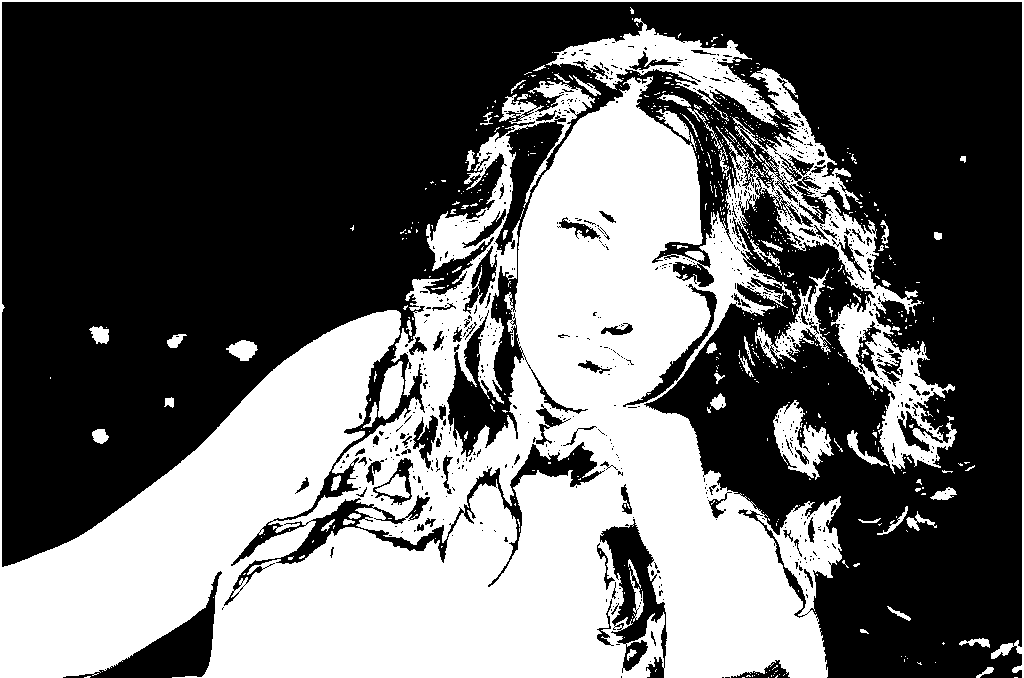
how's this silhouette-ish image?
Image
i did colors->posterize then only chose 3 colors and then selected some colors and replaced with white and others replaced with black.

_________________
Image
Visualize your and others dreams coming true.


Top
 Post subject: Re: Silhouette
PostPosted: Mon Jul 07, 2014 5:57 pm  (#6) 
Offline
GimpChat Member
User avatar

Joined: Apr 07, 2010
Posts: 14182
Wow, that is very good Trin.

_________________
Image


Top
 Post subject: Re: Silhouette
PostPosted: Mon Jul 07, 2014 5:59 pm  (#7) 
Offline
Script Coder
User avatar

Joined: May 07, 2014
Posts: 4557
Location: Canada
thanks i was curious and experimented :)
here's another experiment.
Image
i did image->mode->indexed then chose generate optimal palette with 2 colors
then image->mode->rgb
then image->mode->indexed then chose use black and white (1-bit) palette)

_________________
Image
Visualize your and others dreams coming true.


Top
 Post subject: Re: Silhouette
PostPosted: Mon Jul 07, 2014 6:44 pm  (#8) 
Offline
GimpChat Member
User avatar

Joined: Apr 07, 2010
Posts: 14182
Very nice but I like the first one better. I think it is because of the way the hair flowed with some transparent areas.

_________________
Image


Top
 Post subject: Re: Silhouette
PostPosted: Mon Jul 07, 2014 6:56 pm  (#9) 
Offline
Script Coder
User avatar

Joined: May 07, 2014
Posts: 4557
Location: Canada
how's this one? it's just the first one inverted.
Image

_________________
Image
Visualize your and others dreams coming true.


Top
 Post subject: Re: Silhouette
PostPosted: Tue Jul 08, 2014 2:05 am  (#10) 
Offline
GimpChat Member
User avatar

Joined: Jan 20, 2013
Posts: 14835
Location: roma, italy
ofnuts wrote:
dinasset wrote:
to transform a photo into a silhouette, Ofnuts is a master.[/url]
Qui ça, moi? You must be mistaking me for a real artist.

Otherwise line art is easy using the Edge detection filter (+color inversion and Curves):

by googling, I found you helping other people on this subject, hehehe...

_________________
"Where am I ?"


Top
Post new topic Reply to topic  [ 10 posts ] 

All times are UTC - 5 hours [ DST ]


* Login  


Powered by phpBB3 © phpBB Group