It is currently Fri Oct 02, 2026 6:09 am


All times are UTC - 5 hours [ DST ]


Post new topic Reply to topic  [ 9 posts ] 
Author Message
 Post subject: Gimp 64bit apng files [ solved and working]
PostPosted: Thu Aug 07, 2014 2:57 am  (#1) 
Offline
Script Coder
User avatar

Joined: Feb 18, 2011
Posts: 4826
Location: Bendigo Vic. Australia
GIMP Version: 2.8.10
Operating System: Windows
GIMP Experience: Beginner Level

List any relevant plug-ins or scripts:
apng


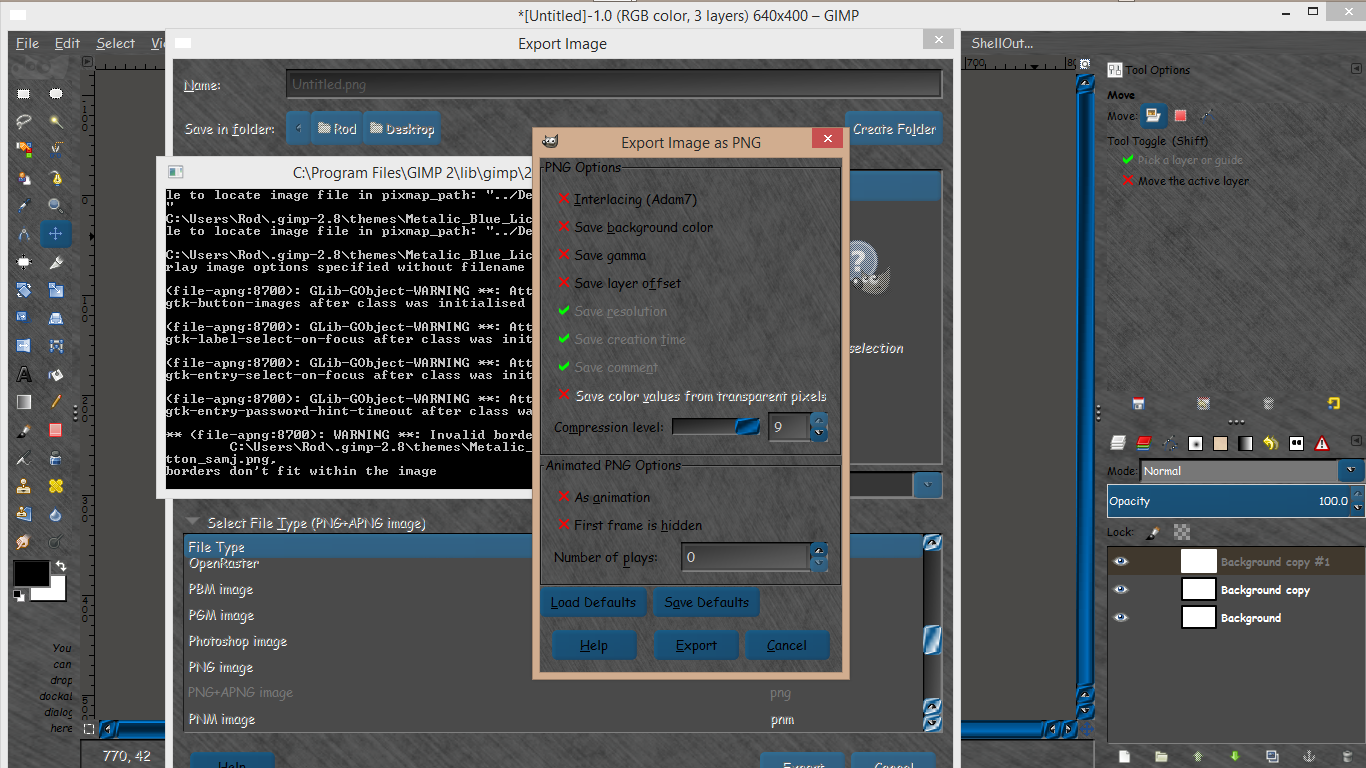
Where can i get apng files for Win64bit or how should I install the current 32bit files I have? thanks in advance for any advice

_________________
Image
No matter how much you push the envelope, it'll still be stationery.


Last edited by Graechan on Thu Aug 07, 2014 9:13 pm, edited 1 time in total.

Share on Facebook Share on Twitter Share on Orkut Share on Digg Share on MySpace Share on Delicious Share on Technorati
Top
 Post subject: Re: Gimp 64bit apng files
PostPosted: Thu Aug 07, 2014 4:10 am  (#2) 
Offline
GimpChat Member
User avatar

Joined: Dec 08, 2013
Posts: 1088
You might find something useful here G. I hope so.

http://www.softpedia.com/dyn-search.php ... ng&x=0&y=0

_________________
Image


Top
 Post subject: Re: Gimp 64bit apng files
PostPosted: Thu Aug 07, 2014 6:12 am  (#3) 
Offline
GimpChat Member
User avatar

Joined: Sep 22, 2012
Posts: 2089
Location: US
Here you go Graechan: 64-bit apng plugin viewtopic.php?f=9&t=212&start=110#p31336


Top
 Post subject: Re: Gimp 64bit apng files
PostPosted: Thu Aug 07, 2014 7:29 pm  (#4) 
Offline
Script Coder
User avatar

Joined: Feb 18, 2011
Posts: 4826
Location: Bendigo Vic. Australia
K1TesseraEna it failed, does anyone have it working in their 2.8.10 64bit gimp

_________________
Image
No matter how much you push the envelope, it'll still be stationery.


Last edited by Graechan on Thu Aug 07, 2014 8:05 pm, edited 1 time in total.

Top
 Post subject: Re: Gimp 64bit apng files
PostPosted: Thu Aug 07, 2014 7:41 pm  (#5) 
Offline
GimpChat Founder
User avatar

Joined: May 22, 2008
Posts: 5241
Location: Gimpville
Graechan, I'm not sure what problem you had but there are some issues with the APNG plug-in.

Note from the plugin Developer
Quote:
First frame must be full size (and second frame must be full size too, if first frame is hidden).

Failure to follow this convention will result in a save error..

libpng error: width and/or height in the first frame's fcTL don't match the ones in IHDR

I received this error when the top layer in my layer dialog was not the same size as the overall image.

Once I resized the top layer to the image size, I was able to save as an animated PNG.

As far as I know, that plug-in hasn't been updated since 2010.

_________________
“If you reach for the stars, you just might land on a decently sized hill.” - Stuart Hill


Top
 Post subject: Re: Gimp 64bit apng files
PostPosted: Thu Aug 07, 2014 7:43 pm  (#6) 
Offline
Global Moderator
User avatar

Joined: May 16, 2010
Posts: 16175
Yes in 64 bit, just remove the old libpng-15-15.dll file and rename it (save as backup).
Place the new LARGER dll file in the bin folder.
Place the plug-in-file-apng.ui in the share/ui/plug-ins folder
Place the exe binary in lib/gimp/2.0/plug-ins folder

Restart GIMP

Image


Top
 Post subject: Re: Gimp 64bit apng files
PostPosted: Thu Aug 07, 2014 8:05 pm  (#7) 
Offline
Script Coder
User avatar

Joined: Feb 18, 2011
Posts: 4826
Location: Bendigo Vic. Australia
my problem was I stupidly tried (combine) mode, forgetting it only works with (replace) mode
your never to old to be dumb everything OK now
Image

_________________
Image
No matter how much you push the envelope, it'll still be stationery.


Top
 Post subject: Re: Gimp 64bit apng files
PostPosted: Thu Aug 07, 2014 9:29 pm  (#8) 
Offline
GimpChat Member
User avatar

Joined: Sep 22, 2012
Posts: 2089
Location: US
Graechan wrote:
K1TesseraEna it failed, does anyone have it working in their 2.8.10 64bit gimp


:hoh I'd never offer you a stuff that's not working Graechan!
Sorry, I had limited time to explain all the dll files you have to swap to get it working and thought you'd had 32-bit version
running just wanted to upgrade to 64-bit.

I prefer APNG Anime Maker. It's a tiny standalone app which gets the work done better than gimp plugin.
All you need to do is export layers in gimp to individual png files and open them in Anime Maker.
Unlike apng-file you get frame rate/delay control, optimization and quality controls, compression levels and whatnot.


Last edited by K1TesseraEna on Thu Aug 07, 2014 10:11 pm, edited 1 time in total.

Top
 Post subject: Re: Gimp 64bit apng files [ solved and working]
PostPosted: Thu Aug 07, 2014 9:52 pm  (#9) 
Offline
Script Coder
User avatar

Joined: Feb 18, 2011
Posts: 4826
Location: Bendigo Vic. Australia
K1TesseraEna the files were great, I was having a stupid day that's all :oops: :roll:

_________________
Image
No matter how much you push the envelope, it'll still be stationery.


Top
Post new topic Reply to topic  [ 9 posts ] 

All times are UTC - 5 hours [ DST ]


* Login  


Powered by phpBB3 © phpBB Group