It is currently Fri Oct 02, 2026 1:44 pm


All times are UTC - 5 hours [ DST ]


Post new topic Reply to topic  [ 17 posts ] 
Author Message
 Post subject: Is there a PDF exportation script?
PostPosted: Thu Feb 19, 2015 3:53 pm  (#1) 
Offline
GimpChat Member
User avatar

Joined: Aug 28, 2012
Posts: 3060
Location: Idk where I am.
GIMP Version: 2.8.14
Operating System: Windows
GIMP Experience: Beginner Level


Haiiii! I was curious if there is a script that you can export a gimp project file as a PDF, each layer being a page.

I would like to know that because I want to try something but the "pages" would be horizontal not vertical and no program that I know of exports horizontal pages...it is kinda an odd thing I guess but anyways...lol

Any ideas?


Thanks!


~ God Bless ~


~ Moko

_________________
Image
Reality is a lovely place...But I wouldn't wanna live there.


Share on Facebook Share on Twitter Share on Orkut Share on Digg Share on MySpace Share on Delicious Share on Technorati
Top
 Post subject: Re: Is there a PDF exportation script?
PostPosted: Thu Feb 19, 2015 4:28 pm  (#2) 
Offline
GimpChat Member
User avatar

Joined: Sep 24, 2010
Posts: 12850
As long as it's just one layer, GIMP can export to PDF easily as is Moko. If you are wanting pages, then you could always use PDF Split and Merge to concatenate them. :)

http://sourceforge.net/projects/pdfsam/

_________________
Lyle

Psalm 109:8

Image


Top
 Post subject: Re: Is there a PDF exportation script?
PostPosted: Thu Feb 19, 2015 4:50 pm  (#3) 
Offline
GimpChat Member
User avatar

Joined: Nov 16, 2011
Posts: 5127
Location: Metro Vancouver, BC
Lyle is right, Gimp is fine for exporting single PDF's you combine late. There is GIMP Book (authors site) plug-in, I first saw at the registry that might be worth a look. The original idea of the plug-in was for comics but it would work for you if you imported your layers. I've played with it before and thought the author of the plug-in did a pretty good job.

[EDIT] I re-downloaded GIMP Book, is does not export PDF format. My mistake! :oops:
GIMP Book will export gif, xcf, jpg, ora, psd, png or tiff files. OfficeLibre handles gif, jpg, ora, psd, png or tiff files for making quick PDFs.

_________________
Image
Gimp 2.8.18, Linux, median user
Gimp Chat Tutorials Index
Spirit Bear (Kermode)


Top
 Post subject: Re: Is there a PDF exportation script?
PostPosted: Thu Feb 19, 2015 4:57 pm  (#4) 
Offline
GimpChat Member

Joined: Mar 04, 2011
Posts: 2615
pdfsam is a good java application, one that I even donated to.

A bit more hands on using imagemagick (IM) and for windows users I think that also needs ghostscript for pdf.

Export the layers to individual files say file-0.png file-1.png ..file-n.png There are plugins to do this. Use the IM command
convert file*.png multipage.pdf


Another way using IM but a bit flakey/limited, no good with transparent layers, is export the file as a mng animation then again IM
convert file.mng multipage.pdf


Top
 Post subject: Re: Is there a PDF exportation script?
PostPosted: Thu Feb 19, 2015 5:09 pm  (#5) 
Offline
Script Coder
User avatar

Joined: Apr 23, 2010
Posts: 1553
Location: not from Guildford after all
GIMP can save to a multi-page PDF -- using a hidden feature -- but your pages need to be in separate images, not layers.

GIMP-GAP can be used to split a multi-layer image into multiple, one-layer images.

_________________
Any sufficiently primitive technology is indistinguishable from a rock.


Top
 Post subject: Re: Is there a PDF exportation script?
PostPosted: Thu Feb 19, 2015 5:20 pm  (#6) 
Offline
Global Moderator
User avatar

Joined: Apr 01, 2012
Posts: 8475
Location: On the other side of your screen
I have opened pdf's and saved as a pdf before.
Yes you can export as a portable document format

_________________
Image
Free Fun Photo Editing & resources
Poems from the Lord
Gimp Newby
Gimp version 3.2.4 and GMIC-Qt 4.0.2 OS :- Windows 10 Home 64


Top
 Post subject: Re: Is there a PDF exportation script?
PostPosted: Thu Feb 19, 2015 5:46 pm  (#7) 
Offline
GimpChat Member
User avatar

Joined: Jan 31, 2015
Posts: 146
http://registry.gimp.org/node/27987

Take note of the Windows instructions.


Top
 Post subject: Re: Is there a PDF exportation script?
PostPosted: Thu Feb 19, 2015 5:57 pm  (#8) 
Offline
GimpChat Member
User avatar

Joined: Nov 16, 2011
Posts: 5127
Location: Metro Vancouver, BC
David-C wrote:
http://registry.gimp.org/node/27987

Take note of the Windows instructions.
Great idea, works like a charm. :bigthup
Like David says read the instructions, ImageMagick path is required.

_________________
Image
Gimp 2.8.18, Linux, median user
Gimp Chat Tutorials Index
Spirit Bear (Kermode)


Top
 Post subject: Re: Is there a PDF exportation script?
PostPosted: Sat Feb 21, 2015 8:24 am  (#9) 
Offline
Global Moderator
User avatar

Joined: May 16, 2010
Posts: 16180
David-C wrote:
http://registry.gimp.org/node/27987

Take note of the Windows instructions.

Also you will need to change line #74 to apng if you have apng installed.
         pdb.file_apng_save(image, layer, fullpath, png_filename, 0, 9, 1, 1, 1, 1, 1)


Works well if you save the default.env file after changes to the user/gimp-2.8/environment folder.
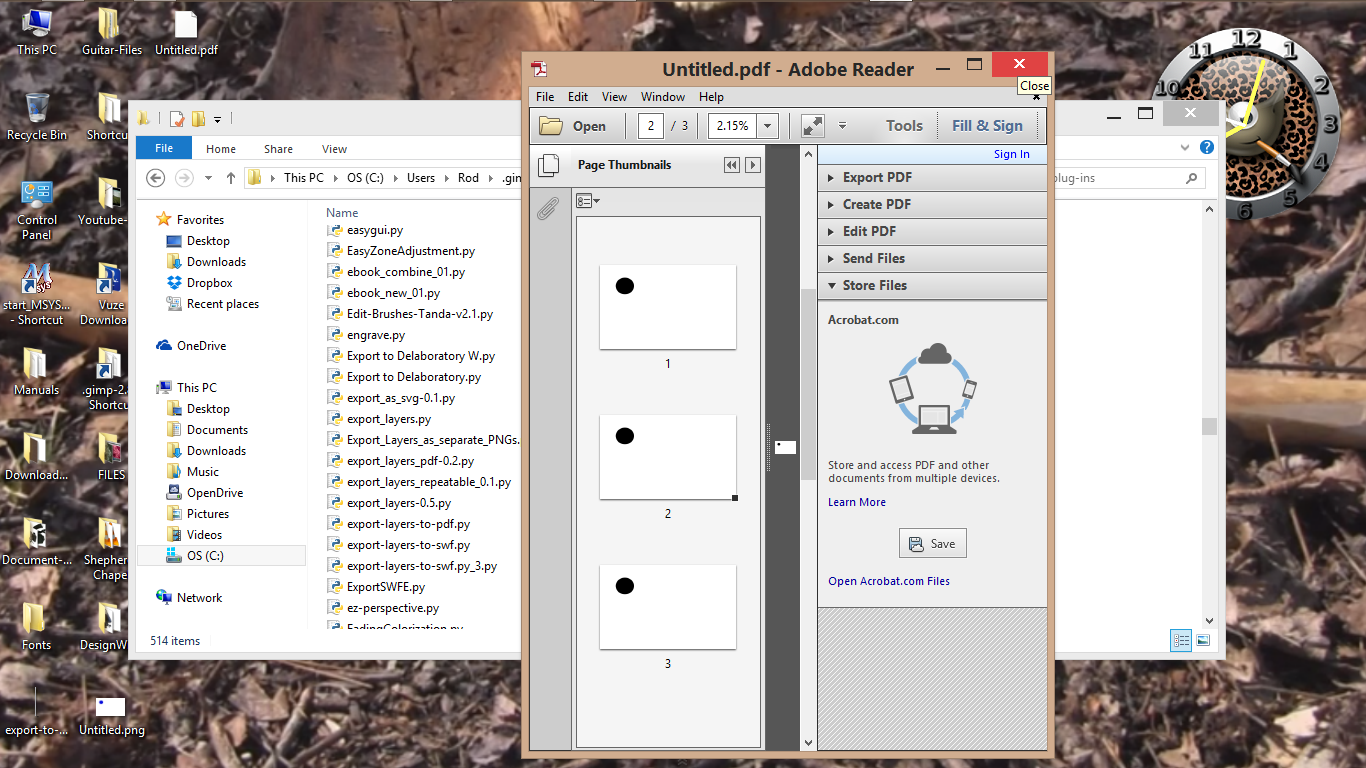
My saved PDF

Seems to only catch the selected layer though. ;)
Image

Thanks for this new filter.

Saulgoode your link isn't working.
http://chiselapp.com/user/saulgoode/rep ... -pdf-multi


Top
 Post subject: Re: Is there a PDF exportation script?
PostPosted: Sat Feb 21, 2015 8:45 am  (#10) 
Offline
Global Moderator
User avatar

Joined: May 16, 2010
Posts: 16180
After further testing i am correct. The filter only copies the selected layer.
Image

Also you cannot export the PDF unless the layers are saved as an image first.

May be it has something to do with my save_apng change in the python file?


Top
 Post subject: Re: Is there a PDF exportation script?
PostPosted: Sat Feb 21, 2015 9:04 am  (#11) 
Offline
Global Moderator
User avatar

Joined: May 16, 2010
Posts: 16180
Tested this one
http://registry.gimp.org/node/25677 02 version with apng change in python script.
Line #50
                pdb.file_apng_save(tmp, tmp.layers[0], fullpath, filename, 0, 9, 1, 1, 1, 1, 1)

Same thing. The filter copies only the selected layer and copies the same amount of layers as in the image.
Image


Top
 Post subject: Re: Is there a PDF exportation script?
PostPosted: Sat Feb 21, 2015 10:52 am  (#12) 
Offline
Script Coder
User avatar

Joined: Apr 23, 2010
Posts: 1553
Location: not from Guildford after all
Rod wrote:

It appears to be back up (for) now. :)

_________________
Any sufficiently primitive technology is indistinguishable from a rock.


Top
 Post subject: Re: Is there a PDF exportation script?
PostPosted: Sat Feb 21, 2015 11:12 am  (#13) 
Offline
GimpChat Member
User avatar

Joined: Aug 28, 2012
Posts: 3060
Location: Idk where I am.
I'm confused now. lol
If I save using any of these pdf thingys it'll only save the selected layer?
And I have no clue what apng is. xD

_________________
Image
Reality is a lovely place...But I wouldn't wanna live there.


Top
 Post subject: Re: Is there a PDF exportation script?
PostPosted: Sat Feb 21, 2015 2:02 pm  (#14) 
Offline
GimpChat Member
User avatar

Joined: Nov 16, 2011
Posts: 5127
Location: Metro Vancouver, BC
Mokonafan wrote:
I'm confused now. lol
If I save using any of these pdf thingys it'll only save the selected layer?
And I have no clue what apng is. xD
Which method are you asking about?
saulgoode: Export Multi-page PDF
or
David-C mentioned: Export Layers to single multiple pages PDF

saulgoode's script 'Export Multi-page PDF' works with multiple open images.
'Export Layers to single multiple pages PDF' is the one that works with a single image layers. 'Export Layers to single multiple pages PDF' also requires ImageMagick or GraphicsMagick. In Windows you need to set-up the correct path to ImageMagick or GraphicsMagick. Someone will help if you need path instruction.

_________________
Image
Gimp 2.8.18, Linux, median user
Gimp Chat Tutorials Index
Spirit Bear (Kermode)


Top
 Post subject: Re: Is there a PDF exportation script?
PostPosted: Tue Feb 24, 2015 1:29 am  (#15) 
Offline
GimpChat Member
User avatar

Joined: Aug 28, 2012
Posts: 3060
Location: Idk where I am.
to be honest I'm lost in all this let me read again before I annoy people. xD

_________________
Image
Reality is a lovely place...But I wouldn't wanna live there.


Top
 Post subject: Re: Is there a PDF exportation script?
PostPosted: Tue Feb 24, 2015 6:46 am  (#16) 
Offline
Global Moderator
User avatar

Joined: May 16, 2010
Posts: 16180
Mokonafan wrote:
to be honest I'm lost in all this let me read again before I annoy people. xD

Use Saulgoodes script. It calls the actual "removed" menu option to save as multi page PDF. Works excellent! :) :bigthup


Top
 Post subject: Re: Is there a PDF exportation script?
PostPosted: Tue Feb 24, 2015 6:47 am  (#17) 
Offline
Global Moderator
User avatar

Joined: May 16, 2010
Posts: 16180
saulgoode wrote:
Rod wrote:

It appears to be back up (for) now. :)

Thanks Saulgoode. Your script is much appreciated. I don't understand why the devs removed this option though. :)


Top
Post new topic Reply to topic  [ 17 posts ] 

All times are UTC - 5 hours [ DST ]


* Login  


Powered by phpBB3 © phpBB Group