It is currently Thu Sep 24, 2026 12:20 am


All times are UTC - 5 hours [ DST ]


Post new topic Reply to topic  [ 6 posts ] 
Author Message
 Post subject: Difference Colors Gimp / Firefox
PostPosted: Mon Jun 08, 2015 10:42 am  (#1) 
Offline
GimpChat Member

Joined: Jun 07, 2015
Posts: 13
GIMP Version: 2.8.14
Operating System: Windows
OS Version: 7
GIMP Experience: New User


Hello,

All my images are using the colour space Adobe RGB 1998.
I work my images with Gimp, I did a fresh reinstall of Windows 7 last week and since then I can't get the same result on Firefox or Chrome of the images I upload. I loose colours or the Adobe RGB 1998 space colours. When I open the jpg image with Gimp colours are fine.

So I would like to know if it's my installation of Windows 7 which prevents me from seeing the Adobe RGB 1998 colours or if Gimp does not save correctly the images.

How to check if Windows 7 and Firefox or Chrome can display Adobe RGB 1998 images ?

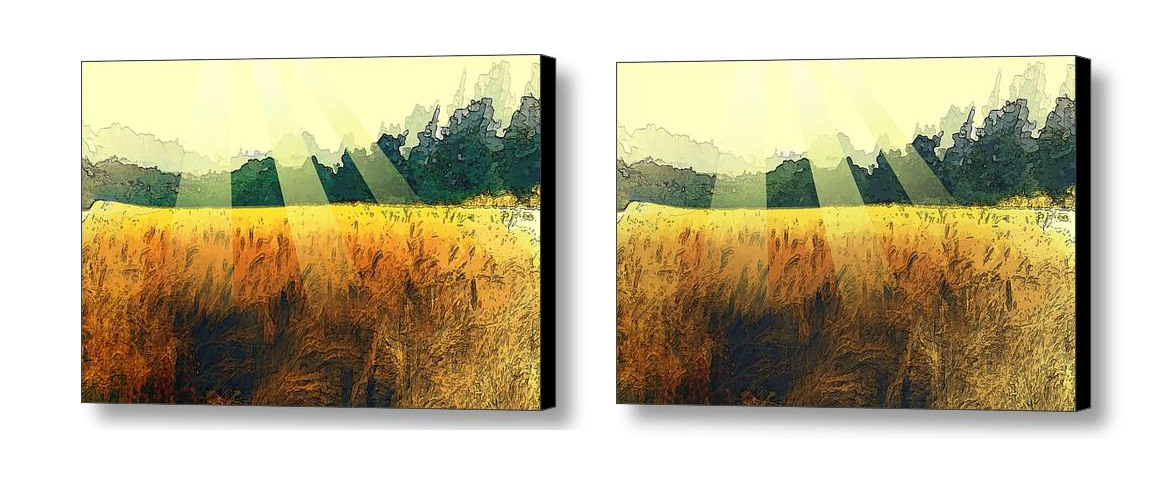
I attached a file to the left what I see with Gimp, to the right what I see with the image opened with Firefox or Chrome.
Image

Thanks,
Vincent.


Share on Facebook Share on Twitter Share on Orkut Share on Digg Share on MySpace Share on Delicious Share on Technorati
Top
 Post subject: Re: Difference Colors Gimp / Firefox
PostPosted: Mon Jun 08, 2015 11:19 am  (#2) 
Offline
GimpChat Member

Joined: Jun 07, 2015
Posts: 13
ok, sorry guys, it's not about Gimp it's about Windows 7.

I reinstalled Windows 7 it's because I changed my disk to a SSD one.

I have put back my old hard disk, to see if I can get the right colours and the colours are the same on Firefox and on Gimp. So the problem comes from my new installation of Windows 7 on the SSD disk.

Does anyone know what I should do on this new installation or what I could recover from the last installation ?


Top
 Post subject: Re: Difference Colors Gimp / Firefox
PostPosted: Mon Jun 08, 2015 11:29 am  (#3) 
Offline
GimpChat Member
User avatar

Joined: Nov 16, 2011
Posts: 5127
Location: Metro Vancouver, BC
When you assign a colour profile in Gimp, Image | Mode | Assign Colour Profile, it will be saved on export.
Are you using, Color Management with GIMP and your new computer setup?
Additional info: Color Management and Photography

_________________
Image
Gimp 2.8.18, Linux, median user
Gimp Chat Tutorials Index
Spirit Bear (Kermode)


Top
 Post subject: Re: Difference Colors Gimp / Firefox
PostPosted: Mon Jun 08, 2015 11:37 am  (#4) 
Offline
GimpChat Member

Joined: Jun 07, 2015
Posts: 13
Odinbc,

I am using the Gimp gimp separate+ plugin to convert and to assign to Adobe RGB 1998 colour space. It' my new Windows 7 computer setup which does not open correctly this colour space.

I don't know what to do on Windows 7 to be able to open correctly this colour space. I installed all the drivers, and there were a lot, it's Sony Vaio laptop (SVS1311C5E).


Top
 Post subject: Re: Difference Colors Gimp / Firefox
PostPosted: Mon Jun 08, 2015 3:28 pm  (#5) 
Offline
Script Coder
User avatar

Joined: Oct 25, 2010
Posts: 4812
You have to set up color management on your new system.

_________________
Image


Top
 Post subject: Re: Difference Colors Gimp / Firefox
PostPosted: Mon Jun 08, 2015 3:46 pm  (#6) 
Offline
GimpChat Member

Joined: Jun 07, 2015
Posts: 13
ofnuts wrote:
You have to set up color management on your new system.


Yes, you've found the solution. Thanks a lot. :hi5

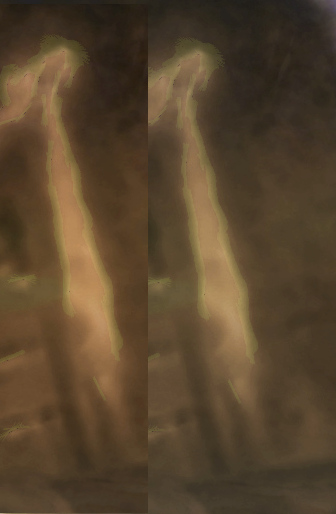
The difference was big (On the left OK, on the right bad) :
Image

Cheers,
Vincent.


Top
Post new topic Reply to topic  [ 6 posts ] 

All times are UTC - 5 hours [ DST ]


* Login  


Powered by phpBB3 © phpBB Group