It is currently Sun Sep 27, 2026 7:46 am


All times are UTC - 5 hours [ DST ]


Post new topic Reply to topic  [ 3 posts ] 
Author Message
 Post subject: How to show tool box in red circle ?
PostPosted: Thu Aug 06, 2015 9:53 am  (#1) 
Offline
GimpChat Member

Joined: Mar 14, 2014
Posts: 29
GIMP Version: 2.8.14
Operating System: Windows
GIMP Experience: New User


How to show tool box in red circle ?

http://image.free.in.th/v/2013/ia/150806095915.png


How to add tool in this area


Attachments:
tool.png
tool.png [ 40.87 KiB | Viewed 2189 times ]
Share on Facebook Share on Twitter Share on Orkut Share on Digg Share on MySpace Share on Delicious Share on Technorati
Top
 Post subject: Re: How to show tool box in red circle ?
PostPosted: Thu Aug 06, 2015 10:22 am  (#2) 
Offline
GimpChat Member
User avatar

Joined: Aug 16, 2012
Posts: 4271
Location: Göteborg, Sweden
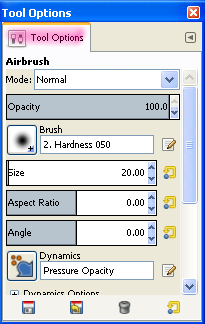
peap: i'm not sure i understand your question correctly. do you mean the tool options swindow, with the alternatives for the selected tool? see my screen shot.

Image
if this is what you're after, just click in the area i've marked with pink and drag the whole box to the area you circled, then just drop it. if you don't have a tool options tab open at all you can go to Windows - dockable dialogues and click on Tool options in the drop-down list.

_________________


Top
 Post subject: Re: How to show tool box in red circle ?
PostPosted: Thu Aug 06, 2015 2:43 pm  (#3) 
Offline
Script Coder
User avatar

Joined: Oct 25, 2010
Posts: 4812
peap wrote:
GIMP Version: 2.8.14
Operating System: Windows
GIMP Experience: New User


How to show tool box in red circle ?

http://image.free.in.th/v/2013/ia/150806095915.png


How to add tool in this area

If you want to see a colormap, you have to use an image with one, in other words a color-indexed image. See Image>Mode>Indexed.

_________________
Image


Top
Post new topic Reply to topic  [ 3 posts ] 

All times are UTC - 5 hours [ DST ]


* Login  


Powered by phpBB3 © phpBB Group