It is currently Tue Sep 22, 2026 2:21 am


All times are UTC - 5 hours [ DST ]


Post new topic Reply to topic  [ 16 posts ] 
Author Message
 Post subject: Managing patterns/gradients/brushes (SOLVED)
PostPosted: Mon Jul 18, 2016 2:17 pm  (#1) 
Offline
GimpChat Member
User avatar

Joined: Apr 09, 2016
Posts: 580
Location: Sheffield UK
GIMP Version: 2.8.14
Operating System: Windows
GIMP Experience: New User


I'm tech illiterate really, I've read Graechans post re; Gurm and from there became baffled.
At present I download patterns, (sometimes make my own) rename if preferred, copy and paste into my Gimp. What would you guys suggest to be the most simple manager for a simple person with an ever expanding collection of patterns, gradients and brushes? Thank you - RJKD.

_________________
Image


Last edited by RJKD on Tue Sep 13, 2016 6:18 am, edited 5 times in total.

Share on Facebook Share on Twitter Share on Orkut Share on Digg Share on MySpace Share on Delicious Share on Technorati
Top
 Post subject: Re: Managing patterns/gradients/brushes
PostPosted: Mon Jul 18, 2016 2:27 pm  (#2) 
Offline
GimpChat Member
User avatar

Joined: Jan 20, 2013
Posts: 14835
Location: roma, italy
Ofnuts' Add-on Manager
search for: Gimp Help Topic: Add on Manager

edit: and also the initiating thread Gimp Scripts and Plugins Topic: Improved MrQ add-on manager (dinasset's request)

_________________
"Where am I ?"


Top
 Post subject: Re: Managing patterns/gradients/brushes (SOLVED)
PostPosted: Mon Jul 18, 2016 4:16 pm  (#3) 
Offline
GimpChat Member
User avatar

Joined: Apr 09, 2016
Posts: 580
Location: Sheffield UK
Thanx dinasset, much appreciated - in Peace RJKD

_________________
Image


Top
 Post subject: Re: Managing patterns/gradients/brushes
PostPosted: Thu Jul 21, 2016 6:47 am  (#4) 
Offline
GimpChat Member
User avatar

Joined: Apr 09, 2016
Posts: 580
Location: Sheffield UK
Thank you for you detail re; add on manager (Post subject: Re: KWARD scripts) dinasset.
I have unzipped and have;
addonCollectionManager-3.0.py
addonCollectionManager.ini - all good so far....
however I couldn't understand your instructions b1)brushes (initially empty) and brushes_storage (with your groups of brushes) through to b6) (initially empty) and
(with your groups of brushes)
this is because I'm only just learning about computers, filling/folders and suchlike (I have another help thread going - Failure to exe some scripts, Wallace and odinbc are helping me sort out my scripts and plug-in files)
NB this is not a reflection in any way of your instructions, simply that I am so new to technology at 59 yrs old (it's a long story) - could you help please? in Peace RJKD

_________________
Image


Top
 Post subject: Re: Managing patterns/gradients/brushes
PostPosted: Thu Jul 21, 2016 7:19 am  (#5) 
Offline
GimpChat Member
User avatar

Joined: Jan 20, 2013
Posts: 14835
Location: roma, italy
OK, I'll try to be more detailed
First of all;
the instructions are related to the first setup of the Addon Manager:
...
I report here the text you mentioned:
------------------------------------------------------------------------------------------------
b) in your /.gimp-2.8 folder check you have:
b1)brushes (initially empty) and brushes_storage (with your groups of brushes)
b2)fonts (initially empty) and fonts_storage (with your groups of fonts)
b3)gradients (initially empty) and gradients_storage (with your groups of gradients)
b4)palettes (initially empty) and palettes_storage (with your groups of palettes)
b5)patterns (initially empty) and patterns_storage (with your groups of patterns)
b6)scripts (initially empty) and scripts_storage (with your groups of scripts)

------------------------------------------------------------------------------------------------
the basic meaning of these lines is:
1- when first setting the Addon Manager your (username)/.gimp-2.8 folder should contain:
-- the always present folders brushes, fonts, gradients, palettes, patterns, scripts (created by any installation of Gimp) should be empty, i.e. not contain any element
-- the newly created folders brushes_storage, fonts_storage, gradients_storage, palettes_storage, patterns_storage, scripts_storage (created by YOU as new folders) should be filled with your "addons" (i.e. the brushes, gradients etc you like to add to the standard created by Gimp installation), using subfolders to categorize them and let them being accessible to the manager.
Example (using brushes, but the same is true for all the others):
brushes: empty
brushes_storage, filled with n subfolders, like brushes_A, brushes_B, brushes_C, each of them containing elementary brushes.

With this assumtion, when you launch Gimp you will find (clicking on Brushes_Manager under Help) the possibility to select one or two or all the 3 subfolders checkboxes)

Let me know if you succeed.
You may start using just one addon type, again for instance brushes

_________________
"Where am I ?"


Top
 Post subject: Re: Managing patterns/gradients/brushes (SOLVED)
PostPosted: Sat Sep 10, 2016 11:06 am  (#6) 
Offline
GimpChat Member
User avatar

Joined: Apr 09, 2016
Posts: 580
Location: Sheffield UK
I am about to follow rich2005 - A video to show that it does work http://youtu.be/goLDxiygW_c (5 mins)
This, for me, is a massive undertaking so I'm very nervous in case I screw up (i am not tech literate, but very willing to learn).
Before I commence, I have one major concern - in my C/user/me/GIMP 2.8/brushes - I have lots of 'sub-folders' would I unpack them before moving them into gurm or move them as they are?
Image
Image

_________________
Image


Top
 Post subject: Re: Managing patterns/gradients/brushes (re-visit)
PostPosted: Sat Sep 10, 2016 12:11 pm  (#7) 
Offline
GimpChat Member
User avatar

Joined: Nov 16, 2011
Posts: 5127
Location: Metro Vancouver, BC
To calm the nerves; before you begin make a ZIP back-up of your [USER]/.gimp-2.8 folder.

_________________
Image
Gimp 2.8.18, Linux, median user
Gimp Chat Tutorials Index
Spirit Bear (Kermode)


Top
 Post subject: Re: Managing patterns/gradients/brushes (re-visit)
PostPosted: Sat Sep 10, 2016 12:36 pm  (#8) 
Offline
GimpChat Member
User avatar

Joined: Oct 06, 2010
Posts: 4050
Move them as they are, but as Odin says, back up everything before commencing on ANY major change to your directories. GIMP and GURM has the same ability to check sub-directories in preference settings, so all is not lost by leaving them in the sub folders.

_________________
"In order to attain the impossible, one must attempt the absurd."
~ Miguel de Cervantes


Top
 Post subject: Re: Managing patterns/gradients/brushes (re-visit)
PostPosted: Sat Sep 10, 2016 12:41 pm  (#9) 
Offline
GimpChat Member
User avatar

Joined: Apr 09, 2016
Posts: 580
Location: Sheffield UK
Thank you, that's really helped.

_________________
Image


Top
 Post subject: Re: Managing patterns/gradients/brushes (re-visit)
PostPosted: Sat Sep 10, 2016 1:02 pm  (#10) 
Offline
GimpChat Member
User avatar

Joined: Apr 09, 2016
Posts: 580
Location: Sheffield UK
Ok, one last thing before I dive into the deep, would a complete tech novice like me be better installing GURM or addonCollectionManager, by Ofnuts?

_________________
Image


Top
 Post subject: Re: Managing patterns/gradients/brushes (re-visit)
PostPosted: Sat Sep 10, 2016 2:13 pm  (#11) 
Offline
GimpChat Member
User avatar

Joined: Nov 16, 2011
Posts: 5127
Location: Metro Vancouver, BC
RJKD wrote:
Ok, one last thing before I dive into the deep, would a complete tech novice like me be better installing GURM or addonCollectionManager, by Ofnuts?
Personally I like (and think you should lean towards), ofnuts addonCollectionManager. As well as the author, you're going to have a bunch of us who use it to guide you along.

_________________
Image
Gimp 2.8.18, Linux, median user
Gimp Chat Tutorials Index
Spirit Bear (Kermode)


Top
 Post subject: Re: Managing patterns/gradients/brushes (re-visit)
PostPosted: Sat Sep 10, 2016 2:43 pm  (#12) 
Offline
GimpChat Member
User avatar

Joined: Apr 09, 2016
Posts: 580
Location: Sheffield UK
Thank you so much to all of you, I'm really growing in confidence and that means the world to me. I have had success with GURM - yipee, now I need to figure out why I've got; tool-presets .gtp & palette .gpi & tool-options (blend, clone etc & an empty tool-presets in my C\user\me \brushes folder to start with???
I'm determined to clean up my Gimp and then i'll progress to AddOnManager with a good clean hit.
Thanks again guys, I don't want to bleat on but you've really given me such a boost.

_________________
Image


Top
 Post subject: Re: Managing patterns/gradients/brushes (re-visit)
PostPosted: Sun Sep 11, 2016 8:07 am  (#13) 
Offline
GimpChat Member
User avatar

Joined: Apr 09, 2016
Posts: 580
Location: Sheffield UK
Please be patient with me.
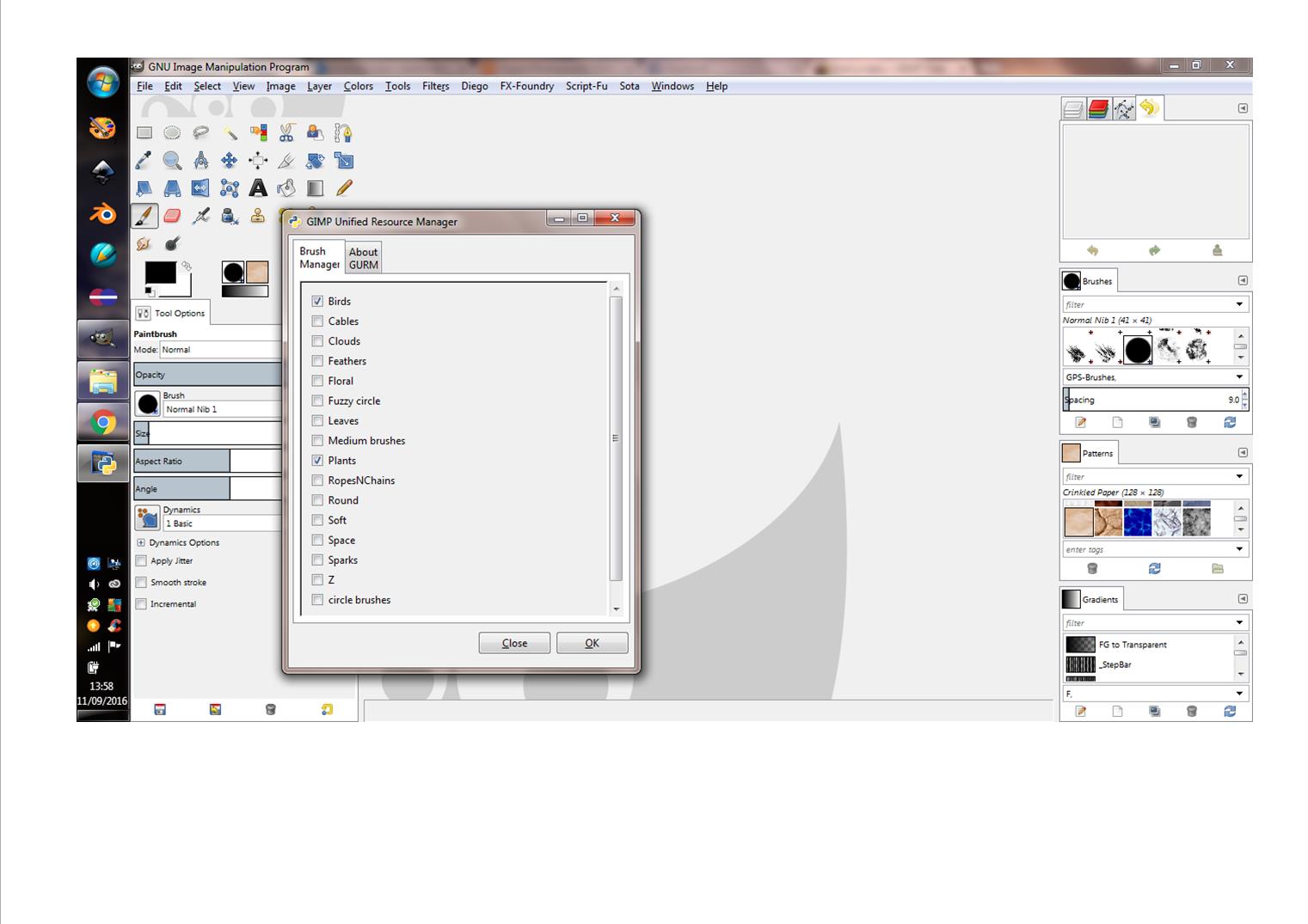
I've installed GURM and under filters/GURM the check-box appears, when checked GURM seems to load accordingly (see image below) - however nothing changes in my brushes dialogue?
Image
I have researched the GC threads but haven't found this specific issue referred to (it's mainly about installation).
I'm running Win7 GIMP 2.8
Has anyone got any suggestion as to what I'm doing incorrectly please?

_________________
Image


Top
 Post subject: Re: Managing patterns/gradients/brushes (re-visit)
PostPosted: Sun Sep 11, 2016 11:24 pm  (#14) 
Offline
GimpChat Member
User avatar

Joined: Jan 20, 2013
Posts: 14835
Location: roma, italy
I'm in favour of Ofnuts' addonCollectionManager

_________________
"Where am I ?"


Top
 Post subject: Re: Managing patterns/gradients/brushes (re-visit)
PostPosted: Mon Sep 12, 2016 1:19 am  (#15) 
Offline
Administrator
User avatar

Joined: Aug 10, 2012
Posts: 14206
Location: Native to NYC living in Arizona, Gimp 2.8 - 3.0, Win 11 PC.
dinasset wrote:
I'm in favour of Ofnuts' addonCollectionManager

I'm with dinasset.
:bigthup

_________________
Image
"A wise man learns more from a foolish question than a fool can learn from a wise answer"
Image


Top
 Post subject: Re: Managing patterns/gradients/brushes (re-visit)
PostPosted: Tue Sep 13, 2016 6:17 am  (#16) 
Offline
GimpChat Member
User avatar

Joined: Apr 09, 2016
Posts: 580
Location: Sheffield UK
Ok guys - 'i'll grow some' and give AddOnCollection Manager a go, thank you.

_________________
Image


Top
Post new topic Reply to topic  [ 16 posts ] 

All times are UTC - 5 hours [ DST ]


cron

* Login  


Powered by phpBB3 © phpBB Group