It is currently Thu Sep 24, 2026 10:21 pm


All times are UTC - 5 hours [ DST ]


Post new topic Reply to topic  [ 8 posts ] 
Author Message
 Post subject: Where does GIMP cache data [Solved]
PostPosted: Sat Feb 11, 2017 5:23 am  (#1) 
Offline
GimpChat Member
User avatar

Joined: Sep 27, 2016
Posts: 345
Location: Germany, BW
GIMP Version: 2.8.20
Operating System: Linux
OS Version: Mint 17.1
GIMP Experience: Intermediate Level


Hello all,

Does anyone know where GIMP caches data?

Why do I want to know this?
Well, I add brushes in my brushes folder -> they don't show. Not always but sometimes.
Alternatively I delete subfolders from my brushes folder because I don't need them any more ... but they are still shown on the filters list of the brushes selection dialogue.

What can I do?

Cheers
nelo

_________________
Regards
nelo

(Gimp 2.10 on Linux Mint MATE 20.1)


Last edited by nelo on Sun Feb 12, 2017 4:22 am, edited 1 time in total.

Share on Facebook Share on Twitter Share on Orkut Share on Digg Share on MySpace Share on Delicious Share on Technorati
Top
 Post subject: Re: Where does GIMP cache data
PostPosted: Sat Feb 11, 2017 6:17 am  (#2) 
Offline
GimpChat Member

Joined: Mar 04, 2011
Posts: 2615
nelo wrote:
Alternatively I delete subfolders from my brushes folder because I don't need them any more ... but they are still shown on the filters list of the brushes selection dialogue.

What can I do?


Are you deleting the folder without refreshing the brushes or close/restart Gimp?

Example, (detached the brushes tab so you can see the difference).

1. Before adding the folder: screenshot: http://i.imgur.com/uASRk34.jpg
2. Refreshed the brushes http://i.imgur.com/1tijIhk.jpg
3. Deleted the brushes folder but not refreshed. Brushes still show until refreshed. http://i.imgur.com/olZPhVX.jpg

If you are doing this on a regular basis I advise using a resources manager such as Ofnuts plugin addonCollectionManager


Top
 Post subject: Re: Where does GIMP cache data
PostPosted: Sat Feb 11, 2017 8:27 am  (#3) 
Offline
GimpChat Member
User avatar

Joined: Sep 27, 2016
Posts: 345
Location: Germany, BW
I usually restart GIMP after adding/ deleting items.
I already thought about the resourcs manager, too.
I'll have to give it a try.

_________________
Regards
nelo

(Gimp 2.10 on Linux Mint MATE 20.1)


Top
 Post subject: Re: Where does GIMP cache data
PostPosted: Sat Feb 11, 2017 9:14 am  (#4) 
Offline
GimpChat Member

Joined: Mar 04, 2011
Posts: 2615
Before you dash off and get confused by a resources manager.

Quote:
Well, I add brushes in my brushes folder -> they don't show. Not always but sometimes.
Alternatively I delete subfolders from my brushes folder because I don't need them any more


Sometimes works, sometimes does not work, is strange.

Where do you add your folders? Should be your home folder ~/.gimp-2.8/brushes Have you checked for duplicated entries?

Do you have any extra folder entries in Edit -> Preferences -> Folders -> Brushes.

This is the default, just two locations. Sub-folders will register, no need to add them.

Attachment:
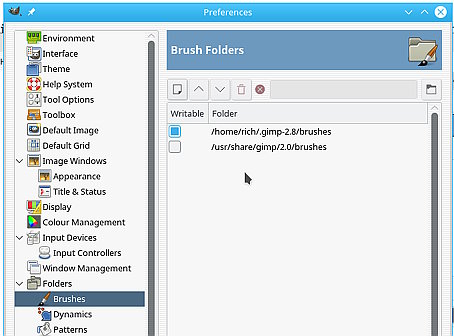
folders.jpg
folders.jpg [ 32.41 KiB | Viewed 11405 times ]

Folder names, are they simple such as clouds or complex such as fluffy clouds with spaces and ### funny.characters.included


Top
 Post subject: Re: Where does GIMP cache data
PostPosted: Sat Feb 11, 2017 1:34 pm  (#5) 
Offline
GimpChat Member
User avatar

Joined: Sep 27, 2016
Posts: 345
Location: Germany, BW
Thanks for your answer.
Yes I checked all these. No double folders in the settings. I add things in my home gimp folder only. Checked for duplicates. Searched the system for the folder's name ... it's no longer there.

A screenshot of the "problem":
Attachment:
GNU Image Manipulation Program_011.png


I created the folder when I tried to make the snowflake brush the other day. When it worked alright I moved the brush to its place and removed the folder. But it still shows in the dialogue. So I wonder where GIMP stores that info .... so I could remove it to keep things clean. GIMP was rebooted numerous times meanwhile so GIMP should have noticed that the folder isn't there any longer ;-=.

Got the addon manager installed this afternoon: the folder still shows.

Very strange.
Oh .. before I forget to mention. I even checked the files in /usr/share .... just in case.

nelo

_________________
Regards
nelo

(Gimp 2.10 on Linux Mint MATE 20.1)


Top
 Post subject: Re: Where does GIMP cache data
PostPosted: Sat Feb 11, 2017 1:42 pm  (#6) 
Offline
GimpChat Member
User avatar

Joined: Jan 20, 2013
Posts: 14835
Location: roma, italy
try restarting the PC, maybe the "cache" is in the OS

_________________
"Where am I ?"


Top
 Post subject: Re: Where does GIMP cache data
PostPosted: Sat Feb 11, 2017 2:36 pm  (#7) 
Offline
GimpChat Member

Joined: Mar 04, 2011
Posts: 2615
Not a folder, it is a tag associated with the brush, remains even though the brush has been moved.

The official help says it can be removed, see the bottom of the page.
https://docs.gimp.org/en/gimp-tagging.html

I would try renaming the file tags.xml and starting Gimp to create a new 'clean' file. It is text, alternative you can edit it.
Attachment:
tags.jpg
tags.jpg [ 115.27 KiB | Viewed 11378 times ]


Top
 Post subject: Re: Where does GIMP cache data
PostPosted: Sun Feb 12, 2017 4:20 am  (#8) 
Offline
GimpChat Member
User avatar

Joined: Sep 27, 2016
Posts: 345
Location: Germany, BW
Thank you Rich ... that helped.
Mistery solved.

nelo

_________________
Regards
nelo

(Gimp 2.10 on Linux Mint MATE 20.1)


Top
Post new topic Reply to topic  [ 8 posts ] 

All times are UTC - 5 hours [ DST ]


* Login  


Powered by phpBB3 © phpBB Group