It is currently Sat Sep 26, 2026 12:28 am


All times are UTC - 5 hours [ DST ]


Post new topic Reply to topic  [ 40 posts ]  Go to page Previous  1, 2
Author Message
 Post subject: Re: Bending Lines
PostPosted: Mon Jun 13, 2011 11:14 pm  (#21) 
Offline
GimpChat Member

Joined: Dec 20, 2010
Posts: 174
Location: Wherever the voices in my head tell me I am.
Oregonian wrote:
ccbarr wrote:
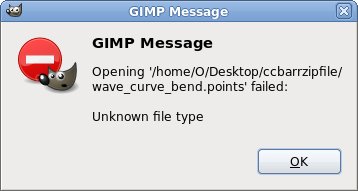
click on the Open button and then open the folder containing the unzipped file I added to load my Curve Bend curve file.
Your file has no extension it, ccbarr, and GIMP does not recognize it.
Image


ccbarr wrote:
I'm posting a ZIP file of a Curve Bend curve file similar to the one you like by mahvin. After downloading it, please unzip it into a folder of your choice. Then with your "psp mask" layer selected in Gimp, run the Curve Bend distort filter and in the dialog box that opens, click on the Open button and then open the folder containing the unzipped file I added to load my Curve Bend curve file


O,

Sorry if my instructions were not quite clear. I highlighted portions of my quote in red above to indicated the steps that I intended. I was short on time at that point and needing to go, so I added a brief explanation. I'll repeat the instructions here, hopefully a bit clearer.

1.) Unzip the zipped Curve Bend curve points file I posted as an attachment into a folder of your choice.
2.) In the pink.xcf file, make sure the "psp layermask" layer (I think it's actually called Clipboard in the pink.xcf image file) is selected in Gimp.
3.) In Gimp, select Filters | Distort | Curve Bend
4.) The Curve Bend Dialog window will open.
5.) In the Curve Bend Dialog window, towards the bottom right, you will see an "Open" button.
6.) Click on that button labeled Open and an Explorer like window will open, where you can open the folder containing the unzipped file. Select the now unzipped file and click OK in that Explorer like window.
7.) The Curve Bend curve that I sent should now appear in your Curve Bend Dialog window. Feel free to try it as is, or to adjust it as you see fit.

Again, I apologize for the briefly worded instructions in my previous post and hope this clarifies things for anyone wanting to try that out.

It looks like Rod was able to import it into Gimp.

The nice thing about the fact that this site allows ZIP files to be posted as Attachments is I can share with others things like that curve, or saved Paths, Patterns, Gradients, Brushes, and more that Gimp allows to be saved and shared with others. I think that really helps this site to have an added dimension of interactivity between users rather than forcing me to host some elements offsite, not knowing how long they might last.


Top
 Post subject: Re: Bending Lines
PostPosted: Mon Jun 13, 2011 11:33 pm  (#22) 
Offline
GimpChat Member

Joined: Dec 20, 2010
Posts: 174
Location: Wherever the voices in my head tell me I am.
Rod wrote:
Thanks ccbarr i will be editing and re-using that points file ;)


You don't fool me Rod! You're going to take my Curve Bend points file and sell it to the highest bidder on Ebay! And all I'll have to show for it will be my lousy points file, while you get money for your camping vacation from my [sarcasm]professional hard work[/sarcasm]. Just teasing.

On a serious note though, I hope your comment was not meant to poke fun at me for posting the zipped file. It was my intention to provide that as a help since I remember my confusion the first times I used the Curve Bend distort filter. Sorry if I misunderstood, but that emoticon used left me wondering, is all. Naturally, you or anyone can download it and feel free to use it as you wish.


Top
 Post subject: Re: Bending Lines
PostPosted: Tue Jun 14, 2011 12:22 am  (#23) 
Offline
GimpChat Member
User avatar

Joined: Apr 09, 2011
Posts: 1764
LOL!!! ccbarr...I think you might just be a genius!! thank you for that..it worked like a charm even on my mac!


Top
 Post subject: Re: Bending Lines
PostPosted: Tue Jun 14, 2011 11:27 am  (#24) 
Offline
Global Moderator
User avatar

Joined: May 16, 2010
Posts: 16175
ccbarr wrote:
Rod wrote:
Thanks ccbarr i will be editing and re-using that points file ;)


You don't fool me Rod! You're going to take my Curve Bend points file and sell it to the highest bidder on Ebay! And all I'll have to show for it will be my lousy points file, while you get money for your camping vacation from my [sarcasm]professional hard work[/sarcasm]. Just teasing.

On a serious note though, I hope your comment was not meant to poke fun at me for posting the zipped file. It was my intention to provide that as a help since I remember my confusion the first times I used the Curve Bend distort filter. Sorry if I misunderstood, but that emoticon used left me wondering, is all. Naturally, you or anyone can download it and feel free to use it as you wish.


LOL i would never poke fun at you ccbarr. :)
Great job on that points file though.It did work excellent.


Top
 Post subject: Re: Bending Lines
PostPosted: Thu Jun 16, 2011 1:48 pm  (#25) 
Offline
Script Coder
User avatar

Joined: Jul 14, 2010
Posts: 697
mahvin wrote:
I tried your technique, Rob, and it left the lines looking really jagged and rough. Is there a work-around for this?

Actually, pretty much any distortion adds jaggedness to the mask (after observing the other methods more closely). With the exception of laying out a stroked path, which had the cleanest edges.


Sorry about the upload, I assumed the forum would take care of name collisions :oops:

The only way around the jaggies (introduced by all these methods) is to upscale the layer first, do the distortion then rescale the layer back down. This is kind of like performing subpixel antialiasing then...

In this specific case, as were are dealing with B&W line art, a better way to clean it up is to replace the transparency with black, then blur the lines layer with a heavy gaussian blur then "correct" it by applying an aggressive S curve, keeping the curve crossing .5/.5:

Attachment:
rma_pink.jpg
rma_pink.jpg [ 37.54 KiB | Viewed 2322 times ]


I left the layer in screen mode at 100% opacity to show the effect of the blur/curve. You can see it rounded the end of the top line on the left....

-Rob A>

_________________
Image
Fantasy Cartography and Mapping by RobA


Top
 Post subject: Re: Bending Lines
PostPosted: Thu Jun 16, 2011 3:35 pm  (#26) 
Offline
GimpChat Member
User avatar

Joined: Apr 09, 2011
Posts: 1764
I'm going to show you all what I really wanted to do using somebody elses art.I'll give a couple of examples and these were done with a filter on PSP by 2 other ladies....I reckon someone with a gift ought to be able to make a filter to do this sort of thing. Perhaps in the next gmic who knows. Point here is you can see the different ways it can be bended using this filter. I want to do that in GIMP


Attachments:
Image4-10.jpg
Image4-10.jpg [ 62.46 KiB | Viewed 2310 times ]
Gentle As Silence.jpg
Gentle As Silence.jpg [ 127.83 KiB | Viewed 2310 times ]
Top
 Post subject: Re: Bending Lines
PostPosted: Thu Jun 16, 2011 3:38 pm  (#27) 
Offline
GimpChat Member
User avatar

Joined: Apr 09, 2011
Posts: 1764
now the challenge is called as close as you can and this is what I came up with using GIMP. Not really the thing I was trying to achieve. I just couldnt get the lines to bend the way I wanted them to.


Attachments:
ascloseas.png
ascloseas.png [ 342.11 KiB | Viewed 2308 times ]
Top
 Post subject: Re: Bending Lines
PostPosted: Thu Jun 16, 2011 3:41 pm  (#28) 
Offline
GimpChat Member
User avatar

Joined: Oct 06, 2010
Posts: 4050
A little bit of perspective tool would help give the lines a vanishing point.

_________________
"In order to attain the impossible, one must attempt the absurd."
~ Miguel de Cervantes


Last edited by mahvin on Thu Jun 16, 2011 4:06 pm, edited 1 time in total.

Top
 Post subject: Re: Bending Lines
PostPosted: Thu Jun 16, 2011 3:43 pm  (#29) 
Offline
GimpChat Member
User avatar

Joined: Apr 09, 2011
Posts: 1764
oh well perhaps I wasnt clear enough but I was trying to avoid posting somebody elses work.


Top
 Post subject: Re: Bending Lines
PostPosted: Thu Jun 16, 2011 4:07 pm  (#30) 
Offline
GimpChat Member
User avatar

Joined: Oct 06, 2010
Posts: 4050
A picture is worth a thousand words. I prefer to see an example, it speeds up the Q & A process.

_________________
"In order to attain the impossible, one must attempt the absurd."
~ Miguel de Cervantes


Top
 Post subject: Re: Bending Lines
PostPosted: Thu Jun 16, 2011 4:13 pm  (#31) 
Offline
GimpChat Member
User avatar

Joined: Apr 09, 2011
Posts: 1764
well Mahvin I reckon that if there is a filter for psp to do this then its possible for one to be done in GIMP. I just dont have the know how to do something like that


Top
 Post subject: Re: Bending Lines
PostPosted: Thu Jun 16, 2011 4:14 pm  (#32) 
Offline
GimpChat Member
User avatar

Joined: Apr 09, 2011
Posts: 1764
Anyway, I'm over that one now and hell bent on getting that sand thing done if I can


Top
 Post subject: Re: Bending Lines
PostPosted: Thu Jun 16, 2011 4:18 pm  (#33) 
Offline
GimpChat Member
User avatar

Joined: Oct 06, 2010
Posts: 4050
I don't want to open Windows to see what filters in PSP would have created it, but if you know the name of the filter, that would help things along faster. Some PSP filters have no GIMP equivalents, so you have to "cheat".

_________________
"In order to attain the impossible, one must attempt the absurd."
~ Miguel de Cervantes


Top
 Post subject: Re: Bending Lines
PostPosted: Thu Jun 16, 2011 5:21 pm  (#34) 
Offline
GimpChat Member
User avatar

Joined: Apr 09, 2011
Posts: 1764
Actually I am just looking at the original instructions and it doesnt say filter at all...it says *The distortion used on the selection is: "warp"*


Top
 Post subject: Re: Bending Lines
PostPosted: Thu Jun 16, 2011 5:48 pm  (#35) 
Offline
GimpChat Member
User avatar

Joined: Oct 06, 2010
Posts: 4050
Yep. Sounds like wire mesh warp, which allows you to control points within the image for warping. The great thing about that filter is that you can make the grid however you wish and then use control points based on the pixel increments. I wish GIMP had something similar now, but I am told Cage transform is the new tool in upcoming 2.8.

_________________
"In order to attain the impossible, one must attempt the absurd."
~ Miguel de Cervantes


Top
 Post subject: Re: Bending Lines
PostPosted: Thu Jun 16, 2011 8:11 pm  (#36) 
Offline
Global Moderator
User avatar

Joined: May 16, 2010
Posts: 16175
Actually akky if you can open PSP in Shellout that might be your answer to doing it in Gimp. :)
I assume you are talking about Paint Shop Pro?
Also could you tell me the name of the filter they used?


Top
 Post subject: Re: Bending Lines
PostPosted: Thu Jun 16, 2011 8:13 pm  (#37) 
Offline
GimpChat Member
User avatar

Joined: Oct 06, 2010
Posts: 4050
Wire mesh warp isn't an added filter, its PSP hard coded, so not transferrable without using PSP itself.

And since she is using a Mac, wouldn't she need to be able to set it up properly as well? I'm no help there. Any Mac users using shellout?

_________________
"In order to attain the impossible, one must attempt the absurd."
~ Miguel de Cervantes


Top
 Post subject: Re: Bending Lines
PostPosted: Thu Jun 16, 2011 11:57 pm  (#38) 
Offline
GimpChat Member
User avatar

Joined: Oct 06, 2010
Posts: 4050
This is PSP mesh warp. It's customizable, very handy, but it's in the wrong graphics application, because PSP blows (GIMP 2.8 can't get here fast enough):

Image

_________________
"In order to attain the impossible, one must attempt the absurd."
~ Miguel de Cervantes


Top
 Post subject: Re: Bending Lines
PostPosted: Fri Jun 17, 2011 6:27 am  (#39) 
Offline
GimpChat Member
User avatar

Joined: Apr 07, 2010
Posts: 14182
ditto mahv. that mesh filter looks like a pretty good tool to have.... I wish 2.8 would soon get here too....

_________________
Image


Top
 Post subject: Re: Bending Lines
PostPosted: Fri Jun 17, 2011 7:43 am  (#40) 
Offline
GimpChat Member
User avatar

Joined: Apr 09, 2011
Posts: 1764
Actually thats familiar to me. I think I have played with it before....
I can open most of the psp files on my VMware but prefer not to have it running if possible...
But one thing I have been thinking of doing and I can do it as well is put a linux OS on the VMware
and using GIMP on that. Not sure if I will get more out of it or not.


Top
Post new topic Reply to topic  [ 40 posts ]  Go to page Previous  1, 2

All times are UTC - 5 hours [ DST ]


* Login  


Powered by phpBB3 © phpBB Group



