It is currently Tue Sep 22, 2026 12:59 am


All times are UTC - 5 hours [ DST ]


Post new topic Reply to topic  [ 26 posts ]  Go to page Previous  1, 2
Author Message
 Post subject: Re: How could I give my splat some chrome effect?
PostPosted: Tue Oct 04, 2011 7:18 am  (#21) 
Offline
GimpChat Member
User avatar

Joined: Aug 24, 2011
Posts: 1785
Location: Dallas, TX
The simplest way is to just do a screenshot of the curves themselves. I wouldn't know what to do with all those numbers and code.

_________________
Image


Top
 Post subject: Re: How could I give my splat some chrome effect?
PostPosted: Tue Oct 04, 2011 7:31 am  (#22) 
Offline
Global Moderator
User avatar

Joined: May 16, 2010
Posts: 16173
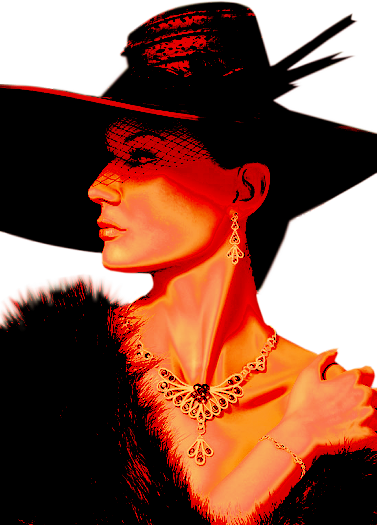
Here is the curve in action Draconian.

Image

Here is what i did to get this interesting peach gradient effect.
Open the image - duplicate it
Desaturate using luminosity
Run the curve setting
Go to your gradients and pick the peach one i uploaded here before.
Now go to colors/map/gradient map
Select the bottom layer (original)
Set it on top and set the mode to burn.

Image

_________________
Image


Top
 Post subject: Re: How could I give my splat some chrome effect?
PostPosted: Tue Oct 04, 2011 7:54 am  (#23) 
Offline
GimpChat Member
User avatar

Joined: Aug 24, 2011
Posts: 1785
Location: Dallas, TX
Rod wrote:
Here is the curve in action Draconian.

Image

Here is what i did to get this interesting peach gradient effect.
Open the image - duplicate it
Desaturate using luminosity
Run the curve setting
Go to your gradients and pick the peach one i uploaded here before.
Now go to colors/map/gradient map
Select the bottom layer (original)
Set it on top and set the mode to burn.
Image


Thanks Rod. I have several saved curves for chrome from doing a lot of the tutorials but not that particular one. I'll have to add that one to my arsenal.

I was just letting him know how much easier it would be for everyone to use a screenshot, especially people like me who don't know what to do with all that code and numbers.

I really like the way you used those settings to get that shiny, peachy effect on the photo. Never thought of using it as just a layer. You and Lyle and mahvin are starting to rub off on me when it comes to using layers and modes. Thanks for the flow on that one.

_________________
Image


Top
 Post subject: Re: How could I give my splat some chrome effect?
PostPosted: Tue Oct 04, 2011 8:58 am  (#24) 
Offline
Retired Staff
User avatar

Joined: May 22, 2008
Posts: 6946
Location: Somewhere in GIMP
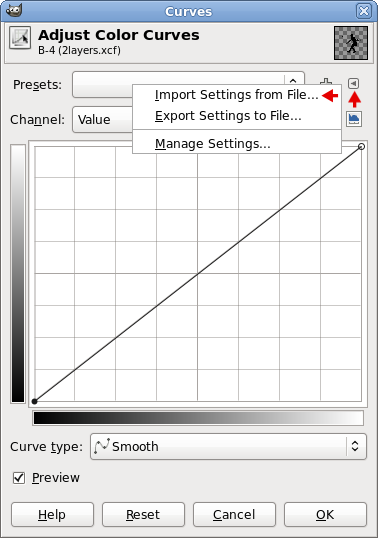
In case anyone would like to know what is going on with the curves preset that Draconian posted. Here is how to use it. I've copied the code to a txt file (with no extension), zipped it, and attached it below. Download it, unzip it, and put the file into the .gimp-2.6 / curves folder. Close and re-open gimp so that it will be available. The file is named: mrbiggzcurves

Open the image you plan to use it on. Colors > Curves and click the tiny arrow in the dialog indicated by the red arrow in the image below. Click Import Settings from File. Select the mrbiggzcurves file, Open. Image on right shows the resulting curves.
Image.....Image


Attachments:
mrbiggzcurves.zip [2.02 KiB]
Downloaded 63 times

_________________
Image
World War IV will be fought with sticks and stones. - Albert Einstein
Top
 Post subject: Re: How could I give my splat some chrome effect?
PostPosted: Tue Oct 04, 2011 5:38 pm  (#25) 
Offline
GimpChat Member
User avatar

Joined: Jul 04, 2011
Posts: 395
Location: Indianapolis, IN
A little pre-Halloween .. but I made the skull metal, the teeth didn't come out the way I wanted them to. Not sure what happened, I was shooting for more of a smooth gold. I used the gold gradient.

And considering I have absolutely no artistic talent .. it came out ok!

Attachment:
skull_fire_eyes.gif
skull_fire_eyes.gif [ 887.33 KiB | Viewed 1416 times ]


I will now leave the metal rest! =)

_________________
"That which does not kill us makes us stronger." ~ Friedrich Nietzsche


Top
 Post subject: Re: How could I give my splat some chrome effect?
PostPosted: Tue Oct 04, 2011 5:59 pm  (#26) 
Offline
GimpChat Member
User avatar

Joined: Apr 07, 2010
Posts: 14182
very nice, I hope I don't meet up with that dude.

_________________
Image


Top
Post new topic Reply to topic  [ 26 posts ]  Go to page Previous  1, 2

All times are UTC - 5 hours [ DST ]


* Login  


Powered by phpBB3 © phpBB Group