It is currently Sat Sep 26, 2026 1:27 am


All times are UTC - 5 hours [ DST ]


Post new topic Reply to topic  [ 37 posts ]  Go to page Previous  1, 2
Author Message
 Post subject: Re: Does anyone know what causes this?
PostPosted: Sat Aug 21, 2010 5:08 pm  (#21) 
Offline
GimpChat Member
User avatar

Joined: Apr 22, 2010
Posts: 126
I gotta go now and in Europ we have middle of the night.GOOD NIGHT. :otb

_________________
Image


Top
 Post subject: Re: Does anyone know what causes this?
PostPosted: Sat Aug 21, 2010 5:09 pm  (#22) 
Offline
Retired Staff
User avatar

Joined: May 22, 2008
Posts: 6946
Location: Somewhere in GIMP
Thanks for your input pogo!!!

_________________
Image
World War IV will be fought with sticks and stones. - Albert Einstein


Top
 Post subject: Re: Does anyone know what causes this?
PostPosted: Sat Aug 21, 2010 5:25 pm  (#23) 
Offline
GimpChat Member
User avatar

Joined: Apr 30, 2010
Posts: 1937
Location: Missouri
For the record i don't have the APNG package, if it matters.

_________________
Image
The last time I kept an open mind,
my brain fell out and the dog grabbed it.
Now it's full of dirt, toothmarks, and dog slobber.
No more open minds or dogs for me.


Top
 Post subject: Re: Does anyone know what causes this?
PostPosted: Sat Aug 21, 2010 5:32 pm  (#24) 
Offline
GimpChat Member
User avatar

Joined: Apr 07, 2010
Posts: 14182
I just opened them with Paint.NET and saved them as gif and now they work fine in GIMP......

_________________
Image


Top
 Post subject: Re: Does anyone know what causes this?
PostPosted: Sat Aug 21, 2010 6:58 pm  (#25) 
Offline
GimpChat Founder
User avatar

Joined: May 22, 2008
Posts: 5241
Location: Gimpville
Oregonian wrote:
It opens fine that way.

Well, that proves it's an APNG-Plugin problem.

Someone needs to report this bug to the GIMP APNG developer...

_________________
“If you reach for the stars, you just might land on a decently sized hill.” - Stuart Hill


Top
 Post subject: Re: Does anyone know what causes this?
PostPosted: Sat Aug 21, 2010 7:02 pm  (#26) 
Offline
Retired Staff
User avatar

Joined: May 22, 2008
Posts: 6946
Location: Somewhere in GIMP
Well you lost a lot of quality saving them as gif files.

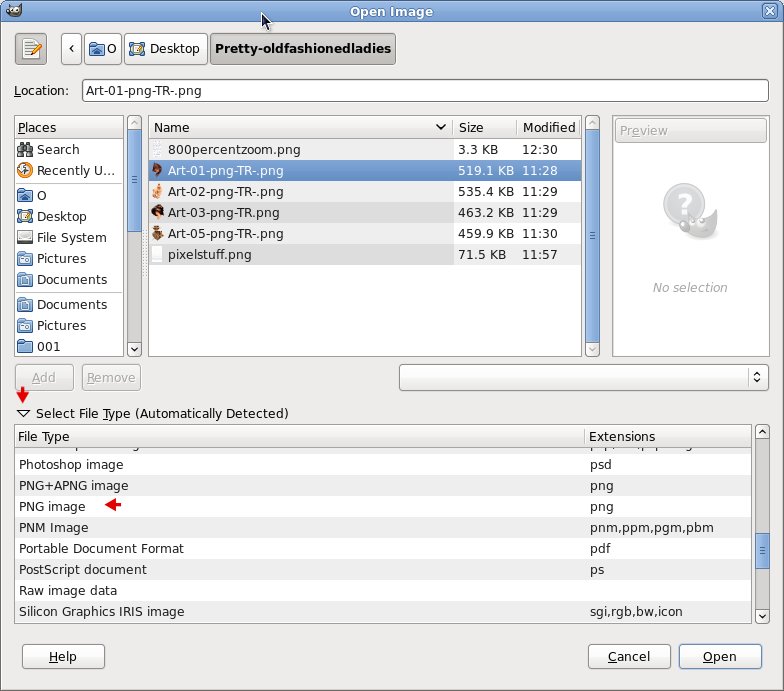
You can open them in gimp if you go to File > Open. Click the file to highlight it, then choosing PNG image in the dropdown in the File > Open dialog. Then you can Save As and overwrite the offending png file.

Image

_________________
Image
World War IV will be fought with sticks and stones. - Albert Einstein


Top
 Post subject: Re: Does anyone know what causes this?
PostPosted: Sat Aug 21, 2010 7:18 pm  (#27) 
Offline
GimpChat Member
User avatar

Joined: Apr 07, 2010
Posts: 14182
ok, thanks "O", I still have them in png format too...... nice to know. still strange tho....grrrr

_________________
Image


Top
 Post subject: Re: Does anyone know what causes this?
PostPosted: Sat Aug 21, 2010 7:30 pm  (#28) 
Offline
Script Coder
User avatar

Joined: Apr 23, 2010
Posts: 1553
Location: not from Guildford after all
What OS? What version of GIMP? What version of 'libpng'?

If you are running GNU/Linux, what is the output of running the following command:

ldd /usr/bin/gimp |grep libpng

_________________
Any sufficiently primitive technology is indistinguishable from a rock.


Top
 Post subject: Re: Does anyone know what causes this?
PostPosted: Sat Aug 21, 2010 9:41 pm  (#29) 
Offline
Retired Staff
User avatar

Joined: May 22, 2008
Posts: 6946
Location: Somewhere in GIMP
[O@localhost ~]$ ldd /usr/bin/gimp |grep libpng

libpng12.so.0 => /usr/lib/libpng12.so.0 (0x00942000)

_________________
Image
World War IV will be fought with sticks and stones. - Albert Einstein


Top
 Post subject: Re: Does anyone know what causes this?
PostPosted: Sat Aug 21, 2010 10:09 pm  (#30) 
Offline
Script Coder
User avatar

Joined: Apr 23, 2010
Posts: 1553
Location: not from Guildford after all
You might try installing version 1.4

_________________
Any sufficiently primitive technology is indistinguishable from a rock.


Top
 Post subject: Re: Does anyone know what causes this?
PostPosted: Sat Aug 21, 2010 10:47 pm  (#31) 
Offline
GimpChat Founder
User avatar

Joined: May 22, 2008
Posts: 5241
Location: Gimpville
Just a note but Fedora 12 currently uses libpng v1.2.44. That's the latest version of libpng included in the Fedora repositories. There are lots of packages in Fedora that depend on that version of libpng so update manually at your own risk.

To be able run the APNG plugin, libpng needs to be patched and installed in the proper location for Fedora per this thread. O, I believe you are up to date on this.

It's certainly possible there is a bug in the libpng patch that's causing this problem. Although, Windows users are reporting the same problem, fwtw...

_________________
“If you reach for the stars, you just might land on a decently sized hill.” - Stuart Hill


Top
 Post subject: Re: Does anyone know what causes this?
PostPosted: Sun Aug 22, 2010 5:06 am  (#32) 
Offline
GimpChat Member

Joined: Apr 12, 2010
Posts: 5870
i can open in gimp without problem..i have not the apng plugin i used gimpportable

_________________
My 3D Gallery on Deviantart http://photocomix2.deviantart.com/
Main gallery http://www.flickriver.com/photos/photocomix-mandala/
Mandala and simmetry http://www.flickriver.com/photos/photocomix_mandala/

Image

Mrs Wilbress


Top
 Post subject: Re: Does anyone know what causes this?
PostPosted: Sun Aug 22, 2010 10:47 am  (#33) 
Offline
GimpChat Member
User avatar

Joined: Apr 22, 2010
Posts: 126
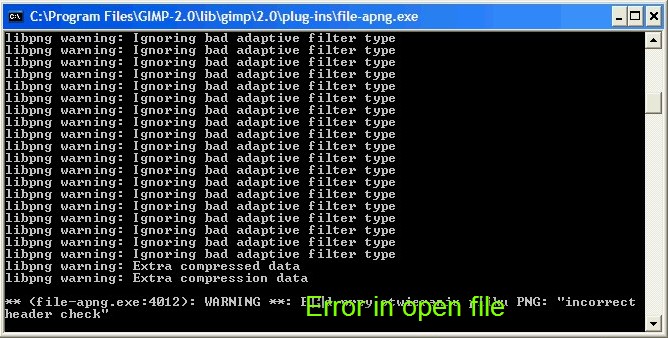
This file was originally written as an APNG animation was then opened and saved as png in another program without the support APNG, after re-opening in the GIMP, I can only see The highest layer, additionally mutated, caused the error with premeditation.Open the image in gimp, which has support APNG you'll see the same error.ImageErrors are the same when we open these files in the gimp with the APNG.ImageI'm using Windows XP.pogo ..
_________________
Image


Top
 Post subject: Re: Does anyone know what causes this?
PostPosted: Sun Aug 22, 2010 11:57 am  (#34) 
Offline
Retired Staff
User avatar

Joined: May 22, 2008
Posts: 6946
Location: Somewhere in GIMP
@ Pogogogo (love your pickle avatar. :-D)

As a way of explanation to let you know how I came by the image.

I frequent a newsgroup called annexcafe.psp.tubes through Thunderbird. Paint Sho Pro (PSP) tubes are transparent images that we gimpers call renders.

Since I joined, a lot of the "tubers" make png images rather than using the PSP native image format for me because some versions of the PSP images will not open in gimp.

I don't know how they make png images but it's different and a bit more difficult than it is in gimp. Other tubers' transparent pngs open fine for me but one member's pngs don't.

I've attached a png image from someone else in the newsgroup that opens without difficulty in gimp for me. Perhaps you would like to run it through that process to see what it does.


Attachments:
Anf_45_Pineapple_P.png
Anf_45_Pineapple_P.png [ 478.74 KiB | Viewed 1965 times ]

_________________
Image
World War IV will be fought with sticks and stones. - Albert Einstein
Top
 Post subject: Re: Does anyone know what causes this?
PostPosted: Sun Aug 22, 2010 1:51 pm  (#35) 
Offline
GimpChat Member
User avatar

Joined: Apr 07, 2010
Posts: 14182
I just saved it and opened it with Gimp and it is a perfect transparent pineapple with caterpillars on it. go figure. hope they don't get inside...

_________________
Image


Top
 Post subject: Re: Does anyone know what causes this?
PostPosted: Sun Aug 22, 2010 4:35 pm  (#36) 
Offline
GimpChat Member

Joined: May 15, 2010
Posts: 64
I can see the pixel mess in 53_Art-01-png-TR-.png too.

I think it's because the image is interlaced. And something is wrong with interlacing handling, apparently.


Top
 Post subject: Re: Does anyone know what causes this?
PostPosted: Sun Aug 22, 2010 10:05 pm  (#37) 
Offline
Global Moderator
User avatar

Joined: May 16, 2010
Posts: 16175
I do not understand why anyone would want to use interlacing anymore anyways.Now that most connections are faster it really isn't needed.


Top
Post new topic Reply to topic  [ 37 posts ]  Go to page Previous  1, 2

All times are UTC - 5 hours [ DST ]


* Login  


Powered by phpBB3 © phpBB Group