It is currently Wed Sep 23, 2026 10:21 am


All times are UTC - 5 hours [ DST ]


Post new topic Reply to topic  [ 28 posts ]  Go to page Previous  1, 2
Author Message
 Post subject: Re: WrapMap(?) Border: Fade from edge to Black (or White)?
PostPosted: Sun Feb 19, 2012 7:46 pm  (#21) 
Offline
Script Coder
User avatar

Joined: Oct 25, 2010
Posts: 4812
Check the coordinates of the blur center. The blur center should be somewhere in the middle of the head.

_________________
Image


Top
 Post subject: Re: WrapMap(?) Border: Fade from edge to Black (or White)?
PostPosted: Sun Feb 19, 2012 7:59 pm  (#22) 
Offline
GimpChat Member
User avatar

Joined: Apr 20, 2011
Posts: 287
Location: Dane-ish Co., West Gonsin
ofnuts wrote:
  • fill selection with "shaped" gradient (black on the outside)


@ofnuts

Could you hold forth a bit on "shaped" gradient? (I fear you may only mean a custom one, but it made me wonder.)


Thanks.

BTW:
Are 2D gradients possible? (If the answer is not a quick "NO!" this should probably be another thread.) I'm thinking of it this way: think of any selection to be painted as being painted by a brush "across" which colors are distributed on the basis of the rule of a first gradient, but "along" which the colors derived from their position on the first gradient follow a rule from a second gradient.

Brush dynamics are, I think, one example of a second gradient, as are rotational brushes. The one I'm thinking of that isn't writ yet is one where the brush paints black at start and white on stop and fills the path with the proper gradient after the end-of-stroke.
--
Gramp

_________________
--
GraMP
"Once you sit on your glasses, the rest of getting old seems obvious."


Top
 Post subject: Re: WrapMap(?) Border: Fade from edge to Black (or White)?
PostPosted: Sun Feb 19, 2012 8:12 pm  (#23) 
Offline
GimpChat Member
User avatar

Joined: Apr 20, 2011
Posts: 287
Location: Dane-ish Co., West Gonsin
ofnuts wrote:
Check the coordinates of the blur center. The blur center should be somewhere in the middle of the head.


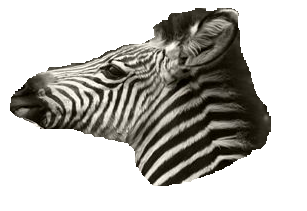
Oh, iyumdum. I thought--for no reason other than sheer wishful laziness--that the center was being inferred from the preview window. :oops: If MoBlur is asked to go "outward" from the bottom RH corner of the pic, it'll definitely go SE->NW...

Mo' bettah. Even wow. Apparently I've caught the "essence" of zebra lips.
Image

_________________
--
GraMP
"Once you sit on your glasses, the rest of getting old seems obvious."


Top
 Post subject: Re: WrapMap(?) Border: Fade from edge to Black (or White)?
PostPosted: Sun Feb 19, 2012 11:07 pm  (#24) 
Offline
GimpChat Member
User avatar

Joined: Feb 14, 2012
Posts: 426
gramp wrote:
Now finding RobA's "Sample Gradient Along Path"
http://registry.gimp.org/node/10240
which seems to do circumferentially what I'd like to see radially.

As for deciding the "direction" of gradient rays, outward normals to the curve seem to be the best default.

Subject matter, "courtesy" of the crude messpaint of the current operating system I am stuck on.
Image


I keep trying to save the Sample Gradient Along Path script but it intalls it with 0kb into my script folder and it doesn't show up in Gimp. Is there a new location for the script?

Alan


Top
 Post subject: Re: WrapMap(?) Border: Fade from edge to Black (or White)?
PostPosted: Sun Feb 19, 2012 11:13 pm  (#25) 
Offline
GimpChat Member
User avatar

Joined: Feb 14, 2012
Posts: 426
Never Mind! I was digging too deep and didn't try to download from the first page on the link provided.

Alan


Top
 Post subject: Re: WrapMap(?) Border: Fade from edge to Black (or White)?
PostPosted: Mon Feb 20, 2012 2:49 am  (#26) 
Offline
Script Coder
User avatar

Joined: Oct 25, 2010
Posts: 4812
gramp wrote:
Could you hold forth a bit on "shaped" gradient? (I fear you may only mean a custom one, but it made me wonder.)
I'm just using the "shaped" choice in the "Shape" choices of the blend tool (other choices are Linear/Bi-linear/Radial/Square/Conical/Spiral...)

_________________
Image


Top
 Post subject: Re: WrapMap(?) Border: Fade from edge to Black (or White)?
PostPosted: Thu May 03, 2012 5:23 pm  (#27) 
Offline
GimpChat Member
User avatar

Joined: Apr 20, 2011
Posts: 287
Location: Dane-ish Co., West Gonsin
gramp wrote:
BTW:
Are 2D gradients possible? (If the answer is not a quick "NO!" this should probably be another thread.) I'm thinking of it this way: think of any selection to be painted as being painted by a brush "across" which colors are distributed on the basis of the rule of a first gradient, but "along" which the colors derived from their position on the first gradient follow a rule from a second gradient.

Brush dynamics are, I think, one example of a second gradient, as are rotational brushes. The one I'm thinking of that isn't writ yet is one where the brush paints black at start and white on stop and fills the path with the proper gradient after the end-of-stroke.
--
Gramp


Apparently!

There's a script called "PathBlend".
http://registry.gimp.org/node/26195

I only found it because it happens to be on Page 1 of registry.gimp.org at the mo'.

I know what to do when I walk into a fresh wet fish. Report it. That's what.

(Looks like it might not've existed yet when I aksed the quexstion.)

EDIT:
Umm, well, as you ALL know, it's one of RobA's... :oops:

Like mother used to tell me, "Sonny, you may be slow, but just remember: at least
you're ugly."

Anyone finding the mention here, hie thee on to the real discussion:
http://www.gimpchat.com/viewtopic.php?f=9&t=4066

_________________
--
GraMP
"Once you sit on your glasses, the rest of getting old seems obvious."


Top
 Post subject: Re: WrapMap(?) Border: Fade from edge to Black (or White)?
PostPosted: Fri May 04, 2012 8:34 am  (#28) 
Offline
GimpChat Member
User avatar

Joined: Apr 20, 2011
Posts: 287
Location: Dane-ish Co., West Gonsin
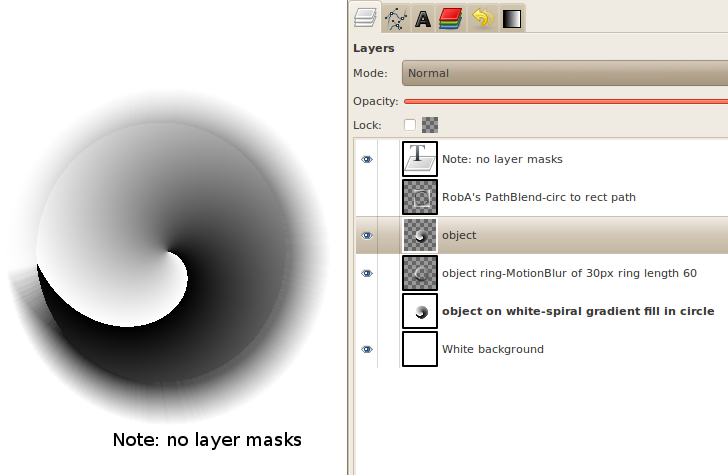
Following (mostly) ofnuts' prescription earlier, here's a test result (probably shoulda donea zebra, huh):
Image

In my 3D CAM software (which generates G-code to operate a CNC machine, which can import BW images and interpret them as bumpmaps, it comes out like:
Image

Works well on zoomable, read convex, things, but of course I've got concave things. I probably should decompose them into a sum of convexes and process them independent.

_________________
--
GraMP
"Once you sit on your glasses, the rest of getting old seems obvious."


Top
Post new topic Reply to topic  [ 28 posts ]  Go to page Previous  1, 2

All times are UTC - 5 hours [ DST ]


* Login  


Powered by phpBB3 © phpBB Group