It is currently Sun Sep 27, 2026 9:04 am


All times are UTC - 5 hours [ DST ]


Post new topic Reply to topic  [ 14 posts ] 
Author Message
 Post subject: Best Dark Theme?
PostPosted: Fri Aug 10, 2012 9:09 pm  (#1) 
Offline
GimpChat Member

Joined: Jul 27, 2012
Posts: 20
Location: Columbus, Nebraska
GIMP Version: 2.8
Operating System: Windows
OS Version: Win7
GIMP Experience: Beginner Level


I was just wondering (Partially directed towards Rod) if anybody had some great, tried and true dark themes for Gimp (2.8) - I have tried Darknice but the top menu bar is silver with white text, can't stand that part!


Share on Facebook Share on Twitter Share on Orkut Share on Digg Share on MySpace Share on Delicious Share on Technorati
Top
 Post subject: Re: Best Dark Theme?
PostPosted: Fri Aug 10, 2012 10:11 pm  (#2) 
Offline
Global Moderator
User avatar

Joined: May 16, 2010
Posts: 16175
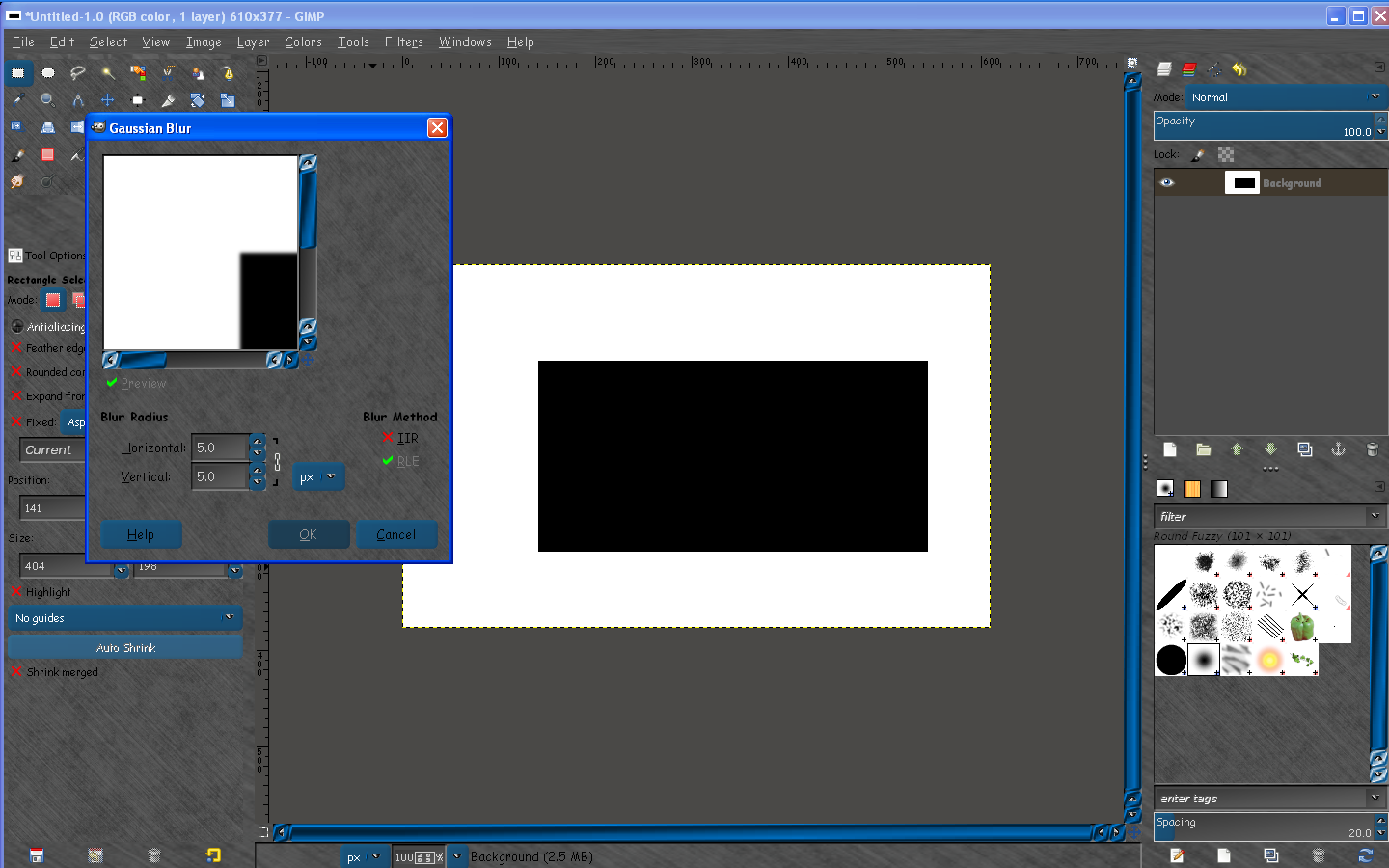
I created this theme last month that works well in Gimp-2.8 versions. :)
Image

I call it "Blue-Licorice-Dynamic-Metallica"

More information and download link can be found here.
viewtopic.php?f=12&t=4784#p59427


Top
 Post subject: Re: Best Dark Theme?
PostPosted: Fri Aug 10, 2012 10:21 pm  (#3) 
Offline
GimpChat Member

Joined: Jul 27, 2012
Posts: 20
Location: Columbus, Nebraska
Right on, thanks! Been messing with some myself. Who knew making buttons could be so much fun..?!


Top
 Post subject: Re: Best Dark Theme?
PostPosted: Fri Aug 10, 2012 10:26 pm  (#4) 
Offline
Global Moderator
User avatar

Joined: May 16, 2010
Posts: 16175
clanderson wrote:
Right on, thanks! Been messing with some myself. Who knew making buttons could be so much fun..?!

Yes it's quite easy to create your own themes now using this template. :) :bigthup
I try and use all seamless images i create in Filter Forge for the table.png and bg.png images.
That way they scale (when you enlarge the dialogs), seamlessly.


Top
 Post subject: Re: Best Dark Theme?
PostPosted: Fri Aug 10, 2012 11:27 pm  (#5) 
Offline
GimpChat Member
User avatar

Joined: Nov 16, 2011
Posts: 5127
Location: Metro Vancouver, BC
clanderson wrote:
I was just wondering (Partially directed towards Rod) if anybody had some great, tried and true dark themes for Gimp (2.8) - I have tried Darknice but the top menu bar is silver with white text, can't stand that part!

Everything seems to work fine for me with, MarbleIce.

_________________
Image
Gimp 2.8.18, Linux, median user
Gimp Chat Tutorials Index
Spirit Bear (Kermode)


Top
 Post subject: Re: Best Dark Theme?
PostPosted: Sat Aug 11, 2012 7:28 am  (#6) 
Offline
GimpChat Member
User avatar

Joined: Aug 24, 2011
Posts: 1785
Location: Dallas, TX
Rod wrote:
Yes it's quite easy to create your own themes now using this template.


Speak for yourself Rod. I've tried six ways from Sunday and everything is either squished together or really spread out. Different areas seem to hav ethe same distortions no matter what I try. I looked at altering both gtkrc files where it says stretch and entered False instead of True, tried them one at a time, changed every text color in each then both themes, and still some text is unreadable agaist a similar colored background in some menus and in some parts of the tool dialogs.

There are a bunch of separate folders in the OSX theme that contain all the peices and parts like bars and buttons that I like or would like to recreate with different metallic finishes, but I don't have a clue what is what and all the names are really confusing to me so I just gave up. I guess I need to find a tutorial that explains how each part functions and what it is called. What the heck is a "Trough" and a "Null" anyway.

I used this image

Image

and got this result.

Image

_________________
Image


Top
 Post subject: Re: Best Dark Theme?
PostPosted: Sat Aug 11, 2012 10:57 am  (#7) 
Offline
GimpChat Member

Joined: Jul 27, 2012
Posts: 20
Location: Columbus, Nebraska
Ack! Rod, you know the bar on your opacity, size, position, etc? How did you get it transparent? I'm working with a theme right now and I have white text with a white bar, I'd like to get it semi-transparent or transparent like you have it. But I'm not sure what it would even be called in the theme folder!

Or, better yet, check out this image - part of the text changes from white to black when the bar goes through it - know how I'd do that..? Hahaha. I can't see the names on the left side, only the amount.
And here is the theme I'm working with.


Attachments:
BarChange.png
BarChange.png [ 96.17 KiB | Viewed 6024 times ]
Top
 Post subject: Re: Best Dark Theme?
PostPosted: Sun Aug 12, 2012 3:13 pm  (#8) 
Offline
Administrator
User avatar

Joined: Aug 10, 2012
Posts: 14214
Location: Native to NYC living in Arizona, Gimp 2.8 - 3.0, Win 11 PC.
Rod wrote:
clanderson wrote:
Right on, thanks! Been messing with some myself. Who knew making buttons could be so much fun..?!

Yes it's quite easy to create your own themes now using this template. :) :bigthup
I try and use all seamless images i create in Filter Forge for the table.png and bg.png images.
That way they scale (when you enlarge the dialogs), seamlessly.


What's this about a template that can be used to create my own theme?

_________________
Image
"A wise man learns more from a foolish question than a fool can learn from a wise answer"
Image


Top
 Post subject: Re: Best Dark Theme?
PostPosted: Sun Aug 12, 2012 6:35 pm  (#9) 
Offline
GimpChat Member
User avatar

Joined: Mar 23, 2012
Posts: 7388
Location: Göteborg at last!
Wallace wrote:
What's this about a template that can be used to create my own theme?


I think this post will be useful to you. http://www.gimpchat.com/viewtopic.php?f=12&t=4260


Top
 Post subject: Re: Best Dark Theme?
PostPosted: Sun Aug 12, 2012 7:42 pm  (#10) 
Offline
Administrator
User avatar

Joined: Aug 10, 2012
Posts: 14214
Location: Native to NYC living in Arizona, Gimp 2.8 - 3.0, Win 11 PC.
Erisian wrote:
Wallace wrote:
What's this about a template that can be used to create my own theme?


I think this post will be useful to you. http://www.gimpchat.com/viewtopic.php?f=12&t=4260


This is an incredible post, thanks for the suggestion. Still don't have a clue about this so called "template" for creating your own theme, but it look like I can play around with my favorite theme and customize it to my needs/wants.

Great link... Thanks Erisian! :bigthup

_________________
Image
"A wise man learns more from a foolish question than a fool can learn from a wise answer"
Image


Top
 Post subject: Re: Best Dark Theme?
PostPosted: Sun Aug 12, 2012 10:24 pm  (#11) 
Offline
GimpChat Member

Joined: Jul 27, 2012
Posts: 20
Location: Columbus, Nebraska
Anyone know how to edit that bar as in my last post? :(


Top
 Post subject: Re: Best Dark Theme?
PostPosted: Tue Aug 14, 2012 12:47 pm  (#12) 
Offline
GimpChat Member

Joined: Jul 27, 2012
Posts: 20
Location: Columbus, Nebraska
Buuuump


Top
 Post subject: Re: Best Dark Theme?
PostPosted: Wed Aug 15, 2012 6:18 am  (#13) 
Offline
GimpChat Member
User avatar

Joined: Aug 24, 2011
Posts: 1785
Location: Dallas, TX
Don't feel bad, no one addressed my issues either. Maybe we need to wait for the right person to come back on line and see it?

_________________
Image


Top
 Post subject: Re: Best Dark Theme?
PostPosted: Thu Aug 16, 2012 9:23 pm  (#14) 
Offline
GimpChat Member

Joined: Jul 27, 2012
Posts: 20
Location: Columbus, Nebraska
Bump?


Top
Post new topic Reply to topic  [ 14 posts ] 

All times are UTC - 5 hours [ DST ]


* Login  


Powered by phpBB3 © phpBB Group