It is currently Thu Oct 01, 2026 6:40 am


All times are UTC - 5 hours [ DST ]


Post new topic Reply to topic  [ 29 posts ]  Go to page 1, 2  Next
Author Message
 Post subject: Picking a text color
PostPosted: Fri Dec 12, 2014 4:22 pm  (#1) 
Offline
GimpChat Member

Joined: Nov 26, 2014
Posts: 37
GIMP Version: 2.8.10
Operating System: Mac OS
GIMP Experience: Beginner Level


Hi Gimpers,

When using the text tool, I can click on the color button to bring up the swatches and color tools, but strangely the color picker (eye dropper) is missing here. Can I not get a color from my screen? Looks like I can't even set the text color to the current foreground/background color unless I look at the numbers, memorize them, and punch them into the text tool again. I'm sure there must be an easier way.

Thanks,
Stefan


Share on Facebook Share on Twitter Share on Orkut Share on Digg Share on MySpace Share on Delicious Share on Technorati
Top
 Post subject: Re: Picking a text color
PostPosted: Fri Dec 12, 2014 4:45 pm  (#2) 
Offline
Script Coder
User avatar

Joined: Oct 25, 2010
Posts: 4812
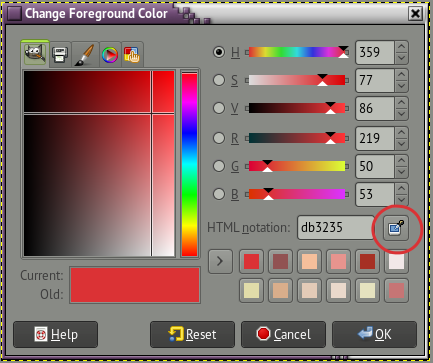
If you click on the "Color" rectangle in the Text options or in the color square in the on-canvas editor, the color selector dialog that shows up has a "Color picker" button (to the right of the HTML notation entry field).

Attachment:
TextTool-ColorPicker.png
TextTool-ColorPicker.png [ 67.21 KiB | Viewed 5956 times ]

_________________
Image


Top
 Post subject: Re: Picking a text color
PostPosted: Fri Dec 12, 2014 5:05 pm  (#3) 
Offline
Administrator
User avatar

Joined: Aug 10, 2012
Posts: 14220
Location: Native to NYC living in Arizona, Gimp 2.8 - 3.0, Win 11 PC.
Here's a link to a gif image I made, showing how I change the color of text. This isn't the only way to change the color of text in Gimp, but it's a way that I found works for me.
https://www.dropbox.com/s/gm2uk149pru3z ... 9.gif?dl=0

_________________
Image
"A wise man learns more from a foolish question than a fool can learn from a wise answer"
Image


Last edited by Wallace on Sat Dec 13, 2014 12:18 am, edited 1 time in total.

Top
 Post subject: Re: Picking a text color
PostPosted: Fri Dec 12, 2014 11:07 pm  (#4) 
Offline
Global Moderator
User avatar

Joined: May 16, 2010
Posts: 16175
Another easy way is to double click your text area with the text tool selected. Then click on the color swatch on the text tool.

Image


Top
 Post subject: Re: Picking a text color
PostPosted: Sat Dec 13, 2014 6:55 am  (#5) 
Offline
GimpChat Member

Joined: Nov 26, 2014
Posts: 37
ofnuts wrote:
If you click on the "Color" rectangle in the Text options or in the color square in the on-canvas editor, the color selector dialog that shows up has a "Color picker" button (to the right of the HTML notation entry field).

Oh boy, I actually missed this icon! Thanks for pointing it out, but somehow its logic isn't clear to me. When I click the eyedropper, I expected the cursor to change which doesn't happen (it's just the normal pointer), so I click somewhere, but the color isn't changed. Clicking on the big color field and swatches does work, but not with the eyedropper. That's odd.

Stefan


Top
 Post subject: Re: Picking a text color
PostPosted: Sat Dec 13, 2014 6:58 am  (#6) 
Offline
GimpChat Member
User avatar

Joined: Apr 07, 2010
Posts: 14182
It should definitely change to an eye dropper :colpick icon, sometimes when it doesn't change for me I have to click it a few times to make it change. I blame it on the mouse setting.

_________________
Image


Top
 Post subject: Re: Picking a text color
PostPosted: Sat Dec 13, 2014 7:07 am  (#7) 
Offline
GimpChat Member

Joined: Nov 26, 2014
Posts: 37
molly wrote:
It should definitely change to an eye dropper :colpick icon, sometimes when it doesn't change for me I have to click it a few times to make it change. I blame it on the mouse setting.


Looks like my system is weird again - I can click all I want. The status changes (the button alternates between slightly highlighted and tool tip), but no matter how much I click the pointer does not change and I can not pick a color outside of the color box dialog (i.e. in my image).

Stefan


Top
 Post subject: Re: Picking a text color
PostPosted: Sat Dec 13, 2014 7:51 am  (#8) 
Offline
GimpChat Member
User avatar

Joined: Apr 07, 2010
Posts: 14182
Now that is strange, someone here might have the answer.
What about using the Gimp tools color picker here... Image
instead of the foreground one Image

_________________
Image


Top
 Post subject: Re: Picking a text color
PostPosted: Sat Dec 13, 2014 10:41 am  (#9) 
Offline
GimpChat Member

Joined: Nov 26, 2014
Posts: 37
molly wrote:
Now that is strange, someone here might have the answer.
What about using the Gimp tools color picker here... [ Image ]


Yes the normal foreground color picker works as expected, but I can't use that to color text. :(

Stefan


Top
 Post subject: Re: Picking a text color
PostPosted: Sat Dec 13, 2014 2:01 pm  (#10) 
Offline
GimpChat Member
User avatar

Joined: Nov 16, 2011
Posts: 5127
Location: Metro Vancouver, BC
Sometimes the Text tool can seem a bit funny when you're not use to it. Try the, Use editor checkbox.
I've also had a color picker selection not register as the current text color when it was already in the history list.
Image

_________________
Image
Gimp 2.8.18, Linux, median user
Gimp Chat Tutorials Index
Spirit Bear (Kermode)


Top
 Post subject: Re: Picking a text color
PostPosted: Sat Dec 13, 2014 2:07 pm  (#11) 
Offline
GimpChat Member
User avatar

Joined: Apr 07, 2010
Posts: 14182
coalman wrote:
molly wrote:
Now that is strange, someone here might have the answer.
What about using the Gimp tools color picker here... [ Image ]


Yes the normal foreground color picker works as expected, but I can't use that to color text. :(

Stefan

Why not. Once you have your color selected, go alpha to selection on your text, then drag your color over into it, or use the bucket tool.

_________________
Image


Top
 Post subject: Re: Picking a text color
PostPosted: Sun Dec 14, 2014 12:02 am  (#12) 
Offline
Global Moderator
User avatar

Joined: May 16, 2010
Posts: 16175
molly wrote:
coalman wrote:
molly wrote:
Now that is strange, someone here might have the answer.
What about using the Gimp tools color picker here... [ Image ]


Yes the normal foreground color picker works as expected, but I can't use that to color text. :(

Stefan

Why not. Once you have your color selected, go alpha to selection on your text, then drag your color over into it, or use the bucket tool.

Yes but then it is no longer a text layer it will be rastered. Do as i said before viewtopic.php?f=8&t=11611#p157040 and double click the text with the text tool selected. Then click the swatch on the text tool and select the color picker from the dialog that will open. Your text MUST be a text layer (T next to the layer) for this to work.


Top
 Post subject: Re: Picking a text color
PostPosted: Sun Dec 14, 2014 8:11 am  (#13) 
Offline
GimpChat Member

Joined: Nov 26, 2014
Posts: 37
Odinbc wrote:
Sometimes the Text tool can seem a bit funny when you're not use to it. Try the, Use editor checkbox.
I've also had a color picker selection not register as the current text color when it was already in the history list.

Unfortunately, the color picker behaves exactly the same way for me as the on-canvas color picker. It won't let me pick anything. It just toggles status (without changing the icon, though).

Guess I'll live with the Apple color picker to find out the color value of the pixel I want, then copy that into the color picker table. Nice detour... sheeesh.


Top
 Post subject: Re: Picking a text color
PostPosted: Mon Dec 15, 2014 3:35 am  (#14) 
Offline
GimpChat Member

Joined: Nov 26, 2014
Posts: 37
Rod wrote:
Yes but then it is no longer a text layer it will be rastered. Do as i said before viewtopic.php?f=8&t=11611#p157040 and double click the text with the text tool selected. Then click the swatch on the text tool and select the color picker from the dialog that will open. Your text MUST be a text layer (T next to the layer) for this to work.

Well that's just what I did. Unfortunately, I can't show you my cursor while I'm grabbing the screen, but it's my normal pointer after I click the picker (you can barely see that it's selected). And I cannot pick a color while the picker is active. When it's not active, I can pick a color from the color dialog window. But I want to pick a color form the screen (which is the whole point of the picker I suppose).
I don't think I'm doing something wrong, I think my system is weird.


Attachments:
colorgrab.png
colorgrab.png [ 53.7 KiB | Viewed 3934 times ]
Top
 Post subject: Re: Picking a text color
PostPosted: Mon Dec 15, 2014 4:09 am  (#15) 
Offline
Script Coder
User avatar

Joined: Oct 25, 2010
Posts: 4812
coalman wrote:
But I want to pick a color form the screen (which is the whole point of the picker I suppose).
I don't think I'm doing something wrong, I think my system is weird.


AFAIK the picker cannot pick colors on windows that don't belong to Gimp. This said, there are plenty of cases where you want to pick a color within the same image, and if necessary you can do a screenshot in Gimp and pick your colors from that.

_________________
Image


Top
 Post subject: Re: Picking a text color
PostPosted: Mon Dec 15, 2014 5:21 am  (#16) 
Offline
GimpChat Member

Joined: Nov 26, 2014
Posts: 37
ofnuts wrote:
AFAIK the picker cannot pick colors on windows that don't belong to Gimp. This said, there are plenty of cases where you want to pick a color within the same image, and if necessary you can do a screenshot in Gimp and pick your colors from that.


Yes, that's a workaround, but perhaps not simpler than using my Apple digital color meter, finding a pixel in my image and copying the info into the GIMP color window. I'm pretty sure it used to work for me, but as my previous installation had weird problems of not finding plugins etc. I reinstalled GIMP and it looks like the tradeoff now is the color picker!


Top
 Post subject: Re: Picking a text color
PostPosted: Mon Dec 15, 2014 6:06 am  (#17) 
Offline
Script Coder
User avatar

Joined: Oct 25, 2010
Posts: 4812
coalman wrote:
ofnuts wrote:
AFAIK the picker cannot pick colors on windows that don't belong to Gimp. This said, there are plenty of cases where you want to pick a color within the same image, and if necessary you can do a screenshot in Gimp and pick your colors from that.


Yes, that's a workaround, but perhaps not simpler than using my Apple digital color meter, finding a pixel in my image and copying the info into the GIMP color window. I'm pretty sure it used to work for me, but as my previous installation had weird problems of not finding plugins etc. I reinstalled GIMP and it looks like the tradeoff now is the color picker!


Technically picking a color in some other application isn't a good idea, because if you use color management, the color you'll pick is the final color, not the original color-managed color, and since you can't tell which color profile that app is using, you don't really know what color you picked.

_________________
Image


Top
 Post subject: Re: Picking a text color
PostPosted: Mon Dec 15, 2014 10:34 am  (#18) 
Offline
GimpChat Member

Joined: Nov 26, 2014
Posts: 37
ofnuts wrote:
Technically picking a color in some other application isn't a good idea, because if you use color management, the color you'll pick is the final color, not the original color-managed color, and since you can't tell which color profile that app is using, you don't really know what color you picked.

Actually that app just copies the color off the screen. How that would be different from the GIMP picker? Doesn't it do the exact same thing? I can also display that color in HTML notation or as a RGB triplet. If I enter the values into the GIMP box, it looks pretty good to me. Of course, this is all just for on-screen work.


Top
 Post subject: Re: Picking a text color
PostPosted: Mon Dec 15, 2014 10:54 am  (#19) 
Offline
Global Moderator
User avatar

Joined: Apr 01, 2012
Posts: 8474
Location: On the other side of your screen
@ Coalman I don't always get the proper icon but if I use the active cursor after clicking on colour picker (Often it's a "+") that is active at the time, I usually get the colour I'm after.

_________________
Image
Free Fun Photo Editing & resources
Poems from the Lord
Gimp Newby
Gimp version 3.2.4 and GMIC-Qt 4.0.2 OS :- Windows 10 Home 64


Top
 Post subject: Re: Picking a text color
PostPosted: Mon Dec 15, 2014 12:14 pm  (#20) 
Offline
GimpChat Member
User avatar

Joined: Nov 16, 2011
Posts: 5127
Location: Metro Vancouver, BC
Use the Gimp Colour Picker Tool to chose the screen colour 'before' you add text. This will change both the regular foreground colour and text colour in text options. If that doesn't work, you have issues with your set-up.

_________________
Image
Gimp 2.8.18, Linux, median user
Gimp Chat Tutorials Index
Spirit Bear (Kermode)


Top
Post new topic Reply to topic  [ 29 posts ]  Go to page 1, 2  Next

All times are UTC - 5 hours [ DST ]


* Login  


Powered by phpBB3 © phpBB Group





