Deblk wrote:
molly wrote:
You can use any selection tool you want. If there is any kind of selection you can change anything within this selection. You can also do them on different layers too, then merge them.
Could you post the image of what it is you want to change?
I have finished my project now by doing it the slow way. I would like to be able to use the technique in other projects though. What happens is when I select an area then use the 'select by colour tool' in that area the selection goes and the selected colour is then selected though the whole image.
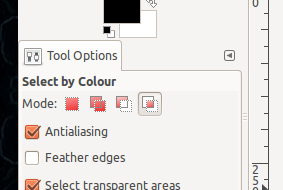
The trick is to "intersect" two selections. For instance you select by colour normally first (that will select plenty of red areas) and then you use another selection tool (Freehand for instance) to reselect the area of interest. So you end up with only bits that are selected in both selections, the red stuff which is within your freehand selection.
Attachment:
 IntersectSelections.png [ 242.33 KiB | Viewed 3310 times ]
You can also do the exact opposite, ie select the area first, and then do a color selection in intersect mode.
 Login
Login Register
 Tweets
 FAQ
FAQ Advanced Search


 Tia
Tia.gif)