It is currently Wed Nov 11, 2026 12:53 am


All times are UTC - 5 hours [ DST ]


Post new topic Reply to topic  [ 3 posts ] 
Author Message
 Post subject: Button-pressed-icon for dockable dialogues possible? [SOLVED]]
PostPosted: Sun Jan 08, 2017 1:36 pm  (#1) 
Offline
GimpChat Member
User avatar

Joined: Sep 27, 2016
Posts: 345
Location: Germany, BW
GIMP Version: 2.8.18
Operating System: Linux
OS Version: MInt 17.1
GIMP Experience: Basic Level


Hello,

I have a question about theming again.
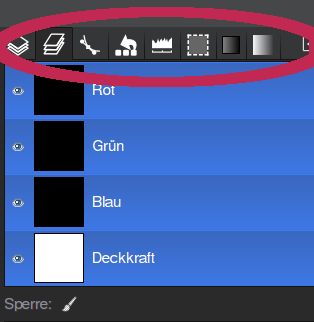
I'd like to have some optical hint to see which dialogue I'm on.

Image

I have a file "button-pressed.png" for it ... but I don't know how to add it to my gtkrc file.

Can anybody help?

Cheers
nelo

_________________
Regards
nelo

(Gimp 2.10 on Linux Mint MATE 20.1)


Last edited by nelo on Mon Jan 09, 2017 4:18 am, edited 1 time in total.

Share on Facebook Share on Twitter Share on Orkut Share on Digg Share on MySpace Share on Delicious Share on Technorati
Top
 Post subject: Re: Button-pressed-icon for dockable dialogues possible?
PostPosted: Sun Jan 08, 2017 3:04 pm  (#2) 
Offline
Script Coder
User avatar

Joined: Jun 22, 2010
Posts: 1171
Location: Here and there
This should help you with the tabs:
viewtopic.php?f=23&t=10531&start=30#p140247

Kevin


Top
 Post subject: Re: Button-pressed-icon for dockable dialogues possible?
PostPosted: Mon Jan 09, 2017 4:17 am  (#3) 
Offline
GimpChat Member
User avatar

Joined: Sep 27, 2016
Posts: 345
Location: Germany, BW
ahh .... notebook was what I had to look for.
Thank you Kevin. That did the trick.

Cheers
nelo

_________________
Regards
nelo

(Gimp 2.10 on Linux Mint MATE 20.1)


Top
Post new topic Reply to topic  [ 3 posts ] 

All times are UTC - 5 hours [ DST ]


* Login  


Powered by phpBB3 © phpBB Group