|
GIMP Version: 2.8.16
Operating System: Mac OS
OS Version: 10.13.5
GIMP Experience: New User
This is my first experience with a graphics tablet, so please excuse me if the answer is something terribly simple.
So, I've plugged the tablet (Huion H640P) into my computer (a Mac), installed the relevant driver, went into GIMP/Preferences/Configure Input Devices and changed 'Quartz Pen' to 'Screen' rather than 'Disabled'
For a short while, this let me draw with the pen and tablet. It all seemed fine. Then something (I don't know what) changed, which meant I could 'click' with the pen, putting a single dot of ink on the screen, but I couldn't then drag. (Weirdly, but maybe irrelevantly, there was a middle stage, where it let me draw with the 'Airbrush Tool' but only do a single dot with 'Pencil Tool' or 'Pen Tool'
I *think* the issue is that Gimp knows I have both a 'Core Pointer' and a 'Quartz Pen' plugged in, but it is convinced my tablet is the Core Pointer, not the Quartz Pen. I've no idea how to tell it, 'no, the device I'm literally using right now is the one that's not the Core Pointer'. As you'll see in the attached screencap, 'Device Status' lists them both, and seems to have 'selected' Core Pointer. When I change foreground/background colours, they're the one attached to Core Pointer, etc., but there's nothing you can click on or do with Device Status (cos it just reports status). So, how do I make Gimp realise that the pen in my hand is the quartz pen, and isn't the core pointer?
(Sorry again if it's a very obvious answer. I tried googling, but all the results were about pressure sensitivity, which isn't my issue at all)
tl;dr How do I tell it 'this is not the core pointer, it's the other thing you can see'?
| Attachments: |
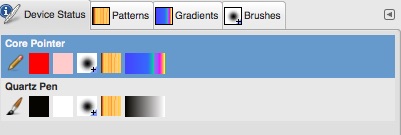
devicestatus.jpg [ 20.19 KiB | Viewed 2996 times ]
|
|
 Login
Login Register
 Tweets
 FAQ
FAQ Advanced Search


