It is currently Mon Aug 03, 2026 2:55 am


All times are UTC - 5 hours [ DST ]


Post new topic Reply to topic  [ 12 posts ] 
Author Message
 Post subject: GIMP Portable
PostPosted: Tue Dec 27, 2022 5:11 pm  (#1) 
Offline
GimpChat Member
User avatar

Joined: Jun 02, 2013
Posts: 2090
GIMP Version: 2.8.14
Operating System: Windows 10 Professional
GIMP Experience: Intermediate Level


Where's the best place to get GIMP 2.10 portable, 64bit? I found several download places, but am not familiar with most. Does Samj still do portables? I have yet to try GIMP 2.10, and feel this would be a good place to start. Thanks for any help, appreciate it.

_________________
Image


Share on Facebook Share on Twitter Share on Orkut Share on Digg Share on MySpace Share on Delicious Share on Technorati
Top
 Post subject: Re: GIMP Portable
PostPosted: Tue Dec 27, 2022 6:44 pm  (#2) 
Now then samj is dealing with the versions 2.99 but you can go back in the month of June where he has the last release of the 2.10 versions (2.10.32).

You can go to his blog: https://samjcreations.blogspot.com/2022 ... -bits.html


Top
 Post subject: Re: GIMP Portable
PostPosted: Tue Dec 27, 2022 6:56 pm  (#3) 
Offline
GimpChat Member
User avatar

Joined: Jun 02, 2013
Posts: 2090
Perfect, thank you, appreciate it.

_________________
Image


Top
 Post subject: Re: GIMP Portable
PostPosted: Tue Dec 27, 2022 7:23 pm  (#4) 
Offline
GimpChat Member
User avatar

Joined: Jun 02, 2013
Posts: 2090
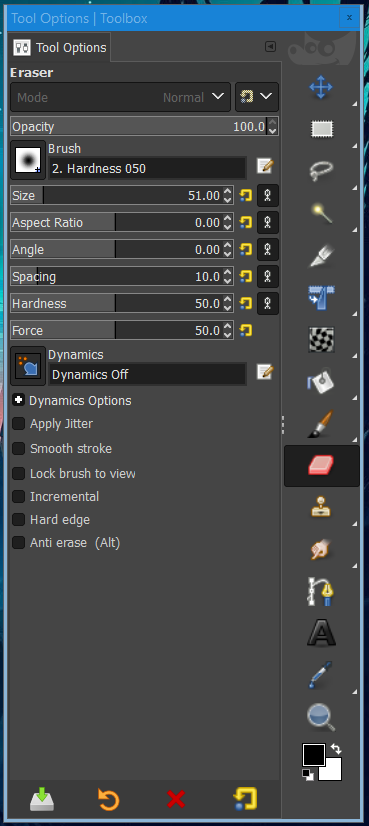
Whoa, way different than my themed 2.8, haha. Small icons too. Hard for this old man to see. Probably a way to resize them?

_________________
Image


Top
 Post subject: Re: GIMP Portable
PostPosted: Tue Dec 27, 2022 9:37 pm  (#5) 
Offline
Global Moderator
User avatar

Joined: Apr 01, 2012
Posts: 8447
Location: On the other side of your screen
Have a look in your preferences. You may have a way to resize in icon themes.
In 2.10 you have Small, Medium, Large and Huge - down the bottom of the theme window.

_________________
Image
Free Fun Photo Editing & resources
Poems from the Lord
Gimp Newby
Gimp version 3.2.4 and GMIC-Qt 4.2.0 OS :- Windows 10 Home 64


Top
 Post subject: Re: GIMP Portable
PostPosted: Tue Dec 27, 2022 9:56 pm  (#6) 
Offline
GimpChat Member
User avatar

Joined: Jun 02, 2013
Posts: 2090
Thanks sallyanne, worked perfectly.

_________________
Image


Top
 Post subject: Re: GIMP Portable
PostPosted: Tue Dec 27, 2022 10:29 pm  (#7) 
Offline
GimpChat Member
User avatar

Joined: Jun 02, 2013
Posts: 2090
Any clue how I get my icons back on top of the tool options, instead of the way they're on the side? Thanks.

Image

_________________
Image


Top
 Post subject: Re: GIMP Portable
PostPosted: Tue Dec 27, 2022 10:54 pm  (#8) 
Offline
GimpChat Member
User avatar

Joined: Jun 02, 2013
Posts: 2090
I figured it out.

_________________
Image


Top
 Post subject: Re: GIMP Portable
PostPosted: Tue Dec 27, 2022 11:14 pm  (#9) 
Offline
GimpChat Member
User avatar

Joined: Jun 02, 2013
Posts: 2090
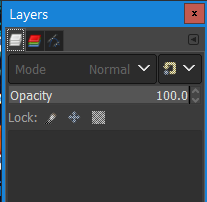
Anyway to make the icons larger on the layers dialog?

Image

_________________
Image


Top
 Post subject: Re: GIMP Portable
PostPosted: Tue Dec 27, 2022 11:40 pm  (#10) 
Offline
Global Moderator
User avatar

Joined: Oct 02, 2014
Posts: 5011
Location: Sydney Australia
I'm not using a portable version of Gimp, but I also had difficulties with the smaller icons in 2.10, so under Edit>Preferences>Icon Theme, I selected Legacy. There is also an option there to size whatever icons you are using, but I've not tried that.

_________________
Image

Respect should be offered freely but hard earned


Top
 Post subject: Re: GIMP Portable
PostPosted: Wed Dec 28, 2022 3:59 am  (#11) 
Offline
GimpChat Member

Joined: Mar 04, 2011
Posts: 2610
The Warrior wrote:
Anyway to make the icons larger on the layers dialog?

[ Image ]


There is a plugin for that

Attachment:
icons.jpg
icons.jpg [ 53.51 KiB | Viewed 2405 times ]


see: viewtopic.php?f=11&t=19154&start=10#p261235

edit: oh... you were there a year ago. Might come in handy for new gimp users


Top
 Post subject: Re: GIMP Portable
PostPosted: Wed Dec 28, 2022 7:06 am  (#12) 
Offline
GimpChat Member
User avatar

Joined: Jun 02, 2013
Posts: 2090
Thanks guys, appreciate it. Rich2005, I forgot all about that plug in. Worked flawlessly.

_________________
Image


Top
Post new topic Reply to topic  [ 12 posts ] 

All times are UTC - 5 hours [ DST ]


* Login  


Powered by phpBB3 © phpBB Group