It is currently Tue Nov 24, 2026 8:41 pm


All times are UTC - 5 hours [ DST ]


Post new topic Reply to topic  [ 30 posts ]  Go to page 1, 2  Next
Author Message
 Post subject: Can someone help me with a GAP animation?
PostPosted: Tue Jul 05, 2011 10:01 pm  (#1) 
Offline
Retired Staff
User avatar

Joined: May 22, 2008
Posts: 6946
Location: Somewhere in GIMP
GIMP Version: 2.6.11
Operating System: Linux
OS Version: Fedora 12
GIMP Experience: Intermediate Level

List any relevant plug-ins or scripts:
GAP


I made this little twirly thing. The dot of the exclamation mark on my 4th of July banner intrigued me and I thought it was cute. Image

I set up a path for it to follow using GAP, but I can't get it to twirl as it travels the path. Can someone help me with that part of it?

Image

_________________
Image
World War IV will be fought with sticks and stones. - Albert Einstein


Share on Facebook Share on Twitter Share on Orkut Share on Digg Share on MySpace Share on Delicious Share on Technorati
Top
 Post subject: Re: Can someone help me with a GAP animation?
PostPosted: Tue Jul 05, 2011 10:13 pm  (#2) 
Offline
GimpChat Member
User avatar

Joined: Jun 25, 2011
Posts: 914
Location: Mount Olive, North Carolina
It's hard for me to tell, but it looks like the pinwheel makes one twirl ``step'' for each bounce ``step.'' Since they're perfectly aligned, it doesn't look like its twirling at all. If you look at it closely, you can tell it -is- twirling, though. Each time it changes location, the rotation angle is slightly different. I would say the problem is the brain just isn't being tricked into thinking its twirling.

Maybe just bumping up the framerate would help, so that the twirl steps and bounce steps aren't aligned. Suppose the pinwheel makes M rotations per second, and N bounces per second. Ideally I'd think you would want M and N to be relatively prime. That would be as far ``out of alignment'' as you could get. But anything other than M = N, and both numbers small, would probably help. A smoother framerate would probably help, too.


Top
 Post subject: Re: Can someone help me with a GAP animation?
PostPosted: Tue Jul 05, 2011 10:25 pm  (#3) 
Offline
GimpChat Founder
User avatar

Joined: May 22, 2008
Posts: 5248
Location: Gimpville
I wasn't aware that GAP could move an animated gif along a path but then again, I haven't used GAP lately. Last time I used it, it would only move a single layer image across a path and not a multi-layer animated gif.

It would be a nice feature though. Maybe you could run each layer though the same path and then alternate the frames somehow, perhaps with a script.

_________________
Image


Top
 Post subject: Re: Can someone help me with a GAP animation?
PostPosted: Tue Jul 05, 2011 10:38 pm  (#4) 
Offline
Retired Staff
User avatar

Joined: May 22, 2008
Posts: 6946
Location: Somewhere in GIMP
merrak wrote:
Each time it changes location, the rotation angle is slightly different. I would say the problem is the brain just isn't being tricked into thinking its twirling.
That's the result of choosing Rotate Follow in GAP. The animation rotates just a bit as it follows the path.

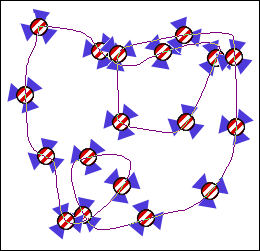
Here is a screen shot with the path and all of the animation layers visible. You can see the twirly thing rotating as it follows the curves of the path.

Image

_________________
Image
World War IV will be fought with sticks and stones. - Albert Einstein


Top
 Post subject: Re: Can someone help me with a GAP animation?
PostPosted: Tue Jul 05, 2011 10:41 pm  (#5) 
Offline
GimpChat Founder
User avatar

Joined: May 22, 2008
Posts: 5248
Location: Gimpville
I see what you're saying. It rotates as it makes a turn but that's not the same as moving an animated gif along a path. For an animated gif, seems to me you'd still have to move each layer along the same path and alternate the layers as you go.

I guess you could simulate the effect you're after by making very small rotations in the path as you go. That would give you more of a rotating effect but that doesn't address the problem of moving an arbitrary animated gif along a path. That's another can of worms.

_________________
Image


Top
 Post subject: Re: Can someone help me with a GAP animation?
PostPosted: Tue Jul 05, 2011 10:55 pm  (#6) 
Offline
Retired Staff
User avatar

Joined: May 22, 2008
Posts: 6946
Location: Somewhere in GIMP
Doing some figuring here. I can rotate the image using the rotation option. If I make a path with 60 nodes, I can set the rotation from 0 to 354. It will turn 360 degrees in one trip along the path. Don't know if that will be fast enough but it might work. May have to make even more nodes. Need to get it set up. Back to the drawing board. :scram

_________________
Image
World War IV will be fought with sticks and stones. - Albert Einstein


Top
 Post subject: Re: Can someone help me with a GAP animation?
PostPosted: Tue Jul 05, 2011 11:09 pm  (#7) 
Offline
Script Coder
User avatar

Joined: Apr 23, 2010
Posts: 1553
Location: not from Guildford after all
Oregonian wrote:
That's the result of choosing Rotate Follow in GAP. The animation rotates just a bit as it follows the path.

You do not want to use Rotate Follow for this. You just want to set your Stepmode to "Loop" for your (multi-layer, animated) source image and use a very high StepFactor (and create lots of frames).

Quote:
Here is a screen shot with the path and all of the animation layers visible. You can see the twirly thing rotating as it follows the curves of the path.

Image

When you Grab your GAP control points from your path, hold down the SHIFT key so that all of the "keyframes" are equally spaced along the path (unless you actually want your spinner to change speed as it proceeds along the path).

_________________
Any sufficiently primitive technology is indistinguishable from a rock.


Top
 Post subject: Re: Can someone help me with a GAP animation?
PostPosted: Tue Jul 05, 2011 11:19 pm  (#8) 
Offline
GimpChat Founder
User avatar

Joined: May 22, 2008
Posts: 5248
Location: Gimpville
saulgoode wrote:
set your Stepmode to "Loop" for your (multi-layer, animated) source image and use a very high StepFactor.

Cool!!

_________________
Image


Top
 Post subject: Re: Can someone help me with a GAP animation?
PostPosted: Tue Jul 05, 2011 11:44 pm  (#9) 
Offline
Retired Staff
User avatar

Joined: May 22, 2008
Posts: 6946
Location: Somewhere in GIMP
The finished image has 181 frames. I can't tell if the fins are spinning or not in the Playback screen. I have a 4 layer animation image I'm using. I centered the spinner on the path nodes, shift Click to grab path, shift click to grab a point then changed the layer and did that for the 4 layers.

I don't know how I managed to get that second one in there.

I'm still going to have to work with this more.

Thanks for your good instructions, saulgoode.

Image

_________________
Image
World War IV will be fought with sticks and stones. - Albert Einstein


Top
 Post subject: Re: Can someone help me with a GAP animation?
PostPosted: Wed Jul 06, 2011 12:03 am  (#10) 
Offline
Script Coder
User avatar

Joined: Apr 23, 2010
Posts: 1553
Location: not from Guildford after all
Oops, I should have said "a very low Stepfactor" -- but even that shouldn't matter that much if you have enough frames.

_________________
Any sufficiently primitive technology is indistinguishable from a rock.


Top
 Post subject: Re: Can someone help me with a GAP animation?
PostPosted: Wed Jul 06, 2011 12:14 am  (#11) 
Offline
Retired Staff
User avatar

Joined: May 22, 2008
Posts: 6946
Location: Somewhere in GIMP
I've zipped the spinner.xcf file (4-layer animation) and the spinner_000001.xcf file. The path is in the .000001 file, and attached the zip file. Maybe you can make heads or tails of them.


Attachments:
spinner.zip [6.33 KiB]
Downloaded 177 times

_________________
Image
World War IV will be fought with sticks and stones. - Albert Einstein
Top
 Post subject: Re: Can someone help me with a GAP animation?
PostPosted: Wed Jul 06, 2011 1:28 am  (#12) 
Offline
Script Coder
User avatar

Joined: Apr 23, 2010
Posts: 1553
Location: not from Guildford after all
Basically, you have a very long path -- about 3600 pixels in length -- and so you will need a lot of frames if you are wanting your graphic, regardless whether it's rotating, to not jump large distances between frames.

Well, here is what I got after modifying your original file to have 12 frames (instead of 4) and creating a 400-frame animation (I would have done 800 frames from I only have 1-gig of RAM and could not convert 800 frames to a GIF).

Attachment:
spinner.gif
spinner.gif [ 163.91 KiB | Viewed 2438 times ]

_________________
Any sufficiently primitive technology is indistinguishable from a rock.


Top
 Post subject: Re: Can someone help me with a GAP animation?
PostPosted: Wed Jul 06, 2011 1:40 am  (#13) 
Offline
Retired Staff
User avatar

Joined: May 22, 2008
Posts: 6946
Location: Somewhere in GIMP
Very nice. Did you increase the frames by taking a frame and rotating it in GAP?

400 frames! Wow. I don't think I've ever made an animation with that many.

So would I have been better off making a smaller path?

What did you do in GAP to make it work?

That's awesome.

_________________
Image
World War IV will be fought with sticks and stones. - Albert Einstein


Top
 Post subject: Re: Can someone help me with a GAP animation?
PostPosted: Wed Jul 06, 2011 9:35 am  (#14) 
Offline
GimpChat Member
User avatar

Joined: Apr 25, 2011
Posts: 121
Location: Taiwan
this is 200 frames with a smaller path
Image

_________________
Sorry for my poor English, I use Google Translate.
There may be something wrong, Please understand.

GIMP 2.10.38 rev1 portable+GAP+G'MIC+nufraw+Beautify+MathMap+...


Top
 Post subject: Re: Can someone help me with a GAP animation?
PostPosted: Wed Jul 06, 2011 11:06 am  (#15) 
Offline
Retired Staff
User avatar

Joined: May 22, 2008
Posts: 6946
Location: Somewhere in GIMP
Excellent, JamesH. I didn't realize I'd have to have so many frames, but it all makes sense if I want that spinner to spin!

Your path must have been a kind of rudimentary figure 8. :hehe

_________________
Image
World War IV will be fought with sticks and stones. - Albert Einstein


Top
 Post subject: Re: Can someone help me with a GAP animation?
PostPosted: Wed Jul 06, 2011 1:24 pm  (#16) 
Offline
GimpChat Founder
User avatar

Joined: May 22, 2008
Posts: 5248
Location: Gimpville
Hey, those turned out nice. Time to compile and install GAP for another look. :2thup

_________________
Image


Top
 Post subject: Re: Can someone help me with a GAP animation?
PostPosted: Wed Jul 06, 2011 1:42 pm  (#17) 
Offline
Retired Staff
User avatar

Joined: May 22, 2008
Posts: 6946
Location: Somewhere in GIMP
GnuTux wrote:
Hey, those turned out nice. Time to compile and install GAP for another look. :2thup
Wonder of the update of Fedora might just happen to have it in the repos yet. :pengy

_________________
Image
World War IV will be fought with sticks and stones. - Albert Einstein


Top
 Post subject: Re: Can someone help me with a GAP animation?
PostPosted: Wed Jul 06, 2011 3:08 pm  (#18) 
Offline
GimpChat Founder
User avatar

Joined: May 22, 2008
Posts: 5248
Location: Gimpville
gimp-gap has been on the RPMFusion wish list for quite a while now but no one has stepped up to the plate and volunteered to be the Fedora package maintainer. So compiling is the only option, afaik.

_________________
Image


Top
 Post subject: Re: Can someone help me with a GAP animation?
PostPosted: Thu Jul 07, 2011 3:18 pm  (#19) 
Offline
Retired Staff
User avatar

Joined: May 22, 2008
Posts: 6946
Location: Somewhere in GIMP
Here it is with 100 frames and a 12 frame spinner. Mine is not spinning as rapidly as saulgoode's and JamesH's but I have less frames and that is probably the reason or I might be doing it wrong.

Image

_________________
Image
World War IV will be fought with sticks and stones. - Albert Einstein


Top
 Post subject: Re: Can someone help me with a GAP animation?
PostPosted: Thu Jul 07, 2011 6:24 pm  (#20) 
Offline
Retired Staff
User avatar

Joined: May 22, 2008
Posts: 6946
Location: Somewhere in GIMP
Image

_________________
Image
World War IV will be fought with sticks and stones. - Albert Einstein


Top
Post new topic Reply to topic  [ 30 posts ]  Go to page 1, 2  Next

All times are UTC - 5 hours [ DST ]


* Login  


Powered by phpBB3 © phpBB Group