It is currently Tue Nov 24, 2026 9:17 pm


All times are UTC - 5 hours [ DST ]


Post new topic Reply to topic  [ 16 posts ] 
Author Message
 Post subject: Curves Folder? Quick Question
PostPosted: Thu Jul 14, 2011 1:28 am  (#1) 
Offline
GimpChat Member

Joined: Jun 18, 2011
Posts: 17
Location: In a box
GIMP Version: 2.6.11
Operating System: Windows
OS Version: Windows 7 SP1
GIMP Experience: Intermediate Level


I ask Oregonian for help earlier pertaining to the "Curves" tool in GIMP. I went to deviantart.com and I came across curves for GIMP. I use Firefox and my downloads automatically save to the "Downloads" folder. I extracted the file and I'm suppose to move the extracted files to the Curves folder in GIMP.. But when I go looking for it I can't find it. I've downloaded brushes and patterns before and this is the directory I use:

[Image Deleted]

And a list of things comes up:

[Image Deleted]

But I don't see the curves folder anywhere in there. Any ideas where it could be?


P.S. I have the newest version of GIMP, why does my files say it's gimp-2.0 still?


Last edited by Bonita on Sun Jul 17, 2011 12:24 am, edited 1 time in total.

Share on Facebook Share on Twitter Share on Orkut Share on Digg Share on MySpace Share on Delicious Share on Technorati
Top
 Post subject: Re: Curves Folder? Quick Question
PostPosted: Thu Jul 14, 2011 1:32 am  (#2) 
Offline
GimpChat Member
User avatar

Joined: Oct 06, 2010
Posts: 4050
I believe you have to create your own curves folder, and the settings can then be found when importing them using Curves in GIMP.

_________________
"In order to attain the impossible, one must attempt the absurd."
~ Miguel de Cervantes


Top
 Post subject: Re: Curves Folder? Quick Question
PostPosted: Thu Jul 14, 2011 9:28 am  (#3) 
Offline
GimpChat Member

Joined: Mar 29, 2011
Posts: 346
Location: Wisconsin
There is a Curves folder in <user>\.gimp-2.6

GIMP uses the gimp-2.0 Program Files directory for the 2.*.* versions of GIMP

_________________
Image


Top
 Post subject: Re: Curves Folder? Quick Question
PostPosted: Thu Jul 14, 2011 9:47 am  (#4) 
Offline
GimpChat Member
User avatar

Joined: Apr 07, 2010
Posts: 14182
yes tiy are correct bkh.... I overlooked it the first time I looked....

_________________
Image


Top
 Post subject: Re: Curves Folder? Quick Question
PostPosted: Thu Jul 14, 2011 9:59 am  (#5) 
Offline
Retired Staff
User avatar

Joined: May 22, 2008
Posts: 6946
Location: Somewhere in GIMP
I didn't even realize there was a curves folder. I looked and there it was.

I've added Bonita's link to the curves in question: Click here

This is the contents of the zipped curves file. The files go into the gimp-2.6 curves folder except for the .jpg file. Apparently the curve files do not work in Mac or Linux.
Image

I went to the gimp manual and here is what it says about curves.
http://docs.gimp.org/2.6/en/gimp-tool-curves.html

_________________
Image
World War IV will be fought with sticks and stones. - Albert Einstein


Top
 Post subject: Re: Curves Folder? Quick Question
PostPosted: Thu Jul 14, 2011 10:58 am  (#6) 
Offline
Global Moderator
User avatar

Joined: May 16, 2010
Posts: 16309
Cool thanks for the link O! :)
Yeah you shouldn't add anything to Gimps program directory.Always use the user folder "gimp-2.6" and its relevant sub folders.It is much easier to keep track of your added resources, and updating is easier.

_________________
Image


Top
 Post subject: Re: Curves Folder? Quick Question
PostPosted: Thu Jul 14, 2011 1:33 pm  (#7) 
Offline
GimpChat Member
User avatar

Joined: Apr 08, 2010
Posts: 5420
Location: Northwest Ohio
What is this folder for? Presets/saved settings?


Top
 Post subject: Re: Curves Folder? Quick Question
PostPosted: Thu Jul 14, 2011 2:58 pm  (#8) 
Offline
Retired Staff
User avatar

Joined: May 22, 2008
Posts: 6946
Location: Somewhere in GIMP
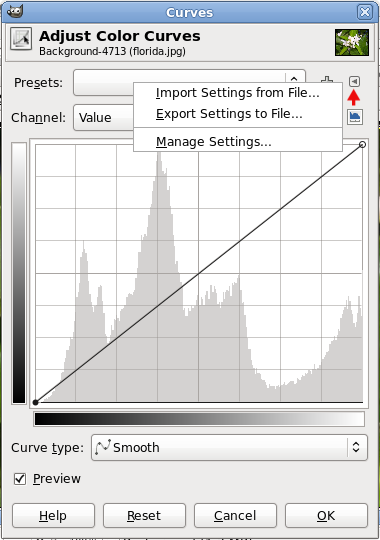
I put the files in the curves folder in Win7. To get to the curves files, click Colors > Curves. Click the tiny arrow on the dialog box and choose Import Settings from File. It takes you to the gimp-2.6/curves folder. Choose the file you want to use. Adjust the curve in the dialog.
Image

_________________
Image
World War IV will be fought with sticks and stones. - Albert Einstein


Top
 Post subject: Re: Curves Folder? Quick Question
PostPosted: Thu Jul 14, 2011 3:09 pm  (#9) 
Offline
Retired Staff
User avatar

Joined: May 22, 2008
Posts: 6946
Location: Somewhere in GIMP
Link to original image. http://www.50states.com/flower/picts/florida.jpg

I used the x4 curve on the image.

Image

_________________
Image
World War IV will be fought with sticks and stones. - Albert Einstein


Top
 Post subject: Re: Curves Folder? Quick Question
PostPosted: Thu Jul 14, 2011 3:18 pm  (#10) 
Offline
Global Moderator
User avatar

Joined: May 16, 2010
Posts: 16309
Nice soft effect.Is there one in there for chrome?

_________________
Image


Top
 Post subject: Re: Curves Folder? Quick Question
PostPosted: Thu Jul 14, 2011 3:28 pm  (#11) 
Offline
Retired Staff
User avatar

Joined: May 22, 2008
Posts: 6946
Location: Somewhere in GIMP
No. The website where the curves can be downloaded shows examples of all of the preset curves. You can make your own presets by setting the color curves how you want, then click the little arrow and Export Settings to File

_________________
Image
World War IV will be fought with sticks and stones. - Albert Einstein


Top
 Post subject: Re: Curves Folder? Quick Question
PostPosted: Thu Jul 14, 2011 3:34 pm  (#12) 
Offline
Retired Staff
User avatar

Joined: May 22, 2008
Posts: 6946
Location: Somewhere in GIMP
Here is the same flower I posted above. I changed the color curves rather drastically and saved it as a preset curve by exporting it. I went back into Colors > Curves and imported my preset and it worked as planned. :mrgreen:

Image

_________________
Image
World War IV will be fought with sticks and stones. - Albert Einstein


Top
 Post subject: Re: Curves Folder? Quick Question
PostPosted: Thu Jul 14, 2011 4:00 pm  (#13) 
Offline
Retired Staff
User avatar

Joined: May 22, 2008
Posts: 6946
Location: Somewhere in GIMP
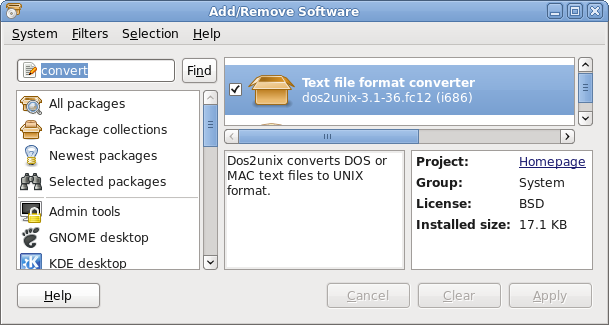
I found the dos2unix text converter in the Fedora repositories so I can convert those curves to work in my Linux version of gimp 2.6.

Image

_________________
Image
World War IV will be fought with sticks and stones. - Albert Einstein


Top
 Post subject: Re: Curves Folder? Quick Question
PostPosted: Sun Jul 17, 2011 12:15 am  (#14) 
Offline
GimpChat Member

Joined: Jun 18, 2011
Posts: 17
Location: In a box
Rod wrote:
Cool thanks for the link O! :)
Yeah you shouldn't add anything to Gimps program directory.Always use the user folder "gimp-2.6" and its relevant sub folders.It is much easier to keep track of your added resources, and updating is easier.


So you are saying I shouldn't add brushes to the gimp 2.0 folder? I should always go through the gimp 2.6 folder? Cause I've always been told to go to the C: drive and go to gimp from there.


Also, I am having a hard time.. I don't quite understand how I am suppose to get to the Gimp 2.6 folder nor the curves folder? I can't seem to find it and I don't have Linux so I don't understand O. D:


Nevermind, I found the Gimp 2.6 folder. c:


Top
 Post subject: Re: Curves Folder? Quick Question
PostPosted: Sun Jul 17, 2011 12:36 am  (#15) 
Offline
GimpChat Member

Joined: Jun 18, 2011
Posts: 17
Location: In a box
I just realized something while I was creating an image in GIMP. I use pixel font from dafont.com and sometimes when I'm using my text tool and writing out things my font becomes blurry in some places and others it isn't. Any idea as to why?


Top
 Post subject: Re: Curves Folder? Quick Question
PostPosted: Sun Jul 17, 2011 12:46 am  (#16) 
Offline
Retired Staff
User avatar

Joined: May 22, 2008
Posts: 6946
Location: Somewhere in GIMP
I'm on my laptop in Win7. On my Desktop is a folder named Downloads. Open that folder and look for a file named Gimp_Curves_III_by_SilaynneStock.rar

Double-click the file to open it. If you don't have the software to open a .rar file, I've made a curves.zip file and attached it below. Download the zip file, double-click it to open it and you will see files named x, 1x, etc. Click File, Extract all and browse to your gimp-2.6 > curves folder and extract them into that.

I'm happy you found the folder. :mrgreen:


Attachments:
curves.zip [1.08 KiB]
Downloaded 99 times

_________________
Image
World War IV will be fought with sticks and stones. - Albert Einstein
Top
Post new topic Reply to topic  [ 16 posts ] 

All times are UTC - 5 hours [ DST ]


* Login  


Powered by phpBB3 © phpBB Group