It is currently Tue Jun 09, 2026 6:03 pm


All times are UTC - 5 hours [ DST ]


Post new topic Reply to topic  [ 22 posts ]  Go to page 1, 2  Next
Author Message
 Post subject: Needed help on gimp
PostPosted: Tue Jan 10, 2012 7:02 am  (#1) 
Offline
GimpChat Member
User avatar

Joined: Jan 10, 2012
Posts: 21
GIMP Version: 2.6.11
Operating System: Windows
OS Version: XP - SP3
GIMP Experience: Beginner Level


How can you do a realistic horse coloured in on gimp from either deviantart or jf studios please answer !!!


Share on Facebook Share on Twitter Share on Orkut Share on Digg Share on MySpace Share on Delicious Share on Technorati
Top
 Post subject: Re: Needed help on gimp
PostPosted: Tue Jan 10, 2012 7:09 am  (#2) 
Offline
GimpChat Member
User avatar

Joined: Apr 07, 2010
Posts: 14182
I don't quite understand your question. Are you asking how to colorize a horse that you already have as a picture?

_________________
Image


Top
 Post subject: Re: Needed help on gimp
PostPosted: Tue Jan 10, 2012 7:11 am  (#3) 
Offline
GimpChat Member
User avatar

Joined: Jan 10, 2012
Posts: 21
yes


Top
 Post subject: Re: Needed help on gimp
PostPosted: Tue Jan 10, 2012 7:16 am  (#4) 
Offline
Global Moderator
User avatar

Joined: May 16, 2010
Posts: 16023
Artistic wrote:
GIMP Version: 2.6.11
Operating System: Windows
OS Version: XP - SP3
GIMP Experience: Beginner Level


How can you do a realistic horse coloured in on gimp from either deviantart or jf studios please answer !!!


My advice would be to open a image of a horse in Gimp and try and use it to create one with brushes.
That is use it to look at for reference.That is how i create. I use visual references.
Then i think of it in layers, and textures. After that i try and get the materials and textures i may need, and then i start. :)

Welcome to Gimp Chat by the way.

_________________
Image


Top
 Post subject: Re: Needed help on gimp
PostPosted: Tue Jan 10, 2012 7:18 am  (#5) 
Offline
Global Moderator
User avatar

Joined: May 16, 2010
Posts: 16023
What kind of image?
Is it a black and white? :)

_________________
Image


Top
 Post subject: Re: Needed help on gimp
PostPosted: Tue Jan 10, 2012 7:28 am  (#6) 
Offline
GimpChat Member
User avatar

Joined: Apr 07, 2010
Posts: 14182
Artistic, you could try this Tutorial by Griatch on learning how to paint in Gimp.
viewtopic.php?f=23&t=3313

_________________
Image


Top
 Post subject: Re: Needed help on gimp
PostPosted: Tue Jan 10, 2012 7:35 am  (#7) 
Offline
GimpChat Member
User avatar

Joined: Jan 10, 2012
Posts: 21
thanks rod ill try it if i can't do it ill make a join me and message you the link so it would be easier to understand


Top
 Post subject: Re: Needed help on gimp
PostPosted: Tue Jan 10, 2012 7:58 am  (#8) 
Offline
Global Moderator
User avatar

Joined: May 16, 2010
Posts: 16023
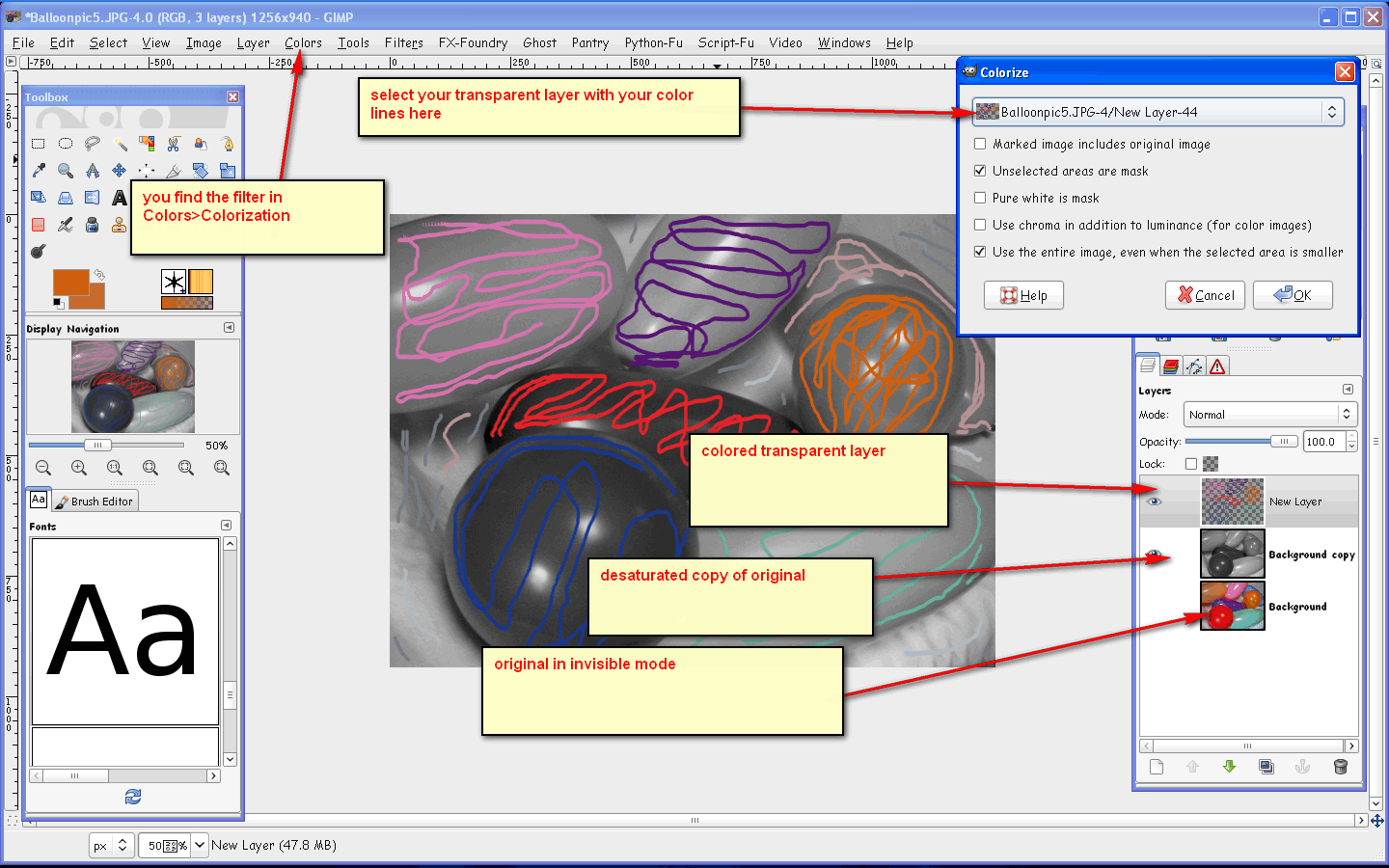
Well if it is a black and white image and you want to add color to it there is a plug-in named colorize that will do this.
You can get it here
viewtopic.php?f=9&t=1625
Just place it in your plug-ins folder.Restart Gimp.
When you use it -
Create a new layer above the image that is desaturated.Draw some lines on the transparent layer (colored lines), of which colors you wish to use.For instance if you want the horse brown draw a line all the way through the horse on the transparent layer in that brown color.
Run the plugin and it will use each of your color selections to color the image.
If you like you can post the image here and get better help.

_________________
Image


Top
 Post subject: Re: Needed help on gimp
PostPosted: Tue Jan 10, 2012 8:28 am  (#9) 
Offline
GimpChat Member
User avatar

Joined: Jan 10, 2012
Posts: 21
ok thanks for the tip


Top
 Post subject: Re: Needed help on gimp
PostPosted: Tue Jan 10, 2012 8:50 am  (#10) 
Offline
Global Moderator
User avatar

Joined: May 16, 2010
Posts: 16023
Here is an example on how to use it.

Image

My results
Image

Keep in mind this was quick so you could make the image look real good if you take your time. :)

_________________
Image


Top
 Post subject: Re: Needed help on gimp
PostPosted: Tue Jan 10, 2012 8:53 am  (#11) 
Offline
GimpChat Member
User avatar

Joined: Jan 10, 2012
Posts: 21
that is so cool


Top
 Post subject: Re: Needed help on gimp
PostPosted: Tue Jan 10, 2012 8:59 am  (#12) 
Offline
Global Moderator
User avatar

Joined: May 16, 2010
Posts: 16023
It's a cool plugin.Just keep in mind also images over 1200pixels will take a very long time to render.
Try and keep them under 1,000x1,000 pixels.

_________________
Image


Top
 Post subject: Re: Needed help on gimp
PostPosted: Tue Jan 10, 2012 9:07 am  (#13) 
Offline
GimpChat Member
User avatar

Joined: Jan 10, 2012
Posts: 21
thanks


Top
 Post subject: Re: Needed help on gimp
PostPosted: Tue Jan 10, 2012 9:31 am  (#14) 
Offline
GimpChat Member
User avatar

Joined: Jan 10, 2012
Posts: 21
thanks for this and how do you make a image blakc and white


Top
 Post subject: Re: Needed help on gimp
PostPosted: Tue Jan 10, 2012 9:56 am  (#15) 
Offline
GimpChat Member
User avatar

Joined: Apr 07, 2010
Posts: 14182
open your image, go up to the menu across the top, click colors, then click desaturate, you will have 3 options, lightness which is the default, luminosity and average. if you click preview then you will see which one suits you best. then click ok.

If you check out this basic tutorial I did, you will see what I mean.
viewtopic.php?f=23&t=2888

_________________
Image


Top
 Post subject: Re: Needed help on gimp
PostPosted: Tue Jan 10, 2012 10:59 am  (#16) 
Offline
GimpChat Member
User avatar

Joined: Jan 10, 2012
Posts: 21
ok thanks it helped alot


Top
 Post subject: Re: Needed help on gimp
PostPosted: Tue Jan 10, 2012 11:03 am  (#17) 
Offline
GimpChat Member
User avatar

Joined: Apr 07, 2010
Posts: 14182
You are welcome, I hope you get your horse the way you want it. I would like to see it.

_________________
Image


Top
 Post subject: Re: Needed help on gimp
PostPosted: Tue Jan 10, 2012 11:08 am  (#18) 
Offline
GimpChat Member
User avatar

Joined: Jan 10, 2012
Posts: 21
ok thanks im working on it now


Top
 Post subject: Re: Needed help on gimp
PostPosted: Tue Jan 10, 2012 11:10 am  (#19) 
Offline
GimpChat Member
User avatar

Joined: Jan 10, 2012
Posts: 21
and it looks great where shall i post it when its done ???


Top
 Post subject: Re: Needed help on gimp
PostPosted: Tue Jan 10, 2012 11:34 am  (#20) 
Offline
GimpChat Member
User avatar

Joined: Apr 07, 2010
Posts: 14182
When you what to upload a file, click full editor. beside the submit button,

You will see an icon that has two green computers on it with a red squiggly line between the two. hover you mouse over it and it will say upload file.
Image When the box comes up click search, choose file, I always find mine on the desktop. I put them there when I want to upload them. find your file, then click it then click open then click add file, when it is added you will see a submit button, click that and your file will upload to your post.

_________________
Image


Top
Post new topic Reply to topic  [ 22 posts ]  Go to page 1, 2  Next

All times are UTC - 5 hours [ DST ]


* Login  


Powered by phpBB3 © phpBB Group