It is currently Tue Jun 23, 2026 1:47 pm


All times are UTC - 5 hours [ DST ]


Post new topic Reply to topic  [ 16 posts ] 
Author Message
 Post subject: translation
PostPosted: Mon Jun 04, 2012 9:23 pm  (#1) 
Offline
GimpChat Member
User avatar

Joined: May 27, 2011
Posts: 707
GIMP Version: 2.6.11
Operating System: Windows
OS Version: XP - SP3
GIMP Experience: Beginner Level


http://www.gimp-werkstatt.de/puzzleani.php

Can Someone translate this tutorial into English, please?
Thank You


Share on Facebook Share on Twitter Share on Orkut Share on Digg Share on MySpace Share on Delicious Share on Technorati
Top
 Post subject: Re: translation
PostPosted: Tue Jun 05, 2012 4:54 am  (#2) 
Offline
Global Moderator
User avatar

Joined: May 16, 2010
Posts: 16042
pirate541 wrote:
GIMP Version: 2.6.11
Operating System: Windows
OS Version: XP - SP3
GIMP Experience: Beginner Level


http://www.gimp-werkstatt.de/puzzleani.php

Can Someone translate this tutorial into English, please?
Thank You

http://translate.google.com/translate?s ... hp&act=url

_________________
Image


Top
 Post subject: Re: translation
PostPosted: Tue Jun 05, 2012 5:12 pm  (#3) 
Offline
GimpChat Member
User avatar

Joined: May 27, 2011
Posts: 707
Thank You Rod :)
Problem is that google translates word by word,it is missing something i think,unless it's me
who can't understand the steps


Top
 Post subject: Re: translation
PostPosted: Tue Jun 05, 2012 5:25 pm  (#4) 
Offline
GimpChat Member
User avatar

Joined: Mar 23, 2012
Posts: 7388
Location: Göteborg at last!
Another problem is that it can't translate screen grabs as they are images and not text.


Top
 Post subject: Re: translation
PostPosted: Tue Jun 05, 2012 5:34 pm  (#5) 
Offline
GimpChat Member
User avatar

Joined: Apr 07, 2010
Posts: 14182
they used to grab screen shots didn't they. Isn't this something that just happened lately.

_________________
Image


Top
 Post subject: Re: translation
PostPosted: Tue Jun 05, 2012 5:35 pm  (#6) 
Offline
GimpChat Member
User avatar

Joined: Mar 23, 2012
Posts: 7388
Location: Göteborg at last!
No idea how it works.


Top
 Post subject: Re: translation
PostPosted: Tue Jun 05, 2012 7:25 pm  (#7) 
Offline
GimpChat Member
User avatar

Joined: May 27, 2011
Posts: 707
heh, me either,that's why i asked for help :)


Top
 Post subject: Re: translation
PostPosted: Tue Jun 05, 2012 7:28 pm  (#8) 
Offline
Script Coder
User avatar

Joined: Apr 23, 2010
Posts: 1553
Location: not from Guildford after all
  1. Open your original image
  2. Create a new layer filled with white
  3. "Filters->Render->Pattern->Jigsaw" -- Number of tiles = 3x3
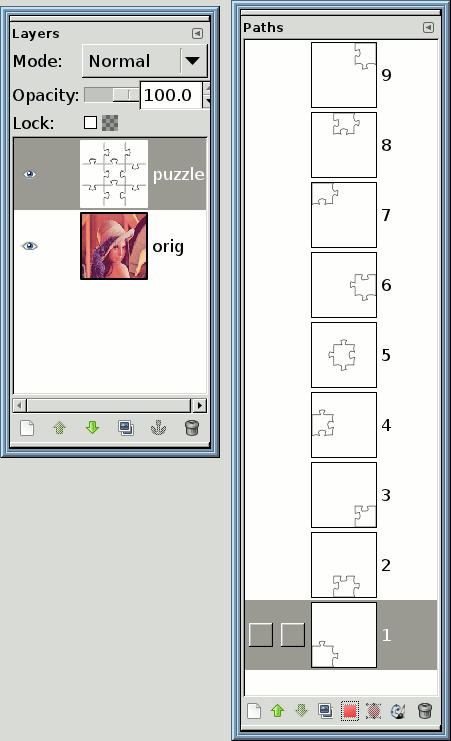
  4. For each of the nine "pieces" of the resulting puzzle, use the Fuzzy Selection Tool :fuzzsel and 1) click on the center of the piece, 2) "Select->Save to Path", and 3) in the Paths Dialog, rename the path to be the "piece number" (1-9). If your Path dialog is not open, open it with "Windows->Dockable Dialogs->Paths".

    Your Layers Dialog and Paths Dialog should now appear like this:
    Attachment:
    SSpuzzle1.png
    SSpuzzle1.png [ 13.72 KiB | Viewed 2849 times ]

  5. You can now delete the white puzzle layer.
  6. Duplicate your original layer nine times so that you end up with 10 layers total.
  7. "Select->All"

    The following steps will be easier if you arrange your windows so that the Layers Dialog and the Paths Dialog are both visible at the same time (you will need to switch back and forth between them).
  8. Click on one of the paths in the Paths Dialog to make it the active path.
  9. Hold down the CTRL key while you click on the red selection button :select at the bottom of the dialog. This will subtract the region of the path from current selection.
  10. Click on the thumbnail preview of the bottommost layer in the Layers Dialog to make it the active layer.
  11. Perform an "Edit->Clear" (or use the DELETE key).
  12. Click on one of the other paths in the Paths Dialog (do not use any of the same paths that you used already; I "chain-linked" each path after using it to keep track).
  13. Hold down the CTRL key while you click on the red selection button :select at the bottom of the dialog. This will subtract the path's region from the existing selection.
  14. Click on the thumbnail preview of the next layer up in the Layers Dialog to make it the active layer.
  15. Perform an "Edit->Clear" (or use the DELETE key).

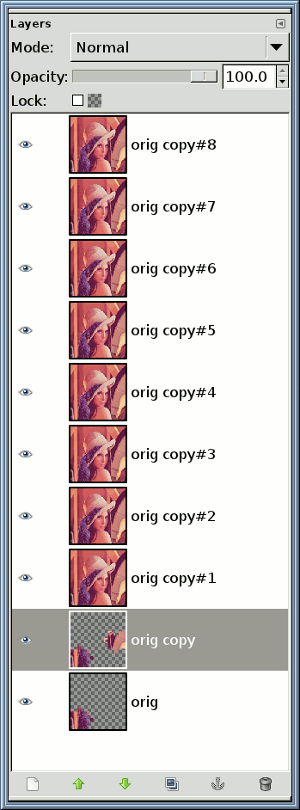
    Here is a screenshot of the Layers Dialog after the first two layers have been processed. Note the checkerboard indicating the transparency around the puzzle pieces.

    Attachment:
    SSpuzzle2.png
    SSpuzzle2.png [ 26.21 KiB | Viewed 2849 times ]

  16. Repeat steps 12 through 15 seven times until you reach the layer that is just below the topmost layer in the layerstack.
  17. Add a new layer and fill it with the background pattern of your choice.
  18. Move the new layer to the bottom of the layerstack.

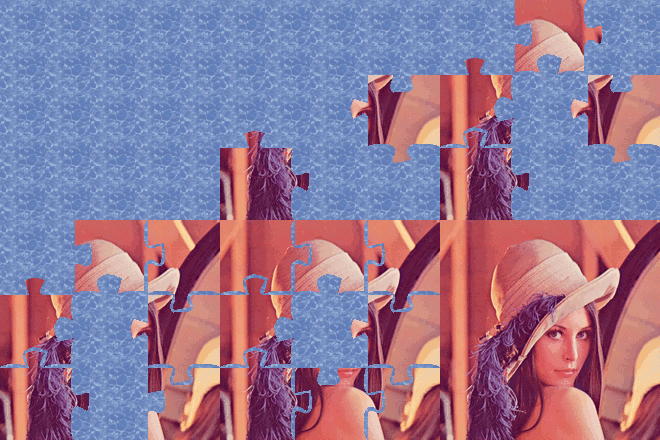
You now have all of the layers of your animation, you can optimize the file ("Filters->Animation->Optimize") and save it with the .gif extension (specify a delay of 1000ms).

Here is my result:

Attachment:
lenna-puzzle.gif
lenna-puzzle.gif [ 63.89 KiB | Viewed 2849 times ]


NOTE: There is another portion of the tutorial which creates a layer that has a few of the pieces "scattered" over the background. Creating this layer is left as an exercise (you should've learned enough about using the paths to cut out pieces of the puzzle, all that remains is moving and rotating them, and adding some shadow effects).

_________________
Any sufficiently primitive technology is indistinguishable from a rock.


Top
 Post subject: Re: translation
PostPosted: Tue Jun 05, 2012 7:45 pm  (#9) 
Offline
GimpChat Member

Joined: Aug 05, 2011
Posts: 606
Location: limestone,ny
Image

I used this tutorial (pdf)


Attachments:
puzzle_1024x768.png
puzzle_1024x768.png [ 268.09 KiB | Viewed 2841 times ]
puzzle_800x600.png
puzzle_800x600.png [ 176.64 KiB | Viewed 2841 times ]
www-dodisdodat-com.pdf [1.14 MiB]
Downloaded 301 times
Top
 Post subject: Re: translation
PostPosted: Tue Jun 05, 2012 9:07 pm  (#10) 
Offline
GimpChat Member
User avatar

Joined: May 27, 2011
Posts: 707
Thank You Saul and thank You Al :)
You guys are just amazing

I will work on it this weekend and post my puzzle


Top
 Post subject: Re: translation
PostPosted: Fri Jun 08, 2012 10:53 pm  (#11) 
Offline
GimpChat Member
User avatar

Joined: May 27, 2011
Posts: 707
My puppies on their couch,yes they have their own couch

:hehe
I have no idea why there is an extra white layer on top of the blue one

Image


Top
 Post subject: Re: translation
PostPosted: Sat Jun 09, 2012 5:30 am  (#12) 
Offline
GimpChat Member
User avatar

Joined: Apr 07, 2010
Posts: 14182
Wow, 3 big dogs on one couch, that must keep the dog chow in business. lol

_________________
Image


Top
 Post subject: Re: translation
PostPosted: Sat Jun 09, 2012 6:38 am  (#13) 
Offline
GimpChat Member
User avatar

Joined: Mar 23, 2012
Posts: 7388
Location: Göteborg at last!
Gorgeous dogs Pirate.


Top
 Post subject: Re: translation
PostPosted: Sat Jun 09, 2012 7:09 am  (#14) 
Offline
GimpChat Member
User avatar

Joined: May 27, 2011
Posts: 707
thank You All,
all 3 dogs are rescued dogs too


Top
 Post subject: Re: translation
PostPosted: Sat Jun 09, 2012 9:15 am  (#15) 
Offline
GimpChat Member
User avatar

Joined: Mar 23, 2012
Posts: 7388
Location: Göteborg at last!
Well they look lovely and healthy now.


Top
 Post subject: Re: translation
PostPosted: Sat Jun 09, 2012 9:41 am  (#16) 
Offline
GimpChat Member
User avatar

Joined: May 27, 2011
Posts: 707
Erisian,they are so healthy that when i take them on a walk,they walk me :)
three leashes pulling me all over the place lol


Top
Post new topic Reply to topic  [ 16 posts ] 

All times are UTC - 5 hours [ DST ]


* Login  


Powered by phpBB3 © phpBB Group