It is currently Tue Jun 23, 2026 2:37 pm


All times are UTC - 5 hours [ DST ]


Post new topic Reply to topic  [ 6 posts ] 
Author Message
 Post subject: Installing GMIC in New Fedora 17
PostPosted: Sat Jun 09, 2012 6:37 am  (#1) 
Offline
GimpChat Member
User avatar

Joined: Apr 07, 2010
Posts: 14182
GIMP Version: 2.6.11
Operating System: Linux
OS Version: Windows7 and Fedora 17
GIMP Experience: Intermediate Level


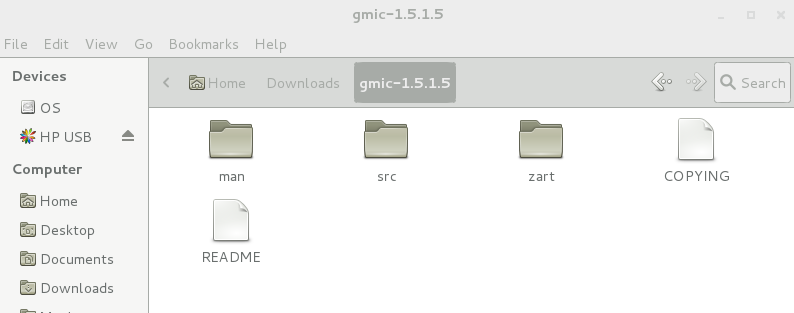
I am trying to install GMIC into Fedora 17. I have downloaded the tar file and extracted it, but not sure as what to install. There are 3 folders which are in the screen shot below.
Do I put all these 3 folders into plug-ins, or just the contents.
Thanks

Image

_________________
Image


Share on Facebook Share on Twitter Share on Orkut Share on Digg Share on MySpace Share on Delicious Share on Technorati
Top
 Post subject: Re: Installing GMIC in New Fedora 17
PostPosted: Sat Jun 09, 2012 6:53 am  (#2) 
Offline
GimpChat Member

Joined: Mar 04, 2011
Posts: 2604
I think you have the source files there, for compiling.
Try one of the pre-compiled packages
gmic_gimp_1.5.1.5_linux64.zip or
gmic_gimp_1.5.1.5_linux32.zip depending on system

These unpack to one file gmic_gimp which goes in your local .gimp-2.x/plug-ins folder.
Already set as executable and ready to go, at least it is here.


Top
 Post subject: Re: Installing GMIC in New Fedora 17
PostPosted: Sat Jun 09, 2012 6:58 am  (#3) 
Offline
GimpChat Member
User avatar

Joined: Oct 29, 2010
Posts: 711
Location: Netherlands
Hi molly,
These folders are of no use to the plug-in folder.
The man folder contains the manual.
The src folder contains the source code which will have to be compiled and the result should go into plugins.
The zart folder I don't know.
In the README folder there should be instructions how to compile and install.
These instructions might also reside inside the src folder.

To save yourself from this hassle: Doesn't Fedora have it in their repository?
Gentoo has gimp-gmic (plug-in) and gmic (stand alone) in their repository.
Gerard.

_________________
Gentoo Linux always up-to-date.
Kernel-3.17.4 Python-2.7.8/3.3.5
Gimp-2.8.14

I use Linux only.
And Virtualbox with Win 7


Top
 Post subject: Re: Installing GMIC in New Fedora 17
PostPosted: Sat Jun 09, 2012 7:03 am  (#4) 
Offline
GimpChat Member
User avatar

Joined: Apr 07, 2010
Posts: 14182
Thank you guys, Gerard, I didn't think to look in the repository, I will do that.

_________________
Image


Top
 Post subject: Re: Installing GMIC in New Fedora 17
PostPosted: Sat Jun 09, 2012 7:43 am  (#5) 
Offline
GimpChat Founder
User avatar

Joined: May 22, 2008
Posts: 5241
Location: Gimpville
Just copy the GMIC executable to the plug-ins folder (64bit or 32bit depending on your Fedora version).. Then, install libpng-compat from the repos. libpng-compat is not installed by default in F17 and it's not a dependency of GIMP 2.8, but it is required by GMIC.

Also, make sure you grab the executable and not the source code.

http://sourceforge.net/projects/gmic/fi ... p/download

_________________
“If you reach for the stars, you just might land on a decently sized hill.” - Stuart Hill


Top
 Post subject: Re: Installing GMIC in New Fedora 17
PostPosted: Sat Jun 09, 2012 8:04 am  (#6) 
Offline
GimpChat Member
User avatar

Joined: Apr 07, 2010
Posts: 14182
:pengy Thank you very much Tux, that worked. woo hoo

_________________
Image


Top
Post new topic Reply to topic  [ 6 posts ] 

All times are UTC - 5 hours [ DST ]


* Login  


Powered by phpBB3 © phpBB Group