It is currently Wed Nov 25, 2026 8:39 am


All times are UTC - 5 hours [ DST ]


Post new topic Reply to topic  [ 19 posts ] 
Author Message
 Post subject: Gimp Crashing
PostPosted: Tue Sep 24, 2013 7:42 am  (#1) 
Offline
Global Moderator
User avatar

Joined: Apr 01, 2012
Posts: 8511
Location: On the other side of your screen
GIMP Version: 2.8.4
Operating System: Windows
OS Version: 7 Home - Premium
GIMP Experience: Beginner Level

List any ERROR messages you received:
Stopped Working


Has happened before with public domain pictures and I thought it was just because they were free. Anyway I am getting the same thing happening now with jpegs and mostly photos posted on another site directly from photographers. I haven't had this Gimp for that long. Do you think I need to upgrade? I don't have a virus or my AV would have picked it up. I have it set to run every day.

_________________
Image
Free Fun Photo Editing & resources
Poems from the Lord
Gimp Newby
Gimp version 3.2.8 and GMIC-Qt 4.0.2 OS :- Windows 10 Home 64


Share on Facebook Share on Twitter Share on Orkut Share on Digg Share on MySpace Share on Delicious Share on Technorati
Top
 Post subject: Re: Gimp Crashing
PostPosted: Tue Sep 24, 2013 8:25 am  (#2) 
Offline
Script Coder
User avatar

Joined: Oct 25, 2010
Posts: 4812
sallyanne wrote:
GIMP Version: 2.8.4
Operating System: Windows
OS Version: 7 Home - Premium
GIMP Experience: Beginner Level

List any ERROR messages you received:
Stopped Working


Has happened before with public domain pictures and I thought it was just because they were free. Anyway I am getting the same thing happening now with jpegs and mostly photos posted on another site directly from photographers. I haven't had this Gimp for that long. Do you think I need to upgrade? I don't have a virus or my AV would have picked it up. I have it set to run every day.

Would you have the URL to one of these files?

_________________
Image


Top
 Post subject: Re: Gimp Crashing
PostPosted: Tue Sep 24, 2013 8:28 am  (#3) 
Offline
Global Moderator
User avatar

Joined: Apr 01, 2012
Posts: 8511
Location: On the other side of your screen
What do you mean URL? I have downloaded them to my computer.
Do you want the URL of where I got them from?

_________________
Image
Free Fun Photo Editing & resources
Poems from the Lord
Gimp Newby
Gimp version 3.2.8 and GMIC-Qt 4.0.2 OS :- Windows 10 Home 64


Top
 Post subject: Re: Gimp Crashing
PostPosted: Tue Sep 24, 2013 2:53 pm  (#4) 
Offline
Script Coder
User avatar

Joined: Oct 25, 2010
Posts: 4812
sallyanne wrote:
Do you want the URL of where I got them from?

Yes... or attach one or two here, so that we can try on our own.

_________________
Image


Top
 Post subject: Re: Gimp Crashing
PostPosted: Wed Sep 25, 2013 2:09 am  (#5) 
Offline
Global Moderator
User avatar

Joined: Apr 01, 2012
Posts: 8511
Location: On the other side of your screen
Must be my program :( . A few that I have had opened and worked on are crashing it now too.

Btw what does 'hosed' mean?

_________________
Image
Free Fun Photo Editing & resources
Poems from the Lord
Gimp Newby
Gimp version 3.2.8 and GMIC-Qt 4.0.2 OS :- Windows 10 Home 64


Top
 Post subject: Re: Gimp Crashing
PostPosted: Wed Sep 25, 2013 3:20 am  (#6) 
Offline
Script Coder
User avatar

Joined: Oct 25, 2010
Posts: 4812
http://en.wiktionary.org/wiki/hosed (meaning #2)

_________________
Image


Top
 Post subject: Re: Gimp Crashing
PostPosted: Wed Sep 25, 2013 4:38 am  (#7) 
Offline
Global Moderator
User avatar

Joined: Apr 01, 2012
Posts: 8511
Location: On the other side of your screen
Thank you for being so patient with me. I think I will have to install another program.

_________________
Image
Free Fun Photo Editing & resources
Poems from the Lord
Gimp Newby
Gimp version 3.2.8 and GMIC-Qt 4.0.2 OS :- Windows 10 Home 64


Top
 Post subject: Re: Gimp Crashing
PostPosted: Wed Sep 25, 2013 5:02 am  (#8) 
Offline
Global Moderator
User avatar

Joined: Apr 01, 2012
Posts: 8511
Location: On the other side of your screen
ok, I downloaded 2.8.6 but this one crashed it straight away.....which is weird because I have already worked on it without Gimp crashing. Was also the last one I tried in 2.8.4 which crashed gimp.
Image

_________________
Image
Free Fun Photo Editing & resources
Poems from the Lord
Gimp Newby
Gimp version 3.2.8 and GMIC-Qt 4.0.2 OS :- Windows 10 Home 64


Top
 Post subject: Re: Gimp Crashing
PostPosted: Wed Sep 25, 2013 10:51 am  (#9) 
Offline
GimpChat Member
User avatar

Joined: Nov 16, 2011
Posts: 5127
Location: Metro Vancouver, BC
There must be something else going on with Gimp. Have you made any changes recently before you started having this problem like adding any scripts, plug-ins or other software to your system?
Open a command prompt and start Gimp verbose, have a look in the terminal output for errors and post the results here.

_________________
Image
Gimp 2.8.18, Linux, median user
Gimp Chat Tutorials Index
Spirit Bear (Kermode)


Top
 Post subject: Re: Gimp Crashing
PostPosted: Wed Sep 25, 2013 5:04 pm  (#10) 
Offline
Script Coder
User avatar

Joined: Oct 25, 2010
Posts: 4812
Any HP hardware (PC, printer, scanner?) Some HP support software has a DLL with a name that conflicts with one used by Gimp (intl.dll, IIRC).

_________________
Image


Top
 Post subject: Re: Gimp Crashing
PostPosted: Wed Sep 25, 2013 7:16 pm  (#11) 
Offline
Global Moderator
User avatar

Joined: Apr 01, 2012
Posts: 8511
Location: On the other side of your screen
Odinbc wrote:
There must be something else going on with Gimp. Have you made any changes recently before you started having this problem like adding any scripts, plug-ins or other software to your system?
Open a command prompt and start Gimp verbose, have a look in the terminal output for errors and post the results here.

No I haven't added any scripts just before this started happening or other software.
I don't make any changes otherwise to gimp. I use it as is. Besides I know I don't have the know-how to make any internal changes. Same goes with all my programs. I did install a font the other day but that was added to 'windows fonts' and was also since this had happened.
Will go and do the command prompt. Edit: Can you direct me what I need to do exactly?

conbagui wrote:
Have you tried System Restore to Restore your PC to an earlier date. Try to remember when the trouble started and restore your PC to an earlier date.

Not tried that. Will have a look at it. Although as I said it had been happening much earlier on some - not all open domain pics and then everything was well for a time. Has just started happening again.

ofnuts wrote:
Any HP hardware (PC, printer, scanner?) Some HP support software has a DLL with a name that conflicts with one used by Gimp (intl.dll, IIRC).

My printer is a Canon. I don't have any other hardware connected to my computer.

_________________
Image
Free Fun Photo Editing & resources
Poems from the Lord
Gimp Newby
Gimp version 3.2.8 and GMIC-Qt 4.0.2 OS :- Windows 10 Home 64


Top
 Post subject: Re: Gimp Crashing
PostPosted: Wed Sep 25, 2013 8:38 pm  (#12) 
Offline
GimpChat Member
User avatar

Joined: Nov 16, 2011
Posts: 5127
Location: Metro Vancouver, BC
sallyanne wrote:
Odinbc wrote:
There must be something else going on with Gimp. Have you made any changes recently before you started having this problem like adding any scripts, plug-ins or other software to your system?
Open a command prompt and start Gimp verbose, have a look in the terminal output for errors and post the results here.
Will go and do the command prompt. Edit: Can you direct me what I need to do exactly?
From: Getting and posting the output of gimp --verbose

On Windows
1. Open the Windows command prompt window:
  • Windows XP users: Click Start, click Run, enter cmd, press <Enter>
  • Windows Vista and Windows 7 users: Click start, enter cmd, press <Enter>
  • Windows 8 users: on the start screen with the tiles: enter cmd, press <Enter>

A black window will open - the Windows command prompt window.

2. Type path to Gimp: c:\program files\gimp 2\bin\gimp-2.8 --verbose (Hit Enter)

After a moment a black command prompt window will open, having the title 'GIMP output. You can minimize this window, but don't close it'. Note that the start might take a bit longer because GIMP now writes output data.

3. When the GIMP application has started, execute the steps to reproduce the error.

4. Select the GIMP output and copy it the clipboard: click on the GIMP icon in the upper left window corner, then Edit/Select All, then Edit/Copy.

5. Create a new text file (for instance in Notepad) and paste the GIMP output there.

6. Save the text file as plain text, not in DOC, RTF, HTML or what else format.

_________________
Image
Gimp 2.8.18, Linux, median user
Gimp Chat Tutorials Index
Spirit Bear (Kermode)


Top
 Post subject: Re: Gimp Crashing
PostPosted: Wed Sep 25, 2013 9:34 pm  (#13) 
Offline
Global Moderator
User avatar

Joined: Apr 01, 2012
Posts: 8511
Location: On the other side of your screen
Not sure if I did this the correct way.
I clicked on the Windows 'start' button - typed cmd in the search area under programs list. I hit enter and the command prompt came up.
I typed in what you had after c:\Users\sallyanne> couldn't get rid of it and this is what I got
The system cannot find the path specified. i haven't deleted the 2.8.4 program yet, only the desktop icon. So I have at least two gimp programs in my system.
"having the title 'GIMP output." never happened.

_________________
Image
Free Fun Photo Editing & resources
Poems from the Lord
Gimp Newby
Gimp version 3.2.8 and GMIC-Qt 4.0.2 OS :- Windows 10 Home 64


Top
 Post subject: Re: Gimp Crashing
PostPosted: Sun Sep 29, 2013 4:30 am  (#14) 
Offline
Global Moderator
User avatar

Joined: Apr 01, 2012
Posts: 8511
Location: On the other side of your screen
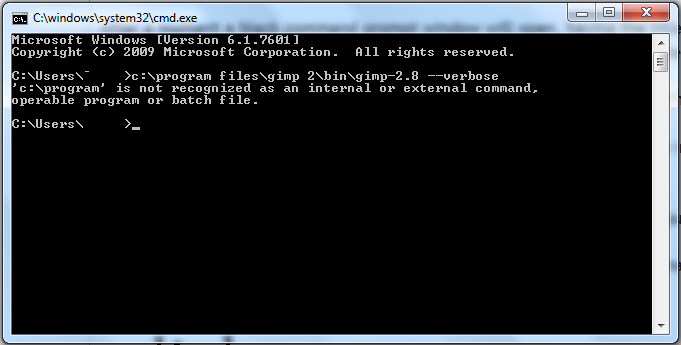
I have done everything that you each suggested but still cannot open most photos that are not my own....sometimes I can. Most times they simply crash gimp straight away. (Could it have something to do with the type of photos? Mine are only Kodak easyshare but are larger.)
This is the message I got in command prompt Odinbc
Image

_________________
Image
Free Fun Photo Editing & resources
Poems from the Lord
Gimp Newby
Gimp version 3.2.8 and GMIC-Qt 4.0.2 OS :- Windows 10 Home 64


Top
 Post subject: Re: Gimp Crashing
PostPosted: Sun Sep 29, 2013 3:19 pm  (#15) 
Offline
GimpChat Member

Joined: Feb 22, 2012
Posts: 295
Location: Germany
You have to say:

"c:\program files\gimp 2\bin\gimp-2.8.exe" --verbose

With the "
Windows interprets the space as a pause between parameters, so windows tries to
start the program "c:\program" with the parameters "files\gimp" and "2\bin\gimp-2.8" and "--verbose"
That fails, of course. By setting the command in " , windows interpretes the whole command as one.


Top
 Post subject: Re: Gimp Crashing
PostPosted: Sun Sep 29, 2013 5:11 pm  (#16) 
Offline
GimpChat Member
User avatar

Joined: Nov 16, 2011
Posts: 5127
Location: Metro Vancouver, BC
sallyanne wrote:
I have done everything that you each suggested but still cannot open most photos that are not my own....sometimes I can. Most times they simply crash gimp straight away. (Could it have something to do with the type of photos? Mine are only Kodak easyshare but are larger.)
This is the message I got in command prompt Odinbc
[ Image ]
The path I gave you would be for the official Windows install from Gimp.org.
Are you using another version (partha?) or maybe a different path?

If your not sure of the path to your Gimp install folder.
In Gimp, Edit | Preferences | Folders (dropdown)
Select any folder (brushes, etc.), on the right side you should see paths to both your Gimp 2.0 (main) and .gimp-2.8 (personal) folders. Use the path to main as a reference, for any edits that might be needed, for the path I originally mentioned.

_________________
Image
Gimp 2.8.18, Linux, median user
Gimp Chat Tutorials Index
Spirit Bear (Kermode)


Top
 Post subject: Re: Gimp Crashing
PostPosted: Sun Sep 29, 2013 5:27 pm  (#17) 
Offline
Global Moderator
User avatar

Joined: Apr 01, 2012
Posts: 8511
Location: On the other side of your screen
I am using Partha's build. Will check out the path when I get home.

_________________
Image
Free Fun Photo Editing & resources
Poems from the Lord
Gimp Newby
Gimp version 3.2.8 and GMIC-Qt 4.0.2 OS :- Windows 10 Home 64


Top
 Post subject: Re: Gimp Crashing
PostPosted: Mon Sep 30, 2013 7:47 am  (#18) 
Offline
Global Moderator
User avatar

Joined: Apr 01, 2012
Posts: 8511
Location: On the other side of your screen
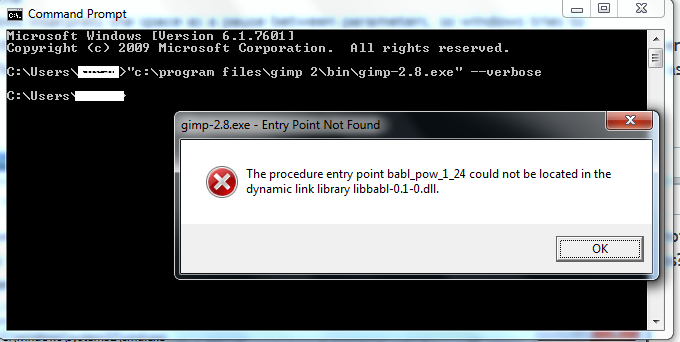
Just tried your suggestion Onkel
Image


I might try the portable gimp and see if that works ok.

_________________
Image
Free Fun Photo Editing & resources
Poems from the Lord
Gimp Newby
Gimp version 3.2.8 and GMIC-Qt 4.0.2 OS :- Windows 10 Home 64


Top
 Post subject: Re: Gimp Crashing
PostPosted: Mon Sep 30, 2013 8:51 am  (#19) 
Offline
Global Moderator
User avatar

Joined: Apr 01, 2012
Posts: 8511
Location: On the other side of your screen
Everything is ok so far. At least I have a gimp to play with but now I have to find scripts etc and a G'mic -
for the Portable do I put Gmic in the 'plugins' folder? (Assuming it has one).

_________________
Image
Free Fun Photo Editing & resources
Poems from the Lord
Gimp Newby
Gimp version 3.2.8 and GMIC-Qt 4.0.2 OS :- Windows 10 Home 64


Top
Post new topic Reply to topic  [ 19 posts ] 

All times are UTC - 5 hours [ DST ]


* Login  


Powered by phpBB3 © phpBB Group