It is currently Mon Sep 21, 2026 10:17 am


All times are UTC - 5 hours [ DST ]


Post new topic Reply to topic  [ 17 posts ] 
Author Message
 Post subject: plug-in installation on mac osx
PostPosted: Sat Oct 12, 2013 2:13 pm  (#1) 
Offline
GimpChat Member
User avatar

Joined: Apr 08, 2010
Posts: 5420
Location: Northwest Ohio
GIMP Version: 2.8.4
Operating System: Mac OS
GIMP Experience: Basic Level

List any relevant plug-ins or scripts:
Luce


I tried to get this into my mcgimp but it's not showing up! Here is where I put it, and this is where I put all my brushes, scm's, gradients, and whatever I use in my mcgimp 2.8. You can see Luce at the bottom, in the plug-in folder, but when I restart Gimp and try to use it, it doesn't show up anywhere in my filters.
Image


Share on Facebook Share on Twitter Share on Orkut Share on Digg Share on MySpace Share on Delicious Share on Technorati
Top
 Post subject: Re: plug-in installation on mac osx
PostPosted: Sat Oct 12, 2013 5:14 pm  (#2) 
Offline
Script Coder
User avatar

Joined: Oct 25, 2010
Posts: 4812
Make sure it's marked executable (open terminal, navigate to plugins directory, and "chmod +x <executable>")

_________________
Image


Top
 Post subject: Re: plug-in installation on mac osx
PostPosted: Sat Oct 12, 2013 5:18 pm  (#3) 
Offline
GimpChat Member
User avatar

Joined: Apr 07, 2010
Posts: 14182
Did you look under Filters > light and shadow > Luce

_________________
Image


Top
 Post subject: Re: plug-in installation on mac osx
PostPosted: Sat Oct 12, 2013 6:00 pm  (#4) 
Hi 2-ton, I'm sure a Mac expert will have the answer for you, but you might check in Gimp's preferences - folders - plugins and add the Luce folder there. That's what I needed to do to make it work for me under windows. :)


Top
 Post subject: Re: plug-in installation on mac osx
PostPosted: Sat Oct 12, 2013 8:05 pm  (#5) 
Offline
GimpChat Member
User avatar

Joined: Apr 08, 2010
Posts: 5420
Location: Northwest Ohio
OfNuts...I have never used terminal, scared to try, lol.
Molly, yes that is where I looked.
Fluffy, the preferences show the path to where it is, is already there. This is the same place I stash all my custom stuffs, and everything except plugins show up fine. AND...when I first load up gimp and the bottom of the splash screen shows all the stuff loading, you can see Luce in the list! Go figure.


Top
 Post subject: Re: plug-in installation on mac osx
PostPosted: Sat Oct 12, 2013 8:10 pm  (#6) 
Offline
GimpChat Member
User avatar

Joined: Jul 17, 2012
Posts: 2769
does it matter the Luce.exe is still in a folder ?
i know it doesnt matter with G'MIC (or is supposed to be that way)

but there is also a read me.txt file in there....

i know, i just put the .exe file in my plug-ins folder

EDIT:
there is also an installation info here:
http://reddog.s35.xrea.com/wiki/Luce%20 ... l#ze0df98b

EDIT 2:
and here is a manual:
http://amicoperry.altervista.org/luce/#manual


Top
 Post subject: Re: plug-in installation on mac osx
PostPosted: Sat Oct 12, 2013 8:18 pm  (#7) 
Offline
GimpChat Member
User avatar

Joined: Apr 08, 2010
Posts: 5420
Location: Northwest Ohio
Hmmm, I will read that, and I did read the 'read me'...but didn't think about opening up the folder.

so I open the folder and this is what is inside...does not look like a program to me. The other one is the read me file.
Image


Top
 Post subject: Re: plug-in installation on mac osx
PostPosted: Sat Oct 12, 2013 9:51 pm  (#8) 
Offline
GimpChat Member

Joined: Mar 14, 2011
Posts: 998
2-ton,

On a Mac or Linux or Windows for that matter, you can't take a compiled plugin and expect it to work unless everything is in the right place. So, with this plugin. :) Can you tell me what this plugin is and where you found it?

BTW, there is no concept of an "exe" file on a Mac or Linux like we do on Windows. It needs to be compiled for the Mac and it does not usually have an extension like exe.

Thanks,
Partha


Top
 Post subject: Re: plug-in installation on mac osx
PostPosted: Sat Oct 12, 2013 10:24 pm  (#9) 
Offline
GimpChat Member
User avatar

Joined: Apr 08, 2010
Posts: 5420
Location: Northwest Ohio
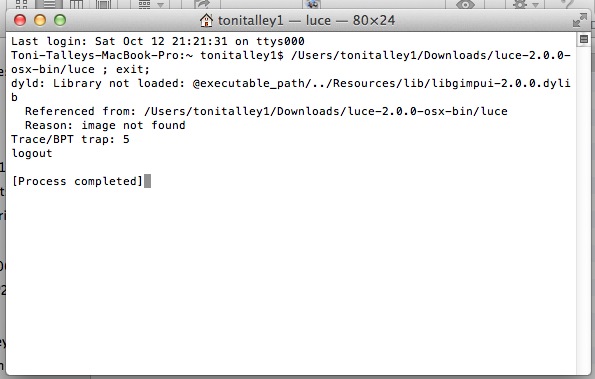
I downloaded it from here, and followed the read me as best as I could. This is supposed to be the Luce plug-in for mac.


Top
 Post subject: Re: plug-in installation on mac osx
PostPosted: Sun Oct 13, 2013 12:22 am  (#10) 
Offline
GimpChat Member

Joined: Mar 14, 2011
Posts: 998
2-ton wrote:
I downloaded it from here, and followed the read me as best as I could. This is supposed to be the Luce plug-in for mac.

Hi 2-ton,

I looked at it and it would be tough to build this so that I can keep compatibility with Snow Leopard and Mountain Lion. What system do you have and how important is this plugin? I am not sure what it does?

Thanks,
Partha


Top
 Post subject: Re: plug-in installation on mac osx
PostPosted: Sun Oct 13, 2013 1:17 am  (#11) 
Offline
GimpChat Member
User avatar

Joined: Nov 16, 2011
Posts: 5127
Location: Metro Vancouver, BC
2-ton wrote:
OfNuts...I have never used terminal, scared to try, lol...
If it is a file permission issue (chmod), you can also do this from the Mac OS X Info window.
How to Set File Permissions in Mac OS X

_________________
Image
Gimp 2.8.18, Linux, median user
Gimp Chat Tutorials Index
Spirit Bear (Kermode)


Top
 Post subject: Re: plug-in installation on mac osx
PostPosted: Sun Oct 13, 2013 2:55 pm  (#12) 
Offline
GimpChat Member
User avatar

Joined: Apr 08, 2010
Posts: 5420
Location: Northwest Ohio
I do have permissions. I finally took it out of my gimp and will try from the start.


Top
 Post subject: Re: plug-in installation on mac osx
PostPosted: Sun Oct 13, 2013 3:21 pm  (#13) 
Offline
GimpChat Member

Joined: Mar 14, 2011
Posts: 998
2-ton wrote:
I do have permissions. I finally took it out of my gimp and will try from the start.

It has nothing to do with permissions. Unlike Windows, Mac and Linux apps have hardcoded paths (like /usr/bin etc.) where to look for shared objects (so files in Linux and dylibs in OSX). The plugins points to locations which are not the same as the ones used by McGimp.


Top
 Post subject: Re: plug-in installation on mac osx
PostPosted: Sun Oct 13, 2013 3:44 pm  (#14) 
Offline
GimpChat Member
User avatar

Joined: Apr 08, 2010
Posts: 5420
Location: Northwest Ohio
partha wrote:
2-ton wrote:
I downloaded it from here, and followed the read me as best as I could. This is supposed to be the Luce plug-in for mac.

Hi 2-ton,

I looked at it and it would be tough to build this so that I can keep compatibility with Snow Leopard and Mountain Lion. What system do you have and how important is this plugin? I am not sure what it does?

Thanks,
Partha


It is not really important, just looked like it would be a nice filter to have. What I will do, if I get around to it, is to download a different gimp and put it into that one just for using the Luce filter. Right now, I don't want it that bad, it just looked like a fun filter. The filter makes rays of light to blur out with or without colors from where you have a selection...or something like that.


Top
 Post subject: Re: plug-in installation on mac osx
PostPosted: Sun Oct 13, 2013 4:25 pm  (#15) 
Offline
GimpChat Member

Joined: Mar 14, 2011
Posts: 998
2-ton,

I take it you are using McGimp 2.8? If yes, do the following:

Unzip the attached file onto your ~/Library/Application Support/GIMP/2.8/plug-ins.

Restart Gimp and let me know if luce works for you or not.

Thanks,
Partha


Attachments:
File comment: McGimp 2.8 Luce
luce.zip [28.76 KiB]
Downloaded 84 times
Top
 Post subject: Re: plug-in installation on mac osx
PostPosted: Sun Oct 13, 2013 8:13 pm  (#16) 
Offline
GimpChat Member
User avatar

Joined: Apr 08, 2010
Posts: 5420
Location: Northwest Ohio
Magic, yes it works just fine, except for the fact that I am not sure how to use all the choices as yet. But it is definitely working...thanks so much! Now to grab some instructions to practice with...and to figure out how Con was able to get all those little round light rays on his first pic.
Image


Top
 Post subject: Re: plug-in installation on mac osx
PostPosted: Mon Oct 14, 2013 4:33 am  (#17) 
Offline
GimpChat Member

Joined: Mar 14, 2011
Posts: 998
2-ton wrote:
Magic, yes it works just fine, except for the fact that I am not sure how to use all the choices as yet. But it is definitely working...thanks so much! Now to grab some instructions to practice with...and to figure out how Con was able to get all those little round light rays on his first pic.
Image

Cool! Glad to hear. :)


Top
Post new topic Reply to topic  [ 17 posts ] 

All times are UTC - 5 hours [ DST ]


* Login  


Powered by phpBB3 © phpBB Group