It is currently Sun Sep 27, 2026 4:37 am


All times are UTC - 5 hours [ DST ]


Post new topic Reply to topic  [ 11 posts ] 
Author Message
 Post subject: Photo Rebuild
PostPosted: Sun Dec 01, 2013 2:13 pm  (#1) 
Offline
GimpChat Member
User avatar

Joined: Aug 30, 2012
Posts: 2174
GIMP Version: 2.8.4
Operating System: Linux
OS Version: Ubuntu 12.04
GIMP Experience: Intermediate Level


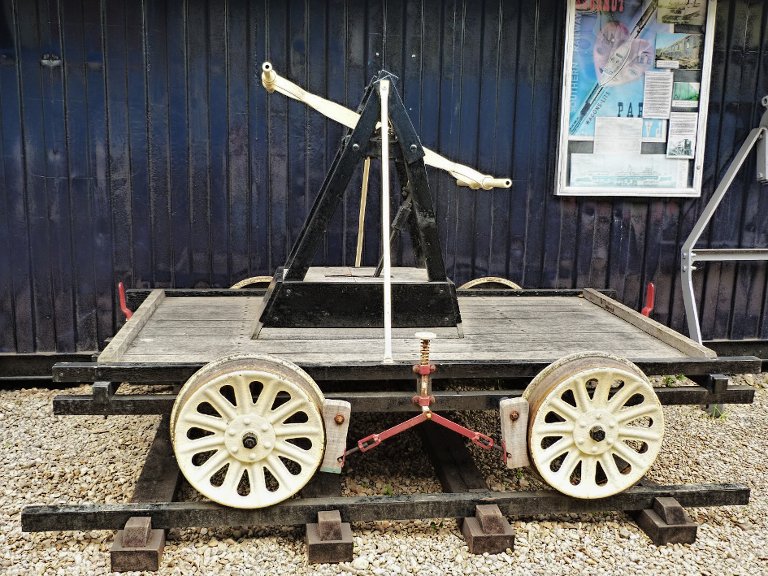
I have been reading a tutorial on grunge layer masks and it mentioned about making a few different coloured circles and then applying different grunge masks to each one, this got me thinking if I could achieve something using a photo.

I have used the channel mixer to create six layers from the photo, now if I set the layers to addition then set the opacity to 100%, I can rebuild the photo back to its original colour but only when I have the red,green & blue layers on or the red and Green/blue layer on or its counterparts. If I try to rebuild from all six layers I get a slightly washed out image, I have tried reducing the opacity of each layer to 33% as this seemed to make sense, also tried at 50% for single colours and 25% for two colours.

Any hints or ideas, here is a screen shot of what I have so far plus the attached xcf, I've had to scale photo to be able to upload xcf here.

Image


Attachments:
Photo Rebuild 01.xcf.bz2 [3.57 MiB]
Downloaded 91 times

_________________
Image
Share on Facebook Share on Twitter Share on Orkut Share on Digg Share on MySpace Share on Delicious Share on Technorati
Top
 Post subject: Re: Photo Rebuild
PostPosted: Sun Dec 01, 2013 2:58 pm  (#2) 
Offline
GimpChat Member
User avatar

Joined: Jul 17, 2012
Posts: 2769
i remember that somebody asked a very similar question
have you tried a search ?


Top
 Post subject: Re: Photo Rebuild
PostPosted: Sun Dec 01, 2013 2:59 pm  (#3) 
Offline
GimpChat Member
User avatar

Joined: Aug 30, 2012
Posts: 2174
No not yet, I'll have a look though and thanks for the info.

_________________
Image


Top
 Post subject: Re: Photo Rebuild
PostPosted: Mon Dec 02, 2013 3:32 pm  (#4) 
Offline
Script Coder
User avatar

Joined: Jul 14, 2010
Posts: 697
Image composition is RGB - If you turn off the other three - Red/Green Blue/Green Blue/Red then you get the exact same image.

-Rob A>

_________________
Image
Fantasy Cartography and Mapping by RobA


Top
 Post subject: Re: Photo Rebuild
PostPosted: Tue Dec 03, 2013 1:42 pm  (#5) 
Offline
GimpChat Member
User avatar

Joined: Aug 30, 2012
Posts: 2174
Been experimenting with the colours to see what settings achieve what results.Using the rgb layers the graph appears to be linear so 50% opacity on all layers will give a 50% grey as the outcome. Using the r/g,g/b,b/r layers the graph appears to be curved so to get a 50% grey I have to set the Layer opacity to 29.5% so this would appear to be the reason as to why a graduated colour of the layers doesn't seem to produce the image colours correctly.

_________________
Image


Top
 Post subject: Re: Photo Rebuild
PostPosted: Tue Dec 03, 2013 4:40 pm  (#6) 
Hi He4rty,

I have never experimented with anything like what you are doing, and I haven't got any photo manipulation expertise or knowledge.
I have only been skimming this thread, but on each occasion that I see a new post in this topic, I kept getting the feeling of having read something similar (or maybe it's not) previously here on Gimp Chat.

I had a search around, and finally found the topic that I was recalling.
I am not sure that it is relevant to what you are experimenting with, but here is the link anyway.
Apologies in advance if I am way off the mark, but all information is good information right?
http://gimpchat.com/viewtopic.php?f=8&t=7468&start=0


Top
 Post subject: Re: Photo Rebuild
PostPosted: Tue Dec 03, 2013 4:59 pm  (#7) 
Offline
Global Moderator
User avatar

Joined: Apr 01, 2012
Posts: 8472
Location: On the other side of your screen
Have you looked at the beautify filter he4rty? you may find something there you like
filters > beautify > beautify. I never used to go to it as I thought it was just as it says....to make more beautiful (but then what is beautiful to you is different to someone else)

_________________
Image
Free Fun Photo Editing & resources
Poems from the Lord
Gimp Newby
Gimp version 3.2.4 and GMIC-Qt 4.0.2 OS :- Windows 10 Home 64


Top
 Post subject: Re: Photo Rebuild
PostPosted: Tue Dec 03, 2013 5:05 pm  (#8) 
Offline
GimpChat Member
User avatar

Joined: Nov 16, 2011
Posts: 5127
Location: Metro Vancouver, BC
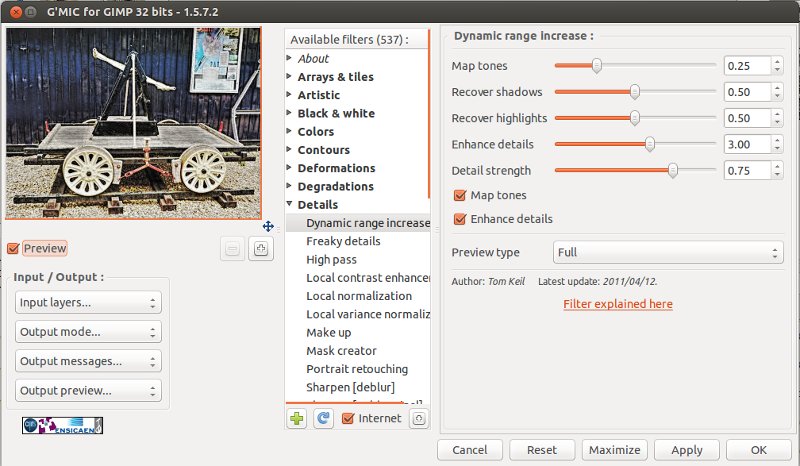
He's an idea using G'MIC | Details | Dynamic range increase.
Image
1. New from Visible.
2. On Duplicate layer, Dynamic range increase.
Image
3. Layer mode, Darken only.

_________________
Image
Gimp 2.8.18, Linux, median user
Gimp Chat Tutorials Index
Spirit Bear (Kermode)


Top
 Post subject: Re: Photo Rebuild
PostPosted: Wed Dec 04, 2013 10:40 am  (#9) 
Offline
GimpChat Member
User avatar

Joined: Aug 30, 2012
Posts: 2174
Fluffy - Thanks for the link, did some searching but didn't find that thread, it is very informative if a little confusing in places.
Sallyanne,Odinbc - thanks for the suggestions I'll have a look into them but not sure they are really what I am after.

_________________
Image


Top
 Post subject: Re: Photo Rebuild
PostPosted: Wed Dec 04, 2013 8:14 pm  (#10) 
Offline
GimpChat Member
User avatar

Joined: Nov 16, 2011
Posts: 5127
Location: Metro Vancouver, BC
I gave it another go.
Image
I first played with, Colors | Components | Channel Mixer with some interesting results.
Nothing magic this is just, Colors | Auto | Colours Enhance.
I think I might have used, Stretch Contrast first, but I can't remember.

_________________
Image
Gimp 2.8.18, Linux, median user
Gimp Chat Tutorials Index
Spirit Bear (Kermode)


Top
 Post subject: Re: Photo Rebuild
PostPosted: Thu Dec 05, 2013 6:19 am  (#11) 
Offline
Global Moderator
User avatar

Joined: Apr 01, 2012
Posts: 8472
Location: On the other side of your screen
Attachment:
Photo Rebuild 01collage all effects.png
That should be 'all presets'

_________________
Image
Free Fun Photo Editing & resources
Poems from the Lord
Gimp Newby
Gimp version 3.2.4 and GMIC-Qt 4.0.2 OS :- Windows 10 Home 64


Top
Post new topic Reply to topic  [ 11 posts ] 

All times are UTC - 5 hours [ DST ]


* Login  


Powered by phpBB3 © phpBB Group