It is currently Wed Sep 23, 2026 3:16 pm


All times are UTC - 5 hours [ DST ]


Post new topic Reply to topic  [ 40 posts ]  Go to page Previous  1, 2
Author Message
 Post subject: Re: Don't need help, need opinions plz
PostPosted: Sun Jan 23, 2011 1:01 pm  (#21) 
Offline
GimpChat Member

Joined: Oct 28, 2010
Posts: 166
Good afternoon..:) below is what I copied and pasted from the website about the image. I guess its not a true vector..since you can't enlarge with out getting blurry.

Oh well thank you guys for all your help..off to finish reading what you all posted

File Type: EPS
This image is a scalable vector illustration and can be scaled to any size without loss of resolution. This image will download as a .eps or ai file. You will need a vector editor to use this file (such as Adobe Illustrator or CorelDRAW).


Top
 Post subject: Re: Don't need help, need opinions plz
PostPosted: Sun Jan 23, 2011 1:33 pm  (#22) 
Offline
Retired Staff
User avatar

Joined: May 22, 2008
Posts: 6946
Location: Somewhere in GIMP
Can you post a link to the eps / ai image? You posted a jpg image and a png image and they are not vector images.

Inkscape will open eps and ai images. That's what you need to open and scale in Inkscape.

Never mind, I found your image here. http://www.webdesignhot.com/free-vector-graphics/coffee-cup-vector-set/

I downloaded it (.eps file) and scaled it 200% in Inkscape, then saved it as a png. It's 1372 x 1010px. I don't know how much larger you want it.

You can also right-click this link and download a 400% scale of the image in Inkscape's svg format. If you left-click the link you can see it full-sized and also right-click the image and download it. GIMP will open svg images.
http://gimpchat.com/o/Inkscape/Coffee-Cup-Vector-Set400pc.svg

Same cup at 200% & 400%.

Image


Attachments:
g2849.png
g2849.png [ 392.3 KiB | Viewed 5028 times ]

_________________
Image
World War IV will be fought with sticks and stones. - Albert Einstein
Top
 Post subject: Re: Don't need help, need opinions plz
PostPosted: Sun Jan 23, 2011 2:26 pm  (#23) 
Offline
Global Moderator
User avatar

Joined: May 16, 2010
Posts: 16173
Wait a minute?
When i try to open an eps file in Inkscape it doesn't recognize the format.
Am i missing a plug-in or extension for this?

Irfanview works for eps too

Hey check out my new Inkscape theme!

_________________
Image


Top
 Post subject: Re: Don't need help, need opinions plz
PostPosted: Sun Jan 23, 2011 2:34 pm  (#24) 
Offline
Retired Staff
User avatar

Joined: May 22, 2008
Posts: 6946
Location: Somewhere in GIMP
That's cool, Rod. Love that lemon character!

What version of Inkscape do you have? Mine's v0.47. Also, mine is from the Linux Repos. Don't know if there's a difference.

When you open a file from Inkscape, you need to click the file type and choose the kind you want to open. I think you'll be surprised at how many are listed in there.

Image

_________________
Image
World War IV will be fought with sticks and stones. - Albert Einstein


Top
 Post subject: Re: Don't need help, need opinions plz
PostPosted: Sun Jan 23, 2011 4:24 pm  (#25) 
Offline
Global Moderator
User avatar

Joined: May 16, 2010
Posts: 16173
i use .048 the newest version - thanks O!
To get those themes you have to do a little copy and pasting of files and then edit the gtkrc in inkscape.
here are the directions- this is for windows only folks-and you have to have themes v-0.1 installed.
1. Copy all themes from the <gimpdir>\share\themes folder to the <inkscapedir>\share\themes folder. I chose not to overwrite Inkscape's Default, Emacs, MS-Windows, and Raleigh themes, although I'm not sure if makes any difference.
2. Copy all files from <gimpdir>\lib\gtk-2.0\2.10.0\engines to <inkscapedir>\lib\gtk-2.0\2.10.0\engines. Do not overwrite any of the dll files in this inkscape directory.
3. Edit <inkscapedir>\etc\gtk-2.0\gtkrc and find the line that starts with style "msw-default", then use the # character to comment out that line and all following lines up to and including class "*" style "msw-default" (which is the last line of the file for me). I suppose you could also delete these lines but I chose to just comment them out.
4. That's it, now start Inkscape and it should be using the same theme as Gimp, due to using the theme specified in C:\Users\<name>\.gtkrc-2.0, same as Gimp does.
5. If you want Inkscape to use a different theme, you should be able to edit Inkscape's gtkrc with the theme details in the format shown in C:\Users\<name>\.gtkrc-2.0. Be advised that I haven't tried this, I'm only assuming this will let you override the theme just for Inkscape. The easiest way to get this right would be to save your original C:\Users\<name>\.gtkrc-2.0 file that Gimp uses, then run Gimpthemes-v1.0.exe again to setup the theme you want for Inkscape. Allow it to overwrite the .gtkrc-2.0 file, then copy & paste the contents of that file to Inkscape's gtkrc (replacing the section you commented out in step #3). Then you can restore the .gtkrc-2.0 file you backed up, which should restore Gimp's theme. At least I think that should work, but personally I like both using the same theme so I've not tried it.

Got these directions from a user at Gimper.net

_________________
Image


Top
 Post subject: Re: Don't need help, need opinions plz
PostPosted: Sun Jan 23, 2011 4:26 pm  (#26) 
Offline
Retired Staff
User avatar

Joined: May 22, 2008
Posts: 6946
Location: Somewhere in GIMP
Rod wrote:
i use .048 the newest version - thanks O!

Were you able to open that eps file in Inkscape, Rod?

_________________
Image
World War IV will be fought with sticks and stones. - Albert Einstein


Top
 Post subject: Re: Don't need help, need opinions plz
PostPosted: Sun Jan 23, 2011 4:40 pm  (#27) 
Offline
Global Moderator
User avatar

Joined: May 16, 2010
Posts: 16173
Still wont work for me O.
Image
How do you get the file type window up?

_________________
Image


Top
 Post subject: Re: Don't need help, need opinions plz
PostPosted: Sun Jan 23, 2011 4:50 pm  (#28) 
Offline
Retired Staff
User avatar

Joined: May 22, 2008
Posts: 6946
Location: Somewhere in GIMP
Rod wrote:
Still wont work for me O.

How do you get the file type window up?


Bummer.

It should open. I don't know why it does in mine. When you go File > Open in Inkscape, that dropdown bar is in the lower right corner of the Open dialog.

_________________
Image
World War IV will be fought with sticks and stones. - Albert Einstein


Top
 Post subject: Re: Don't need help, need opinions plz
PostPosted: Sun Jan 23, 2011 4:58 pm  (#29) 
Offline
Global Moderator
User avatar

Joined: May 16, 2010
Posts: 16173
Ahh i figured it out O i had to re-install Ghost Script again. =)

_________________
Image


Top
 Post subject: Re: Don't need help, need opinions plz
PostPosted: Sun Jan 23, 2011 5:25 pm  (#30) 
Offline
Retired Staff
User avatar

Joined: May 22, 2008
Posts: 6946
Location: Somewhere in GIMP
Just out of curiosity, I checked in my add/remove programs and found this. I expect it was one of the dependencies that installed with Inkscape.

Image

_________________
Image
World War IV will be fought with sticks and stones. - Albert Einstein


Top
 Post subject: Re: Don't need help, need opinions plz
PostPosted: Sun Jan 23, 2011 6:27 pm  (#31) 
Offline
Global Moderator
User avatar

Joined: May 16, 2010
Posts: 16173
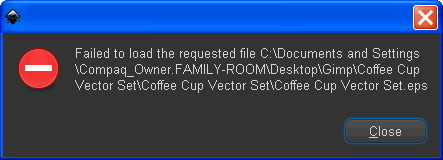
After installing GhostScript and adding the path variable i try to open the file and now get this error window.
Image

I get this same error with both reg and portable Inkscape. :(

I'll look into the add/remove programs idea.
After looking in the add/remove programs area i only see this.
Image

I wonder if it was only installed with pre-versions of Inkscape before 0.48?
Guess ill have to look into that. :)

Thanks for all your help O.

_________________
Image


Top
 Post subject: Re: Don't need help, need opinions plz
PostPosted: Sun Jan 23, 2011 6:31 pm  (#32) 
Offline
Retired Staff
User avatar

Joined: May 22, 2008
Posts: 6946
Location: Somewhere in GIMP
Well I wasn't helpful. I just don't know how to make it work for you.

_________________
Image
World War IV will be fought with sticks and stones. - Albert Einstein


Top
 Post subject: Re: Don't need help, need opinions plz
PostPosted: Sun Jan 23, 2011 6:35 pm  (#33) 
Offline
Global Moderator
User avatar

Joined: May 16, 2010
Posts: 16173
Ahh well they only come for Linux installs looks like.
I can open PDF and a whole slew of other stuff, just not EPS even with GS installed...bummer.

Well Gimp, XnView, and Irfanview all open EPS files so no biggy.

_________________
Image


Top
 Post subject: Re: Don't need help, need opinions plz
PostPosted: Mon Jan 24, 2011 8:51 am  (#34) 
Offline
GimpChat Member

Joined: Oct 28, 2010
Posts: 166
Thanks guys, hubby found a new game on Facebook and wouldn't let me back online last night...LOL

I am off to read again..LOL

Micki


Top
 Post subject: Re: Don't need help, need opinions plz
PostPosted: Mon Jan 24, 2011 11:54 am  (#35) 
Offline
Global Moderator
User avatar

Joined: May 16, 2010
Posts: 16173
Time to ask hubby for a puter of your own for your next B-Day Micki! =)

_________________
Image


Top
 Post subject: Re: Don't need help, need opinions plz
PostPosted: Mon Jan 24, 2011 12:07 pm  (#36) 
Offline
GimpChat Member

Joined: Oct 28, 2010
Posts: 166
I'm thinking when tax money comes in in the next couple of wks...LOL


Top
 Post subject: Re: Don't need help, need opinions plz
PostPosted: Mon Jan 24, 2011 1:50 pm  (#37) 
Offline
GimpChat Member
User avatar

Joined: Oct 19, 2010
Posts: 376
Location: North Central Ohio, USA
If that doesn't work out exile him to the couch and his own cooking....always made me see the light! :lol

_________________
Life Truth: #12
My cat is a worst typist than I am.


Top
 Post subject: Re: Don't need help, need opinions plz
PostPosted: Mon Jan 24, 2011 2:38 pm  (#38) 
Offline
Global Moderator
User avatar

Joined: May 16, 2010
Posts: 16173
LOL@Bob <--- Bob speaks wisdom.

_________________
Image


Top
 Post subject: Re: Don't need help, need opinions plz
PostPosted: Sun Jan 30, 2011 2:08 pm  (#39) 
Offline
Script Coder
User avatar

Joined: Jul 14, 2010
Posts: 697
For windows users follow this:
http://www.ehow.com/how_5844063_open-_e ... scape.html

(though you don't need the reboot as far as I know).

It didn't work for me (had the same error as Rod) until I found the comment by flibblebot:
Quote:
In Step 11, you also need to add the path to the "bin" folder as well as the "lib" folder.
So, using the example above, the path

C:\Program Files\gs\gs8.70\bin

needs to be added to the end of the PATH line too.


I did that and and now it works!

-Rob A>

_________________
Image
Fantasy Cartography and Mapping by RobA


Top
 Post subject: Re: Don't need help, need opinions plz
PostPosted: Mon Jan 31, 2011 3:03 pm  (#40) 
Offline
Global Moderator
User avatar

Joined: May 16, 2010
Posts: 16173
That's odd though because i have the path set straight to the exe file itself in the bin folder.
Ill try it though, thanks Rob. :)

Nope still doesn't work for me.

_________________
Image


Top
Post new topic Reply to topic  [ 40 posts ]  Go to page Previous  1, 2

All times are UTC - 5 hours [ DST ]


* Login  


Powered by phpBB3 © phpBB Group