It is currently Sat Oct 03, 2026 3:09 pm


All times are UTC - 5 hours [ DST ]


Post new topic Reply to topic  [ 53 posts ]  Go to page Previous  1, 2, 3  Next
Author Message
 Post subject: Re: Changing image to different color
PostPosted: Tue Aug 12, 2014 6:16 am  (#21) 
Offline
GimpChat Member
User avatar

Joined: Dec 08, 2013
Posts: 1088
It will work on both techniques. color to alpha might remove color portions though. fading etc.

You can also just turn the image BLACK and WHITE.


Attachments:
cup --.png
cup --.png [ 6.91 KiB | Viewed 1476 times ]

_________________
Image


Last edited by SysTemX on Tue Aug 12, 2014 6:46 am, edited 1 time in total.
Top
 Post subject: Re: Changing image to different color
PostPosted: Tue Aug 12, 2014 6:23 am  (#22) 
Offline
GimpChat Member
User avatar

Joined: Apr 07, 2010
Posts: 14182
I would try all these methods then pick the one that suits you best. There are several ways of tackling things to end up with the same result.

_________________
Image


Top
 Post subject: Re: Changing image to different color
PostPosted: Tue Aug 12, 2014 6:25 am  (#23) 
Offline
GimpChat Member
User avatar

Joined: Dec 08, 2013
Posts: 1088
Very true Molly. Everyone has a different method for the same job ;-}

_________________
Image


Top
 Post subject: Re: Changing image to different color
PostPosted: Tue Aug 12, 2014 6:26 am  (#24) 
Offline
GimpChat Founder
User avatar

Joined: May 22, 2008
Posts: 5241
Location: Gimpville
My attempt: Color to alpha (white) - Colorify or Contrast/Brightness to Black - Duplicate layer - Merge down.

Image

_________________
“If you reach for the stars, you just might land on a decently sized hill.” - Stuart Hill


Top
 Post subject: Re: Changing image to different color
PostPosted: Tue Aug 12, 2014 6:26 am  (#25) 
Offline
Script Coder
User avatar

Joined: Oct 25, 2010
Posts: 4812
The only method that really demonstrably works for the original question (painting something over transparent background) is the alpha-lock method as indicated by Rich. Other may sometimes work but not for the right reasons.

_________________
Image


Top
 Post subject: Re: Changing image to different color
PostPosted: Tue Aug 12, 2014 6:34 am  (#26) 
Offline
GimpChat Member

Joined: Aug 06, 2014
Posts: 9
GnuTux wrote:
My attempt: Color to alpha (white) - Contrast/Brightness to Black- duplicate layer - Merge down.

[ Image ]


If you still have it open could you leave the leaves original color and the cup to black? That one actually looks quite good. Also thing is I am going to scale it down a bit so should look fine.


Top
 Post subject: Re: Changing image to different color
PostPosted: Tue Aug 12, 2014 6:39 am  (#27) 
Offline
GimpChat Founder
User avatar

Joined: May 22, 2008
Posts: 5241
Location: Gimpville
Here is another attempt where I wand selected @ 100 threshold, then color to alpha (white), Contrast/Brightness to black.

Image

Image

_________________
“If you reach for the stars, you just might land on a decently sized hill.” - Stuart Hill


Top
 Post subject: Re: Changing image to different color
PostPosted: Tue Aug 12, 2014 7:24 am  (#28) 
Offline
GimpChat Member
User avatar

Joined: Apr 07, 2010
Posts: 14182
that one is a lot better, the last one looked like it had some black fuzz stuck in the white.

_________________
Image


Top
 Post subject: Re: Changing image to different color
PostPosted: Tue Aug 12, 2014 7:27 am  (#29) 
Offline
GimpChat Founder
User avatar

Joined: May 22, 2008
Posts: 5241
Location: Gimpville
It did but that can be easily removed.

_________________
“If you reach for the stars, you just might land on a decently sized hill.” - Stuart Hill


Top
 Post subject: Re: Changing image to different color
PostPosted: Tue Aug 12, 2014 7:36 am  (#30) 
Offline
GimpChat Member
User avatar

Joined: Apr 07, 2010
Posts: 14182
O

_________________
Image


Top
 Post subject: Re: Changing image to different color
PostPosted: Tue Aug 12, 2014 7:54 am  (#31) 
Offline
Administrator
User avatar

Joined: Aug 10, 2012
Posts: 14224
Location: Native to NYC living in Arizona, Gimp 2.8 - 3.0, Win 11 PC.
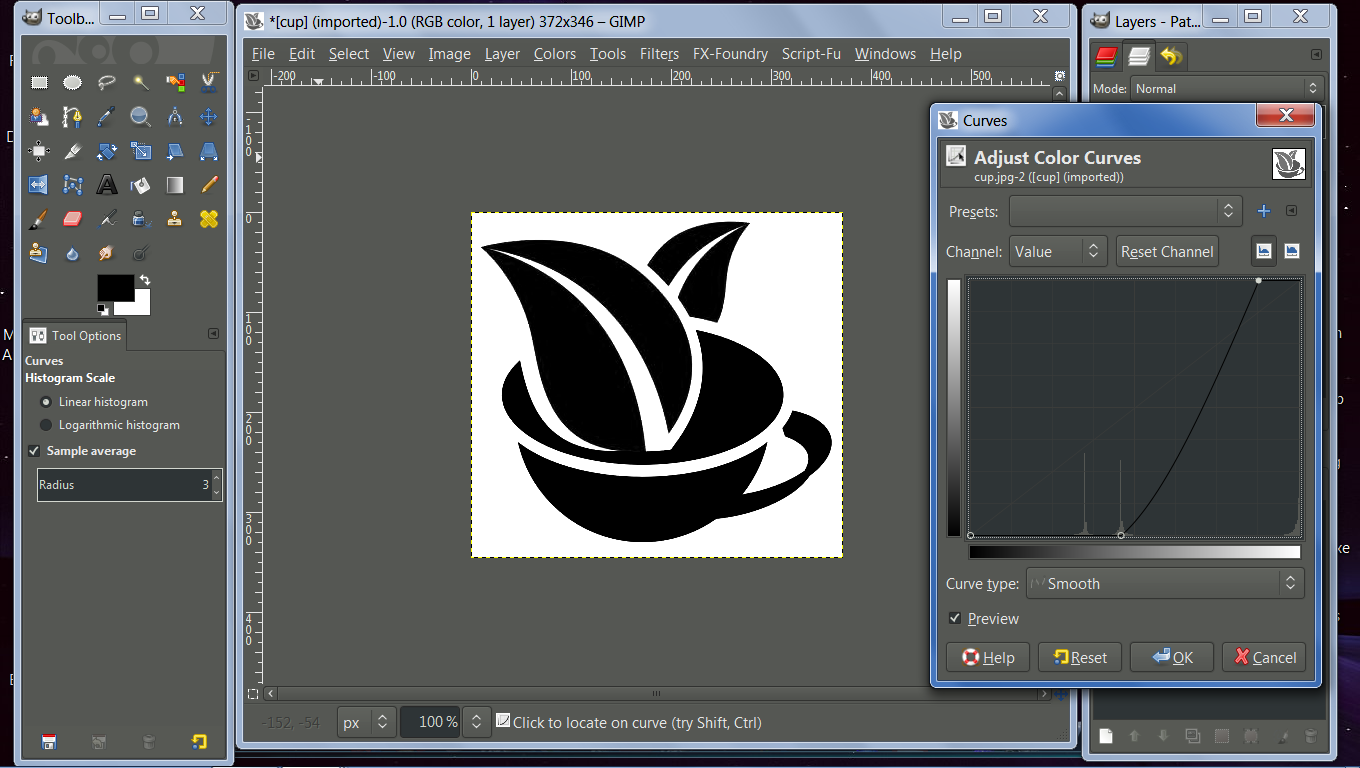
After adding an alpha channel, I desaturated the image.
Used curves as seen below.
Image

Did a color to alpha on the white.
Alpha selected the black and save the selection as a path.
Stroked the path by 1.
Image

Selected the inside of the stroked path of the image and grew the selection by one and filed it with black.
Image

Final Image
Image


Attachments:
Wallace cup.xcf [178.18 KiB]
Downloaded 71 times

_________________
Image
"A wise man learns more from a foolish question than a fool can learn from a wise answer"
Image


Last edited by Wallace on Tue Aug 12, 2014 8:09 am, edited 1 time in total.
Top
 Post subject: Re: Changing image to different color
PostPosted: Tue Aug 12, 2014 7:56 am  (#32) 
Offline
GimpChat Member
User avatar

Joined: Dec 08, 2013
Posts: 1088
:hehe


Attachments:
cup-Black ++.png
cup-Black ++.png [ 74.68 KiB | Viewed 1535 times ]

_________________
Image
Top
 Post subject: Re: Changing image to different color
PostPosted: Tue Aug 12, 2014 7:58 am  (#33) 
Offline
GimpChat Member
User avatar

Joined: Apr 07, 2010
Posts: 14182
excellent Wallace

_________________
Image


Top
 Post subject: Re: Changing image to different color
PostPosted: Tue Aug 12, 2014 8:12 am  (#34) 
Offline
Administrator
User avatar

Joined: Aug 10, 2012
Posts: 14224
Location: Native to NYC living in Arizona, Gimp 2.8 - 3.0, Win 11 PC.
molly wrote:
excellent Wallace

Thanks Molly!
I had to alter the path a little, but all in all It seem to work out well.

_________________
Image
"A wise man learns more from a foolish question than a fool can learn from a wise answer"
Image


Top
 Post subject: Re: Changing image to different color
PostPosted: Tue Aug 12, 2014 10:26 am  (#35) 
Offline
GimpChat Member
User avatar

Joined: Apr 11, 2013
Posts: 57
Location: Scotland, Isle of Arran
Hello

May I ask why nobody suggested this typical vector graphic to be designed with Gimps cousin, Inkscape?

_________________
Kubuntu 14.04, 14.10, Monitor HP ZR30w, Scanner Epson V300 photo


Top
 Post subject: Re: Changing image to different color
PostPosted: Tue Aug 12, 2014 10:32 am  (#36) 
Offline
GimpChat Founder
User avatar

Joined: May 22, 2008
Posts: 5241
Location: Gimpville
It's because the question asked was about changing the color of an existing image using GIMP. Telling someone to use another app is not a very helpful suggestion in a GIMP forum.

Now, if someone were to ask about designing a scalable logo, recommending Inkscape or some other vector graphics app, would be appropriate.

_________________
“If you reach for the stars, you just might land on a decently sized hill.” - Stuart Hill


Top
 Post subject: Re: Changing image to different color
PostPosted: Tue Aug 12, 2014 10:57 am  (#37) 
Offline
GimpChat Member

Joined: Aug 06, 2014
Posts: 9
GnuTux wrote:
It's because the question asked was about changing the color of an existing image using GIMP. Telling someone to use another app is not a very helpful suggestion in a GIMP forum.

Now, if someone were to ask about designing a scalable logo, recommending Inkscape or some other vector graphics app, would be appropriate.


That is very much the path I will have to take. The logo will be used on packaging as well and social media so will definitely be getting scaled quite often (also need one to cover atleast half an a4 page possibly). Gonna check inkscape out but might need to get a freelancer for this job.


Top
 Post subject: Re: Changing image to different color
PostPosted: Tue Aug 12, 2014 12:02 pm  (#38) 
Offline
Global Moderator
User avatar

Joined: Apr 01, 2012
Posts: 8475
Location: On the other side of your screen
There are some very capable people here who use Inkscape. There is another forum called other graphics application with Inkscape under it. Go ask there.

_________________
Image
Free Fun Photo Editing & resources
Poems from the Lord
Gimp Newby
Gimp version 3.2.4 and GMIC-Qt 4.0.2 OS :- Windows 10 Home 64


Top
 Post subject: Re: Changing image to different color
PostPosted: Tue Aug 12, 2014 12:03 pm  (#39) 
Offline
GimpChat Founder
User avatar

Joined: May 22, 2008
Posts: 5241
Location: Gimpville
sharpCode wrote:
That is very much the path I will have to take. The logo will be used on packaging as well and social media so will definitely be getting scaled quite often (also need one to cover atleast half an a4 page possibly). Gonna check inkscape out but might need to get a freelancer for this job.

Well, in that case, you might as well send Wallace a check. He's already done most of the work. :hehe

Just import this into inkscape.

_________________
“If you reach for the stars, you just might land on a decently sized hill.” - Stuart Hill


Top
 Post subject: Re: Changing image to different color
PostPosted: Tue Aug 12, 2014 1:26 pm  (#40) 
Offline
Administrator
User avatar

Joined: Aug 10, 2012
Posts: 14224
Location: Native to NYC living in Arizona, Gimp 2.8 - 3.0, Win 11 PC.
GnuTux wrote:
sharpCode wrote:
That is very much the path I will have to take. The logo will be used on packaging as well and social media so will definitely be getting scaled quite often (also need one to cover atleast half an a4 page possibly). Gonna check inkscape out but might need to get a freelancer for this job.

Well, in that case, you might as well send Wallace a check. He's already done most of the work. :hehe

Just import this into inkscape.


Image :hehe

_________________
Image
"A wise man learns more from a foolish question than a fool can learn from a wise answer"
Image


Top
Post new topic Reply to topic  [ 53 posts ]  Go to page Previous  1, 2, 3  Next

All times are UTC - 5 hours [ DST ]


* Login  


Powered by phpBB3 © phpBB Group