It is currently Fri Nov 13, 2026 7:10 pm


All times are UTC - 5 hours [ DST ]


Post new topic Reply to topic  [ 28 posts ]  Go to page Previous  1, 2
Author Message
 Post subject: Re: No more glitter?
PostPosted: Thu Sep 17, 2015 1:55 am  (#21) 
Offline
GimpChat Member
User avatar

Joined: Feb 14, 2013
Posts: 462
Location: Stockholm
Somtimes I got this problem with gimp when I upgrade

This is all stuff i have inside the Gimpfolder.
Image

_________________
Late 2017 iMac Retina 4K 21,5 inch Mac OS High Sierra version 10.13.4
3,6 GHz Intel Core i7
16 GB Ram 2400 MHz DDR4
Graphic card Radeon Pro 560 4096 MB
Affinity Photo and Affinity Designers.


Top
 Post subject: Re: No more glitter?
PostPosted: Thu Sep 17, 2015 3:16 am  (#22) 
Offline
GimpChat Member
User avatar

Joined: Mar 23, 2012
Posts: 7388
Location: Göteborg at last!
I have had the language problem with a few open source apps, simply because my computer is Swedish and I couldn't change the language. In the end I looked through the folders and found one - I think it is called "Locale" - and deleted everything in it except for English. Now my Gimp works in English!


Top
 Post subject: Re: No more glitter?
PostPosted: Thu Sep 17, 2015 3:59 am  (#23) 
Offline
GimpChat Member
User avatar

Joined: Feb 14, 2013
Posts: 462
Location: Stockholm
Hello Erisian. Yes, but I have not any problem all the time after I upgrade Gimp.
At this window I suppose to Choose language, but this time the window ar empty???
Image

I have looking all over the Gimp folder, there is nothing about "Locale"

_________________
Late 2017 iMac Retina 4K 21,5 inch Mac OS High Sierra version 10.13.4
3,6 GHz Intel Core i7
16 GB Ram 2400 MHz DDR4
Graphic card Radeon Pro 560 4096 MB
Affinity Photo and Affinity Designers.


Top
 Post subject: Re: No more glitter?
PostPosted: Thu Sep 17, 2015 7:50 am  (#24) 
Offline
GimpChat Member
User avatar

Joined: Jan 13, 2011
Posts: 2648
Location: Poland
No file gimprc - is a serious problem - sorry but unfortunately I do not know Mac.
Does the Mac are also hidden files or requiring administrative privileges?

_________________
Image


Top
 Post subject: Re: No more glitter?
PostPosted: Thu Sep 17, 2015 8:00 am  (#25) 
Offline
GimpChat Member
User avatar

Joined: Feb 14, 2013
Posts: 462
Location: Stockholm
2 weeks ago Gimp running perfect on my iMac without any problem. So I think I have downloaded Gimp from wrong site.

_________________
Late 2017 iMac Retina 4K 21,5 inch Mac OS High Sierra version 10.13.4
3,6 GHz Intel Core i7
16 GB Ram 2400 MHz DDR4
Graphic card Radeon Pro 560 4096 MB
Affinity Photo and Affinity Designers.


Top
 Post subject: Re: No more glitter?
PostPosted: Thu Sep 17, 2015 9:16 am  (#26) 
Offline
GimpChat Member
User avatar

Joined: Aug 16, 2012
Posts: 4271
Location: Göteborg, Sweden
lurifax73: i think you should go back to partha's place and download from there, but download a tried and trusted 2.8 version this time, not 2.9. if you get a crash during installation again i suspect there might be hidden problems on your computer - i don't know much about computers and still less about macs (pc user joke), but i do know i had that problem once when an earlier version of gimp didn't uninstall completely.

_________________


Top
 Post subject: Re: No more glitter?
PostPosted: Thu Sep 17, 2015 9:36 am  (#27) 
Offline
GimpChat Member
User avatar

Joined: Feb 14, 2013
Posts: 462
Location: Stockholm
Yes I think that to.

Thanks.

_________________
Late 2017 iMac Retina 4K 21,5 inch Mac OS High Sierra version 10.13.4
3,6 GHz Intel Core i7
16 GB Ram 2400 MHz DDR4
Graphic card Radeon Pro 560 4096 MB
Affinity Photo and Affinity Designers.


Top
 Post subject: Re: No more glitter?
PostPosted: Mon Oct 12, 2015 3:36 am  (#28) 
Offline
GimpChat Member
User avatar

Joined: Feb 14, 2013
Posts: 462
Location: Stockholm
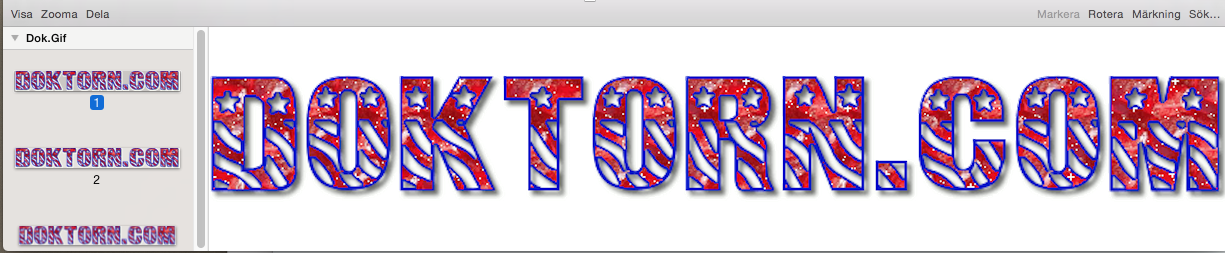
I still have problem with my BlingBling (Glittering)

When I start 10 Gimpprojects with Bling Bling I got 3 perfect results and 7 without any BlingBling (Glittering).

I think the reson ar font Patriot (Wrong sort) If I try with other fonts the BlingBling working.
This is to much. (Irritating)

Image

Image

_________________
Late 2017 iMac Retina 4K 21,5 inch Mac OS High Sierra version 10.13.4
3,6 GHz Intel Core i7
16 GB Ram 2400 MHz DDR4
Graphic card Radeon Pro 560 4096 MB
Affinity Photo and Affinity Designers.


Top
Post new topic Reply to topic  [ 28 posts ]  Go to page Previous  1, 2

All times are UTC - 5 hours [ DST ]


* Login  


Powered by phpBB3 © phpBB Group