It is currently Thu Nov 12, 2026 7:31 pm


All times are UTC - 5 hours [ DST ]


Post new topic Reply to topic  [ 31 posts ]  Go to page Previous  1, 2
Author Message
 Post subject: Re: computer techs?
PostPosted: Fri Oct 30, 2015 5:51 pm  (#21) 
Offline
GimpChat Member
User avatar

Joined: Sep 24, 2010
Posts: 12856
Idle tasks does more then just defrag Sallyanne. :)

_________________
Lyle

Psalm 109:8

Image


Top
 Post subject: Re: computer techs?
PostPosted: Sat Oct 31, 2015 1:38 am  (#22) 
Offline
Global Moderator
User avatar

Joined: Apr 01, 2012
Posts: 8503
Location: On the other side of your screen
Thanks

_________________
Image
Free Fun Photo Editing & resources
Poems from the Lord
Gimp Newby
Gimp version 3.2.8 and GMIC-Qt 4.0.2 OS :- Windows 10 Home 64


Top
 Post subject: Re: computer techs?
PostPosted: Sat Oct 31, 2015 2:28 am  (#23) 
Offline
GimpChat Member
User avatar

Joined: Nov 15, 2014
Posts: 161
Another thing you can try Sallyanne, is to open your command prompt and run the system file check utility tool. It will attempt to fix any errors your disk may have (but may not fix all of them) Just press Windows key and x at the same time then select "Command Prompt (Admin)" A window will pop up asking "Do you want to allow this app to make changes to your PC?", select yes. In the command prompt window type "sfc /scannow" without the quotations (the tool will take a while to complete) After the scan has finished, if it couldn't repair everything, the next tool to run should be the "Deployment Imaging and Servicing Management" tool (or Dism) Just type "Dism /Online /Cleanup-Image /RestoreHealth" and that should take care of the rest of the corruptions (if any were found)


Top
 Post subject: Re: computer techs?
PostPosted: Sat Oct 31, 2015 2:48 am  (#24) 
Offline
GimpChat Member
User avatar

Joined: Sep 24, 2010
Posts: 12856
sfc may require OS CD. Good command, but, be aware of this. Below might be a helpful thread. Good info too Charlie (it's how I found the link below). :)

http://answers.microsoft.com/en-us/insi ... 528?auth=1

_________________
Lyle

Psalm 109:8

Image


Top
 Post subject: Re: computer techs?
PostPosted: Sat Oct 31, 2015 10:15 pm  (#25) 
Offline
Global Moderator
User avatar

Joined: Apr 01, 2012
Posts: 8503
Location: On the other side of your screen
Hope i am not deviating at all here. I also have 'Crap Cleaner'. Asks me occaisionally if I want to run it. I am scared to so don't (incase it deletes something I want to keep)
Should I run it or leave it?

_________________
Image
Free Fun Photo Editing & resources
Poems from the Lord
Gimp Newby
Gimp version 3.2.8 and GMIC-Qt 4.0.2 OS :- Windows 10 Home 64


Top
 Post subject: Re: computer techs?
PostPosted: Sat Oct 31, 2015 11:00 pm  (#26) 
Offline
Administrator
User avatar

Joined: Aug 10, 2012
Posts: 14269
Location: Native to NYC living in Arizona, Gimp 2.8 - 3.0, Win 11 PC.
sallyanne wrote:
Hope i am not deviating at all here. I also have 'Crap Cleaner'. Asks me occaisionally if I want to run it. I am scared to so don't (incase it deletes something I want to keep)
Should I run it or leave it?

I would suggest that if you're going to use a cleaner,
that you use Ccleaner by Piriform instead of Crap Cleaner.
I would also suggest that you uninstall this "Crap Cleaner" form your computer

_________________
Image
"A wise man learns more from a foolish question than a fool can learn from a wise answer"
Image


Top
 Post subject: Re: computer techs?
PostPosted: Sat Oct 31, 2015 11:17 pm  (#27) 
Offline
Global Moderator
User avatar

Joined: Apr 01, 2012
Posts: 8503
Location: On the other side of your screen
Thanks
EDIT:
That the one I have Wallace :oops: Apparently it is always running in the background
CCleaner (formerly Crap Cleaner), developed by Piriform, is a utility program used to clean ...

_________________
Image
Free Fun Photo Editing & resources
Poems from the Lord
Gimp Newby
Gimp version 3.2.8 and GMIC-Qt 4.0.2 OS :- Windows 10 Home 64


Top
 Post subject: Re: computer techs?
PostPosted: Sat Oct 31, 2015 11:28 pm  (#28) 
Offline
Administrator
User avatar

Joined: Aug 10, 2012
Posts: 14269
Location: Native to NYC living in Arizona, Gimp 2.8 - 3.0, Win 11 PC.
sallyanne wrote:
Thanks
EDIT:
That the one I have Wallace :oops: Apparently it is always running in the background
CCleaner (formerly Crap Cleaner), developed by Piriform, is a utility program used to clean ...

Crap Cleaner is old software no longer made by Piriform.
Ccleaner By Piriform is what you want.
You can disable monitoring by going to the Options settings.


Look at this attachment Sallyanne...
Attachment:
screencapture-download-cnet-com-Crap-Cleaner.png
screencapture-download-cnet-com-Crap-Cleaner.png [ 218.66 KiB | Viewed 1294 times ]

_________________
Image
"A wise man learns more from a foolish question than a fool can learn from a wise answer"
Image


Top
 Post subject: Re: computer techs?
PostPosted: Sun Nov 01, 2015 12:19 am  (#29) 
Offline
Global Moderator
User avatar

Joined: Apr 01, 2012
Posts: 8503
Location: On the other side of your screen
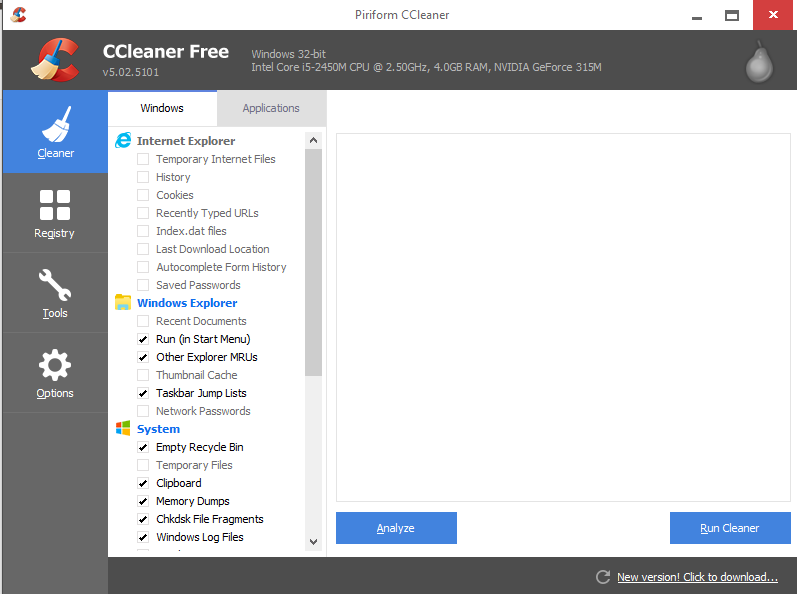
So this is not it?
Image
I had heard of Crap Cleaner before and mistook the CC to mean the same thing

_________________
Image
Free Fun Photo Editing & resources
Poems from the Lord
Gimp Newby
Gimp version 3.2.8 and GMIC-Qt 4.0.2 OS :- Windows 10 Home 64


Top
 Post subject: Re: computer techs?
PostPosted: Sun Nov 01, 2015 12:45 am  (#30) 
Offline
Administrator
User avatar

Joined: Aug 10, 2012
Posts: 14269
Location: Native to NYC living in Arizona, Gimp 2.8 - 3.0, Win 11 PC.
sallyanne wrote:
So this is not it?
[ Image ]
I had heard of Crap Cleaner before and mistook the CC to mean the same thing

That looks like it, but the most recent version is 5.11+...

_________________
Image
"A wise man learns more from a foolish question than a fool can learn from a wise answer"
Image


Top
 Post subject: Re: computer techs?
PostPosted: Sun Nov 01, 2015 3:03 am  (#31) 
Offline
GimpChat Member
User avatar

Joined: Nov 15, 2014
Posts: 878
sallyanne,

In the days when I was using Windows XP I used to run CCleaner regularly. It did an excellent job and I never had any problems with it.
You can update to the latest version (as I am sure you know) by clicking on the update message at the bottom right of the screen.

As I say, I never had any problems with it, but I was using an antique version of Windows on an antique computer!

david.


Top
Post new topic Reply to topic  [ 31 posts ]  Go to page Previous  1, 2

All times are UTC - 5 hours [ DST ]


* Login  


Powered by phpBB3 © phpBB Group