It is currently Thu Aug 27, 2026 9:28 am


All times are UTC - 5 hours [ DST ]


Post new topic Reply to topic  [ 37 posts ]  Go to page Previous  1, 2
Author Message
 Post subject: Re: GIMP on a USB Flash Drive
PostPosted: Mon Jul 25, 2011 6:06 pm  (#21) 
Offline
GimpChat Member
User avatar

Joined: Jul 08, 2011
Posts: 285
Oregonian wrote:
Ana wrote:
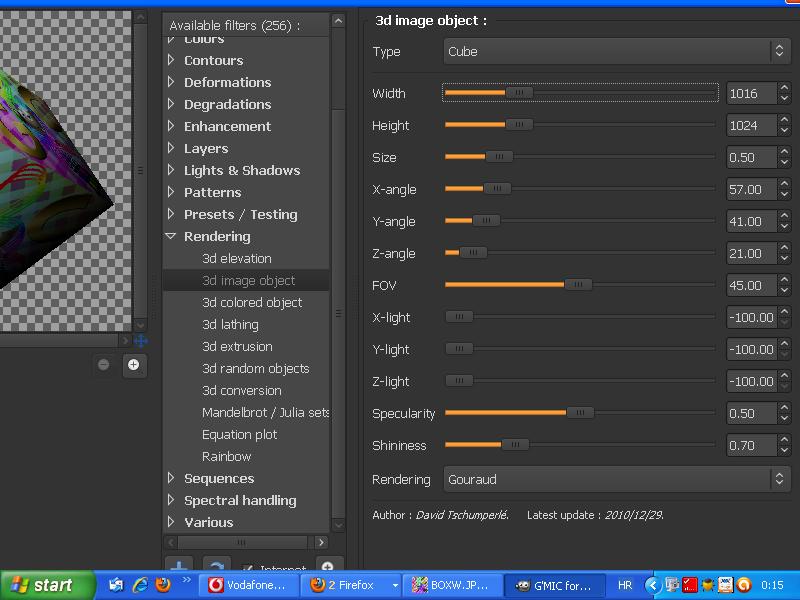
ok...i think i'll download this 2.7 on usb....just to ask you something...i just downloaded g'mic and his window is bigggger than my monitor...how to resize it????do you know???
Don't be too quick to get rid of 2.6.11. 2.7 has a lot of bugs and things that need to be fixed. My advice is to save a copy of the GIMP 2.7 folder somewhere on your hard drive, like in your downloads folder and keep it for parts. You may be happy you did. Also, you can browse the folder to see where files are in it.

O no "O"....i didn't even think of getting rid of 2.6.11.It stays on my pc.but i was thinking about downloading 2.7 to usb.....

Image

can you help me with this?????
G'mic window is bigger then my monitor screen...how can i reduce G'mic window??

_________________
Image

My Flickr
http://anaplus.deviantart.com/


Top
 Post subject: Re: GIMP on a USB Flash Drive
PostPosted: Mon Jul 25, 2011 6:14 pm  (#22) 
Offline
Retired Staff
User avatar

Joined: May 22, 2008
Posts: 6946
Location: Somewhere in GIMP
I have it in Linux and don't know if that makes any difference, but I can drag it shorter but only so far. Can't make it narrower though.

_________________
Image
World War IV will be fought with sticks and stones. - Albert Einstein


Top
 Post subject: Re: GIMP on a USB Flash Drive
PostPosted: Mon Jul 25, 2011 6:19 pm  (#23) 
Offline
GimpChat Member
User avatar

Joined: Jul 08, 2011
Posts: 285
Oregonian wrote:
I have it in Linux and don't know if that makes any difference, but I can drag it shorter but only so far. Can't make it narrower though.

yes and i can drag it but still can't see the lower part....can't see reset,apply and cancel button....and because of that i can't use it :(

_________________
Image

My Flickr
http://anaplus.deviantart.com/


Top
 Post subject: Re: GIMP on a USB Flash Drive
PostPosted: Mon Jul 25, 2011 6:38 pm  (#24) 
Offline
GimpChat Member
User avatar

Joined: Apr 07, 2010
Posts: 14182
Could it be anything to do with your screen resolution?

_________________
Image


Top
 Post subject: Re: GIMP on a USB Flash Drive
PostPosted: Mon Jul 25, 2011 6:42 pm  (#25) 
Offline
GimpChat Member
User avatar

Joined: Jul 08, 2011
Posts: 285
molly wrote:
Could it be anything to do with your screen resolution?

i don' know ...it says 800x600 and i think it's the lowest

_________________
Image

My Flickr
http://anaplus.deviantart.com/


Top
 Post subject: Re: GIMP on a USB Flash Drive
PostPosted: Mon Jul 25, 2011 7:46 pm  (#26) 
Offline
Retired Staff
User avatar

Joined: May 22, 2008
Posts: 6946
Location: Somewhere in GIMP
Maybe David can fix it so that the dialogs are more flexible and can be shortened.

_________________
Image
World War IV will be fought with sticks and stones. - Albert Einstein


Top
 Post subject: Re: GIMP on a USB Flash Drive
PostPosted: Mon Jul 25, 2011 9:14 pm  (#27) 
Offline
GimpChat Member
User avatar

Joined: Apr 30, 2010
Posts: 1937
Location: Missouri
Oregonian wrote:
Ana wrote:
ok...i think i'll download this 2.7 on usb....just to ask you something...i just downloaded g'mic and his window is bigggger than my monitor...how to resize it????do you know???
Don't be too quick to get rid of 2.6.11. 2.7 has a lot of bugs and things that need to be fixed. My advice is to save a copy of the GIMP 2.7 folder somewhere on your hard drive, like in your downloads folder and keep it for parts. You may be happy you did. Also, you can browse the folder to see where files are in it.

Yes, she's right. I only use 2.6.11 and don't even have 2.7 on any of my computers because it's so buggy I have to have a fly swatter handy when I started it up.

_________________
Image
The last time I kept an open mind,
my brain fell out and the dog grabbed it.
Now it's full of dirt, toothmarks, and dog slobber.
No more open minds or dogs for me.


Top
 Post subject: Re: GIMP on a USB Flash Drive
PostPosted: Mon Jul 25, 2011 10:00 pm  (#28) 
Offline
Former Member
User avatar

Joined: Nov 17, 2010
Posts: 618
Location: Rockford, IL
So you're asking for GAP to run on Gimp Portable???

I think I can do that, but you'll haft to wait till Saturday if that's ok with you.


Top
 Post subject: Re: GIMP on a USB Flash Drive
PostPosted: Mon Jul 25, 2011 10:06 pm  (#29) 
Offline
Retired Staff
User avatar

Joined: May 22, 2008
Posts: 6946
Location: Somewhere in GIMP
You may want to check this post, Speed.
viewtopic.php?p=29084#p29084

_________________
Image
World War IV will be fought with sticks and stones. - Albert Einstein


Top
 Post subject: Re: GIMP on a USB Flash Drive
PostPosted: Tue Jul 26, 2011 5:52 am  (#30) 
Offline
GimpChat Member
User avatar

Joined: Apr 07, 2010
Posts: 14182
Rod wrote:
Molly you can run GAP-2.6 in portable gimp-2.6.11 if you install it into the Apps/Gimp folder where the bin folder is.
Here is my latest with Portable :)

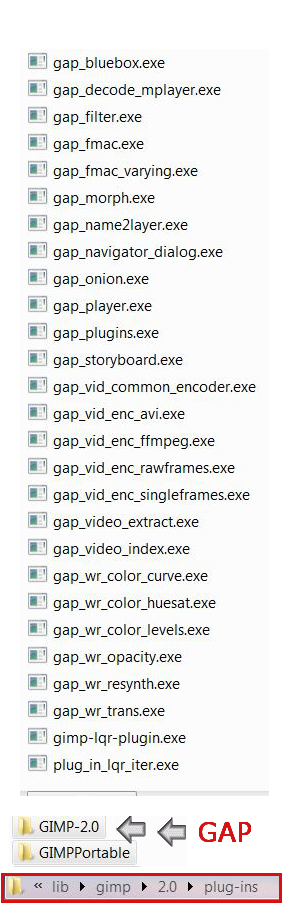
Rod, I installed Gap where I thought you said. Here is a scrn shot of what I did. It doesn't show up in Gimp\Portable, so it must be in the wrong place. You will see at the bottom of the scrn shot that it went into lib-gimp-2.0-plug-ins. Somehow there is a GIMP 2.0 folder above GIMPPortable and that is where GAP is residing. How do I fix this. :oops:
Image

_________________
Image


Top
 Post subject: Re: GIMP on a USB Flash Drive
PostPosted: Tue Jul 26, 2011 6:05 am  (#31) 
Offline
Global Moderator
User avatar

Joined: May 16, 2010
Posts: 16168
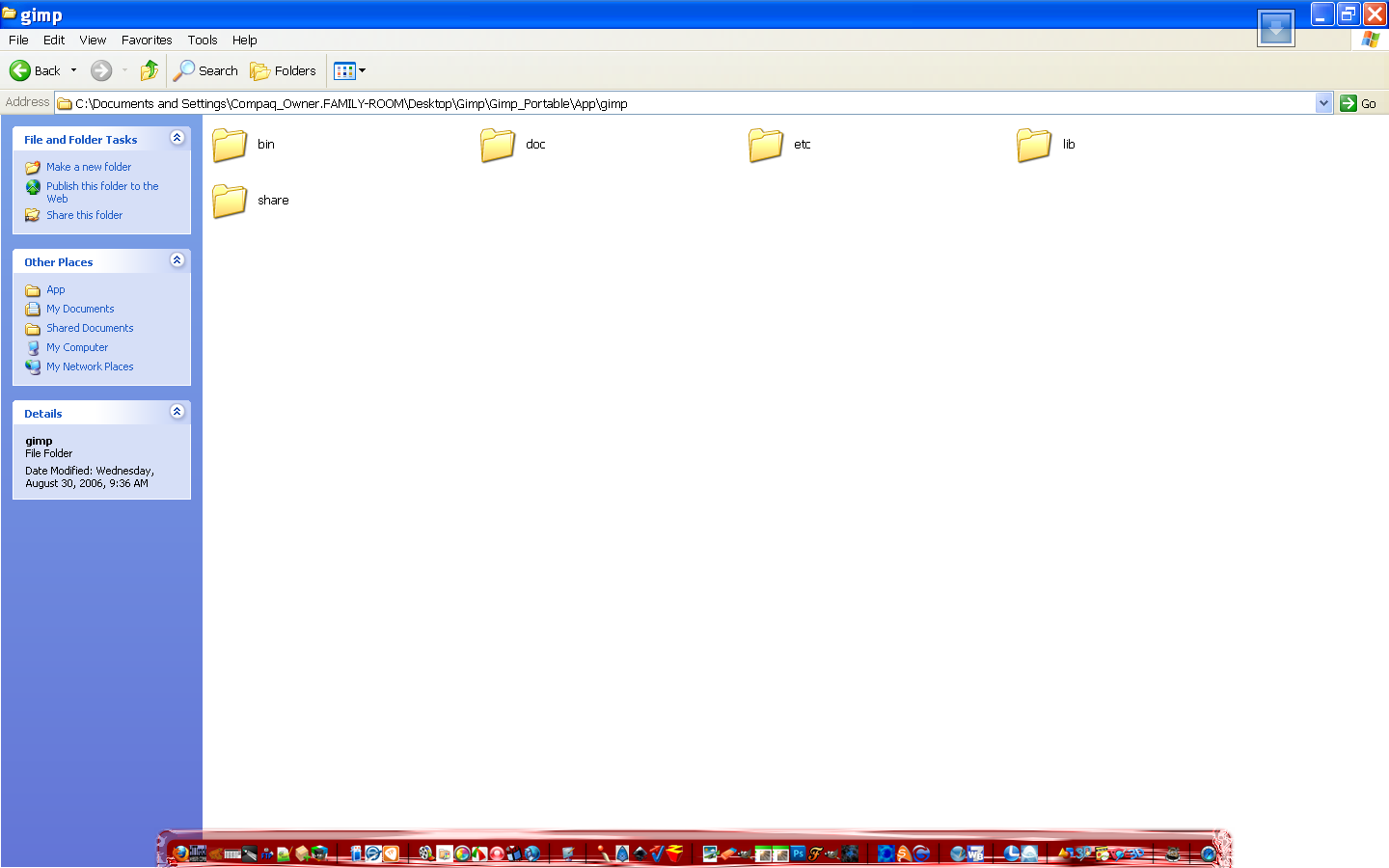
Molly just move all those plug-ins too the folder i showed you App/Gimp
What happened was when you installed it the installer added the extra folder and installed it into what it thought was gimp-2.6.11 :lol
So just move those exe files to the folder i showed you and restart Gimp portable again. :)
All GAP is is a set of exe files (plugins) that run together.

If the installer created that folder then all those files need to be moved.

Molly have you re-installed Gimp-2.6.11 regular version?

This is where GAP should be installed...as it installs it will find the various folders it needs.
Image

If you want and if you can wait for a couple days i should have this whole package ready to go of the new revised Gimp_Portable. :)

_________________
Image


Top
 Post subject: Re: GIMP on a USB Flash Drive
PostPosted: Tue Jul 26, 2011 7:01 am  (#32) 
Offline
GimpChat Member
User avatar

Joined: Apr 07, 2010
Posts: 14182
No I installed Gimp2.6portable, like you said. I took it all out again and re-installed it. It is finally where it is supposed to be. For some reason, I didn't have to install GMIC, it was already there. Now the next big task is Mathmap. :oops:

_________________
Image


Top
 Post subject: Re: GIMP on a USB Flash Drive
PostPosted: Tue Jul 26, 2011 7:52 am  (#33) 
Offline
Global Moderator
User avatar

Joined: May 16, 2010
Posts: 16168
Molly to install MathMap, place the mathmap.exe binary file and its DLL files in your regular plug-ins folder App/Gimp/lib/gimp/2.0/plug-ins folder.

Place the MathMap folder in the Gimp_Portable\Data\settings\ folder

I now have python installed within Gimp_Portable-2.6.11 :)

Next is themes.

_________________
Image


Top
 Post subject: Re: GIMP on a USB Flash Drive
PostPosted: Tue Jul 26, 2011 9:43 am  (#34) 
Offline
Global Moderator
User avatar

Joined: May 16, 2010
Posts: 16168
Scratch having python installed correctly just yet...getting there though. :)

_________________
Image


Top
 Post subject: Re: GIMP on a USB Flash Drive
PostPosted: Tue Jul 26, 2011 9:57 am  (#35) 
Offline
GimpChat Member
User avatar

Joined: Apr 07, 2010
Posts: 14182
Rod, I don't think I will be able to put python onto the gimp\portable. To do that, I have to allow Python in the Gimp install and there is nothing to click to do that. I checked it out.

_________________
Image


Top
 Post subject: Re: GIMP on a USB Flash Drive
PostPosted: Tue Jul 26, 2011 10:11 am  (#36) 
Offline
Global Moderator
User avatar

Joined: May 16, 2010
Posts: 16168
Partha was able to do it for gimp-2.7.3 portable so i believe it is also possible for 2.6 portable....somehow. :)

_________________
Image


Top
 Post subject: Re: GIMP on a USB Flash Drive
PostPosted: Tue Jul 26, 2011 11:11 am  (#37) 
Offline
GimpChat Member
User avatar

Joined: Apr 07, 2010
Posts: 14182
Go for it Rod. Hope you make it work......

_________________
Image


Top
Post new topic Reply to topic  [ 37 posts ]  Go to page Previous  1, 2

All times are UTC - 5 hours [ DST ]


* Login  


Powered by phpBB3 © phpBB Group