It is currently Mon Nov 23, 2026 12:03 pm


All times are UTC - 5 hours [ DST ]


Post new topic Reply to topic  [ 25 posts ]  Go to page Previous  1, 2
Author Message
 Post subject: Re: 32 VS 64 bit [solved]
PostPosted: Sat Apr 14, 2012 7:12 am  (#21) 
Offline
GimpChat Member
User avatar

Joined: Apr 07, 2010
Posts: 14182
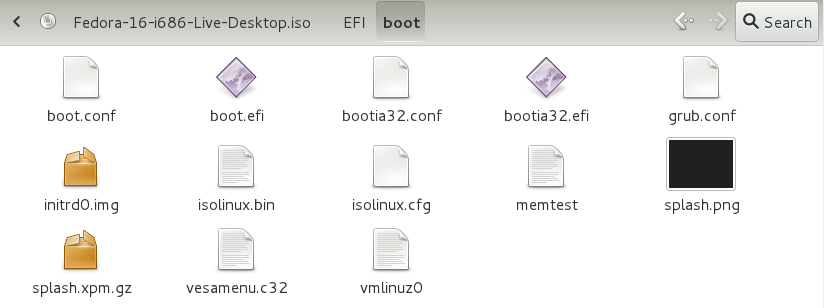
Well I guess I have Fedora 16 32-bit. I just put my live disk in and all the files in that have 32 beside them. So, I guess this means I keep using 32-bit software. I have no clue how to upgrade that to 64-bit. At least now I know what I am running. :teeth

Tux, you have a good memory

Image

_________________
Image


Top
 Post subject: Re: 32 VS 64 bit
PostPosted: Sat Apr 14, 2012 10:09 am  (#22) 
Offline
Script Coder
User avatar

Joined: Apr 23, 2010
Posts: 1553
Location: not from Guildford after all
molly wrote:
okay, thank you all you brilliant techies, I will run 64 bit apps from now on. I did this uname-a thang and this is what it shows but I don't see 32 or 64 in it.

Image

The "i686" indicates it is for Intel 32-bit architectures (80686 processors or similar). 64-bit architectures would be indicated by "x86_64".

molly wrote:
I have no clue how to upgrade that to 64-bit. At least now I know what I am running. :teeth

You would need to download and install the 64-bit version anew (https://fedoraproject.org/get-fedora-options).

_________________
Any sufficiently primitive technology is indistinguishable from a rock.


Top
 Post subject: Re: 32 VS 64 bit [solved]
PostPosted: Sat Apr 14, 2012 10:12 am  (#23) 
Offline
GimpChat Member
User avatar

Joined: Apr 07, 2010
Posts: 14182
Thank you Saul, I might wait until 17 comes out, not sure yet.

_________________
Image


Top
 Post subject: Re: 32 VS 64 bit [solved]
PostPosted: Sat Apr 14, 2012 11:30 am  (#24) 
Offline
GimpChat Founder
User avatar

Joined: May 22, 2008
Posts: 5248
Location: Gimpville
To date, the problem with running 64-bit Linux is that most of the important apps and device drivers were 32-bit. There were lots of problems and incompatibilities with 32-bit device drivers that drove many users (especially new Linux users) back to the 32-bit version. This is slowly changing and we are beginning to see many stable and issue free 64-bit device drivers, as well as many of the apps we use, such as GIMP, FireFox & Flash release stable 64-bit versions.

You would definitely want to wait until F17, which is due out next month. There is really no pressing need to move to the 64-bit version Fedora on your hardware, unless you must have a specific app that is 64-bit only. You might even want to wait until F18. Support for F16 will drop a few months after the release of F18 so you'll need to be upgrading by that time anyway. Keep in mind that it wouldn't be an "upgrade" on your part, it would be a complete replacement so you'd be starting again from scratch.

In Fedora, and many other Linux distros, you'll be upgrading (or replacing from scratch, if you prefer) approximately every 18 months, just to keep up with new software versions and innovations. I tend to skip two releases and completely replace from scratch every 3rd release. It has been my experience that "upgrading" from one release to the next can be problematic, to say the least, because things change so rapidly and some of the old stuff gets left behind. This can be even more problematic when "upgrading" from several releases below the current release, say from F14 to F18. Since I skip several releases in between, I always install clean from scratch and avoid "upgrading".

_________________
Image


Top
 Post subject: Re: 32 VS 64 bit [solved]
PostPosted: Sat Apr 14, 2012 11:39 am  (#25) 
Offline
GimpChat Member
User avatar

Joined: Apr 07, 2010
Posts: 14182
I figured that.
Looks like I will be staying where I am for now but I was thinking of version 17. Knowing that it would be a complete clean install, I better stay at 16. lol. I would screw up for sure.

thanks

_________________
Image


Top
Post new topic Reply to topic  [ 25 posts ]  Go to page Previous  1, 2

All times are UTC - 5 hours [ DST ]


* Login  


Powered by phpBB3 © phpBB Group