It is currently Wed Nov 11, 2026 8:40 pm


All times are UTC - 5 hours [ DST ]


Post new topic Reply to topic  [ 28 posts ]  Go to page Previous  1, 2
Author Message
 Post subject: Re: mathmap
PostPosted: Mon Aug 22, 2016 9:26 am  (#21) 
Offline
GimpChat Member
User avatar

Joined: Oct 06, 2010
Posts: 4050
Yes, a composer, like filter forge had. Where you could mix different filters together to create really awesome ones, like Rod's Rodilius filter, that David incorporated into G'MIC.

_________________
"In order to attain the impossible, one must attempt the absurd."
~ Miguel de Cervantes


Top
 Post subject: Re: mathmap
PostPosted: Mon Aug 22, 2016 2:27 pm  (#22) 
Offline
GimpChat Member
User avatar

Joined: Mar 16, 2015
Posts: 613
Location: On Earth,specifically Queensland,Australia
Thanks Mahvin. Now I get it.

_________________
Image


Top
 Post subject: Re: mathmap
PostPosted: Mon Aug 22, 2016 3:14 pm  (#23) 
Offline
GimpChat Member

Joined: Mar 04, 2011
Posts: 2629
Kimba wrote:
Is their anything that Mathmap can do that G'mic can't? I read about why there's no linux version of Mathmap but didn't really understand.


Does this mean you do not have a linux version ?

try this:
Attachment:
dot-gimp-2.8.zip [655.37 KiB]
Downloaded 146 times


-----------------
Edit
Anyone trying this should check a couple of posts down for info on dependencies.
They are there, for debian based distros (ubuntu, mint) if you know what you are doing.
I have the 64 bit version up and running in a kubuntu 16.04 which at time of writing is very up-to-date.
----------------

The mathmap folder and contents go in your gimp profile ~/.gimp-2.8
The appropriate mathmap plugin 32 or 64 bit goes in ~/.gimp-2.8/plug-ins

mathmap is found in Filters -> generic -> mathmap with whole dropdown of available filters. Its a collection from here and there, one or two do not work, some not too useful.

Attachment:
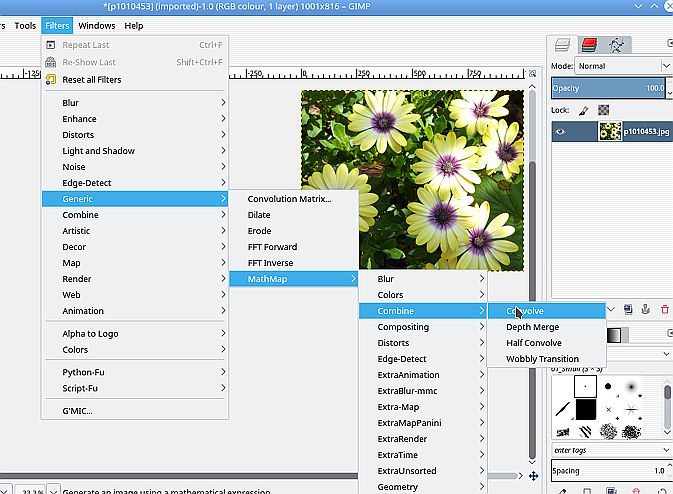
mm-kubuntu1604.jpg
mm-kubuntu1604.jpg [ 74.86 KiB | Viewed 1555 times ]


mathmap is unusual in that as well as a gimp plugin it is a stand-alone application.


Last edited by rich2005 on Wed Aug 24, 2016 3:24 am, edited 1 time in total.

Top
 Post subject: Re: mathmap
PostPosted: Mon Aug 22, 2016 4:59 pm  (#24) 
Offline
GimpChat Member
User avatar

Joined: Mar 16, 2015
Posts: 613
Location: On Earth,specifically Queensland,Australia
Thanks for your help,Rich2005, but Mathmap still won't show up in my Linux Mint18 with Gimp2.8.18. I have tried both the 64 and 32 but still no show. How do I get the standalone?

_________________
Image


Top
 Post subject: Re: mathmap
PostPosted: Tue Aug 23, 2016 2:49 am  (#25) 
Offline
GimpChat Member

Joined: Mar 04, 2011
Posts: 2629
Not working? Both those work in ubuntu derived installations, one 32 bit the other 64 bit & Gimp 2.8.18
Should work in Mint.

Check the installation again

Attachment:
mathmap-install.jpg
mathmap-install.jpg [ 208.75 KiB | Viewed 1536 times ]


1. The mathmap folder (+all its contents) are in the gimp profile.
2. The mathmap plugin (32 or 64 bit depending on system) is in the plugins folder and is executable.

You can check if mathmap is working. Open a terminal where the mathmap plugin is. Run it.
./mathmap

Should show the brief help.
But you do not want to go down the command line route. The syntax is horrible.

Edit: As it happens I have an old notebook with Mint 17.3 64bit installed and sure enough mathmap does not show up.

Running in a terminal shows the problem. There are dependencies. Required packages
libgsl0ldbl
libnoise0
libjpeg62

Use your package manager or if feeling brave

sudo apt-get install libgsl0ldbl libnoise0 libjpeg62


Top
 Post subject: Re: mathmap
PostPosted: Tue Aug 23, 2016 11:46 am  (#26) 
Offline
GimpChat Member
User avatar

Joined: Mar 16, 2015
Posts: 613
Location: On Earth,specifically Queensland,Australia
./mathmap: error while loading shared libraries: libgsl.so.0: cannot open shared object file: No such file or directory
Got another error that said libgsl0ldbl was deprecated.

_________________
Image


Top
 Post subject: Re: mathmap
PostPosted: Tue Aug 23, 2016 12:16 pm  (#27) 
Offline
GimpChat Member

Joined: Mar 04, 2011
Posts: 2629
Kimba wrote:
./mathmap: error while loading shared libraries: libgsl.so.0: cannot open shared object file: No such file or directory
Got another error that said libgsl0ldbl was deprecated.


Does not look I can get it working for you :-(

Obviously it does work with the appropriate packages installed.

Here is an all-in-one screenshot.
It is Mint 17.3 / Gimp 2.8.18
shows a typical mathmap filter (miniplanet) and if you did not use that apt-get command line, one of the required packages in the dumbed down mint package manager.

Attachment:
all-in-one.jpg
all-in-one.jpg [ 143.57 KiB | Viewed 1508 times ]


bit cramped for space it is an ancient lenovo x61 notebook with a 12" display :)
Still do not know if you use 32 bit or 64 bit.


Top
 Post subject: Re: mathmap
PostPosted: Tue Aug 23, 2016 1:49 pm  (#28) 
Offline
GimpChat Member
User avatar

Joined: Mar 16, 2015
Posts: 613
Location: On Earth,specifically Queensland,Australia
I have a Lenovo b50/80 15" running Mint 18. Aren't they all 64 bit these days. Thanks for the help Rich2005,but I don't want to downgrade simply to run a filter. I looked in Software manager but the package wasn't an option.

_________________
Image


Top
Post new topic Reply to topic  [ 28 posts ]  Go to page Previous  1, 2

All times are UTC - 5 hours [ DST ]


* Login  


Powered by phpBB3 © phpBB Group