It is currently Thu Aug 13, 2026 11:31 am


All times are UTC - 5 hours [ DST ]


Post new topic Reply to topic  [ 44 posts ]  Go to page Previous  1, 2, 3  Next
Author Message
 Post subject: Re: Gimp-2.8 Sometimes Crashing On Export/Save
PostPosted: Thu Dec 06, 2012 10:43 pm  (#21) 
Offline
GimpChat Founder
User avatar

Joined: May 22, 2008
Posts: 5241
Location: Gimpville
molly wrote:
My Gimp is also still crashing.

what about if I un-install Gimp 2.8.2 (64-bit) and install 32-bit.

Suggestions please

The first thing I would try is with GIMP closed, rename the hidden .gimp-2.8 folder in your Home directory to .backup-gimp-2.8. When you start GIMP, it will create a clean .gimp-2.8 folder.

Then without adding any scripts, fonts or anything else, do a lot of save/export testing to see if it still crashes. That will at least tell us if there is corruption (or something bad) in your old .gimp-2-8 folder.

If it still crashes, we can dig deeper, look at other system wide plugins or perhaps re-install.

_________________
“If you reach for the stars, you just might land on a decently sized hill.” - Stuart Hill


Top
 Post subject: Re: Gimp-2.8 Sometimes Crashing On Export/Save
PostPosted: Fri Dec 07, 2012 4:27 am  (#22) 
Offline
GimpChat Member
User avatar

Joined: Apr 07, 2010
Posts: 14182
Thanks, I will try that. :pengy

OK, here is what I did. I changed the folder to .backup like you said. I opened Gimp and got this message.

Image

Gimp opened so I opened an image and saved it as an xcf and it crashed right away, no messages. I tried it twice more and the same thing.
I then opened it with the terminal. This is the message I received when it opened.
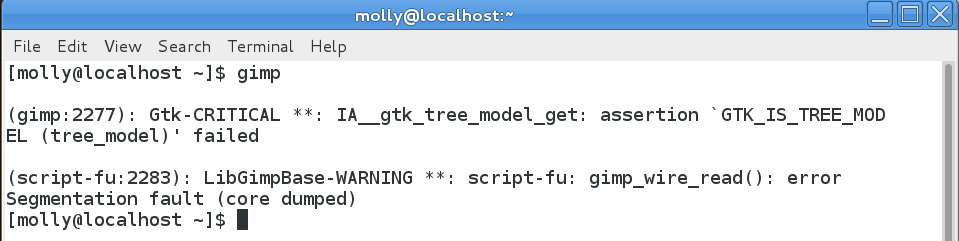
Image

I closed the terminal by typing exit and it also closed Gimp.

I opened Gimp two more times after that and saved as xcf and it crashed again.
Now this is the strange part, I saved with Export several times and it didn't crash, but then again maybe it will when I try it enough times.

opened with --verbose

[molly@localhost ~]$ gimp --verbose
INIT: gimp_load_config
Parsing '/home/molly/.gimp-2.8/unitrc'
Parsing '/etc/gimp/2.0/gimprc'
Parsing '/home/molly/.gimp-2.8/gimprc'
gimp_composite: verbose=no
Processor instruction sets: +mmx +sse +sse2 -3dnow -altivec -vis
Adding theme 'Default' (/usr/share/gimp/2.0/themes/Default)
Adding theme 'Small' (/usr/share/gimp/2.0/themes/Small)
Writing '/home/molly/.gimp-2.8/themerc'
Trying splash '/home/molly/.gimp-2.8/gimp-splash.png' ... failed
Trying splash '/usr/share/gimp/2.0/images/gimp-splash.png' ... OK
INIT: gimp_initialize
INIT: gimp_real_initialize
INIT: gui_initialize_after_callback
INIT: gimp_restore
Parsing '/home/molly/.gimp-2.8/parasiterc'
Loading 'brush factory' data
Loading 'dynamics factory' data
Loading 'pattern factory' data
Loading 'palette factory' data
Loading 'gradient factory' data
Loading fonts
Loading 'tool preset factory' data
Parsing '/home/molly/.gimp-2.8/templaterc'
Parsing '/home/molly/.gimp-2.8/modulerc'
INIT: gui_restore_callback
clipboard: writable pixbuf format: image/png
clipboard: writable pixbuf format: image/tiff
clipboard: writable pixbuf format: image/x-icon
clipboard: writable pixbuf format: image/x-ico
clipboard: writable pixbuf format: image/x-win-bitmap
clipboard: writable pixbuf format: image/bmp
clipboard: writable pixbuf format: image/x-bmp
clipboard: writable pixbuf format: image/x-MS-bmp
clipboard: writable pixbuf format: image/jpeg
Parsing '/etc/gimp/2.0/sessionrc'
Parsing '/home/molly/.gimp-2.8/dockrc'
Parsing '/home/molly/.gimp-2.8/toolrc'
Parsing '/home/molly/.gimp-2.8/contextrc'
Parsing '/home/molly/.gimp-2.8/tool-options/gimp-rect-select-tool'
Parsing '/home/molly/.gimp-2.8/tool-options/gimp-ellipse-select-tool'
Parsing '/home/molly/.gimp-2.8/tool-options/gimp-free-select-tool'
Parsing '/home/molly/.gimp-2.8/tool-options/gimp-fuzzy-select-tool'
Parsing '/home/molly/.gimp-2.8/tool-options/gimp-by-color-select-tool'
Parsing '/home/molly/.gimp-2.8/tool-options/gimp-iscissors-tool'
Parsing '/home/molly/.gimp-2.8/tool-options/gimp-foreground-select-tool'
Parsing '/home/molly/.gimp-2.8/tool-options/gimp-vector-tool'
Parsing '/home/molly/.gimp-2.8/tool-options/gimp-color-picker-tool'
Parsing '/home/molly/.gimp-2.8/tool-options/gimp-zoom-tool'
Parsing '/home/molly/.gimp-2.8/tool-options/gimp-measure-tool'
Parsing '/home/molly/.gimp-2.8/tool-options/gimp-move-tool'
Parsing '/home/molly/.gimp-2.8/tool-options/gimp-align-tool'
Parsing '/home/molly/.gimp-2.8/tool-options/gimp-crop-tool'
Parsing '/home/molly/.gimp-2.8/tool-options/gimp-rotate-tool'
Parsing '/home/molly/.gimp-2.8/tool-options/gimp-scale-tool'
Parsing '/home/molly/.gimp-2.8/tool-options/gimp-shear-tool'
Parsing '/home/molly/.gimp-2.8/tool-options/gimp-perspective-tool'
Parsing '/home/molly/.gimp-2.8/tool-options/gimp-flip-tool'
Parsing '/home/molly/.gimp-2.8/tool-options/gimp-cage-tool'
Parsing '/home/molly/.gimp-2.8/tool-options/gimp-text-tool'
Parsing '/home/molly/.gimp-2.8/tool-options/gimp-bucket-fill-tool'
Parsing '/home/molly/.gimp-2.8/tool-options/gimp-blend-tool'
Parsing '/home/molly/.gimp-2.8/tool-options/gimp-pencil-tool'
Parsing '/home/molly/.gimp-2.8/tool-options/gimp-paintbrush-tool'
Parsing '/home/molly/.gimp-2.8/tool-options/gimp-eraser-tool'
Parsing '/home/molly/.gimp-2.8/tool-options/gimp-airbrush-tool'
Parsing '/home/molly/.gimp-2.8/tool-options/gimp-ink-tool'
Parsing '/home/molly/.gimp-2.8/tool-options/gimp-clone-tool'
Parsing '/home/molly/.gimp-2.8/tool-options/gimp-heal-tool'
Parsing '/home/molly/.gimp-2.8/tool-options/gimp-perspective-clone-tool'
Parsing '/home/molly/.gimp-2.8/tool-options/gimp-convolve-tool'
Parsing '/home/molly/.gimp-2.8/tool-options/gimp-smudge-tool'
Parsing '/home/molly/.gimp-2.8/tool-options/gimp-dodge-burn-tool'
Parsing '/home/molly/.gimp-2.8/tool-options/gimp-desaturate-tool'
Parsing '/home/molly/.gimp-2.8/tool-options/gimp-color-balance-tool'
Parsing '/home/molly/.gimp-2.8/tool-options/gimp-hue-saturation-tool'
Parsing '/home/molly/.gimp-2.8/tool-options/gimp-colorize-tool'
Parsing '/home/molly/.gimp-2.8/tool-options/gimp-brightness-contrast-tool'
Parsing '/home/molly/.gimp-2.8/tool-options/gimp-threshold-tool'
Parsing '/home/molly/.gimp-2.8/tool-options/gimp-levels-tool'
Parsing '/home/molly/.gimp-2.8/tool-options/gimp-curves-tool'
Parsing '/home/molly/.gimp-2.8/tool-options/gimp-posterize-tool'
Parsing '/home/molly/.gimp-2.8/tool-options/gimp-gegl-tool'
INIT: gimp_real_restore
Parsing '/home/molly/.gimp-2.8/pluginrc'
Starting extension: 'extension-script-fu'
INIT: gui_restore_after_callback
Parsing '/home/molly/.gimp-2.8/menurc'
Parsing '/home/molly/.gimp-2.8/devicerc'
Parsing '/home/molly/.gimp-2.8/controllerrc'
Parsing '/home/molly/.gimp-2.8/colorrc'
loading menu '/usr/share/gimp/2.0/menus/image-menu.xml' for /image-menubar


_________________
Image


Top
 Post subject: Re: Gimp-2.8 Sometimes Crashing On Export/Save
PostPosted: Fri Dec 07, 2012 3:13 pm  (#23) 
Offline
GimpChat Founder
User avatar

Joined: May 22, 2008
Posts: 5241
Location: Gimpville
molly wrote:
OK, here is what I did. I changed the folder to .backup like you said. I opened Gimp and got this message.

Image

Well, the error message is saying that .gimp-2.8/brushes already exists. That doesn't make sense if you renamed the .gimp-2.8 folder to .backup-gimp-2.8. How could it exist if you renamed it? You've only posted the last few items in the log so that doesn't help as much as t would if you have posted the entire log.

Btw - I renamed my .gimp-2.8 folder to .backup-gimp-2.8. and when I started GIMP, it created a new .gimp-2.8 folder, without error. I've never seen that GIMP User Installation Box before.

Perhaps someone else can explain the behavior you are seeing. I suspect that you've done a lot of GIMP customization that I'm not familiar with, so I probably won't be able to help with that. The only thing I do is add a few fonts, along with a few scripts/plug-ins and that's it.

_________________
“If you reach for the stars, you just might land on a decently sized hill.” - Stuart Hill


Top
 Post subject: Re: Gimp-2.8 Sometimes Crashing On Export/Save
PostPosted: Fri Dec 07, 2012 5:47 pm  (#24) 
Offline
GimpChat Member
User avatar

Joined: Apr 07, 2010
Posts: 14182
I don't understand why that error message would say .gimp-2.8/brushes already exists either. The only changes I have made to gimp was to install the MrQ-Brush-Manager.py. I removed all my brushes out of the brush folder and pasted them into /brushes_my brushes folder. I did this in order to make all new categorized folders for my brushes so I could use brush Manager. Other than that, the only changes I made was to add scripts, plug-ins, patterns and gradients.

Which message above did I send just part of? I selected all and copied and pasted the verbose in between the code brackets.

Anyway, thank you for trying to help me. I have to go searching to see why that message said I already had brushes installed.

_________________
Image


Top
 Post subject: Re: Gimp-2.8 Sometimes Crashing On Export/Save
PostPosted: Sat Dec 08, 2012 2:00 pm  (#25) 
Offline
GimpChat Founder
User avatar

Joined: May 22, 2008
Posts: 5241
Location: Gimpville
molly wrote:
Which message above did I send just part of?

Image
Judging from the blue scroll bar, looks like we are only seeing the last few lines. I've never seen a GIMP install log or that box before.

Did you rename the hidden .gimp-2.8 folder in your user directory and then start up GIMP? If you renamed it, how could it have complained that brushes folder exists? I just don't get that.

Have you made any modifications to /usr/share/gimp/2.0? That is the system wide GIMP folder.

_________________
“If you reach for the stars, you just might land on a decently sized hill.” - Stuart Hill


Top
 Post subject: Re: Gimp-2.8 Sometimes Crashing On Export/Save
PostPosted: Sat Dec 08, 2012 2:17 pm  (#26) 
Offline
GimpChat Member
User avatar

Joined: Apr 07, 2010
Posts: 14182
No, I have never touched the /usr/share/gimp/2.0? Yes I renamed the .gimp-2.8 I did everything you said. I don't know why that message came up either but I cannot find any other gimp/brushes folder floating around.

I went back to my renamed gimp and changed it back to .gimp-2.8 and removed the new one cuz it was crashing. So far today, I haven't crashed at all in my regular one and I have been playing around in it all day.

If I do start crashing again, is it worthwhile thinking about going to 32-bit Gimp. I really don't care if I lose MM and GAP for now.

_________________
Image


Top
 Post subject: Re: Gimp-2.8 Sometimes Crashing On Export/Save
PostPosted: Sat Feb 02, 2013 10:20 pm  (#27) 
Offline
New Member

Joined: Feb 02, 2013
Posts: 4
here is a workaround for me, fedora17 x86_64, gimp 2.8.2
giving gimp a chance to replace an existing file during exporting will prevent it from crashing this time and later on. so the workaround goes like this:

1 $ touch /tmp/a.jpeg # or any other /path/name u like
2 open any picture with gimp
3 export to /tmp/a.jpeg # or the /path/name u used in step 1
4 hit 'Replace'
5 done. gimp will never crash during export anymore

it sounds like it's not a jpeg/png library issue. before applying this workaround cancelling an export process is still causing gimp to crash. it crashes by caught a a SIGSEGV. but i'm not digging into it to find out what had happened.

hope this is useful to you.


Top
 Post subject: Re: Gimp-2.8 Sometimes Crashing On Export/Save
PostPosted: Sat Feb 02, 2013 10:43 pm  (#28) 
Offline
New Member

Joined: Feb 02, 2013
Posts: 4
missing an entry toplevel->gimp-file-export-dialog in the configuration file ~/.gimp-2.8/sessionrc causes gimp to crash. u can manually insert such an entry to fix it. placing the following block after any other ``session-info'' blocks will work.

(session-info "toplevel"
(factory-entry "gimp-file-export-dialog")
(position 124 200)
(size 1010 667))


edmundni wrote:
here is a workaround for me, fedora17 x86_64, gimp 2.8.2
giving gimp a chance to replace an existing file during exporting will prevent it from crashing this time and later on. so the workaround goes like this:

1 $ touch /tmp/a.jpeg # or any other /path/name u like
2 open any picture with gimp
3 export to /tmp/a.jpeg # or the /path/name u used in step 1
4 hit 'Replace'
5 done. gimp will never crash during export anymore

it sounds like it's not a jpeg/png library issue. before applying this workaround cancelling an export process is still causing gimp to crash. it crashes by caught a a SIGSEGV. but i'm not digging into it to find out what had happened.

hope this is useful to you.


Top
 Post subject: Re: Gimp-2.8 Sometimes Crashing On Export/Save
PostPosted: Sun Feb 03, 2013 5:47 am  (#29) 
Offline
GimpChat Member
User avatar

Joined: Apr 07, 2010
Posts: 14182
Thank you edmundni, but I don't know how to do that. Do I use the terminal or where do I do this?
My Gimp still does crash after every Export save

_________________
Image


Top
 Post subject: Re: Gimp-2.8 Sometimes Crashing On Export/Save
PostPosted: Sun Feb 03, 2013 7:58 pm  (#30) 
Offline
New Member

Joined: Feb 02, 2013
Posts: 4
molly wrote:
Thank you edmundni, but I don't know how to do that. Do I use the terminal or where do I do this?
My Gimp still does crash after every Export save


yes. i use terminal to issue ``touch /tmp/a.jpeg''. or you can simply select any existing *useless* jpeg file as the destination when doing Export. the point is to make gimp to overwrite an existing file.

BTW, currently do you successfully get your photo exported although gimp crashes afterwards? if so my workaround may also work for you. or otherwise there might be other reason. anyway you can have a try.


Top
 Post subject: Re: Gimp-2.8 Sometimes Crashing On Export/Save
PostPosted: Mon Feb 11, 2013 7:00 am  (#31) 
Offline
GimpChat Member
User avatar

Joined: Apr 07, 2010
Posts: 14182
Yes edmundni. The file does export successfully, then it crashes. If I don't save it as an xcf first I lose it all.

_________________
Image


Top
 Post subject: Re: Gimp-2.8 Sometimes Crashing On Export/Save
PostPosted: Wed Feb 13, 2013 12:06 am  (#32) 
Offline
New Member

Joined: Feb 02, 2013
Posts: 4
molly wrote:
Yes edmundni. The file does export successfully, then it crashes. If I don't save it as an xcf first I lose it all.

Then just try my workaround. It will work for you.


Top
 Post subject: Re: Gimp-2.8 Sometimes Crashing On Export/Save
PostPosted: Wed Feb 13, 2013 4:59 am  (#33) 
Offline
GimpChat Member
User avatar

Joined: Apr 07, 2010
Posts: 14182
Okay, I am going to try this and I have someone that is going to try to walk me through it. It is too complicated for me to try by myself.
I have been known to mess these kinds of things up and get into trouble...then can't get myself out of it.

_________________
Image


Top
 Post subject: Re: Gimp-2.8 Sometimes Crashing On Export/Save
PostPosted: Thu Feb 14, 2013 9:00 am  (#34) 
Offline
GimpChat Member
User avatar

Joined: Apr 07, 2010
Posts: 14182
@edmundni... 6:00 AM...I had some help last night with this fix you posted so I will test it for a week to see if I am still crashing. I will post back here to let you know and thank you for the response from my export-crash-dilemma.

10:30 AM...I opened a png with Gimp, exported it, no problem. I opened it again later and exported it with a 2 in the name like iamdense.png imdense2, imdense3, so this means every time I open it and change the number, it crashes.
I posted the ones that crashed.
I also failed to mention the error I get at the bottom of my screen every day when I boot up my computer.

Image


Image

_________________
Image


Top
 Post subject: Re: Gimp-2.8 Sometimes Crashing On Export/Save
PostPosted: Sat Feb 16, 2013 8:52 am  (#35) 
Offline
GimpChat Member
User avatar

Joined: Apr 07, 2010
Posts: 14182
In reference to my post above, could any of you Linux users tell me how I get to that gimp problem where the screen comes up 'report - ignore'
When this message comes up every day when I boot up, I try to click the report button before it disappears, and when I do, where and how do I find this report so I can read it?
HELP - PLEEEZE

_________________
Image


Top
 Post subject: Re: Gimp-2.8 Sometimes Crashing On Export/Save
PostPosted: Sat Feb 16, 2013 10:32 am  (#36) 
Offline
GimpChat Member

Joined: Apr 12, 2010
Posts: 5870
What...from december you didn't solve yet ?
well if can't be solved it is time to find a simple workaround

1 Before save the XCF do Layer/New from visible so at the top you will have a layer with the visible in normal mode
2 just save the xcf
3 forget to use gimp to export, when you need to export just open the xcf WITH YOUR IMAGE VIEWER
(most on linux read xcf) and then use it to save as png or jpg

why waste more time looking for a fix wqhen you may avoid the problem using the image viewer ?

_________________
My 3D Gallery on Deviantart http://photocomix2.deviantart.com/
Main gallery http://www.flickriver.com/photos/photocomix-mandala/
Mandala and simmetry http://www.flickriver.com/photos/photocomix_mandala/

Image

Mrs Wilbress


Top
 Post subject: Re: Gimp-2.8 Sometimes Crashing On Export/Save
PostPosted: Sat Feb 16, 2013 10:41 am  (#37) 
Offline
GimpChat Member
User avatar

Joined: Apr 07, 2010
Posts: 14182
Thank you PC...I can do that and it makes sense, but I still don't like getting that error every time I boot up my pc. I will use this method of yours until I either get a fix or dump GIMP and re-install.

BTW, I think that since Dec, you and Tux, gerard82 and edmundi are the only ones that did answer this thread after 3 months.

_________________
Image


Top
 Post subject: Re: Gimp-2.8 Sometimes Crashing On Export/Save
PostPosted: Sat Feb 16, 2013 10:48 am  (#38) 
Offline
GimpChat Member

Joined: Apr 12, 2010
Posts: 5870
It is a pity that RIOT is not available for Linux i bet that will solve (because use different libraries to export )

Now i should read back to see about the error message at loading time...uff 4 pages to check

_________________
My 3D Gallery on Deviantart http://photocomix2.deviantart.com/
Main gallery http://www.flickriver.com/photos/photocomix-mandala/
Mandala and simmetry http://www.flickriver.com/photos/photocomix_mandala/

Image

Mrs Wilbress


Top
 Post subject: Re: Gimp-2.8 Sometimes Crashing On Export/Save
PostPosted: Sat Feb 16, 2013 10:58 am  (#39) 
Offline
GimpChat Member

Joined: Apr 12, 2010
Posts: 5870
Looking better was September not December ...

Well i fear i can't help for the error message it just say that was something wrong in the installed gimp. and that is surely true since it crashes when you try to export

Anyway here more expert linux users would know how to bypass the error message, for sure you may do loading gimp from command line but i don't remember the exact command (you know i use much more Windows )

_________________
My 3D Gallery on Deviantart http://photocomix2.deviantart.com/
Main gallery http://www.flickriver.com/photos/photocomix-mandala/
Mandala and simmetry http://www.flickriver.com/photos/photocomix_mandala/

Image

Mrs Wilbress


Top
 Post subject: Re: Gimp-2.8 Sometimes Crashing On Export/Save
PostPosted: Sat Feb 16, 2013 11:01 am  (#40) 
Offline
GimpChat Member
User avatar

Joined: Apr 07, 2010
Posts: 14182
:bow ok, THANKS PC

_________________
Image


Top
Post new topic Reply to topic  [ 44 posts ]  Go to page Previous  1, 2, 3  Next

All times are UTC - 5 hours [ DST ]


* Login  


Powered by phpBB3 © phpBB Group