It is currently Tue Nov 24, 2026 3:26 pm


All times are UTC - 5 hours [ DST ]


Post new topic Reply to topic  [ 38 posts ]  Go to page Previous  1, 2
Author Message
 Post subject: Re: Right Click Menu... "Edit with GIMP"???
PostPosted: Tue Sep 11, 2012 6:05 pm  (#21) 
Offline
GimpChat Member

Joined: Apr 12, 2010
Posts: 5870
Wallace wrote:
Odinbc wrote:
A couple of handy utilities you may find useful from NirSoft.

ShellMenuView is a small utility that display the list of static menu items that appeared in the context menu when you right-click a file/folder on Windows Explorer, and allows you to easily disable unwanted menu items.

ShellExView utility displays the details of shell extensions (DLLs) installed on your computer, and allows you to easily disable and enable each shell extension.


I downloaded this utility, thanks maybe this can help me remove the "Edit with GIMP" from my right click menu that doesn't seem to function properly.

I did take a look at my registry and where the shell extensions for "Edit with GIMP" should have been... there was nothing there that pointed to "Edit with GIMP". :? So I left it as is...


The first program may help

Not much the second because should bee no any DLL to find, since gimp doesn't add any dll ( ...not outside the gimp folder in Program Files )

_________________
My 3D Gallery on Deviantart http://photocomix2.deviantart.com/
Main gallery http://www.flickriver.com/photos/photocomix-mandala/
Mandala and simmetry http://www.flickriver.com/photos/photocomix_mandala/

Image

Mrs Wilbress


Last edited by PhotoComix on Tue Sep 11, 2012 6:08 pm, edited 2 times in total.

Top
 Post subject: Re: Right Click Menu... "Edit with GIMP"???
PostPosted: Tue Sep 11, 2012 6:07 pm  (#22) 
Offline
Administrator
User avatar

Joined: Aug 10, 2012
Posts: 14282
Location: Native to NYC living in Arizona, Gimp 2.8 - 3.0, Win 11 PC.
GnuTux wrote:
So you can't do as I suggested in my 1st post and associate .jpg with GIMP, then be able to double click a .jpg and have it open in GIMP. I'm still unclear as to whether you can or cannot do that. Or is it that when you try to associate using the method I suggested, it tells you it's already associated with GIMP?

If that's the case, associate the .jpg with another app, then you should be able to "Open with GIMP". As long as the associated app's path to the .exe is correct, I can't see why it wouldn't work.


I don't get it either... it should work, but it don't.
I thing I'll try using the shell viewer utility that was suggested and remove the "Edit with GIMP" altogether for the right click menu if I can.

How does changing the file association work to make "Edit with GIMP" on the right click menu work to edit JPG's with GIMP? :?

_________________
Image
"A wise man learns more from a foolish question than a fool can learn from a wise answer"
Image


Top
 Post subject: Re: Right Click Menu... "Edit with GIMP"???
PostPosted: Tue Sep 11, 2012 6:47 pm  (#23) 
Offline
GimpChat Founder
User avatar

Joined: May 22, 2008
Posts: 5248
Location: Gimpville
Wallace wrote:
How does changing the file association work to make "Edit with GIMP" on the right click menu work to edit JPG's with GIMP? :?

Well, I believe that in the past, associating a file type with an app can populate the right click menu and give you the "Open With" option for that previously associated app, setting up the path properly.

It does sound like Windows is now confused, probably due to a re-installation of the app after the all the associations were previously made and paths created. Windows is buggy. You're probably going to have to somehow break the old associations and/or update the path to the apps .exe.

I no longer run Windows for personal use so I'm sorry I can't really be of much more help.

_________________
Image


Top
 Post subject: Re: Right Click Menu... "Edit with GIMP"???
PostPosted: Tue Sep 11, 2012 6:57 pm  (#24) 
Offline
Administrator
User avatar

Joined: Aug 10, 2012
Posts: 14282
Location: Native to NYC living in Arizona, Gimp 2.8 - 3.0, Win 11 PC.
GnuTux wrote:
Wallace wrote:
How does changing the file association work to make "Edit with GIMP" on the right click menu work to edit JPG's with GIMP? :?

Well, I believe that in the past, associating a file type with an app can populate the right click menu and give you the "Open With" option for that previously associated app, setting up the path properly.

It does sound like Windows is now confused, probably due to a re-installation of the app after the all the associations were previously made and paths created. Windows is buggy. You're probably going to have to somehow break the old associations and/or update the path to the apps .exe.

I no longer run Windows for personal use so I'm sorry I can't really be of much more help.


That's alright, I can't say that you didn't try. I can however open all my image files using the "Edit" option that is within the right click menu. It's only when I try to use the option "Edit with GIMP" from this same menu, that things screw up and I get that funny message.

I did use the shell viewer utility, but could not find anything there to help remove the "Edit with GIMP" option that's in the right click menu.

_________________
Image
"A wise man learns more from a foolish question than a fool can learn from a wise answer"
Image


Top
 Post subject: Re: Right Click Menu... "Edit with GIMP"???
PostPosted: Tue Sep 11, 2012 7:44 pm  (#25) 
Offline
GimpChat Member

Joined: Apr 19, 2012
Posts: 80
Location: Australia
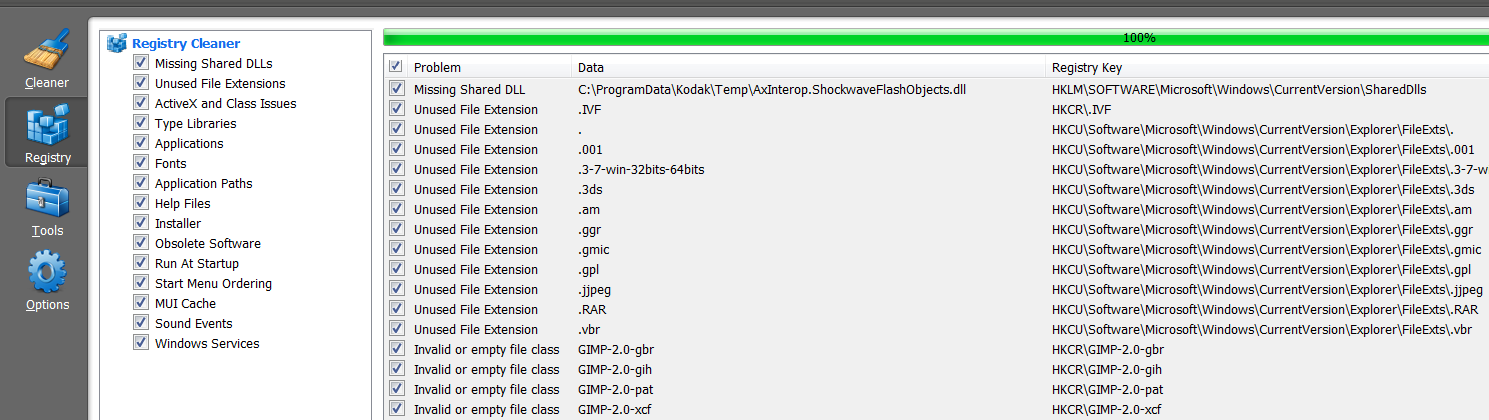
The Registry Clean part of CCleaner http://www.piriform.com/ccleaner will probably find and remove any 'left-overs'. You could try that. It has a 'Scan for errors' option before changing anything.


Top
 Post subject: Re: Right Click Menu... "Edit with GIMP"???
PostPosted: Tue Sep 11, 2012 8:53 pm  (#26) 
Offline
GimpChat Member
User avatar

Joined: Nov 16, 2011
Posts: 5127
Location: Metro Vancouver, BC
b10h4z4rd wrote:
The Registry Clean part of CCleaner http://www.piriform.com/ccleaner will probably find and remove any 'left-overs'. You could try that. It has a 'Scan for errors' option before changing anything.

CCleaner is good, if you avoid the registry cleaning part. So called "registry cleaners" are, more often than not, a slow dead to your OS.

_________________
Image
Gimp 2.8.18, Linux, median user
Gimp Chat Tutorials Index
Spirit Bear (Kermode)


Top
 Post subject: Re: Right Click Menu... "Edit with GIMP"???
PostPosted: Tue Sep 11, 2012 9:09 pm  (#27) 
Offline
GimpChat Member

Joined: Apr 19, 2012
Posts: 80
Location: Australia
@odinbc
But as you can clearly see the entries relating to Gimp in the results, and you can choose which fixes you want it to do or not. Makes it pretty safe for a once off fix. Plus it has the option to backup the registry before changing anything. See an example below after I ran the scan for errors on my registry.
Image


Top
 Post subject: Re: Right Click Menu... "Edit with GIMP"???
PostPosted: Tue Sep 11, 2012 10:27 pm  (#28) 
Offline
Administrator
User avatar

Joined: Aug 10, 2012
Posts: 14282
Location: Native to NYC living in Arizona, Gimp 2.8 - 3.0, Win 11 PC.
b10h4z4rd wrote:
The Registry Clean part of CCleaner http://www.piriform.com/ccleaner will probably find and remove any 'left-overs'. You could try that. It has a 'Scan for errors' option before changing anything.


Yeah... I did that, still no change.

_________________
Image
"A wise man learns more from a foolish question than a fool can learn from a wise answer"
Image


Top
 Post subject: Re: Right Click Menu... "Edit with GIMP"???
PostPosted: Tue Sep 11, 2012 10:30 pm  (#29) 
Offline
Administrator
User avatar

Joined: Aug 10, 2012
Posts: 14282
Location: Native to NYC living in Arizona, Gimp 2.8 - 3.0, Win 11 PC.
b10h4z4rd wrote:
@odinbc
But as you can clearly see the entries relating to Gimp in the results, and you can choose which fixes you want it to do or not. Makes it pretty safe for a once off fix. Plus it has the option to backup the registry before changing anything. See an example below after I ran the scan for errors on my registry.
Image


I use cCleaner and nothing related to GIMP has ever come up.

_________________
Image
"A wise man learns more from a foolish question than a fool can learn from a wise answer"
Image


Top
 Post subject: Re: Right Click Menu... "Edit with GIMP"???
PostPosted: Tue Sep 11, 2012 10:50 pm  (#30) 
Offline
GimpChat Founder
User avatar

Joined: May 22, 2008
Posts: 5248
Location: Gimpville
Digging a little deeper, these articles show you where the registry keys are located for the various apps and file types associated with the "Open With" list.

Quote:
The OpenWithList key contains a list of values, with each value containing the executable name of an application. Examples: paint.exe, notepad.exe, wordpad.exe etc. The applications listed under this key for a file extension appear under the Recommended Programs heading in the Open With dialog box. These applications also appear in the Open With submenu. link

Quote:
Don´t worry if you´ve removed an entry you rather hadn´t removed. When rightclicking a file there will be another option in the "open with" extension where you can choose any program on your computer. Once used, it will reappear in the list of associated programs. link

Don't forget to create a restore point and backup the registry before removing keys using regedit. :)

_________________
Image


Top
 Post subject: Re: Right Click Menu... "Edit with GIMP"???
PostPosted: Wed Sep 12, 2012 7:11 am  (#31) 
Offline
Script Coder
User avatar

Joined: Jun 22, 2010
Posts: 1171
Location: Here and there
I've been playing this morning and found there are some odd interdependencies between the four file extensions that use the JPEG Image file type, so make sure you check all 4 - JFIF, JPE, JPEG and JPG

I've also managed to add in separate entries for editing with 2.6 and 2.8 (although you can't have both running at the same time)

You do have to edit the Application string to put the double-quotes around the %1 parameter to cope with paths that have space characters in them:
"C:\Program Files\GIMP-2.6.7\bin\gimp-2.6.exe" "%1"

Attachment:
Untitled.png
Untitled.png [ 38.85 KiB | Viewed 1987 times ]


Kevin


Top
 Post subject: Re: Right Click Menu... "Edit with GIMP"???
PostPosted: Wed Sep 12, 2012 8:59 am  (#32) 
Offline
Global Moderator
User avatar

Joined: May 16, 2010
Posts: 16309
Seems easier to just right click the image and select open with. :)
Gimp should be listed if not...select other
Select other programs in the dialog list
Then browse to gimps exe file and click ok.

After that the Gimp program should be listed for that type of file.(in the open with list)

_________________
Image


Top
 Post subject: Re: Right Click Menu... "Edit with GIMP"???
PostPosted: Wed Sep 12, 2012 9:08 am  (#33) 
Offline
GimpChat Member

Joined: Aug 05, 2011
Posts: 606
Location: limestone,ny
Rod wrote:
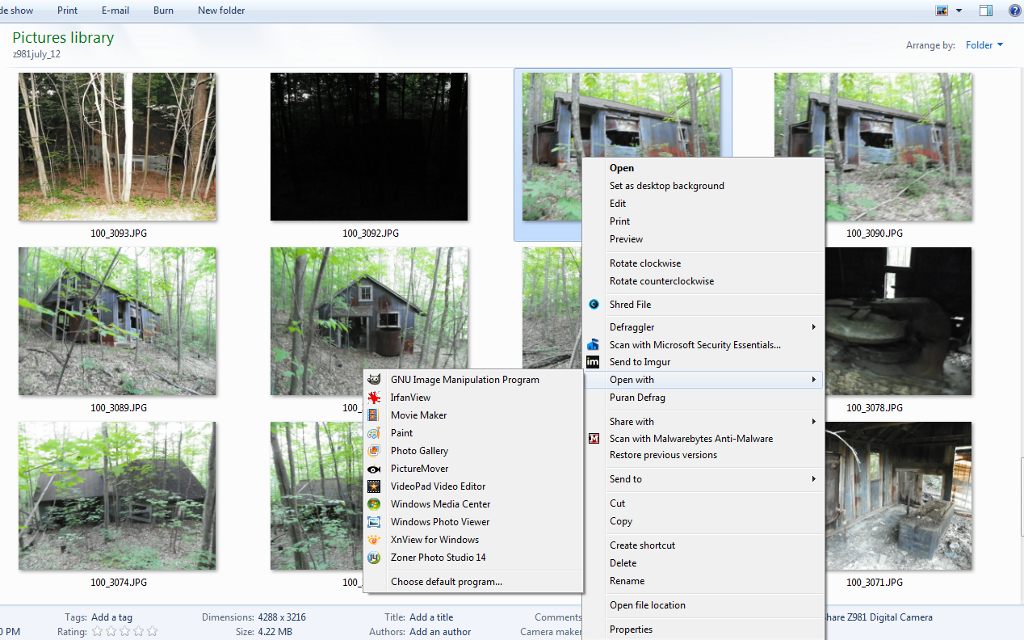
Seems easier to just right click the image and select open with. :)
Gimp should be listed if not...select other
Select other programs in the dialog list
Then browse to gimps exe file and click ok.

After that the Gimp program should be listed for that type of file.(in the open with list)

Exactly how i have it set up Rod in win7
I have pictures set to open in Irfanview by default but can use the right click "open with"
Image


Top
 Post subject: Re: Right Click Menu... "Edit with GIMP"???
PostPosted: Wed Sep 12, 2012 9:36 am  (#34) 
Offline
GimpChat Member

Joined: Apr 12, 2010
Posts: 5870
If i remember well the path should be NOT for gimp.exe

A path to gimp.exe would open a new gimp each time you click "edit with":
let say with 5 clicks you should have 5 jpg open on 5 instances of gimp running simultaneously...a sort of nighmare (and big risk to crash if they try to load simultaneously )

To avoid this the file to point should be gimp-console.exe (also in Bin as gimp.exe)

_________________
My 3D Gallery on Deviantart http://photocomix2.deviantart.com/
Main gallery http://www.flickriver.com/photos/photocomix-mandala/
Mandala and simmetry http://www.flickriver.com/photos/photocomix_mandala/

Image

Mrs Wilbress


Top
 Post subject: Re: Right Click Menu... "Edit with GIMP"???
PostPosted: Wed Sep 12, 2012 9:40 am  (#35) 
Offline
GimpChat Member
User avatar

Joined: Jun 24, 2010
Posts: 504
Location: Western Vic Australia
Yes a bit of a problem this "Edit with Gimp" issue, When I was running Windows XP there was indeed the screen that Paynekj shows where there is an option to allocate an "edit with " function. Since I changed to Windows 7, I can no longer find that screen. I also find that using the Browse "open with" panel and browsing to the Gimp/bin /.exe does not open the file with Gimp.
I am using Windows 7 Home Premium X64. Gimp 2.6.11. I have previously spent quite some time on this but I just can not get it it work correctly. However it works in ZoomBrowser (canon product) where I can select an external editor like Gimp.
I will have a look in the file association in the registry tomorrow. It just seems funny that nearly every editor will automatically pop up in the "openwith" panel (including ones that cannot do any editing) but Gimp is conspicuous by its absence in that panel.

_________________
Image


Top
 Post subject: Re: Right Click Menu... "Edit with GIMP"???
PostPosted: Wed Sep 12, 2012 10:19 pm  (#36) 
Offline
Administrator
User avatar

Joined: Aug 10, 2012
Posts: 14282
Location: Native to NYC living in Arizona, Gimp 2.8 - 3.0, Win 11 PC.
wbool63 wrote:
Yes a bit of a problem this "Edit with Gimp" issue, When I was running Windows XP there was indeed the screen that Paynekj shows where there is an option to allocate an "edit with " function. Since I changed to Windows 7, I can no longer find that screen. I also find that using the Browse "open with" panel and browsing to the Gimp/bin /.exe does not open the file with Gimp.
I am using Windows 7 Home Premium X64. Gimp 2.6.11. I have previously spent quite some time on this but I just can not get it it work correctly. However it works in ZoomBrowser (canon product) where I can select an external editor like Gimp.
I will have a look in the file association in the registry tomorrow. It just seems funny that nearly every editor will automatically pop up in the "openwith" panel (including ones that cannot do any editing) but Gimp is conspicuous by its absence in that panel.


I've given up on trying to make any changes to my right click menu. Nothing I do seems to work anyway... so I'll just us the "Edit" or "Open with" right click option and ignore that stupid "Edit with Gimp" option altogether.
All you guys have been a big help, to bad with all your effort nothing was gained.

Oh well...

_________________
Image
"A wise man learns more from a foolish question than a fool can learn from a wise answer"
Image


Top
 Post subject: Re: Right Click Menu... "Edit with GIMP"???
PostPosted: Thu Sep 13, 2012 1:40 am  (#37) 
Offline
GimpChat Member
User avatar

Joined: Jun 24, 2010
Posts: 504
Location: Western Vic Australia
PhotoComix wrote:
If i remember well the path should be NOT for gimp.exe

A path to gimp.exe would open a new gimp each time you click "edit with":
let say with 5 clicks you should have 5 jpg open on 5 instances of gimp running simultaneously...a sort of nighmare (and big risk to crash if they try to load simultaneously )
To avoid this the file to point should be gimp-console.exe (also in Bin as gimp.exe)

Hi PC, yes you are correct , however the console .exe has never worked for me either. So I have tried the direct bin gimp-2.6.exe as well. In short it has never worked for me in any version of Gimp. Perhaps it will work if there are correct path statements or something like that, but it has been 20 years since I played with DOS and win 3.3 and I simply do not remember how or where to put them.
Cheers

_________________
Image


Top
 Post subject: Re: Right Click Menu... "Edit with GIMP"???
PostPosted: Thu Sep 13, 2012 3:05 am  (#38) 
Offline
Script Coder
User avatar

Joined: Jun 22, 2010
Posts: 1171
Location: Here and there
PhotoComix wrote:
If i remember well the path should be NOT for gimp.exe

A path to gimp.exe would open a new gimp each time you click "edit with":
let say with 5 clicks you should have 5 jpg open on 5 instances of gimp running simultaneously...a sort of nighmare (and big risk to crash if they try to load simultaneously )

To avoid this the file to point should be gimp-console.exe (also in Bin as gimp.exe)


That's not true on my Windows Xp system. Once you've got gimp.exe started, clicking "Edit with gimp" opens the image in the existing instance of GIMP. Even trying to launch an image into 2.8 when you got 2.6 already running opens the image in the 2.6 instance.

And gimp-console.exe is what you use for batch processing as it doesn't start the GUI.

Kevin


Top
Post new topic Reply to topic  [ 38 posts ]  Go to page Previous  1, 2

All times are UTC - 5 hours [ DST ]


* Login  


Powered by phpBB3 © phpBB Group