It is currently Tue Nov 17, 2026 12:25 pm


All times are UTC - 5 hours [ DST ]


Post new topic Reply to topic  [ 73 posts ]  Go to page Previous  1, 2, 3, 4  Next
Author Message
 Post subject: Re: My Scripts don't show
PostPosted: Thu Nov 10, 2011 7:15 am  (#31) 
Offline
Script Coder
User avatar

Joined: Jun 22, 2010
Posts: 1171
Location: Here and there
I've hacked at my script a bit more. Now it gives you the option of checking all the scripts in all the directories you have defined in Edit >> Preferences >> Folders >> Scripts

It is also now checking properly where there is more than one script defined in a .scm file and I've made the progress bar keep you informed of how much is done.

Test For Duplicate Scripts Warning
duplicate: script-fu-kp24_webname in
D:\Profiles\kevin\.gimp-2.6\scripts\mine\kp24_webname.scm
and
D:\Profiles\kevin\.gimp-2.6\scripts\kp24_webname.scm

Test For Duplicate Scripts Warning
Finished. Found 169 register attempts
If this looks OK (and I'd welcome any comments about enhancements/coding style) then I'll upload it to GimpScripts

Kevin

p.s. My version still registers in a "contributed" menu. Edit the first line to put it where you want:
(define selfmenuroot "<Image>/contributed")     ; Change these to suit yourself         

change to
(define selfmenuroot "<Image>/Help")     ; Change these to suit yourself         

to put it in the Help menu for instance
(Personally I wouldn't put it under Filters because it doesn't do anything to an image)


Attachments:
File comment: This is version 1.1
kp24_test_for_duplicate_scripts.zip [1.84 KiB]
Downloaded 90 times
Top
 Post subject: Re: My Scripts don't show
PostPosted: Thu Nov 10, 2011 7:48 am  (#32) 
Offline
GimpChat Member
User avatar

Joined: Apr 07, 2010
Posts: 14182
Wow Kevin, I didn't know you were a script writer.
I just ran your script and included ALL scripts. It took about 15 min. I have a whole page of dupes and then some. I saved the error log to go through. The problem is when I reinstalled Gimp-2.6.11 it installs a lot of scripts. I also have my user/molly/.gimp folder with a lot of the same ones. The Question is: Do I delete the dupes out of the Program(x86) folder OR do I delete them from my user folder? This is going to take a lot of deleting either way.
Other than this, I think your script is excellent and will help a lot.

_________________
Image


Top
 Post subject: Re: My Scripts don't show
PostPosted: Thu Nov 10, 2011 8:09 am  (#33) 
Offline
Script Coder
User avatar

Joined: Jun 22, 2010
Posts: 1171
Location: Here and there
Molly,

15 minutes :shock:

There are 97 scripts that come with Gimp and should be in your Program(x86). The rest should be in your user folder(s). I've attached a list of the Gimp-supplied files for you to compare with, but it would be a good idea if someone else checked how many they have as I'm running 2.6.7 and it's possible there are some I've not got.

Kevin


Attachments:
File comment: I've zipped this as someone thinks it's it not acceptable to attach .txt files WHY?
standard_scripts.zip [747 Bytes]
Downloaded 91 times
Top
 Post subject: Re: My Scripts don't show
PostPosted: Thu Nov 10, 2011 9:46 am  (#34) 
Offline
GimpChat Member
User avatar

Joined: Apr 07, 2010
Posts: 14182
Thank you Kevin, I will start working on them.

_________________
Image


Top
 Post subject: Re: My Scripts don't show
PostPosted: Thu Nov 10, 2011 10:42 am  (#35) 
Offline
GimpChat Member
User avatar

Joined: Apr 08, 2010
Posts: 5420
Location: Northwest Ohio
oops, I forgot how to keep the mac from adding ".txt" to the file when I open it in text edit! Argh.


Top
 Post subject: Re: My Scripts don't show
PostPosted: Thu Nov 10, 2011 10:56 am  (#36) 
Offline
GimpChat Member
User avatar

Joined: Apr 07, 2010
Posts: 14182
Are you referring to the scripts? If so, just delete the .txt after the .scm.

_________________
Image


Top
 Post subject: Re: My Scripts don't show
PostPosted: Thu Nov 10, 2011 12:56 pm  (#37) 
Offline
Global Moderator
User avatar

Joined: May 16, 2010
Posts: 16274
Thanks Kevin.This script will be real handy for everyone.
Perhaps a better menu would be help>check for duplicate scripts

Image

zip attached with menu fix
Attachment:
kp24_test_for_duplicate_scripts.zip [1.83 KiB]
Downloaded 99 times

_________________
Image


Top
 Post subject: Re: My Scripts don't show
PostPosted: Thu Nov 10, 2011 7:14 pm  (#38) 
Offline
GimpChat Member
User avatar

Joined: Apr 07, 2010
Posts: 14182
I agree with Rod.
Kevin if you could add a place to type in one script to see if it is already in you files somewhere, that would be great.

I do believe that this script could save a lot of time and headaches.
Great job Kevin and thank you.

_________________
Image


Top
 Post subject: Re: My Scripts don't show
PostPosted: Fri Nov 11, 2011 4:04 am  (#39) 
Offline
Script Coder
User avatar

Joined: Jun 22, 2010
Posts: 1171
Location: Here and there
molly wrote:
I agree with Rod.
Kevin if you could add a place to type in one script to see if it is already in you files somewhere, that would be great.


If you are looking to check for a single script, then I recommend the Procedure Browser (Help >> Procedure Browser) as you can search the description as well as the script procedure name.
Image
This way you can check if you already have a suitable script before downloading a new one.

However I can see that it might be useful to be able to check downloaded scripts before installing them into one of your script folders, so I'll have a look at doing that.

And it would help if you could agree on a menu location and I'll make it appear there.

Kevin


Top
 Post subject: Re: My Scripts don't show
PostPosted: Fri Nov 11, 2011 5:07 am  (#40) 
Offline
GimpChat Member
User avatar

Joined: Apr 07, 2010
Posts: 14182
Thanks Kevin. I think in the help menu is a perfect place.

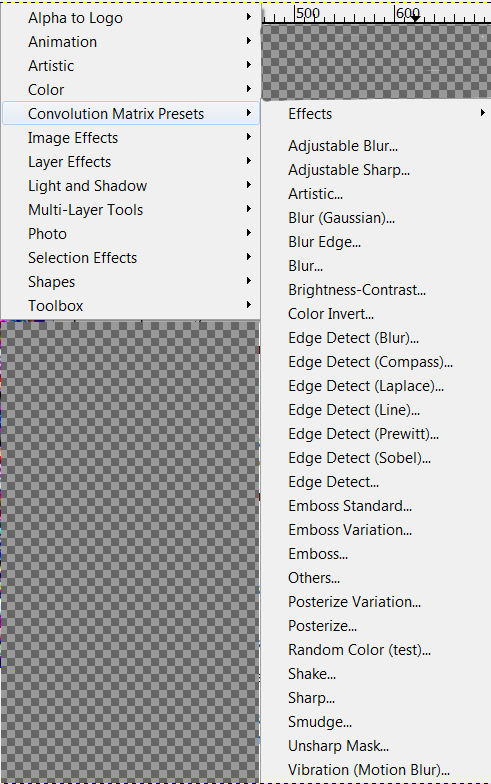
Edit: BTW, Where are these presets. I got a page of these when I ran the script the 3rd time to make sure I got all the dupes.

C:\Program Files (x86)\GIMP-2.6.11\share\gimp\2.0\scripts\iccii-convolution-presets.scm
and
C:\Program Files (x86)\GIMP-2.6.11\share\gimp\2.0\scripts\convolution-presets_1.1.scm
I don't see anything in my scripts by those names.

_________________
Image


Top
 Post subject: Re: My Scripts don't show
PostPosted: Fri Nov 11, 2011 6:29 am  (#41) 
Offline
Script Coder
User avatar

Joined: Jun 22, 2010
Posts: 1171
Location: Here and there
Molly,
I'm not sure what you are saying. Are you saying that the script is reporting those files as a problem, but those files don't exist?

I tried googling for them and found an FX-Foundry page: http://gimpfx-foundry.sourceforge.net/b ... esets.html

Kevin


Top
 Post subject: Re: My Scripts don't show
PostPosted: Fri Nov 11, 2011 6:31 am  (#42) 
Offline
GimpChat Member
User avatar

Joined: Apr 07, 2010
Posts: 14182
I found all those scripts under FX-Foundry. I would like to get rid of that but don't know how to go about it. It seems to me that most of the scripts under that heading are dupes from other places.

Image

_________________
Image


Top
 Post subject: Re: My Scripts don't show
PostPosted: Fri Nov 11, 2011 10:36 am  (#43) 
Offline
Script Coder
User avatar

Joined: Jun 22, 2010
Posts: 1171
Location: Here and there
Sorry, I can't help with the FX-Foundary as I've never installed it.

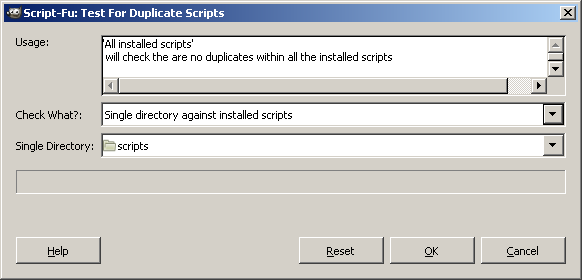
Well, here's another version of the script, now with a third option to compare scripts in a separate directory with what you already have installed:
Image
The text box at the top is just trying to give helpful information about the options.

As per request it now installs in the Help menu

Kevin


Update: Attachment removed, the script now available on GIMP Scripts: http://gimpscripts.com/2011/11/test-for-duplicate-scripts/


Last edited by paynekj on Mon Nov 14, 2011 1:00 pm, edited 1 time in total.

Top
 Post subject: Re: My Scripts don't show
PostPosted: Fri Nov 11, 2011 10:53 am  (#44) 
Offline
GimpChat Member
User avatar

Joined: Apr 07, 2010
Posts: 14182
Thanks Kevin. I don't know why I have FX-Foundry either, it just came with the Gimp 2.6.11 I guess cuz I didn't put it there.
Got your newest script change, thanks

_________________
Image


Top
 Post subject: Re: My Scripts don't show
PostPosted: Fri Nov 11, 2011 11:32 am  (#45) 
Offline
GimpChat Member

Joined: Apr 12, 2010
Posts: 5870
Molly all in that menu is part of a single script, that convolution presets so if you remove both copy you wipe all of them

basically are all presets for "Convolution Matrix" that is in Filters/Generic,( a powerful plugin but quite hard to use ) each correspond to a different effect...often very different but most (blur, sharpen, engrave, dilate. erode.edge detect, unsharp) are equivalent of filters already in gimp and designed with better controls and often a preview

so you will not miss much removing

_________________
My 3D Gallery on Deviantart http://photocomix2.deviantart.com/
Main gallery http://www.flickriver.com/photos/photocomix-mandala/
Mandala and simmetry http://www.flickriver.com/photos/photocomix_mandala/

Image

Mrs Wilbress


Top
 Post subject: Re: My Scripts don't show
PostPosted: Fri Nov 11, 2011 11:33 am  (#46) 
Offline
GimpChat Member

Joined: Apr 12, 2010
Posts: 5870
Kevin i didn't notice before you wrote a script to find duplicates that may be really useful

_________________
My 3D Gallery on Deviantart http://photocomix2.deviantart.com/
Main gallery http://www.flickriver.com/photos/photocomix-mandala/
Mandala and simmetry http://www.flickriver.com/photos/photocomix_mandala/

Image

Mrs Wilbress


Top
 Post subject: Re: My Scripts don't show
PostPosted: Fri Nov 11, 2011 11:36 am  (#47) 
Offline
GimpChat Member
User avatar

Joined: Apr 07, 2010
Posts: 14182
okay thanks PC, if I remove all of FX-Foundry, I won't screw up my gimp?

This is what I was worried about.

How do I remove all of FX-Foundry in one swipe?

_________________
Image


Top
 Post subject: Re: My Scripts don't show
PostPosted: Fri Nov 11, 2011 11:46 am  (#48) 
Offline
GimpChat Member

Joined: Apr 12, 2010
Posts: 5870
you can't remove all fx foundry without risk but i will not know how to find them

_________________
My 3D Gallery on Deviantart http://photocomix2.deviantart.com/
Main gallery http://www.flickriver.com/photos/photocomix-mandala/
Mandala and simmetry http://www.flickriver.com/photos/photocomix_mandala/

Image

Mrs Wilbress


Top
 Post subject: Re: My Scripts don't show
PostPosted: Fri Nov 11, 2011 12:35 pm  (#49) 
Offline
GimpChat Member
User avatar

Joined: Apr 07, 2010
Posts: 14182
ok thanks PC. I will leave them there for now as long as they don't interfere with the scripts I do want to keep.
I just don't understand why I have FX-Foundry and when no one else does when I have the same version of Gimp that most people have.

_________________
Image


Top
 Post subject: Re: My Scripts don't show
PostPosted: Sat Nov 12, 2011 9:53 am  (#50) 
Offline
GimpChat Member

Joined: Mar 29, 2011
Posts: 346
Location: Wisconsin
molly wrote:
okay thanks PC, if I remove all of FX-Foundry, I won't screw up my gimp?
This is what I was worried about.
How do I remove all of FX-Foundry in one swipe?

You can safely remove all of the FX-Foundary scripts. GIMP doesn't need them.

The FX-Foundary package that I have contains 117 separate script files, plus a release notes text file. Unless you want to play with batch files and text editors, you will have to remove the files one-by-one.

My suggestion is to get the FX-Foundary package again and unzip it into a temporary directory. Then look at the files in that directory and remove all the files with the same names from your each of your scripts directories.

_________________
Image


Last edited by bkh1914 on Sat Nov 12, 2011 10:11 am, edited 1 time in total.

Top
Post new topic Reply to topic  [ 73 posts ]  Go to page Previous  1, 2, 3, 4  Next

All times are UTC - 5 hours [ DST ]


* Login  


Powered by phpBB3 © phpBB Group